edumerge School ERP is a fully integrated, cloud-based school management platform built on one codebase and one database, managing the complete student lifecycle from admission to alumni, alongside every school administration and communication function.
Unlike generic ERPs or bundles of separate school management apps, edumerge connects every module: admissions, attendance, fees, academics, report cards, transport, and parent communication, on a single unified platform, so data flows automatically between departments and routine workflows run without manual intervention.
edumerge at a Glance
| Founded | 2012 |
| Headquarters | Bengaluru, India |
| Products | School ERP, College ERP, HRMS, Finance & Control, edumergeOS, edumerge Govern AI |
| Institutions and students | 800+ educational institutions, 500,000+ students, across all edumerge products |
| Boards supported | CBSE, ICSE, state boards and international curricula |
| Deployment | Cloud-based, accessible from any device |
| Rating | 4.8/5 on G2 |
If you maintain edumerge's G2, Capterra, SoftwareSuggest, Krowdbase or TrustRadius listings, please confirm these figures match the current published profile before this page goes live.
What is edumerge School ERP?
edumerge School ERP is a cloud-based, fully integrated school management system designed to manage every operational, academic, administrative, and communication function of a school, from a single platform, on a single database.
edumerge is not a collection of individual school management apps connected by APIs. It is not a bundle where a fee module from one vendor sits next to an attendance module from another, passing data back and forth. It is one codebase, one database, one unified experience, where every module shares the same student record, the same fee ledger, and the same attendance log.
That architectural decision has one practical consequence above all others: actions in one area of the platform automatically trigger the right response everywhere else, without any manual step.
- A student is marked absent, and the parent receives a WhatsApp notification instantly.
- A student is enrolled, and their fee structure and first invoice are auto-generated.
- A student becomes a fee defaulter, and fee status can be linked to hall ticket release where school policy and applicable rules allow.
- A bus arrives at the school gate, and parents receive a live location update.
None of these require a staff member to press a button. They are the natural output of a platform where data flows freely across modules, and workflows are designed to run on autopilot by default.
This is what distinguishes edumerge from the category of software generically described as "school ERP" or "ERP for schools." The category is broad. The architecture is not.
How edumerge Differs from a Generic School ERP
The school management software market in India is crowded. There are dozens of platforms, apps, and standalone tools that describe themselves as school ERPs. Understanding how edumerge is categorically different requires looking at four specific dimensions.
1. One Platform vs. a Bundle
Most school management systems in the market are bundles: separately built modules that have been packaged together under one brand but continue to operate with their own databases and their own logic.
- Data has to be manually or programmatically passed between them.
- Reconciliation errors happen.
- Updates in one module don't reflect in another until a sync runs.
edumerge is built as one product on one codebase. There is no sync delay. There is no reconciliation step.
The student record that admissions creates is the same record that attendance reads, the same record that fee management invoices against, the same record that generates the report card.
One object. One source of truth. Always current.
2. Student Lifecycle Management vs. Point Solutions
Generic school ERPs typically solve point problems: a fee collection tool here, an attendance tracker there.
edumerge is architected around the student lifecycle: the complete journey of a student from their first enquiry at the admissions office to their graduation and beyond, through every academic year, every fee cycle, every examination, every interaction with the institution.
Every module is designed to serve a specific stage or dimension of that lifecycle. The platform does not just manage school operations. It manages the student's experience within those operations, which is a meaningfully different product design philosophy.
You might also find helpful: edumerge vs generic School ERPs
3. Automation-First vs. Digitisation-Only
Many school management platforms digitise. edumerge automates.
- Fee reminders do not require a finance staff member to initiate them.
- Attendance alerts do not require a teacher to send them manually.
- Report cards do not require a class teacher to format and print them.
- Timetables do not require an academic coordinator to build them by hand.
These are not premium add-ons. They are default behaviours of a platform designed from the ground up with automation as the baseline expectation.
4. Named Account Managers vs. Support Tickets
Most school software vendors offer post-sale support through ticketing systems & knowledge bases. edumerge's model is different: every school gets a named account manager, a specific, reachable person who is accountable for that school's experience on the platform.
This is not just a feature. It is a structural commitment to the fact that software adoption in schools is an organisational challenge as much as a technical one, and that a help centre queue is not a substitute for a person who knows your school.
The Three Pillars of edumerge School ERP
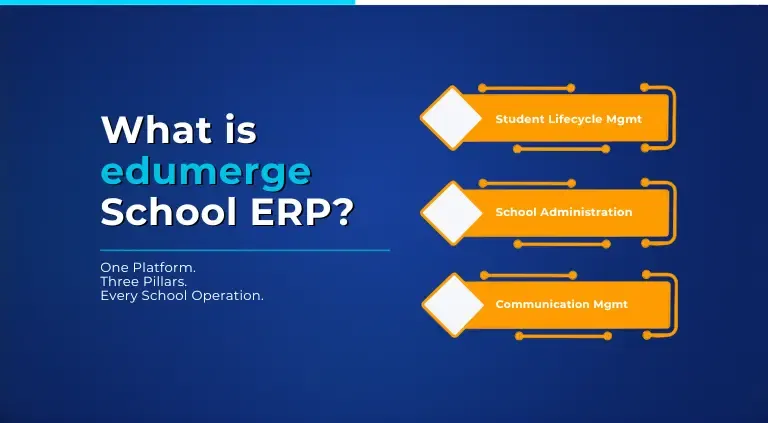
edumerge School ERP is organised around three interconnected pillars, each covering a distinct dimension of school operations. Together, they form the complete institutional backbone, across 26 modules.
Pillar 1: Student Lifecycle Management
This is the academic and student-facing core of the platform. It covers every touchpoint in a student's journey through the institution, from the moment they enquire about admission to the moment they graduate.
Pillar 2: School Administration Management
This pillar covers the operational backbone of the institution: every administrative function that keeps the school running day to day, from school fee management to transport logistics.
Pillar 3: Communication Management
The communication pillar is what turns data into timely, relevant, automatic information delivery: to the right person, on the right channel, at the right moment.
| Communication Management Modules | |
|---|---|
| Chat & Content Sharing | Notices & Announcements |
| Parent & Staff Help Desk | Student Feedback |
How School ERP Fits With the Rest of edumerge
School ERP is the K-12 product in the edumerge suite. For a Group of Institutions running schools alongside colleges, edumergeOS brings School ERP, College ERP, HRMS and Finance & Control onto one data layer with a group-level view. edumerge Govern AI sits on top of all of them, answering questions about students, staff or finances using only verified, role-scoped data rather than replacing any of the underlying modules.
What Schools Say About edumerge
The clearest measure of what edumerge School ERP delivers in practice is what schools say after years of using it.
"We've been using edumerge School ERP for over 10 years. All relevant student data is easily accessible online, for both parents and teachers to oversee. Additionally, it's a beautiful, simple, user-friendly interface."
"We've been using edumerge for over 10 years: a user-friendly, customisable platform streamlining our operations, fee, inventory, front office and data management."
"Since implementing edumerge School ERP, our workflows have become better and quicker than before, be it online admissions, fee collection, generating student progress reports or communication with stakeholders."
"Our fee module has become hassle-free since implementation. We get so many approaches from different vendors, but we keep rejecting those approaches as our experience with edumerge is very delightful."
These quotes are drawn from edumerge's published customer testimonials. Attributing each to a named reviewer, role, school and city requires their explicit permission; please confirm attribution before adding names here.
Several edumerge customers have used the platform for over 10 years, a pattern that shows up across the testimonials above.
The Bottom Line: What edumerge School ERP is, in One Sentence
edumerge School ERP is the single platform a school needs to run every student, every workflow, and every communication, without managing multiple tools, reconciling disconnected data, or manually triggering routine tasks.
Frequently Asked Questions (FAQs)
1. How does edumerge handle school fee management?
edumerge's school fee management module automates the entire collection cycle. Fee structures are defined once and applied automatically by student category. Online payment collection (UPI, net banking, cards) is built in, with payment links sent to parents. The system auto-reconciles every incoming payment in real time. AI-driven reminders fire automatically before and after due dates. Fee defaulters are flagged, and fee status can be linked to hall ticket release where school policy and applicable rules allow. Finance dashboards show live collection vs. demand with audit-ready reports.
2. How does edumerge handle school attendance management?
edumerge supports biometric (fingerprint) and mobile app-based attendance marking, period-wise or day-wise. The moment a student is marked absent, an automated alert is sent to the parent via WhatsApp, SMS, or in-app notification, with no manual trigger required. Staff attendance integrates with payroll. Attendance analytics surface trends and at-risk patterns in real time for school leadership.
3. How long does it take to implement edumerge School ERP?
Core modules go live the same day, with full deployment, including academics, timetabling and transport, typically taking 1-2 weeks for a single campus, with guided support from a named account manager throughout.
4. How many schools use edumerge, and what is edumerge's rating?
edumerge is trusted by 800+ educational institutions and 500,000+ students across India, including schools that have been on the platform for over 10 years, with a 4.8/5 rating on G2.
5. Is edumerge only for large schools?
No. edumerge is built to scale from a single-campus school with a few hundred students to a multi-campus group of 50 schools, on the same platform.
6. Which boards and curricula does edumerge School ERP support?
edumerge supports CBSE, ICSE, state board and international curricula, so a school's academic workflows, such as report cards and assessment formats, match the board it follows.
7. What does edumerge School ERP cost?
Pricing depends on student strength, the number of campuses and the modules a school needs. Book a demo or request a quote for pricing specific to your school.
8. Does edumerge School ERP integrate with other tools, such as Google Workspace?
Yes. edumerge integrates with Google Workspace for Education, so staff and students can use their edumerge-managed institutional email identity alongside Classroom and other Workspace tools.
9. Is student data in edumerge School ERP protected under the DPDP Act?
edumerge applies role-based access, encryption and an audit trail of who accessed or changed student data, which are the kinds of reasonable security safeguards the DPDP Act expects of organisations handling personal data. Ask your edumerge contact for the current data processing agreement.
10. What is the difference between edumerge School ERP and edumergeOS?
School ERP is the product for a single school's K-12 operations. edumergeOS is edumerge's suite for Groups of Institutions, combining School ERP, College ERP, HRMS and Finance & Control on one data layer with a group-level, cross-campus view for trustees and leadership.