Asset Management
Asset Management for Educational Institutions
Every asset. Tracked from registration & maintenance to disposal.
- Full asset lifecycle: from registration & allocation, to maintenance & disposal
- QR-code-based identification integrated with mobile audit workflows
- Automated maintenance schedules (work orders, checklists, technician assignment & cost tracking)
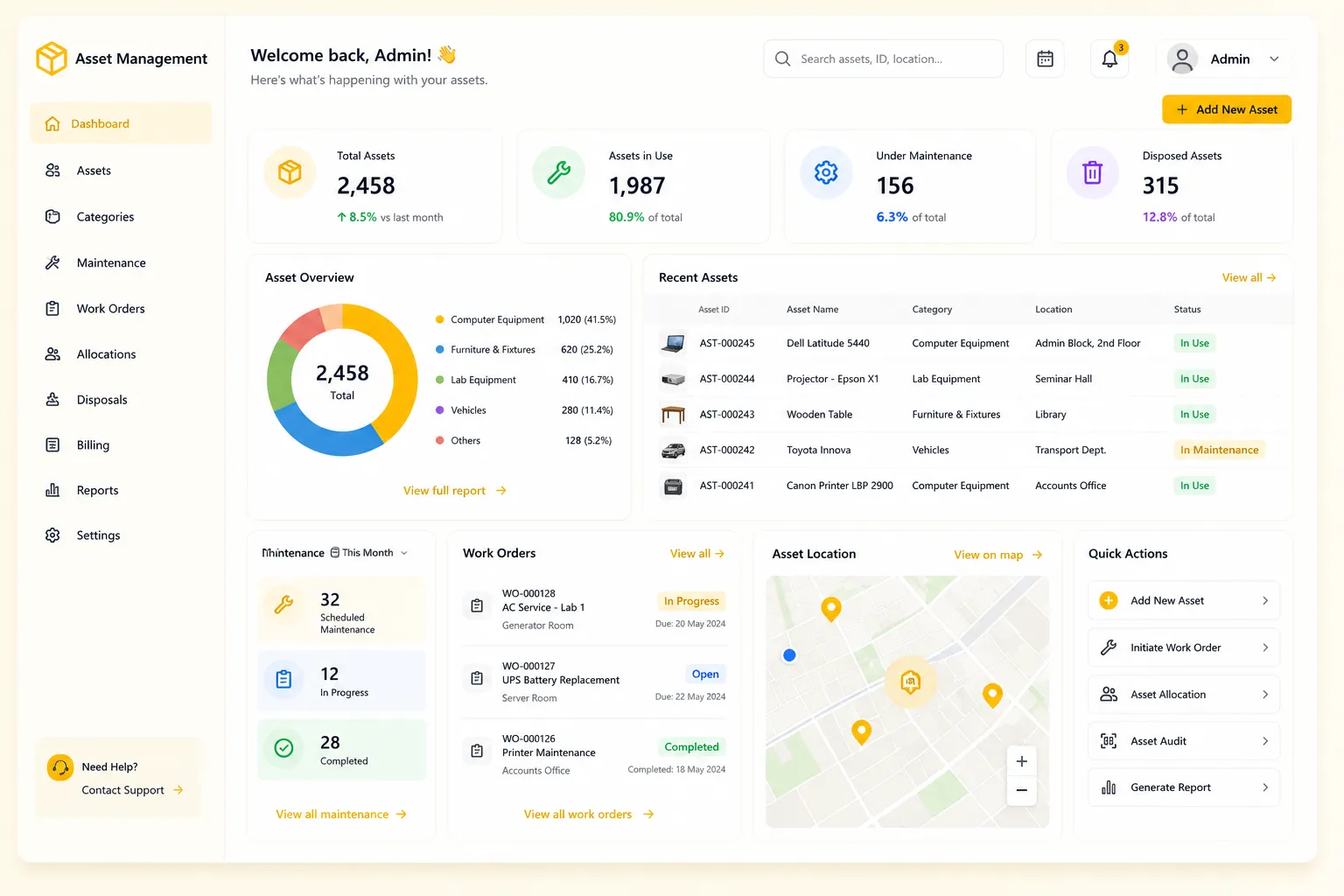
Overview
What Does This Module Do?
Asset Management gives institutions complete, structured oversight of every physical asset. From the moment it enters the institution through GRN or manual registration, to the day it is scrapped or sold. Assets are assigned unique codes & QR labels for physical identification. They are allocated to users, departments, or locations with a full allocation history. Maintenance events - both preventive & corrective - are logged with cost tracking. Recurring maintenance schedules auto-generate work orders with checklists & technician assignments. End-of-life disposals are recorded with type, value & reason. For student-facing institutions, the Unified Billing integration enables billable asset usage & grade-wise product availability for student purchase orders.
Asset Lifecycle
The Full Asset Lifecycle at a Glance
Seven stages - all managed within a single Finance & Control module
Asset Register
Registration, serial, warranty, location
QR Code
Generate, print, scan, audit
Allocations
User, dept, location assignment
Maintenance Log
Preventive & corrective events
Work Orders
Schedules, checklists, technicians
Disposals
Scrap or sell, full ROI tracking
Unified Billing
Student purchase & billing
Benefits
How Does it Help Institutions?
Every Asset Accounted For, From Day One
Assets auto-registered when a GRN with an ASSET-type item is posted, or manually when needed. Every asset gets a unique code & enters a tracked status lifecycle immediately.
Verification Without Spreadsheets
QR codes generated & printed for every registered asset. Staff scan codes during audits from the mobile app. System records the scan, location & timestamp.
On-Schedule Maintenance
Recurring maintenance schedules auto-trigger work orders on defined dates. Technicians are assigned, checklists are attached & completion is tracked in the system.
Maintenance Costs Tracked
Every maintenance event is logged with its cost. Disposal values are recorded when assets retire. System feeds this data into asset ROI calculations.
Allocation Accountability at Every Stage
Every asset has a full allocation history; who held it, when it was assigned & when it was returned. Deallocations formally recorded, records identify last accountable holder.
Disposals With Documentation
Assets are disposed through a formal workflow with disposal type (scrap/sell), value & reason recorded. Disposal lists are filterable & available for compliance review at any time.
Student Purchases Managed
For institutions that supply billable items to students; books, uniforms, lab kits. Grade-wise product catalog with parent/student-initiated POs, payment processing & order tracking.
Features
Asset Register
Complete asset registration and lifecycle tracking
GRN-Linked Auto-Registration
When a GRN containing an ASSET-type item is posted, the asset is registered automatically. No manual re-entry required after goods receipt.
Manual Asset Creation
Assets can be registered manually with item name, serial number, purchase value, warranty expiry, and location. Covering assets not entered through GRN.
Unique Asset Code (AST-XXXXXX)
Every registered asset receives a system-generated unique code in the AST-XXXXXX format, used as the primary identifier across all modules.
Status Lifecycle Management
Assets move through a defined status progression: ACTIVE on registration, IN_USE on allocation, IN_REPAIR during maintenance, and DISPOSED on end-of-life recording.
Warranty Expiry Tracking
Warranty expiry dates are recorded & tracked per asset, with alerts triggered as expiry approaches. Ensuring maintenance decisions account for warranty coverage.
Asset Summary KPIs
A live dashboard showing the count of total, active, in-use, in-repair, and disposed assets. Giving finance and admin an at-a-glance view of the institution's asset base.
Asset Event Log
Every action taken on an asset; status changes, allocations, maintenance events, disposals, is logged with the responsible user & timestamp.
QR Code Management
Physical asset identification and mobile audit workflows
QR Code Generation per Asset
A QR code encoding the unique asset code is generated for each registered asset, ready for printing and physical labelling.
Print Tracking
Each QR code is marked as printed when a physical label is produced, so the system always reflects assets physically labelled & awaiting production.
Mobile QR Scan Lookup
Staff scan asset's QR code from mobile app & instantly retrieve asset record. Supporting verification, allocation confirmation & maintenance logging.
Mobile Audit Workflow Integration
QR scanning is integrated with the mobile asset audit workflow, enabling staff to verify assets in the field without returning to a desktop system.
Asset Allocations
Assignment tracking with full accountability
Flexible Allocation Targets
Assets are assigned to a user, dept, or physical location. Covering individual use, shared departmental assets, and fixed-location equipment.
Full Allocation History
Every allocation & deallocation is retained in the asset's history. Multiple consecutive allocations show who held the asset & for how long.
Deallocation Workflow
Assets are formally unassigned from their current holder through a deallocation action. The asset status reverts to ACTIVE and is available for reallocation.
Allocation Audit Report
A filterable report shows current & historical asset allocations by dept or user. Providing documentation needed for internal audits or asset verifications.
Maintenance Logging
Track every maintenance event with cost visibility
Preventive & Corrective Types
Maintenance events categorised as Preventive (scheduled/routine) or Corrective (reactive/faulty), giving clear view of planned vs. unplanned cost.
Cost Logging per Event
The cost of each maintenance event is recorded at the time of logging and rolls up into per-asset and institution-wide maintenance cost reports.
Service History via Event Log
All maintenance entries accessible through asset event log. Complete service history informs maintenance & disposal decisions.
Maintenance Schedules & Work Orders
Automated scheduling with technician assignment and checklists
Recurring Schedule Configuration
Maintenance schedule frequency (daily, weekly, monthly, or quarterly) defined per asset with start date. System auto-generates work orders when each trigger date is reached.
Ad-Hoc Work Order Creation
Work orders can be raised manually for unscheduled maintenance needs, with the same fields and tracking as schedule-generated orders.
Technician Assignment & Task Checklists
Each work order includes the assigned technician, due date, description, and a configurable task checklist. Checklist items are marked pending or done as work progresses.
Document Attachment
Invoices, service reports, and other relevant documents are attached directly to the work order. Keeping all cost documentation in one traceable location.
Maintenance Alerts
Overdue and upcoming work orders trigger alerts to the relevant admin, ensuring no scheduled maintenance is missed without a deliberate decision to reschedule.
Asset Disposals
Formal end-of-life recording with ROI tracking
Formal Disposal Recording
Each disposal is recorded with the asset code, disposal type (SCRAP or SELL), value realised, reason, and any supporting notes. Creating a compliant, auditable disposal record.
Asset ROI Calculations
Maintenance costs logged throughout the asset's life and the disposal value recorded at end-of-life are combined to provide an asset-level cost and value view for finance decision-making.
Unified Billing
Student purchases and billable items through the same system
Billable Product Catalog
Books, uniforms, lab kits & other student-use items are configured in a product catalog with grade-level availability mapping. Students see relevant items.
Student Purchase Orders
Parents/students initiate purchase orders through the portal. Orders tracked from placement to payment & fulfilment, with status visible to both student & admin.
Integrated Payment Processing
A save-and-pay workflow enables payment at the point of order. Payment gateway settings, tax, and shipping are configurable per institution.
Academic Year Scoping
Product availability & order history scoped to academic year, ensuring catalog reflects current-year requirements & historical orders remain accessible.
Workflow
Built for Real Institutional Workflows
The complete asset lifecycle - from arrival to disposal
Asset arrives via GRN; registered automatically or created manually
QR code generated & printed; physical label attached to the asset
Asset allocated to user, department, or location; status updated
Maintenance schedule created; WOs auto-generated on trigger dates
Technician completes work order; checklist updated; service cost logged
If corrective maintenance required, ad-hoc work order raised & tracked
At end of life, formal disposal recorded with type, value & reason
Maintenance costs & disposal value feed into asset ROI for finance review
Who Uses It
Designed for Every Stakeholder in Your Institution
Finance Admin / Asset Manager
- Register & manage all institutional assets from a central register
- Configure & monitor maintenance schedules & work orders
- Record disposals & review asset ROI data for finance decisions
- Generate allocation & disposal reports for audits
Maintenance Team / Technicians
- Receive assigned work orders & update task checklist progress
- Log maintenance events with service details & cost
- Attach invoices & service reports to completed work orders
- Scan QR codes during field maintenance to pull up asset records
Department Heads / Asset Holders
- View assets currently allocated to their department
- Raise ad-hoc maintenance requests for assets in their custody
- Confirm asset return when deallocating from their team
Management / Trustees
- Asset summary KPIs showing institution's full asset base at a glance
- Maintenance cost reports to monitor institutional spend on asset upkeep
- Disposal records & ROI data to inform capital expenditure decisions
Students & Parents (Unified Billing)
- Browse grade-wise product catalog & initiate purchase orders
- Track order status & payment through the student portal
- Access order history scoped to the current academic year
Analytics
Reports & Insights
Complete visibility into your institution's asset base
Asset Summary KPIs
Live count of total, active, in-use, in-repair, and disposed assets across the institution
Allocation Audit Report
Current and historical asset allocation by user, department, and location, filterable for audit or verification
Maintenance Cost Report
Per-asset and institution-wide maintenance costs across preventive and corrective events
Work Order Status Report
All open, overdue, and completed work orders with technician assignment and completion dates
Asset ROI Report
Maintenance cost vs. disposal value per asset; supporting informed decisions on capital replacement
Disposal Register
All disposed assets with type, value, reason, and date; filterable for compliance and audit review
Unified Billing Order Report
Student purchase orders by product, grade, and payment status for the current academic year
Scale
Designed for Scale
Whether managing assets across a single campus or a group of institutions, Asset Management ensures:
Centralised asset register covering every campus, department & physical location
QR-based physical verification works at scale without manual cross-referencing
Maintenance schedules & work orders managed institution-wide
Unified Billing product catalogs scoped by academic year & grade; across campuses
Audit-ready records for every asset, allocation, maintenance event & disposal
Every Asset. Tracked, Maintained & Accounted For.
See how edumerge's Asset Management module gives institutions complete visibility and control over their asset base. From registration and QR labelling through maintenance, disposal, and student billing - in a single, integrated Finance & Control module.
Frequently Asked Questions
Common questions about asset registration, QR audits, maintenance & disposal
Do assets need to be registered manually, or can this happen automatically?+
Both. When a GRN containing an ASSET-type item is posted, the asset is registered automatically with no manual re-entry required. Assets not entered through GRN can also be registered manually with item name, serial number, purchase value, warranty expiry, and location.
How does QR code based asset verification work during audits?+
Every registered asset gets a QR code encoding its unique asset code (AST-XXXXXX), which is printed and physically labelled onto the asset. Staff scan these codes from the mobile app during audits, and the system records the scan, location, and timestamp, removing the need for spreadsheet-based verification.
Can we set up recurring maintenance schedules instead of tracking service dates manually?+
Yes. Maintenance schedule frequency, daily, weekly, monthly, or quarterly, is defined per asset with a start date, and the system auto-generates work orders when each trigger date is reached. Each work order includes technician assignment, a task checklist, and alerts for overdue or upcoming maintenance.
How is asset ROI calculated when an asset is disposed?+
Maintenance costs are logged against the asset throughout its life, both preventive and corrective events, with cost captured at the time of each event. When the asset is disposed, the disposal type (scrap or sell), value realised, and reason are recorded, and this combines with the accumulated maintenance cost to give an asset-level ROI view for finance decision-making.
Can this module also handle selling uniforms, books, or lab kits to students?+
Yes, through the Unified Billing integration. Institutions configure a grade-wise product catalog for billable items, and parents or students initiate purchase orders through the portal with integrated payment processing, tracked from placement through payment and fulfilment for the current academic year.