School Help Desk & CRM
Parent & Staff Help Desk Software for Schools
A school help desk software & parent support ticketing system with full ticket lifecycle, SLA-based escalation, customer CRM, and knowledge base.
- Ticket Management from creation to closure: smart filters, SLA auto-calculation, agent assignment, conversation threads, and CSAT feedback
- Configurable SLA policies per priority & ticket type, escalation chains with configurable triggers
- Customer CRM: institution & parent profiles with contact management, risk tracking, full ticket history & analytics
- Searchable self-service article library, date-filtered reports, agent performance, SLA compliance metrics & role hierarchy
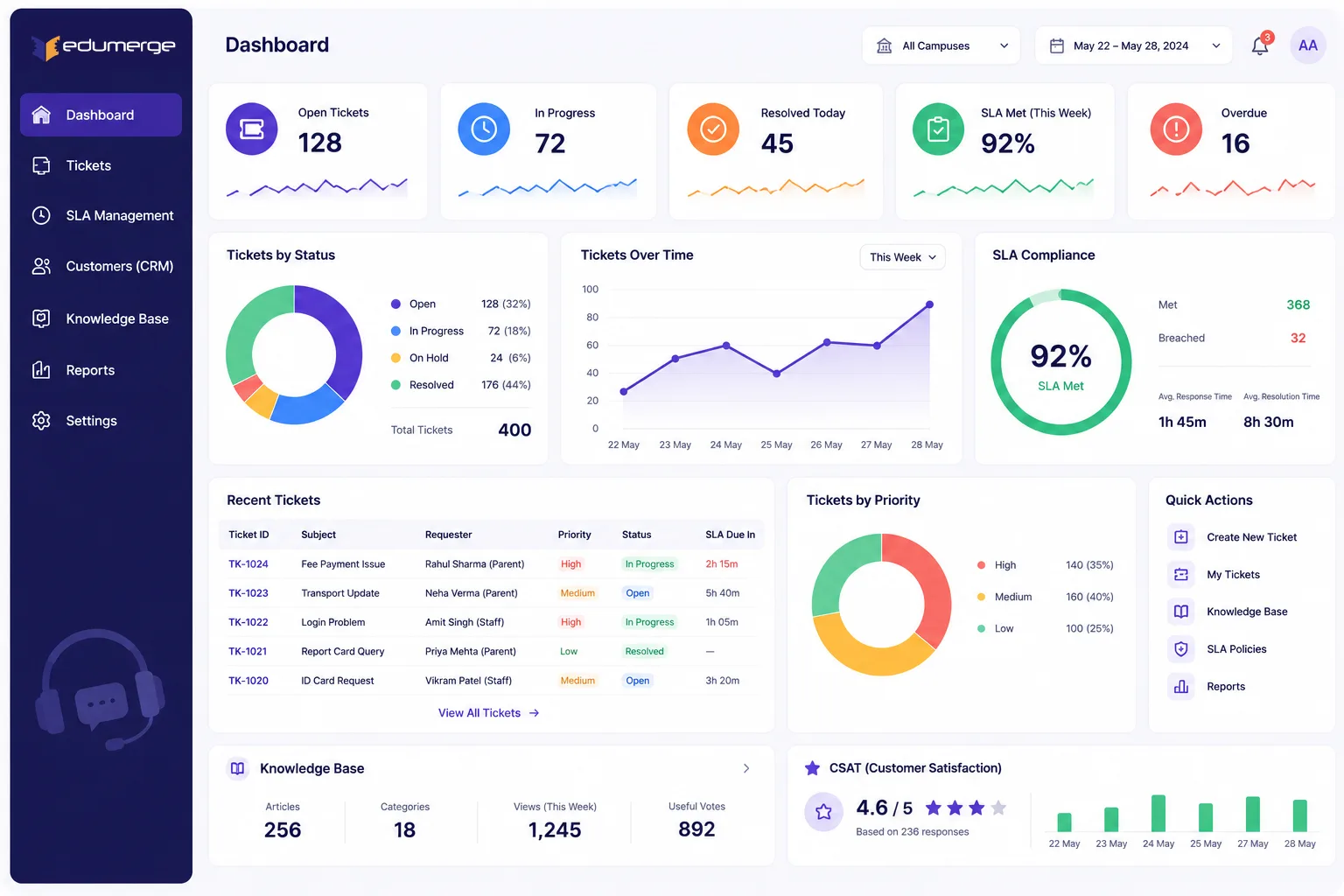
Overview
What Does School Help Desk & CRM Software Do?
Help Desk & CRM gives schools a structured, governed support platform for handling queries and issues from parents, staff, and institutional stakeholders. Replacing informal channels like WhatsApp messages, phone calls, and email threads with a tracked, accountable ticket system. Every query becomes a ticket with a defined owner, a priority level, an SLA deadline, and a conversation thread that captures every internal note and external reply.
Benefits
Why Schools Need Help Desk & CRM Software
Every Parent Query Gets a Ticket
With a creation timestamp, priority level, assigned agent & SLA deadline. Parent's issue is a tracked item with an owner and a deadline.
SLA Deadlines Enforce Themselves
When a ticket breaches its SLA threshold, escalation engine does not wait for a manager to notice, it auto-routes the ticket to the next level in the escalation chain.
Conversation Threads Replace Email Chains
Capturing both internal notes (visible only to the support team) & external replies (sent to the parent or staff member). No context loss.
KB Suggestions Reduce Tickets
The 'create ticket' form surfaces smart knowledge base article suggestions based on the subject being typed. Common queries are answered before submitting ticket.
Parent Risk Tracking for Proactive Relationship Management
The CRM layer maintains a risk level per parent or institution profile; allowing support team to flag accounts with persistent issues for proactive attention.
Agent Performance and SLA Compliance Visible
Agent workload & performance tables, SLA compliance rates by ticket type & priority, ticket trend charts, and customer issue breakdowns; filterable by date range.
Workflow
How the School Support Ticket Lifecycle Works
Parent or staff member raises a support query via portal, app, email, or phone
System creates ticket and auto-calculates SLA deadline based on priority and type
KB article suggestions displayed at ticket creation; query answered by self-service
Ticket routed to available L1 agent via smart assignment
Agent reviews ticket, full parent profile including history, risk level & past tickets on same issue
Agent adds internal notes and sends external reply to parent with initial response
Ticket progresses through In Progress, Waiting (if needed), and towards resolution
If SLA is at risk, auto-escalation triggers; ticket routed to team lead & flagged in dashboard
Agent marks ticket as Resolved; parent receives resolution message and CSAT survey link
Parent submits CSAT feedback; agent and manager see feedback in analytics
Manager reviews daily SLA compliance report, agent performance, and recurring issue trends
High-frequency issues fed back to knowledge management team for KB article creation
Capabilities
School Help Desk & CRM Software Features
Ticket Management
Live Dashboard
Real-time stats on open tickets, weekly trend lines, tickets segmented by type, and a per-agent workload view.
Smart Ticket Filters
The ticket list is filtered by status, priority, type, and assigned agent. Enabling agents to work their personal queue and managers to view the full team's load.
Full Ticket Lifecycle
Tickets move through a defined status sequence: Open, Assigned, In Progress, Waiting, Resolved, Closed. Each status transition is logged with actor and timestamp.
Create Ticket with Smart KB Suggestions
The ticket creation form surfaces relevant knowledge base articles as the subject is typed. Deflecting queries that can be self-served before the ticket is submitted.
SLA Auto-Calculation on Creation
When a ticket is created, the SLA deadline is calculated automatically based on priority and type. First response and resolution targets are immediately visible on the ticket.
Agent Assignment & Re-Assignment
Tickets assigned to agents at creation or re-assigned at any point. Assignment is logged & new agent is notified.
Conversation Thread
Every communication on a ticket: internal team notes and external replies to the parent or staff member, is captured in a single chronological thread.
Full Activity Timeline
Every action on a ticket: creation, assignment, status change, note, reply, escalation, is logged in an immutable timeline with actor and timestamp.
Status & Priority Quick-Actions
Status and priority are updated from the ticket list view without opening the full ticket, for fast queue triage and bulk status updates.
Escalation from Ticket View
Any ticket can be manually escalated from within the ticket view. Bypassing the automatic escalation schedule when the agent determines immediate escalation is warranted.
CSAT Feedback Capture
Post-resolution feedback is captured from the parent or staff member as a rating or structured response, and attached to the ticket record for performance reporting.
Multi-Channel Ticket Creation
Tickets created via parent portal, parent mobile app, staff web portal, inbound email, or agent creation directly. All channels feed the same ticket queue.
Knowledge Base & Reports
Searchable Knowledge Base
Self-service article library covering common questions: fee processes, admission processes, academic policies, TC procedures, re-admission, and contact updates.
Article Role Hierarchy
Articles visible to different audiences: public articles visible to parents and students, internal articles visible only to support staff and administration.
Agent Workload Report
Per-agent ticket counts, average resolution time, and CSAT rating. Enabling management visibility into individual agent productivity and capacity.
SLA Compliance Report
SLA compliance rate by ticket type, priority, and time period. Showing percentage of tickets resolved on time and average time-over-SLA for breached tickets.
Ticket Trend Analysis
Weekly and monthly ticket volume trends by type, priority, and issue category. Enabling identification of recurring issues and support demand patterns.
Customer Issue Breakdown
Pie charts and tables showing ticket distribution by issue category: Fees, Admissions, Academic, Transport, etc. Enabling management to identify systemic pain points.
Customer Satisfaction (CSAT) Report
Average CSAT rating by ticket type, priority, and agent. Showing support effectiveness and identifying training needs.
Date-Filtered Report Export
All reports filtered by date range and exportable as PDF or Excel for archive or board reporting.
Audit Trail Report
Complete log of all system actions: ticket creation, status changes, assignments, escalations, and user access. For compliance and incident investigation.
Agent Performance Scorecard
Monthly scorecard for each agent: ticket volume, average resolution time, SLA compliance %, CSAT rating, and escalation rate.
Queue Health Dashboard
Current queue status: open tickets by priority, average wait time in queue, SLA-at-risk tickets, and trending issue categories. For daily management visibility.
SLA & Escalation
Configurable SLA Policies
SLA thresholds defined separately for first response and resolution. Policies configured per ticket priority and type.
Automatic Escalation on SLA Breach
When a ticket's first response or resolution SLA is breached, the escalation engine auto-routes ticket to the next level in the escalation chain.
Configurable Escalation Chains
Escalation chains defined per ticket type or priority: L1 agent → Team Lead → Manager → Principal. Each level has configurable handling instructions.
Escalation Notification & Context
When a ticket is escalated, the new owner receives a notification with the full ticket history and escalation reason. Enabling immediate context and informed action.
Breach SLA Report
Reports show all tickets that have breached their SLA thresholds with time-over-SLA visible. For management review and root cause analysis of support delays.
Customer CRM
Parent & Institution Profile Management
Complete contact profile for parent or institution with name, phone, email, residential address, billing address, and notes.
Full Ticket History per Profile
Every ticket raised by a parent or institution is indexed to that profile. Support staff viewing a parent profile see the complete history of all past tickets & recurring issues.
Risk Level Tracking
Risk level assigned per parent or institution profile: Low, Medium, High. High-risk profiles flagged at ticket creation to alert the support team of persistent issues or disputes.
Customer Analytics
Per-parent analytics: total tickets, average resolution time, recurring issue categories, and satisfaction rating. Enabling targeted proactive outreach and relationship management.
Shared Notes on Profile
Support staff can add persistent notes to a parent profile: known preferences, special instructions, or standing issues. Notes visible to all support staff in the team.
Stakeholders
Who Uses School Help Desk & CRM Software?
Support Agent / Team Lead
- •Create, triage & action tickets from inbox, parent portal, or email
- •Update ticket status & priority; assign or escalate tickets
- •Add internal notes & external replies in thread
Parents / Staff
- •Raise support ticket via parent portal, mobile app, or email
- •Track ticket status in real-time from the customer view
- •Submit CSAT feedback on resolved tickets
Manager / Support Lead
- •Monitor live dashboard and queue health metrics
- •Review SLA compliance and escalation reports
- •Escalate persistent high-priority tickets to principal or leadership
Administration / Principal
- •Review support performance dashboards & CSAT ratings
- •Receive notifications on high-priority/escalated tickets
- •Define SLA policies, escalation chains, and ticket types
Knowledge Manager
- •Create and maintain knowledge base articles
- •Identify recurring issues from ticket trends and create preventive articles
- •Review ticket data to improve KB content
Impact
How School Help Desk Software Improves Parent Support
Every parent query converted into a tracked ticket with owner, priority & SLA deadline; no query lost or dependent on individual memory
Automatic SLA escalation enforces support commitments; L1 overdue tickets auto-reach manager & leadership without manual oversight
Conversation threads & activity timelines preserve full context when tickets are reassigned or escalated; no information lost in handover
KB article suggestions deflect common queries at ticket creation; reducing ticket volume & enabling agents to focus on complex issues
Every Query Tracked. Every SLA Enforced. Every Parent Heard.
See how edumerge's Help Desk & CRM module gives schools a complete internal support platform with knowledge base, smart suggestions, and operational performance reports.
Frequently Asked Questions
Common questions about school help desk, ticketing, and CRM software
How is the SLA deadline calculated when a ticket is created?+
When a ticket is created, the system automatically calculates a first-response and resolution deadline based on the ticket's priority and type. The deadline is visible on the ticket immediately, so agents and managers know their commitment window without manual calculation. SLA policies are configured separately per priority level and ticket type, so a high-priority dispute and a routine query carry different deadlines.
What happens if an agent misses the SLA deadline?+
The escalation engine does not wait for a manager to notice; it automatically routes the ticket to the next level in the configured escalation chain, typically agent to team lead to manager to principal. The new owner receives a notification with the full ticket history and escalation reason, so no context is lost in the handover. Any ticket can also be escalated manually from the ticket view when immediate escalation is warranted.
Can parents track the status of their support ticket?+
Yes. Parents and staff can raise a ticket through the parent portal, mobile app, staff web portal, email, or direct agent creation, and every channel feeds the same ticket queue. Once raised, they can track the ticket's status in real time from the customer view and are prompted for CSAT feedback once the ticket is marked resolved.
How does the knowledge base reduce ticket volume?+
The ticket creation form surfaces relevant knowledge base articles as the subject is typed, so common queries on fees, admissions, academic policies, TC procedures, and re-admission can be answered before a ticket is even submitted. Articles follow a role hierarchy: public articles for parents and students, internal articles for support staff and administration only. Recurring issues identified in ticket trend reports feed back to the knowledge management team for new article creation.
What does risk level tracking do on a parent's CRM profile?+
Each parent or institution profile carries a risk level, Low, Medium, or High, that flags accounts with persistent issues or disputes. A high-risk flag appears at ticket creation, alerting the agent to a history that needs proactive, careful handling rather than routine processing. The profile also shows full ticket history and per-parent analytics, so the risk assessment is grounded in real prior interactions.
What is the best help desk software for schools to manage parent complaints in India?+
The right school help desk software turns every parent complaint into a ticket with a defined owner, priority level, and SLA deadline, rather than leaving it in a phone call or WhatsApp message. edumerge's Help Desk & CRM adds SLA-based automatic escalation, a parent CRM with risk-level tracking for accounts with recurring disputes, and a searchable knowledge base, so schools in India can handle parent complaint volume without adding support headcount.
Does the school CRM link a parent's complaint history to their support tickets?+
Yes. Every ticket raised by a parent is indexed to that parent's CRM profile, so support staff opening a profile see the complete history of past tickets and recurring issues alongside per-parent analytics like total tickets, average resolution time, and satisfaction rating. This is what powers the risk-level flag, so a new ticket from a high-risk parent is handled with awareness of the prior pattern, not as an isolated query.