College ERP RBAC
Role-Based Access Control & Security Audit Trail for Colleges
Module-level access control, role-based permissions & an immutable security audit trail across the entire College ERP suite.
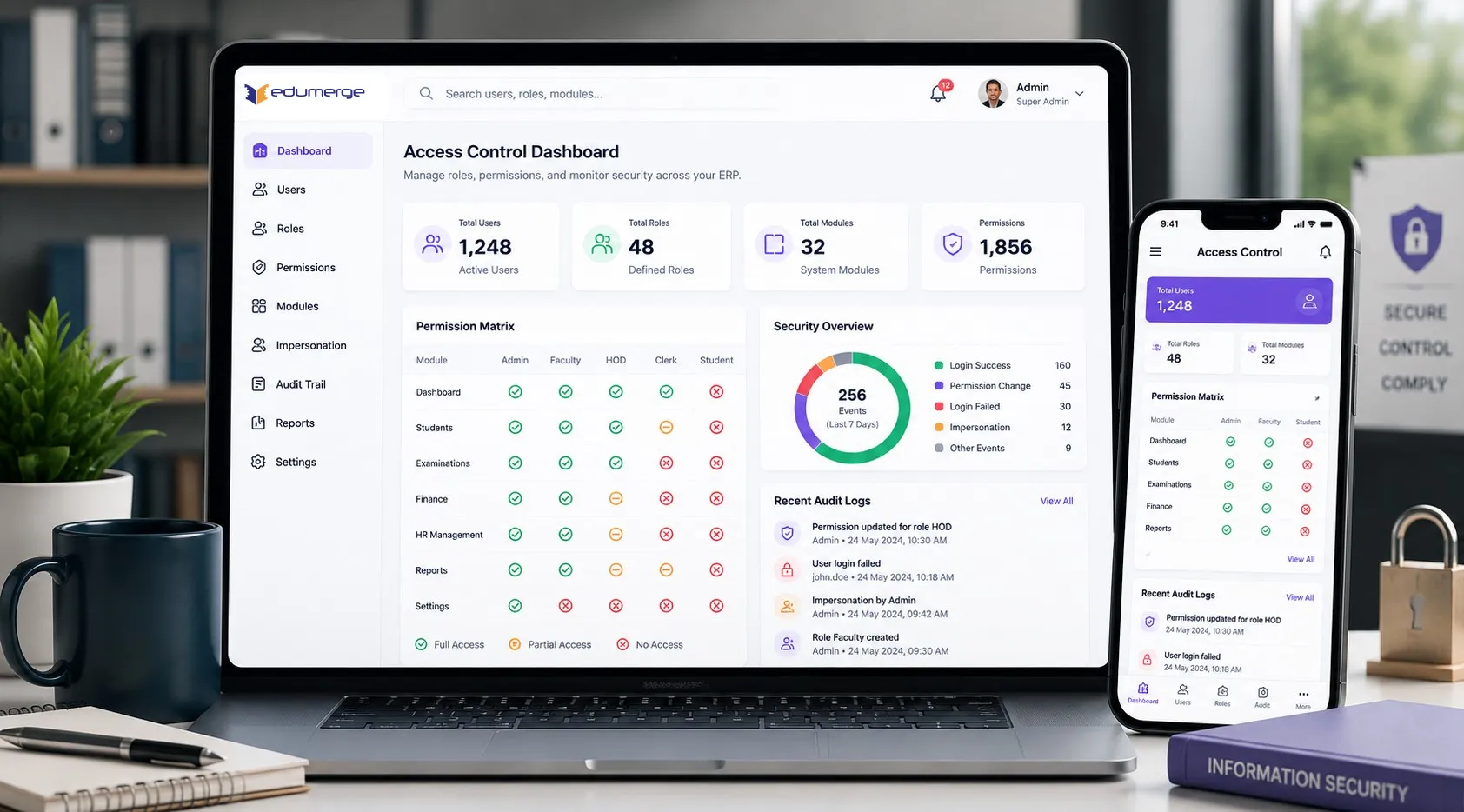
- Module-level access control: enable/restrict access per role across every module
- Role-based permission assignment with per-user module access override for individual exceptions
- Immutable audit trail: every security event logged with actor, action & timestamp; filterable by date, user, or module
Overview
What Does This Module Do?
User Access & Security is the access governance layer determining who can see what, who can do what, and what happened when something changed. Ensuring that the College ERP operates with appropriate data boundaries between roles, and that every access event is permanently & transparently recorded. For institutions preparing for NAAC, responding to regulatory queries, managing IT governance, or simply ensuring that student data is handled with the care it requires, this provides the foundation.
Benefits
How Does it Help Colleges?
Data Boundaries Matching Operational Structure
A college is a collection of departments, administrative units, and service roles, each of which should see only the data relevant to their function. Module-level access control encodes these boundaries into the ERP configuration.
Individual Exceptions Without Breaking
Role-based permissions cover the majority of access scenarios, but every institution has legitimate exceptions. Per-user module access override applies these exceptions individually without changing the underlying role configuration.
Immutable Audit Trail for Governance/Review
When a data concern arises, the audit trail provides the answer. Every security event across the College ERP is logged with the actor, action & timestamp. The log is immutable, it cannot be edited or deleted.
Access History Tracking for Every User
Shows exactly which modules a specific user has accessed & when. For institutions managing data protection obligations, conducting internal investigations, or reviewing user access pattern consistent with their role responsibilities.
Audit Events Filterable by Date, User & Module
A complete audit log is only useful if it is navigable. Audit events are filterable by date range, by the specific user who triggered the event, and by the module in which the event occurred.
Compliance for NAAC, UGC & IT Governance
NAAC quality assessment & UGC guidelines for HEIs, both reference data governance & information security as institutional responsibilities. An ERP with module-level access control proves the institution takes data governance seriously.
Features
Key Capabilities
Comprehensive access control and audit management for college security and compliance.
Access Control
Module-Level Access Control
Each College ERP module can be independently enabled or disabled per role. Role access profile is configured per accessible module.
Role-Based Permission Management
Permissions configured at role level & assigned to users through their role assignment. When roles change, profile updates automatically.
User Permission Matrix - Per-User Override
Provides per-user view of module access & ability to apply individual overrides where a user requires access differing from their role's standard configuration.
Audit Trail
Immutable Security Event Log
Every security event across the College ERP is captured in the audit trail. Login attempts, module access, permission changes, data modifications & configuration updates.
Access History Tracking per User
Each user has an individual access history. Showing the modules they accessed, the actions they performed, and the timestamps of each event.
Filter and Search by Date, User, or Module
Audit events are filterable by date range, by the specific user who triggered the event, and by the module in which it occurred.
Workflow
Built for Real Access Governance Workflows
Access configuration & audit review: ongoing governance, not one-time setup
Roles identified: every user type in the institution mapped to a role
Module-level access configured per role: enabled/disabled based on role
Users assigned to roles: access profile applied immediately on assignment
Per-user overrides applied where individual exceptions are required
Role configurations reviewed & updated when departmental responsibilities change
New users onboarded by role assignment, access profile applied automatically
Access removed when staff leave/change roles, updates all module access
Per-user overrides reviewed periodically to ensure they remain appropriate
Periodic access review: filter audit events by user & date range, confirm access patterns are consistent with role responsibilities
Incident investigation: filter by specific user, module & date; locate the relevant events
Compliance review: export audit log for relevant period for NAAC doc, regulatory inspection, or IT governance audit
Reports & Monitoring
Compliance & Audit Reports
Real-time monitoring and compliance-ready reports for regulatory submissions
Security Audit Log
- All security events: actor, action, module, timestamp.
- Filterable by date, user, and module.
- The primary governance document for access management review and incident investigation.
Access History per User
- Module access history for any individual user.
- Showing all modules accessed & actions taken over any date range.
Role Access Configuration Summary
- Current module access configuration per role.
- For periodic access review & role governance documentation.
Per-User Override Report
- All active per-user access overrides.
- For periodic review and exception management.
Module Access Activity
- Aggregated access activity per module.
- Showing which modules are most accessed, by which roles & in which time periods.
Who Uses It?
Designed for every college stakeholder involved in security and compliance
IT/ERP Administrator
- Configure module-level access control for all roles across the ERP
- Apply & manage per-user access overrides for individual exceptions
- Review & export audit trail for security monitoring & incident investigation
Dept Heads/HODs
- Understand which College ERP modules are accessible to their departmental staff
- Request per-user access exceptions for staff with cross-functional responsibilities
Principal/Management
- Understand the access profile applied to each role across the institution
- Access audit trail for governance review & escalated incident investigation
IQAC / Compliance Cell
- Access audit log exports for NAAC documentation on data governance & information security
- Review access history for compliance with institutional data access policies
Scale
Designed for Scale
Whether managing access for a small single-faculty college or a multi-department institution with hundreds of staff accounts:
Scales to any no. of users: governed by role, not configured per individual.
Per-user overrides remain manageable because they are applied to exceptions.
Audit trail scales with the institution: every event is captured.
Filter & search make the growing audit log navigable at any scale.
Every User Sees What They Should. Every Action Is Recorded.
See how edumerge's User Access & Security module gives colleges module-level access control, role-based permissions, per-user overrides, and an immutable security audit trail. Across the entire College ERP suite.
Frequently Asked Questions
Common questions about role-based access control and audit trails in the College ERP
What is role-based access control (RBAC) in a college ERP?+
RBAC means every College ERP module can be independently enabled or restricted per role, so staff see only the data relevant to their function. Permissions are configured at the role level and applied automatically to every user assigned that role. When a role changes, the access profile updates accordingly, without needing to reconfigure each user one by one.
Can a staff member be given access different from their role?+
Yes. Role-based permissions cover most access scenarios, but per-user module access override lets an administrator apply an individual exception, such as a staff member with cross-functional responsibilities, without changing the role's standard configuration. The override applies only to that user and can be reviewed or removed independently.
What exactly does the audit trail record, and can it be edited?+
The audit trail logs every security event across the College ERP, including login attempts, module access, permission changes, data modifications, and configuration updates, each with the actor, action, and timestamp. It is immutable, meaning entries cannot be edited or deleted once recorded, which keeps it reliable for governance review and incident investigation.
Can we see which modules a specific user has accessed and when?+
Yes. Each user has an individual access history showing the modules they accessed, the actions they performed, and the timestamp of each event. This history is filterable by date range, making it useful for internal investigations or for reviewing whether a user's access pattern matches their role responsibilities.
How does this support NAAC and UGC compliance documentation?+
NAAC quality assessment and UGC guidelines for higher education institutions reference data governance and information security as institutional responsibilities. Module-level access control and the immutable audit log give the IQAC or compliance cell exportable evidence of who had access to what, and a record of every security event, for NAAC documentation or regulatory inspection.