College Grievance Management
Grievance Management for Colleges & Universities
UGC 2023-compliant configurable ticket & committee engine. ICC/POSH track & multi-role dashboards.
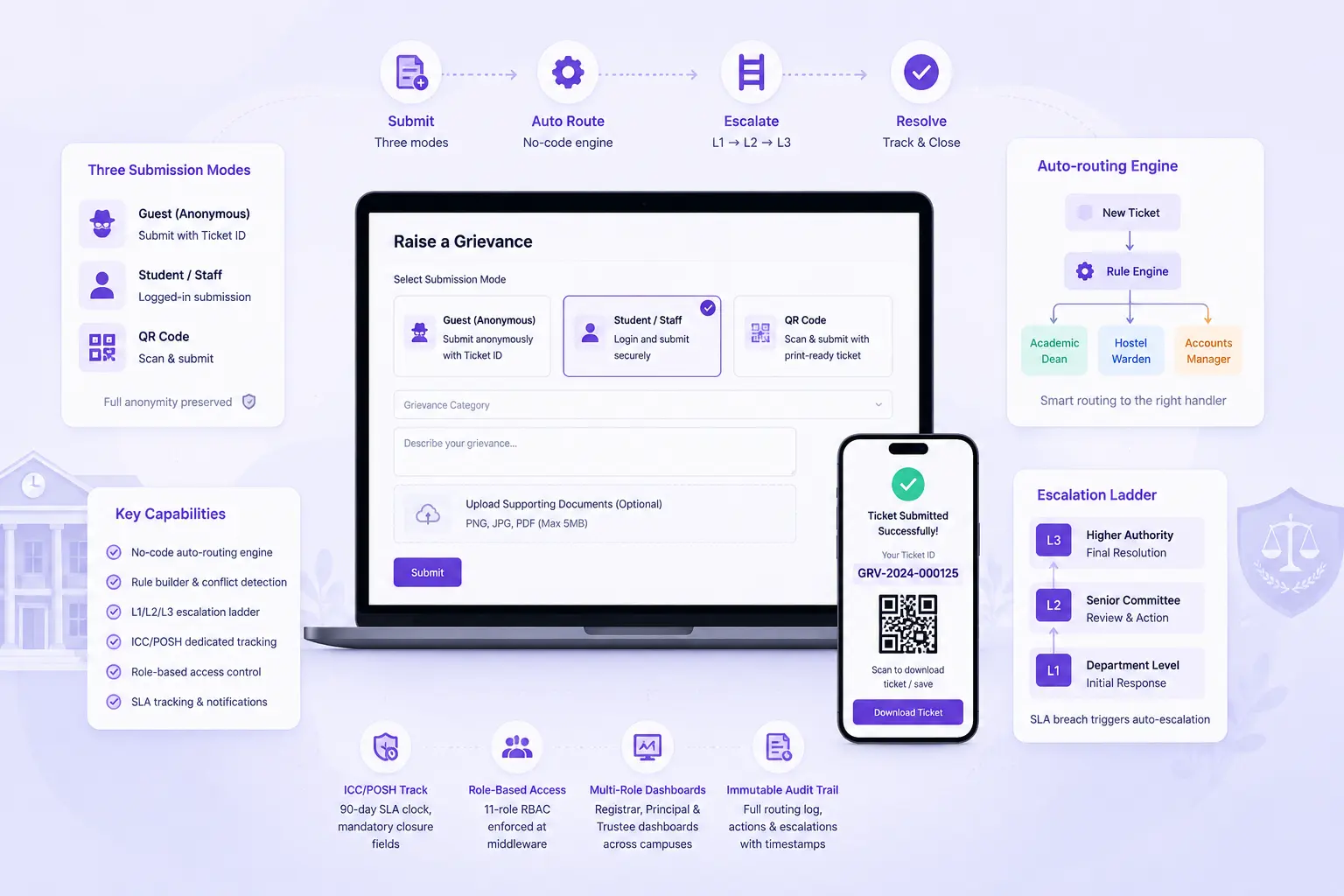
- Three-mode submission portal: Guest, Student/Staff & QR code
- No-code auto-routing engine; conflict detection, test mode & full routing log
- L1/L2/L3 escalation ladder with SLA breach-triggered auto-transitions, nightly cron, and immutable escalation records
- ICC/POSH dedicated track: 90-day statutory SLA clock, mandatory closure fields, complainant/respondent from staff/student directory, no anonymous submissions
- 11-role RBAC enforced at API middleware, no-code committee builder
Overview
What Does Institution Grievance Management Do?
Institution Grievance Management gives colleges a complete, UGC 2023-compliant grievance & committee management system. Configurable without custom code per institution, covering the full lifecycle from anonymous submission through auto-routing, escalation, committee review, and closure. The module ships with pre-built UGC SGRC & ICC/POSH committee types with statutory minimums and SLA rules locked. So institutions cannot inadvertently weaken their compliance position.
Benefits
How Does it Help Colleges?
Statutory Compliance Built In
Pre-built SGRC & ICC/POSH committee types. ICC 90-day SLA clock, mandatory closure fields for inquiry findings & panel decision, and auto-escalation trigger on SLA breach are built-in.
Full Anonymity Where It Matters
Three submission modes handle the distinct anonymity requirements of different grievance types precisely. Anonymous mode stores zero identity. ICC/POSH cases require identified complainants & respondents.
Every Ticket Reaches the Right Handler
No-code auto-routing rule builder auto-assigns every submitted ticket to correct handler. Based on ticket type, category, complainant type, campus & department. Enabled with priority-ordered rule evaluation, conflict detection.
Escalation That Enforces Itself
Nightly cron engine monitors every open ticket against its configured SLA timeline. When a breach threshold is reached, ticket auto-transitions to next escalation level, without manually reviewing overdue tickets & chasing handlers.
Committee Proceedings Cannot Be Seen by Complainant
Internal notes are not visible to the complainant through their Ticket ID tracker. Allowing committee members to document proceedings, record findings & coordinate internally without exposing the committee's working.
Trustee-Level Governance Without Case-Level Access
Trustee multi-campus dashboard surfaces the data trustees need for governance oversight. SLA compliance & escalation rate, ICC open count, and a Green/Amber/Red health score per campus. Without exposing any details.
No Custom Code Per Institution
Every element: ticket types, committee structures, routing rules, visibility tiers & escalation ladders, configurable through the no-code interface. A new institution activates & configures the module via the Ticket Type, Committee & Rule Builder.
Features
Key Capabilities
A detailed view of every capability across all six Institution Grievance Management steps.
Submission Portal
Three Submission Modes
Guest mode (optional email, Ticket ID displayed on screen), Anonymous mode (zero identity stored, one-time Ticket ID with save prompt), and Logged-in mode (student/staff profile pre-filled from master).
QR Code and Shareable URL per Ticket Type
A print-ready 300dpi PNG QR code is generated per ticket type for physical notice board deployment. QR scan pre-selects the correct ticket type on the submission form. Reducing submission errors for walk-in complainants.
Ticket ID Status Tracker
Complainants track their submission's current stage, days elapsed, and SLA deadline using only their Ticket ID. No handler identity, committee membership, or case details exposed through the tracker.
Auto-Routing Engine
No-Code Rule Builder
Rules are built using up to 5 AND conditions per rule across ticket type, category, complainant type, campus & department. No code required.
Priority Evaluation & Conflict Detection
Rules are evaluated in priority order. The first matching rule wins. Conflict detector identifies overlapping rules before saving.
Test Mode
Administrators simulate a ticket submission against the current rule set without creating a real ticket, confirming routing logic before it handles live submissions.
Routing Log per Ticket
Every ticket carries a log of which routing rule fired & which conditions matched. Providing full traceability for routing decisions, for audits/escalations.
L1/L2/L3 Escalation
Configurable Escalation Ladder
Up to 5 escalation levels per ticket type, each with a defined handler type (department or committee) and SLA period. SGRC, ICC & custom types.
Nightly Cron Auto-Transition
A nightly automated process evaluates all open tickets against their SLA timelines. Tickets that breach current level SLA are auto-transitioned.
L1 Department Head Queue
L1 handlers see only tickets from their own department, with green/amber/red SLA colour coding on each ticket. Resolution requires mandatory note.
Immutable Transition Logs
Every escalation transition: whether automatic or manual, is logged with the timestamp, the handler name at each level, and the action taken.
Committee Workspace
Hearing Log and Internal Notes
Committee members log hearing entries & internal inquiry notes in the workspace. Committee working documents remain within the committee.
Mandatory Closure Fields
Cases cannot be closed without completing mandatory recommendation & action fields. Preventing cases from being marked resolved with no documented outcome.
ICC/POSH Dedicated Track
ICC track requires complainant & respondent to be selected from the staff/student directory. No anonymous submissions are permitted.
Anonymous-to-Identified Conversion at L3
When an anonymous case reaches L3 & committee proceedings require identification, a secure one-time disclosure link is generated.
Configuration (No-Code)
Ticket Type Builder
New ticket types: Anti-Ragging, Discipline, Parent Complaint, or any custom workflow; created through a form-based builder. Pre-built SGRC & ICC types.
Committee Builder
New committees created with configurable name, quorum & outcome labels. SGRC & ICC committees ship with their respective statutory defaults partially or fully locked.
Visibility Tiers (4 Levels)
Open, Restricted (SGRC), Confidential (ICC/POSH) & Full Black Box (whistleblower/anti-ragging) visibility tiers enforced at API middleware layer. Cannot be bypassed.
11-Role RBAC at Middleware
Full permission matrix for all 11 roles, enforced at API layer. A role's data access boundaries hold regardless of how the interface is navigated or what API calls are made.
Workflow
The Complete Grievance Lifecycle
From anonymous submission to committee closure, every step logged and traceable
Complainant selects submission mode: Anonymous, Guest, or Logged-in. Submits via portal or QR scan.
Auto-routing engine evaluates ticket against rule set. Auto-assigns to correct L1 handler
Handler receives ticket in queue: reviews, resolves with mandatory note, or escalates with reason
If SLA breaches before L1 resolution: nightly cron auto-escalates to L2, immutable escalation record created
L2 handler or committee receives the escalated ticket; continues resolution or escalates to L3
ICC/POSH cases reaching committee: complainant & respondent identified; 90-day clock active with alerts
Anonymous cases reaching L3: secure one-time disclosure link generated; complainant opts to identify/decline
Committee Workspace: hearing log entries recorded; internal inquiry notes added; outcome documented
Case closed: recommendation & action fields completed; outcome label applied per committee confign
Registrar reviews full ticket table; Principal reviews SLA health dashboard; Trustee reviews campus health table
Analytics
Reports & Insights
Registrar KPI Dashboard
- Ticket volumes by type, L1/L2/L3 distribution, SLA breach count
- Handler-level detail subject to visibility rules; CSV export available
Principal SLA Dashboard
- SLA health donut per ticket type, 6-month trend line, committee queue depths
- Governance view without complainant details
ICC Compliance Widget
- ICC open count with Day-80+ named alert cards
- For monitoring statutory ICC SLA obligations at the Principal level
Trustee Campus Health Table
- SLA compliance rate, L2+ escalation rate, ICC open count, and health score per campus
- For group-level governance
Routing Log per Ticket
- Which rule fired, which conditions matched, which handler was assigned
- For routing audit and dispute resolution
Escalation Transition Log
- All level transitions with timestamp, handler, and action
- Immutable record for compliance audit and accreditation documentation
Who Uses It?
Designed for every grievance stakeholder
Complainants
- Submit grievances in the mode that matches their privacy requirement
- Track case status, SLA deadline & stage using Ticket ID only
- Receive secure disclosure link at L3 if anonymous case reaches committee & identification is required
Department Head (L1 Handler)
- Review assigned tickets from their department only, with SLA colour coding
- Resolve with mandatory resolution note or escalate to L2 with documented reason
Committee Members and Secretary
- Access Committee Workspace for assigned committee type
- Log hearing entries & internal inquiry notes
- Complete mandatory closure fields before case resolution
Registrar / Ticket Admin
- Full ticket table view with L1/L2/L3 & SLA breach count, and CSV export
- Monitor routing rules, manage ticket type & committee configuration
Principal
- SLA health donut, 6-month trend, committee queue depths; without case-level access
- ICC Day-80+ named alert cards visible at dashboard level for compliance monitoring
Trustee / Group Management
- Campus health table with SLA compliance & escalation rate, ICC open count, and RAG health score per campus
- Single-click drill-down to any campus Registrar dashboard for institutional investigation
Scale
Designed for Scale
Whether managing grievances for a single campus or across a Group of Institutions with multiple campuses and committee structures:
No-code configuration allows each campus to have its own ticket types, committees & routing rules
Trustee multi-campus dashboard aggregates compliance health across full group in one view
RBAC enforced at API middleware scales to any number of users without permission drift
QR codes per ticket type enable physical portal deployment across any campus without development
Nightly cron escalation engine handles any ticket volume without manual oversight of SLA timelines
Every Grievance Routed. Every SLA Enforced. Every Committee Proceeding Traceable.
See how edumerge's Institution Grievance Management module gives colleges a UGC 2023-compliant, no-code configurable grievance and committee platform.
Frequently Asked Questions
Common questions about grievance handling, ICC/POSH compliance, and escalation on the Institution Grievance Management module
Is edumerge's grievance module compliant with UGC 2023 regulations?+
Yes. The module ships with pre-built SGRC and ICC/POSH committee types with statutory minimums and SLA rules locked, so a college cannot inadvertently weaken its compliance position. The ICC track carries a 90-day statutory SLA clock and mandatory closure fields for inquiry findings and panel decisions.
Can students and staff submit grievances anonymously?+
Yes, for general grievances. The portal offers three submission modes: Guest (optional email, Ticket ID shown on screen), Anonymous (zero identity stored, one-time Ticket ID with save prompt), and Logged-in (profile pre-filled from the student/staff master). ICC/POSH cases are the exception; the complainant and respondent must be identified and selected from the staff/student directory, so anonymous submission is not permitted for this track.
What happens if a grievance is not resolved within its SLA?+
A nightly cron process checks every open ticket against its configured SLA timeline. When a breach threshold is reached, the ticket auto-transitions to the next escalation level, L1 to L2 to L3, without anyone manually reviewing overdue tickets, and an immutable escalation record is created with a timestamp and handler name at each level.
Can each campus in a Group of Institutions set up its own committees and routing rules?+
Yes. Ticket types, committee structures, routing rules, visibility tiers, and escalation ladders are all configured through no-code builders, so each campus can activate and configure the module for its own needs without custom development. Trustees still get a single multi-campus dashboard with SLA compliance, escalation rate, and a Green/Amber/Red health score per campus, without exposure to case-level details.
Who can see the details of a grievance case, including committee discussions?+
Access is controlled through four visibility tiers, Open, Restricted (SGRC), Confidential (ICC/POSH), and Full Black Box (whistleblower/anti-ragging), enforced at the API middleware layer so they cannot be bypassed. Complainants can track only their case's stage, days elapsed, and SLA deadline via the Ticket ID tracker, with no handler identity or committee details exposed, while committee hearing logs and internal notes stay within the Committee Workspace.