Alumni Management
Alumni Management Software for Colleges & Universities
Full-stack alumni engagement platform. Self-registration portal, events, jobs board, donations, announcements & analytics.
- Live dashboard, searchable directory & lifecycle transition from student to alumni
- Self-registration portal with admin approval queue & profile claim workflow
- Events management, jobs board with referral hiring & donations tracking
- Announcements broadcast to full alumni network & engagement analytics
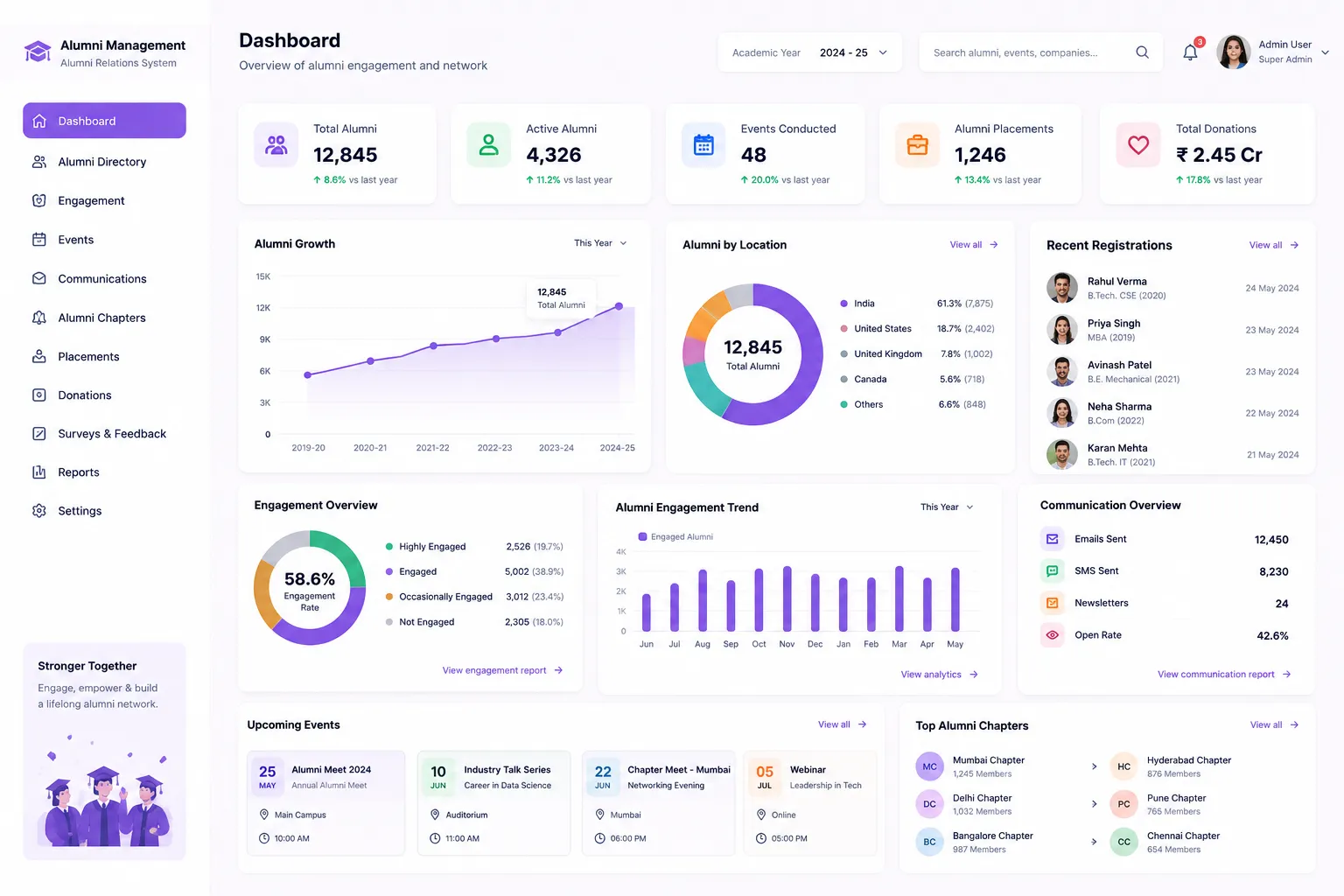
Overview
What Does Alumni Management Software Do?
Alumni Management gives colleges a full-stack alumni engagement platform built natively into the College ERP, across six integrated steps: Dashboard & Directory, User Management, Events, Jobs Board, Donations & Announcements, Analytics & Settings; with portal configuration and reports for institutional review.
Benefits
How Alumni Management Software Helps Colleges
No Alumni Record Lost in Transition
When students complete programme & marked Passed Out, transition to Alumni happens within the system, auto-carrying their academic profile & contact info.
Alumni Contact Records Stay With Institution
Alumni contact information is managed within the College ERP. When staff change, the contact records remain. Changes & updates captured centrally.
Jobs Board Turns Alumni Into a Hiring Network
Alumni post job openings visible to the entire alumni network: with full job details including company, location, salary range, description & deadline.
Donations Tracked & Announcements Broadcast
Alumni giving is tracked with amount, date & campaign association; with a donation listing showing total collections. Announcements are published with notifications.
Data for NAAC, NIRF & Institutional Reporting
NAAC takes alumni engagement & feedback as part of quality assessment framework. NIRF graduate outcome data depends what alumni do post-graduating.
Exit Process Integration That Closes the Loop
Alumni Management integrates with the exit process workflow. When students complete clearances, transition to alumni status follows as natural.
Activity & Engagement Visible Over Time
Engagement & activity tracking maintains a record of alumni interactions: events attended, feedback given, mentorships & institutional contributions.
Alumni Reports Without Manual Compilation
Batch-wise alumni counts, dept-wise distribution, contact update status, engagement activity summaries. Without pulling data from multiple sources.
Features
Alumni Management Software Features
A detailed view of every capability across all Alumni Management sub-modules.
Dashboard & Directory
ActionLive KPI dashboard and searchable alumni directory with advanced filters.
KPI Dashboard
Dashboard cards showing Total Alumni, Active Events, Open Jobs, and Total Donations, with live data. Recent events feed, donations & job postings shown on the dashboard.
Alumni Directory
Searchable, filterable list of all alumni with profile cards. Filter by batch year, course, location, and employment status.
Alumni Profile Page
Personal details, graduation information, current employer, and contact details per alumnus; viewable from the directory.
Lifecycle Transition Integration
Passed-out students auto-flow into the alumni pool, carrying their academic profile, batch, department, and contact information from the student record.
User Management
ActionApprove pending alumni self-registrations and manage existing alumni accounts.
Pending Registrations Queue
Admin reviews and approves or rejects alumni self-registration requests from a dedicated queue, with applicant details visible before action.
Alumni Account Activation and Deactivation
Alumni accounts are activated or deactivated by admin, controlling portal access without deleting the alumni record.
Alumni Self-Registration Portal
A public-facing registration portal allows alumni to register & update their profiles without an ERP login, lowering the barrier to building an active alumni network.
Bulk Approval / Rejection Actions
Multiple pending registration requests are approved or rejected in a single bulk action, for institutions handling high registration volumes.
Alumni Profile Claim Workflow
Self-registered alumni accounts are linked to the original ERP student record through a profile claim workflow, maintaining data integrity between alumni portal and College ERP.
User Role Management Within Alumni Portal
User roles within the alumni portal are managed by admin, controlling which alumni have moderation or elevated access within the network.
Events
ActionCreate and manage alumni events: reunions, seminars, webinars, placement drives, and more.
Event Types
Events are created across types: Seminar, Reunion, Cultural, Sports, Fundraiser, Webinar, Workshop, and Placement Drive.
Event Creation
Each event is created with title, description, date, time, venue, online link, max seats, and type.
Event Status Lifecycle
Events move through a defined status lifecycle: Upcoming, Ongoing, Completed, and Cancelled.
RSVP Management
Alumni register interest and track seat availability through the RSVP system. Admin sees registration counts against max seats.
Invite Alumni via Email or In-Portal Notification
Alumni are invited to events via email or in-portal notification, reaching both active portal users and alumni contacted by email.
Event List with Pagination and Search
The full event history is paginated and searchable; for admin management and alumni browsing.
Edit and Delete Events with Confirmation
Events are edited or deleted with a confirmation step, preventing accidental changes to published events.
Jobs Board
ActionPost alumni job openings and enable referral-based hiring within the network.
Post Job Openings
Alumni post job openings visible to the entire alumni network, turning the alumni community into a referral hiring channel for its own members.
Job Details
Each posting includes title, company, location, salary range, description, and application deadline.
Apply or Refer from Within the Portal
Alumni apply to posted openings or refer other alumni as candidates, directly from the jobs board without leaving the portal.
Job Status Management
Job postings are managed through statuses: Open, Closed, and Expired, keeping the board current without manual cleanup.
Admin Job Management View
Admin has a management view with filter and search across all posted jobs: for moderation, status management, and reporting.
Donations & Announcements
ActionAlumni giving campaigns and broadcast announcements to the entire network.
Donations Management
Alumni contributions are tracked with amount, date & campaign association; providing a structured record of alumni giving.
Donation Listing with Total Collections View
All donations are listed with a total collections view; for campaign progress tracking and institutional fundraising reporting.
Announcements Module
Announcements & news posted to all alumni through announcements module. Keeping the network informed of developments, achievements & events.
Rich-Text Content with Publish Date
Announcements are authored with rich-text formatting and a scheduled publish date, allowing advance preparation of communications.
Broadcast Notifications on New Announcements
When a new announcement is published, a broadcast notification is sent to all alumni, ensuring new content reaches the network proactively.
Workflow
How the College Alumni Management Workflow Works
From final year student to tracked, engaged alumnus, without a separate database or manual data transfer
Student completes programme: marked Passed Out in student lifecycle; auto-transitions to alumni pool with academic profile carried forward
Admin configures portal settings: institution branding, registration approval mode, and notification preferences
Alumni self-register via the public-facing portal (no ERP login required); pending registrations appear in the admin approval queue
Admin reviews & approves or rejects registrations; profile claim workflow links registered account to original ERP student record
Admin creates events: type, date, venue, online link, max seats; alumni invited via email or in-portal notification
Alumni RSVP to events; admin monitors seat availability and attendance
Alumni post job openings on the Jobs Board; other alumni apply or refer candidates from within the portal
Admin posts announcements with rich-text content; broadcast notification sent to all alumni on publish
Alumni donations recorded with amount, date & campaign association; total collections tracked per campaign
Admin reviews engagement analytics dashboard: event, job, and donation activity metrics by cohort
Alumni count, event attendance & donation summary reports generated for NAAC documentation & management review
Analytics
Reports & Insights
Comprehensive reporting and analytics for complete alumni management
KPI Dashboard
- Total Alumni, Active Events, Open Jobs & Total Donations, with recent activity feeds for events, donations & job postings.
Engagement Analytics Dashboard
- Alumni engagement metrics by event, job & donation activity, for management review of which channels are driving alumni participation.
Graduation Year Cohort Analysis
- Alumni data & engagement segmented by graduation year cohort, for NAAC alumni engagement criterion documentation.
Alumni Count by Course/Year
- Batch & department-wise alumni counts, for NAAC documentation, NIRF graduate outcome data, and institutional reporting.
Event Attendance Report
- RSVP & attendance data per event; for event planning, engagement tracking & post-event management review.
Donation Summary Report
- Total donations by campaign & period; for fundraising review, donor acknowledgement, and institutional financial reporting.
Who Uses Alumni Management Software?
Designed for every alumni stakeholder
Alumni Relations Cell / Administration Office
- Manage the alumni database: profiles, contact information & engagement records
- Track engagement activity & update alumni records
- Generate alumni reports for NAAC, NIRF & institutional review
IQAC / Accreditation Cell
- Access alumni data for NAAC alumni feedback & engagement criteria documentation
- Use alumni reports for NIRF graduate outcome data requirements
- Reference lifecycle transition records for accreditation audit purposes
Placement Cell
- Access alumni contact information for industry mentorship & placement drive support
- Track alumni engagement with placement-related activities: campus visits, mock interviews, mentorship
College Management / Principal
- Institution-wide alumni count & batch-wise distribution overview
- Engagement activity summary showing active vs. inactive alumni cohorts
- Alumni data for rankings, institutional branding & strategic planning
Scale
Designed for Scale
Whether managing alumni from a single graduating batch or decades of passed-out students across multiple programmes, Alumni Management ensures:
Structured lifecycle transition that prevents alumni records from being lost when students graduate
Alumni contact records retained institutionally, independent of staff changes or personal systems
Engagement history built over time, enabling deeper alumni relationships and involvement
Reports that meet NAAC, NIRF & institutional governance requirements without manual data compilation
Every Passed-Out Student, Permanently in Your Alumni Record.
See how edumerge's Alumni Management module gives colleges a structured, auto-populated alumni database. With lifecycle transitions, engagement tracking & reports built into the College ERP.
Frequently Asked Questions
Common questions about alumni management for colleges and universities
How do students get moved into the alumni database after graduation?+
When a student completes their programme and is marked Passed Out in the student lifecycle, the record auto-transitions into the alumni pool. Their academic profile, batch, department, and contact information carry forward automatically, so no manual data entry or separate database is needed.
Can alumni register themselves without needing an ERP login?+
Yes. Alumni Management includes a public-facing self-registration portal where alumni can register and update their profiles without ERP credentials. Registrations go into a pending queue that admin reviews and approves or rejects, with a profile claim workflow linking each registration back to the original student record.
What happens to alumni contact records if staff handling alumni relations change?+
Alumni contact information is managed within the College ERP rather than in personal spreadsheets or individual staff systems. Records remain intact and centrally updated when staff change, so institutional knowledge about alumni is not lost during transitions.
Can alumni post job openings and refer other alumni for hiring?+
Yes. The Jobs Board lets alumni post openings with title, company, location, salary range, description, and deadline, visible to the entire alumni network. Other alumni can apply or refer candidates directly from within the portal, and postings move through Open, Closed, and Expired statuses.
Does Alumni Management help with NAAC and NIRF reporting requirements?+
Yes. NAAC assessment considers alumni engagement and feedback, and NIRF graduate outcome data depends on what alumni do after graduating. The module provides batch-wise and department-wise alumni counts, engagement analytics by graduation year cohort, and event and donation reports, without pulling data from multiple sources.
What is the best alumni management software for colleges in India?+
The right alumni management software for an Indian college needs to auto-populate the alumni database as students graduate, rather than relying on a separate spreadsheet built after the fact. edumerge's Alumni Management module does this through the lifecycle transition integration, then adds a self-registration portal, events, a jobs board, donations tracking, and engagement analytics structured for NAAC and NIRF reporting, all inside the same College ERP.
Can alumni update their own contact and profile details without contacting the college?+
Yes. The self-registration portal is public-facing, so alumni can register or update their profile without an ERP login. New and updated registrations go into an admin approval queue, and a profile claim workflow links the submission back to the alumnus's original student record, so self-service updates don't create duplicate or disconnected profiles.