Appraisals - KPIs & KRAs
Staff Appraisals & Performance Management for Educational Institutions
Structured reviews. KRA-linked scoring. Data-linked performance.
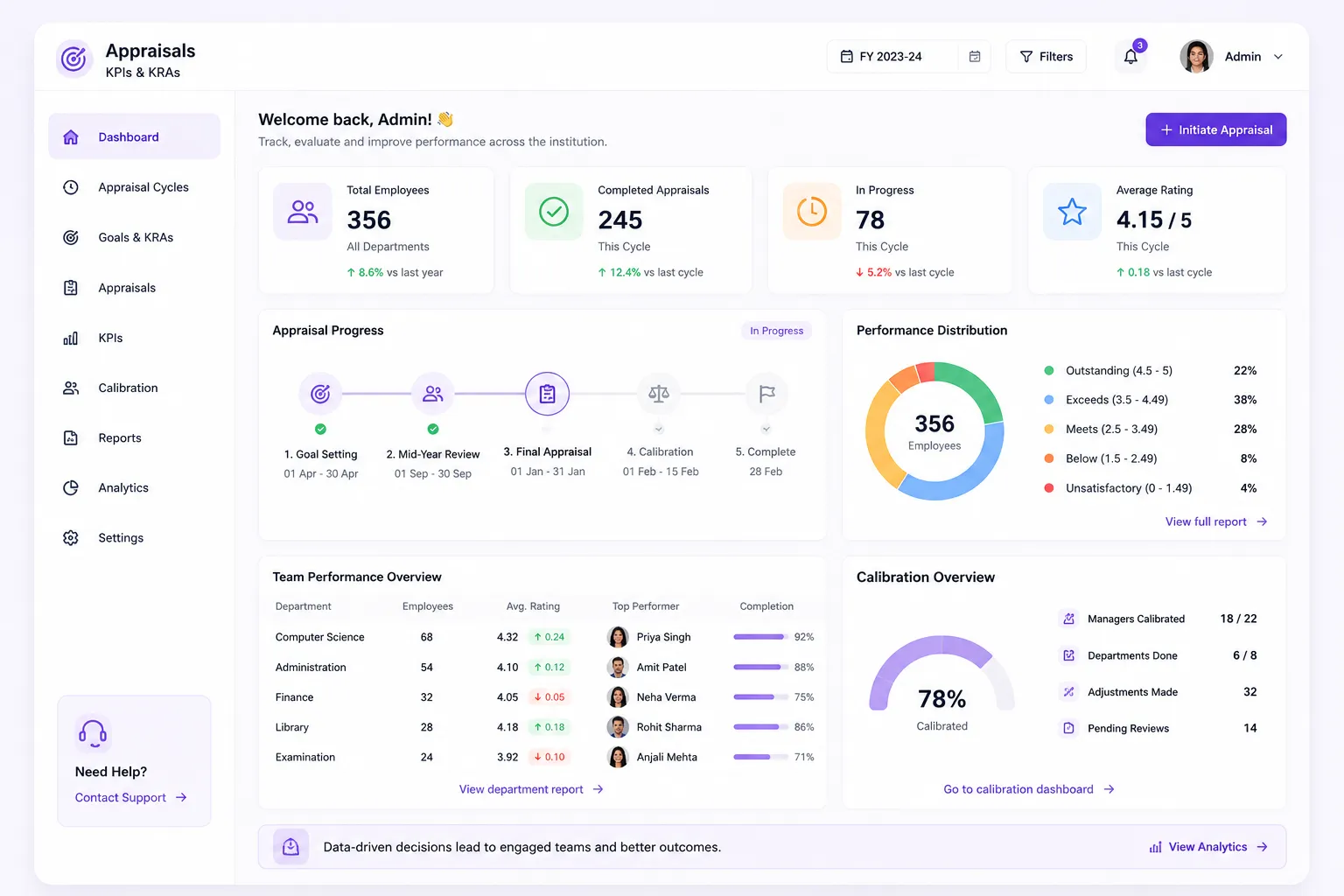
- Full appraisal lifecycle: from setup & review, to scoring, calibration & analytics
- Individual & dept-level goal setting with KRA mgmt. built into the workflow
- Calibration dashboard with manager override, normalisation & band assignment
Overview
What Does This Module Do?
Appraisals & Performance gives HR a structured, configurable system to run the complete performance review cycle for teaching & non-teaching staff. Goals are set at individual & department level at the start of the cycle. KRAs are tracked through the year. Mid-year reviews are submitted & recorded. Final appraisal forms with multi-section scoring are completed by managers, with self-service access for staff throughout. Calibration ensures rating distributions are reviewed & normalised before outcomes are communicated. Analytics surface performance patterns across the institution.
Appraisal Cycle
The Full Performance Lifecycle at a Glance
Every stage managed within a single HRMS module
Cycle Setup
Period, eligibility & rating scale configured
Goal Setting
Individual & department KRAs defined
Mid-Year Review
Progress submitted & recorded
Final Scoring
Multi-section appraisal form completed
Calibration
Override, normalise & assign bands
Analytics
Distribution charts & dept comparisons
Benefits
How Does it Help Institutions?
Reviews Built on Evidence
Final appraisal forms pre-populate with KRA tracking data, mid-year review submissions & goal progress records from within the HRMS.
Goals Set Once & Tracked All Year
Individual & department-level goals are defined at the start of the cycle & tracked through mid-year & final reviews within the same module.
Calibration for Meaningful Ratings
Managers & HR review cross department rating distributions. Override & normalisation ensure final assignments reflect considered decisions.
Staff Visibility Without HR Involvement
My Appraisal self-service for every staff to access their current cycle status, submitted goals, mid-year review record & final appraisal outcome.
Performance Trends Visible Over Time
HR & leadership can identify staff on improving trajectories, consistent performers & who have been stagnant across multiple appraisal cycles.
Analytics That Inform Decisions
Distribution charts & dept-level comparisons giving leadership inputs for promotion decisions, increment planning, and L&D prioritisation.
Features
Key Capabilities
A detailed view of every capability in the Appraisal Lifecycle module
Appraisal Dashboard
A cycle-level overview showing completion status by stage. How many staff have set goals, submitted mid-year reviews, completed final forms, and been assigned performance bands.
Cycle Setup Wizard
HR configures each appraisal cycle through a guided setup. Defining the cycle period, selecting eligible employee groups, and setting the rating scale to be used across all evaluations.
Goal Setting Module
Goals are set at both individual & dept level within the module. Individual goals are assigned to each staff member by their manager; dept-level goals cascade from institutional priorities.
KRA Management
Key Result Areas are defined, assigned & tracked per employee within the appraisal module. Each KRA has a defined weight & measurement basis. Progress is updated & fed into scoring.
Mid-Year Review Submissions
Captures progress against goals & KRAs at the halfway point. Managers & staff both submit inputs, recorded & available for reference during the final appraisal. Preventing recency bias.
Final Appraisal Form with Multi-Section Scoring
Divided into configurable sections. Covering KRA performance, competencies, conduct, and any institution-specific evaluation criteria. Scores entered per section; system computes final rating.
My Appraisal Self-Service View
Every staff member has a personal appraisal view showing their goals, KRAs, mid-year submission, final form status, and the outcome once communicated. They can track where they are in the cycle.
Performance Tracking Over Time
Each employee's appraisal history; ratings, band assignments & KRA scores, retained across cycles, giving HR & managers a longitudinal performance view for development, promotion & succession decisions.
Calibration Dashboard
Before outcomes are finalised, managers & HR review rating distributions in the calibration dashboard. Individual ratings can be overridden & normalised across teams or departments for consistency & fairness.
Performance Band Assignment
Final performance bands assigned through the system based on computed scores & any calibration adjustments. Band assignment is processed server-side, ensuring rules are applied consistently.
Distribution Charts & Dept Comparisons
Post-calibration analytics show rating distribution curves by department and across the institution, enabling leadership to see where performance is concentrated and where it diverges from expectations.
Built for Real Institutional Workflows
The complete appraisal lifecycle - from cycle launch to analytics
HR configures the appraisal cycle; period, eligibility & rating scale, using setup wizard
Managers set individual goals and KRAs for direct reports; department goals cascaded from institutional priorities
Staff acknowledge assigned goals; cycle tracking begins
Mid-year review window opens; managers & staff submit progress inputs
Mid-year records locked; cycle continues to year-end
Final appraisal forms open; managers complete multi-section scoring for all direct reports
HR reviews rating distributions in the calibration dashboard; overrides & normalisation applied where needed
Performance bands assigned server-side; outcomes communicated to staff via self-service view
Analytics published; distribution charts & department comparisons available to HR & leadership
Who Uses It?
Designed for every stakeholder in your institution
HR Admin
- Configure cycles, rating scales & eligible employees
- Monitor cycle completion rates across departments & stages
- Manage calibration & finalise performance band assignments
- Access analytics & distribution reports for institutional review
Department Managers
- Set individual goals & KRAs for direct reports at cycle start
- Submit mid-year review inputs & complete final forms
- Review & override ratings for their team during calibration
- Directly track performance over time through individual profiles
Staff & Faculty
- View assigned goals, KRAs & current cycle status
- Submit self-assessment inputs at mid-year & final stages
- Access appraisal outcomes & performance band
Management / Leadership
- Post-calibration analytics showing institution-wide performance distribution
- Dept-level comparisons to identify high-performing & underperforming units
- Data to support increment, promotion, and L&D decisions
Analytics
Reports & Insights
Get complete visibility into performance patterns and trends
Appraisal Completion Dashboard
Stage-wise completion rates across the institution; goal setting, mid-year, and final form, for the current cycle
Rating Distribution Chart
Visual distribution of final appraisal ratings across the institution and by department, post-calibration
Department Comparison Report
Side-by-side comparison of average ratings, KRA scores, and performance bands across departments
Performance Tracking Over Time
Individual and department-level performance trends across multiple appraisal cycles
High Performer & PIP Identification
List of staff flagged for top-band recognition or performance improvement based on final band assignments
KRA Achievement Summary
Institution-wide view of KRA completion rates. Showing which result areas are consistently met and which are lagging
Designed for Scale
Whether running appraisals for a single campus or across a group of institutions, Appraisals & Performance ensures:
Consistent Appraisal Structures
Rating scales & KRA frameworks across all departments & campuses
Multiple Concurrent Cycles
Different categories; teaching, non-teaching, contract, managed from same module
Flexible Calibration Controls
Work at department, campus, or institution level depending on the review structure
Group-Wide Performance View
Analytics that give leadership a group-wide view without aggregating data manually
Appraisals That Are Structured, Data-Backed, and Actually Useful
See how edumerge's Appraisals & Performance module helps institutions run consistent, KRA-linked performance reviews. With calibration controls and analytics that turn appraisal data into institutional decisions.
Frequently Asked Questions
Common questions about staff appraisals, KRA scoring, and performance calibration
How does KRA-based scoring work in edumerge's appraisal module?+
Key Result Areas are defined and assigned per employee, each with a weight and measurement basis. Progress against KRAs is tracked through the year and captured again at the mid-year review, then feeds directly into the final multi-section appraisal form, so scores are computed from tracked evidence rather than end-of-cycle recall.
What does calibration mean in this appraisal system, and why is it needed?+
Calibration is the step where managers and HR review rating distributions across departments before outcomes are finalised. Individual ratings can be overridden and normalised for consistency across teams, and performance bands are then assigned server-side based on the calibrated scores, so outcomes reflect considered decisions rather than isolated manager judgment.
Can staff and faculty see their own appraisal progress without asking HR?+
Yes. The My Appraisal self-service view gives every staff member access to their assigned goals and KRAs, current cycle status, mid-year review record, and final appraisal outcome once communicated. This reduces the need for staff to approach HR just for a status update.
Does the module support separate appraisal cycles for teaching, non-teaching, and contract staff?+
Yes. The cycle setup wizard lets HR configure the period, eligible employee groups, and rating scale for each cycle. Multiple concurrent cycles can run for different categories, such as teaching, non-teaching, and contract staff, all managed from the same module.
What happens at the mid-year review stage, and why is it kept separate from the final appraisal?+
Mid-year reviews capture progress against goals and KRAs at the halfway point, with inputs submitted by both managers and staff and recorded for reference during the final appraisal. This is intended to prevent recency bias, so the final rating reflects performance across the full cycle rather than just the last few weeks.