Payroll
Staff Payroll Management for Educational Institutions
Robust processing. Accurate salary snapshots. Compliance built in.
- End-to-end payroll processing; from structure config to bank transfer file gen
- Full statutory compliance: TDS, PF, ESI, PT computation & Form 16 generation
- Payslips, tax declarations, reimbursements, FnF settlement & more
Overview
What Does This Module Do?
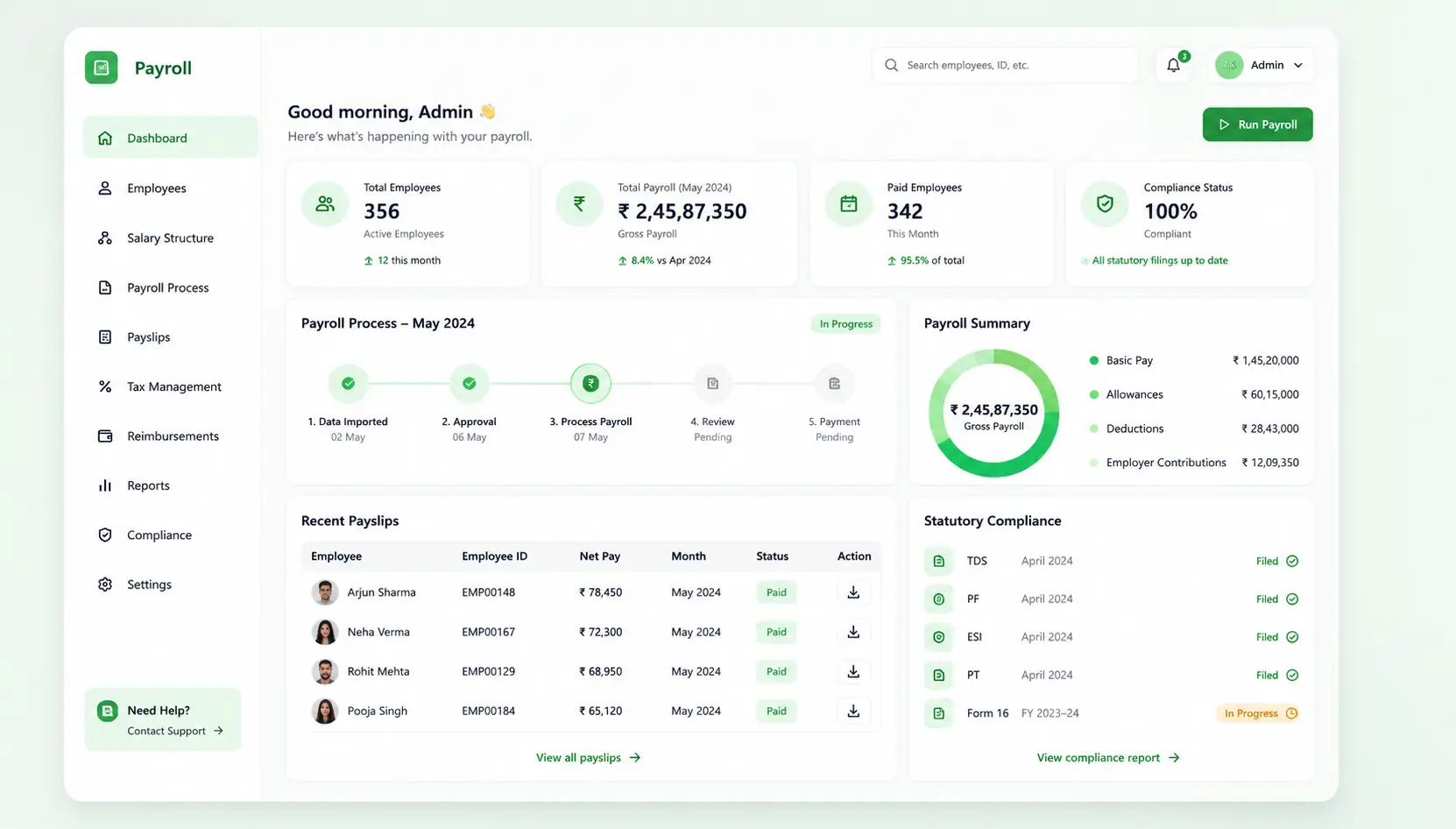
Payroll is a four-portal system covering every stakeholder in the salary cycle. Staff manage their own payslips, declarations & advances. HR & payroll admins configure structures, run & lock payroll, manage LOP & reimbursements, and process full & final (FnF) settlements. The taxation layer handles all statutory deductions and Form 16 generation. Finance gets cost-centre visibility & bank transfer files; all from within a single integrated HRMS module.
Benefits
How Does it Help Institutions?
One System for Every Payroll Stakeholder
Staff, HR admins, the taxation team & finance all operate from the same payroll module with role-appropriate views. There is no need to reconcile data between separate tools or manually hand off between teams at month-end.
Payroll Runs Without Reconciliation Errors
Salary structures, LOP deductions, reimbursement approvals, and investment declarations are all sourced from within the HRMS. The admin portal assembles them into the payroll run automatically.
Statutory Compliance Without the Expert Overhead
TDS, PF, ESI & PT are computed automatically against each employee's profile and applicable regime. Form 16 is generated within the same workflow. Institutions stay compliant without building specialist tax processing capability in-house.
Staff Empowered to Manage Their Own Records
The self-service Staff Portal lets employees view payslips, submit reimbursement claims, declare investments, manage bank details, and track loans. Reducing the volume of routine HR queries every month.
Staff Portal
Self-Service for Every Employee
Empower staff to manage their own payroll-related records
Payslip Viewer
Staff access month-wise payslips directly from their HRMS portal; downloadable, clearly formatted, and always available without raising a request to HR.
Tax Regime Selection
Staff select their preferred tax regime (Old vs New IT regime) at the start of the financial year. The system applies the selected regime to their TDS computation.
Investment Declarations
Structured submission of investment declarations under Section 80C, HRA, and other applicable heads; submitted digitally & routed to the admin for verification.
Reimbursement Claims
Staff submit expense reimbursement claims with supporting documents directly from the portal. Claims route through the configured approval workflow.
Bank Details Management
Employees manage their own salary account details through the portal. Changes are subject to admin verification before taking effect.
Loan Application & Dashboard
Staff apply for institutional loans and track outstanding balances, EMI schedules, and repayment history from a personal loan dashboard.
Admin Portal
Complete Payroll Control for HR
Configure, process, and finalize payroll with full auditability
Payroll Setup & Configuration Wizard
A guided setup wizard for first-time payroll configuration; covering pay period, payroll heads, salary structures, and applicable statutory settings.
Payroll Heads Definition
HR defines earnings (basic, HRA, allowances), deductions (statutory and voluntary), and other payroll components that make up the salary structure.
Payroll Structure Builder
Multiple salary structures are built and assigned to employee grades or roles. Each structure defines the component mix and computation logic for that category.
LOP Management
Loss of Pay days sourced from attendance and leave data are reviewed and confirmed by the admin before inclusion in the payroll run.
Payroll Processing (Run, Lock, Finalize)
A three-stage payroll run: initiate the computation, lock the register for review, and finalise for disbursement. Each stage is controlled and auditable.
Bulk Uploads
Salary structures and bank account details can be uploaded in bulk via Excel, reducing setup time for large institutions or new academic year restructures.
Taxation
Built-In Statutory Compliance
TDS, PF, ESI, PT computed automatically with Form 16 generation
TDS Computation & Form 16
TDS is auto-computed based on each employee's regime selection, declared investments, and applicable income tax slabs. Form 16 is generated at year-end within the same module.
PF, ESI, PT Management
Provident Fund, Employee State Insurance, and Professional Tax contributions are computed for each employee based on eligibility thresholds and applicable state rules.
Payroll Deductions Computation
All statutory and voluntary deductions are computed and applied to the payroll register in a single computation pass, with a full deductions breakdown per employee.
Tax Compliance Reports
Generates the statutory reports needed for PF ECR, ESI, and TDS returns; ready for submission without additional formatting or manual compilation.
Finance Portal
Finance Gets What It Needs, Directly
Cost-centre visibility and bank transfer files without manual extraction
Finance-Level Payroll Dashboard
Finance teams access a payroll cost overview showing total salary outflow, statutory liabilities, and net disbursement; scoped to their visibility level.
Payroll Cost Centre View
Salary costs are broken down by department and cost centre, enabling finance to allocate payroll expenditure accurately in the institution's accounts.
Bank Transfer File Generation
A bank-format salary transfer file is generated on payroll finalisation, ready for upload to the institution's banker for NEFT/RTGS processing; no manual formatting required.
Workflow
Built for Real Institutional Workflows
The complete monthly payroll cycle; from inputs to disbursement
Staff declare investments & claim reimbursement via Staff Portal
Admins verify declarations & approve reimbursements in Admin Portal
Attendance & LOP data locked and confirmed for the cycle
Admin runs payroll; system computes gross, deductions & net pay
Taxation layer applies TDS, PF, ESI & PT to the computed register
Admin reviews draft payroll register; locks & finalises after approval
Finance downloads bank transfer file; payslips published to Staff Portal
Tax compliance reports & disbursement tracking updated
Who Uses It?
Designed for Every Stakeholder in Your Institution
Staff & Faculty
- View monthly payslips and download Form 16
- Declare investment, claim reimbursement, and loan applications
- Manage personal bank account details and track F&F settlement status
HR / Payroll Admin
- Configure payroll structures, heads, and employee salary assignments
- Manage LOP, verify declarations, and approve reimbursements
- Run, lock, and finalise monthly payroll; process F&F settlements
Finance / Accounts Team
- Access the Finance Portal for payroll cost-centre visibility
- Download bank transfer files for direct upload to the institution's banker
- Reconcile payroll costs against institutional budgets by department
Analytics
Reports & Insights
Complete visibility into payroll processing and compliance
Payroll Register
Complete month-wise salary statement for all employees; gross, deductions & net pay
Statutory Deduction Summary
PF, ESI, PT, and TDS amounts payable for the cycle, ready for remittance
Cost Centre Payroll Report
Salary costs broken down by department and cost centre for finance allocation
Tax Compliance Reports
PF ECR, ESI, and TDS return-ready reports generated from within the module
Disbursement Tracking
Track salary transfer status post bank file upload, with confirmation records
Taxation Audit Log Export
Auditable time-stamped record of all tax computations & declaration changes
Scale
Designed for Scale
Whether processing payroll for a single campus or a group of institutions, HRMS Payroll ensures:
Consistent payroll structures and statutory compliance across all campuses
Bulk upload capabilities to handle large headcount without manual entry
Role-based portal access ensuring each stakeholder sees only what is relevant
Audit-ready records for every payroll cycle and statutory deduction
Run Payroll with Confidence. Every Cycle. Every Staff Member.
See how edumerge's Payroll module handles the complete salary cycle. From staff self-service & admin processing to statutory taxation & finance-ready bank files, without manual reconciliation.
Frequently Asked Questions
Common questions about staff payroll processing and statutory compliance
Does the payroll module compute TDS for both the old and new tax regimes?+
Yes. Staff select their preferred regime, old or new IT regime, at the start of the financial year through the Staff Portal. The system applies that selection along with declared investments to compute TDS automatically each cycle, so no separate regime-wise calculation is needed from HR.
Can employees view their payslips and Form 16 without contacting HR?+
Yes. The Staff Portal gives every employee month-wise payslips that are downloadable and always available. Form 16 is generated by the taxation layer at year-end within the same module and made available to staff, reducing the volume of routine document requests to HR.
How are Loss of Pay (LOP) deductions handled during payroll processing?+
LOP days are sourced directly from attendance and leave data already recorded in the HRMS. The HR admin reviews and confirms these days before they are included in the payroll run, so deductions are based on verified records rather than manual reconciliation between attendance and payroll.
Does the system generate bank transfer files for salary disbursement?+
Yes. Once payroll is finalised, a bank-format salary transfer file is generated automatically for NEFT or RTGS upload to the institution's banker. Finance also gets disbursement tracking to confirm salary transfer status after the file is uploaded.
Can HR process full and final (F&F) settlements within the same module?+
Yes. F&F settlement is handled as part of the same admin payroll workflow used for regular monthly processing, and staff can track their settlement status from the Staff Portal. This keeps exit-related payroll processing within the same system rather than a separate offline process.