School Library Management
Library Management System for Schools
Full-cycle ILMS: catalog, accessions, circulation, reservations, fine management, e-books & SMS notifications.
- Book Catalog, Accession Management, Circulation, Reservations
- Member & Fine Management, E-Books, Bulk Operations, Reports, and SMS Config
- Holiday-aware fine calcn, dept-specific fine rates & per-borrower-type overrides
- FIFO reservation queue with auto-SMS when reserved copies become available
- E-books linked to physical book records; multi-format support & digital handling
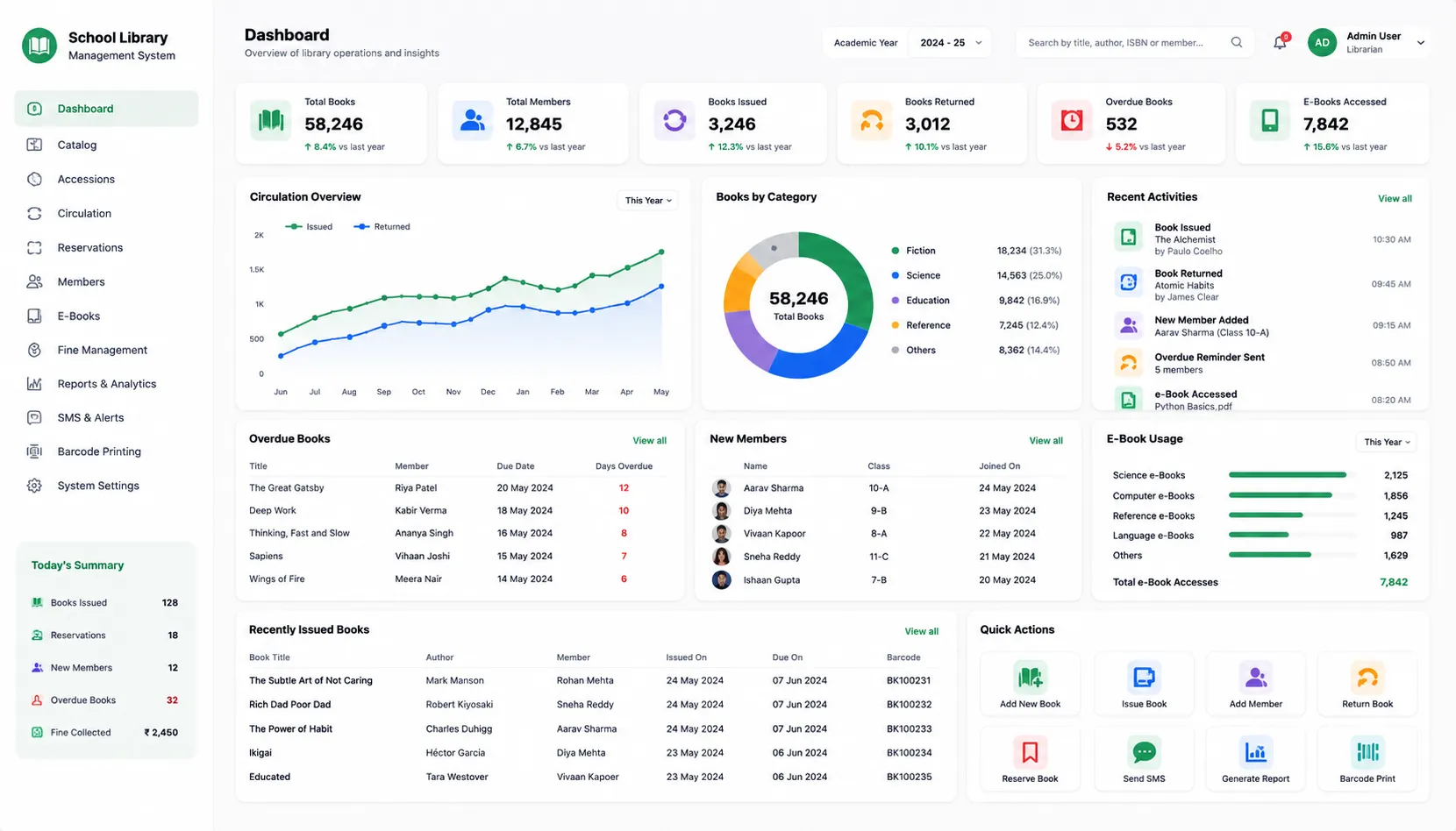
- Library KPI dashboard, 10+ pre-built reports & a borrower self-service dashboard
Overview
What Does School Library Management Do?
School Library Management is a full-cycle Integrated Library Management System (ILMS) built into the School ERP. Covering every library operation from bibliographic cataloguing and physical copy management through circulation, reservations, fines, digital resources & SMS notifications. ISBN normalisation, batch accession generation, a FIFO reservation queue with automatic fulfilment, department-specific fine rate configuration, and a Librarian KPI dashboard are available alongside a student-facing borrower dashboard. The module is designed for school libraries of any size. With bulk operations for rapid catalog setup, soft-delete to preserve transaction history, and validation reports on import errors to maintain data quality throughout.
Benefits
How Does it Help Schools?
Fair & Accurate Fine Calculation
Fine calculation engine skips configured non-working days & imports the school's holiday calendar from the Calendar module. Book return on first working day after long holiday doesn't charge for days the school was closed.
ISBN Normalisation Handling Real Import Files
ISBN numbers exported from Excel or other systems appear in scientific notation, which corrupts the ISBN & breaks catalog matching. The Book Catalog module normalises ISBN values on import, auto-handling scientific notation.
Automatic FIFO Reservations
When all copies of a popular book are issued, students auto-join a FIFO queue. When a copy is returned, system fulfils the reservation, assigns the copy to the next student in the queue, and sends an SMS notification.
Student & Staff Borrowers Registration
All students and staff are auto-registered as library members when they are active in the School ERP; no separate library registration step. Member activation and deactivation is controlled by the librarian.
E-Books Linked to Physical Records
The e-book module links digital editions directly to the existing physical book record. So the catalog entry for a textbook can include both the physical copy accession records and the linked PDF or EPUB.
Rapid Catalog Setup & Annual Updates
Setting up a school library catalog from scratch, or updating it at the start of a new academic year, involves thousands of records. Bulk book import from CSV handles the full catalog in one operation.
Dashboards for Each Role
Management views total books, copies, issued count & active members. Librarian views pending returns, members to notify, unfulfilled reservations. Borrowers view issued books, due dates, fines & transaction history.
SMS Notifications Without Librarian Effort
The system sends automatic overdue alerts via a daily scheduled job, notifies members when their reserved book is ready for collection & supports manual targeted SMS for specific borrowers. Delivery status tracked per message.
Features
Key Capabilities
A detailed view of every capability across all Library Management sub-modules.
Book Catalog
Full Bibliographic Metadata
Every book record captures title, author, co-author, ISBN, publisher, year, pages, and price, with department and subject linking for collection organisation.
ISBN Normalisation
Handles scientific notation in ISBN values from Excel exports. Correcting the format automatically on import so no manual pre-processing is required.
Dewey Decimal & Custom Classification
Books are classified using Dewey Decimal or custom categories defined by the school. Enabling consistent collection organisation and meaningful catalog filtering.
E-Book-Only & Periodical Flags
Books without physical copies are flagged as e-book-only. Periodicals and journals are flagged separately. Preserving correct catalog classification for non-book materials.
Soft-Delete
Books are soft-deleted rather than permanently removed. Preserving all transaction history associated with that title for audit, reporting, and potential reinstatement.
Bulk Import from CSV with Validation
Full catalog can be imported from CSV with row-level validation. Import errors are reported per row so the librarian can correct & re-import without losing valid rows.
Link to Department & Subject
Books are linked to department and subject at the catalog level. Enabling collection filtering & reporting by academic unit.
Book Search & Filter
The catalog is searchable & filterable by category, supplier & active status. Librarians can locate or export specific subsets of collection.
Pagination with Configurable Page Size
The catalog list view uses configurable pagination. Allowing librarians to manage large catalogs efficiently without a fixed page size.
Accession Management
Auto-Generated Accession Numbers
Accession numbers are auto-generated with configurable padding & start value. Matching school's existing convention or establishing a consistent new format.
Batch Accession Generation
Multiple copies of the same title can be accessioned in a single batch operation, each receiving a unique accession number without individual entry.
Condition & Shelf Location Tracking
Each physical copy records its condition (new, good, fair, poor) and physical shelf location. Supporting collection maintenance and helping librarians locate copies quickly.
Copy Status Flag
Every copy has an available or issued status flag, enabling the catalog to reflect real-time physical availability without a separate availability system.
Barcode Scan-Ready Lookup
Copies can be looked up by accession number through a barcode scan. Accelerating counter operations where barcode hardware is available.
Collision Avoidance
If an accession number conflict occurs, the system auto-increments counter to the next available value. Preventing duplicate accession numbers.
Bulk Update Accession Properties
Accession properties: condition, location, status, can be updated in bulk across multiple copies in a single operation.
Circulation
Auto-Calculated Due Date
Due dates are calculated from the configured loan period at the time of issue; separately configurable for students and staff (e.g., 14 days for students, 21 days for staff).
Holiday-Aware Fine Calculation
Fine = late days × fine per day, with non-working days and holidays excluded from the overdue day count. Non-working days are imported from the Calendar module.
Renewal Due Date Logic
Renewal extends from the old due date plus the loan period, not from the return date. Preventing students from resetting their due date by returning late.
Unique Index Prevents Double-Issue
Database-level unique index prevents the same physical accession from being issued to two different borrowers simultaneously. Making double-entry impossible.
Transaction Type Tracking
When a reserved copy is returned and the queue is fulfilled, the next borrower receives an automatic SMS notification, without librarian intervention.
Transaction History per Borrower and per Book
Complete circulation history accessible both from borrower's member profile & the book's record. Giving librarians two entry points to the same transaction data.
Reservations
FIFO Queue with Position Assignment
Reservations queued in strict first-in-first-out order. Each reservation shows borrower's current queue position. Giving students visibility into when they will receive.
Automatic SMS on Availability
When a reserved copy is returned and the queue is fulfilled, the next borrower receives an automatic SMS notification, without librarian intervention.
Reservation Expiry
Each reservation has a configurable pick-up deadline. If borrower doesn't collect by expiry date, reservation expires and next borrower in queue is notified.
Unfulfilled Reservation Tracking
Reservations not been fulfilled, either because no copy has been returned, or because the pick-up deadline was missed, are tracked separately for librarian review.
Member & Fine Management
Auto-Registration of Students & Staff
All active students and staff in the School ERP are automatically registered as library members. Eliminating a separate library membership registration step.
Member Activation Control
Librarians activate or deactivate members. Deactivated members are blocked from issuing books automatically. Enforced at the system level, not manually at the counter.
Member Profile View
Each member's profile shows currently issued books, full transaction history & outstanding fine balance. Accessible from a single screen for counter reference.
Member Lookup by Name, ID, or Email
Members are looked up by name, library ID, or email address. Enabling fast counter lookup without requiring the student's physical library card.
Dept-Specific & Borrower-Type Fine Rates
Fine rates configurable globally & can be overridden per dept & per borrower type using a JSON configuration. Allowing different fine structures.
Fine Collection Report
A report showing all members with outstanding fines; who owes what, for fine collection follow-up and period-end reconciliation.
E-Books & Digital Resources
E-Book Linked to Physical Record
Digital editions linked to the existing physical book record. Catalog entry for a title shows both physical copy availability & the linked digital resource in one place.
Multi-Format Support
E-books supported in PDF & EPUB formats. Accommodating digital resources schools receive from publishers in different file types.
Flexible File URL Options
E-book files can be referenced via S3 storage URL, Google Drive link, local file path, or an embedded viewer link. Accommodating the digital storage infra.
E-Book-Only Books
Titles with no physical copy are supported with the e-book-only flag, ensuring the catalog correctly represents the school's full collection including digital-only titles.
Download / View URL Generation
For each e-book, a shareable download or view URL is generated — enabling direct access links to be shared with students or embedded in course materials.
Digital Resource Tracking
Each book record tracks whether a digital resource is linked. Enabling the librarian to identify which titles have digital editions and which do not.
Bulk Operations
Bulk Book Import (CSV)
School's full book catalog imported from CSV with title, author, ISBN & other metadata fields. Row-level validation catches errors per record without blocking valid rows.
Bulk Accession Number Generation
Accession numbers generated in bulk for large copy additions. Reducing the manual effort of registering new stock after a bulk book purchase.
Bulk Metadata and Accession Updates
Book metadata fields & accession properties updated in bulk across multiple records in a single operation, for catalog corrections or annual updates.
Bulk Fine Structure Update
Fine rates per dept updated in bulk. Enabling librarian to apply new fine structures at start of academic year without record-by-record configuration.
Validation Reports on Import Errors
Import operations produce row-level error reports. Showing exactly which records failed validation & why, librarians can correct & re-import without losing data.
Reports & Dashboard
Library KPI Dashboard
Total books, physical copies, currently issued count, and active member count, a management-level snapshot of the library's current status.
Librarian Action Dashboard
Pending returns, unfulfilled reservations & members to notify. Task-oriented view for librarians covering items requiring attention on any given day.
Borrower Dashboard
Each student's personal library view: currently issued books, due dates, active fines, and transaction history, accessible without visiting the library counter.
Circulation Report
Books issued and returned over a configurable date range. For transaction volume analysis and library usage trends.
Inventory Status Report
Total copies, available, issued & lost. Physical inventory snapshot for stock management & annual audits.
Overdue Report
Which books are overdue, which members hold them, and by how many days; for follow-up and fine management.
Popular Books Report
Most-borrowed titles over a period, supporting acquisition decisions and collection development.
Collection Analysis
Catalog distribution by category, subject, and department; for collection balance review and gap identification.
SMS Notifications & Configuration
Automatic Overdue SMS (Daily)
A daily automated job sends SMS to all members with overdue books. Including borrower name, book title & due date. No librarian action required.
Reservation Availability SMS
When a reserved copy becomes available, an SMS is sent automatically to the next borrower in the FIFO queue, with pick-up instructions and expiry date.
Manual Targeted SMS
The librarian can trigger a manual SMS to specific borrowers for targeted overdue reminders or custom communications, with a configurable message template.
SMS Delivery Status Tracking
Every SMS sent is logged with delivery status. Enabling the librarian to confirm which notifications were delivered and which require follow-up through an alternative channel.
Library Configuration
Loan period, max renewals, fine rate per day, weekly off-days & non-working holiday list are configured with holiday import from School ERP Calendar.
Supplier & Taxonomy Configuration
Supplier/vendor catalog, book categories, subjects & departments are configured as masters. Ensuring consistent taxonomy & accurate collection analysis.
Workflow
Built for Real School Library Workflows
The complete school library lifecycle - from catalog setup to daily circulation & end-of-term reporting
Library configured: loan periods, fine rates, weekly off-days, holiday calendar, and taxonomy masters set up
Book catalog imported in bulk from CSV or entered individually; ISBN normalisation applied on import
Physical copies accessioned: accession numbers auto-generated, condition and shelf location recorded
Students & staff auto-registered as borrowers; membership status managed by librarian
E-books linked to physical book records; digital-only titles flagged & managed separately
Student browses catalog via borrower dashboard; reserves book when all copies are issued
Librarian issues book: due date auto-calculated based on borrower type & loan period
Daily SMS job sends overdue alerts; FIFO queue notifies members when reserved copies are returned
Books returned: fine auto-calculated with holiday skipping; fines recorded against member profile
Librarian reviews KPI dashboard daily; runs overdue report & fine collection report for follow-up
End of term: inventory status report run; popular books & collection analysis reviewed for acquisitions
Stakeholders
Who Uses It?
Designed for every library stakeholder
School Librarian
- Manage full book catalog: accessions, metadata, imports & conditions
- Process daily circulation: issue, return, renewal, reservation fulfilment
- Calculate & collect fines; manage member activation & deactivation
- Monitor action dashboard for pending returns & unfulfilled reservations
Library Administrator / School Admin
- Configure loan periods, fine rates, holiday calendar & library taxonomy
- Run bulk import & update operations for catalog setup & annual updates
- Access Library KPI dashboard & collection analysis for management review
Students
- Access the borrower dashboard for issued books, due dates, fines & transaction history
- Browse the catalog & reserve books through the self-service view
- Access linked e-books & digital resources from the book record
School Management
- Library KPI dashboard for total books, copies, issued count & active members
- Popular books & collection analysis for acquisition budget planning
Scale
Designed for Scale
Whether managing a small school library or a multi-section school with thousands of students
Bulk operations handling full catalog setup & updates without manual entry per record.
Auto-generated accession nos & configurable numbering standards for any school size.
FIFO reservation queue auto-manages popular books & student expectations at scale.
SMS notifications auto-sent to any number of borrowers without librarian overhead.
A School Library That Manages Itself, So the Librarian Can Focus on Students.
See how edumerge's School Library Management module gives schools a full-cycle ILMS. From bibliographic catalog & physical copy management through circulation, reservations, e-books, automated SMS, and 10+ built-in reports.
Frequently Asked Questions
Common questions about School Library Management
Does edumerge's library management system handle e-books along with physical book records?+
Yes. E-books are linked directly to the corresponding physical book record, so a single catalog entry shows both the physical copy availability and the linked digital resource. E-book files are supported in PDF and EPUB formats and can be referenced via S3 storage, Google Drive, a local file path, or an embedded viewer link. Titles with no physical copy can also be flagged as e-book-only, so digital-only resources are represented correctly in the catalog.
How are library fines calculated, and are holidays and weekends accounted for?+
Fines are calculated as late days multiplied by the configured fine per day, with weekly off-days and school holidays excluded from the overdue count. The holiday calendar is imported from the School ERP Calendar module, so a book returned on the first working day after a long break is not charged for the days the school was closed. Fine rates can also be set globally and overridden per department or per borrower type.
What happens when a book a student wants is already issued to someone else?+
The student joins a FIFO reservation queue for that title and can see their queue position. When a copy is returned, the system automatically assigns it to the next borrower in the queue and sends an SMS notification. Each reservation carries a configurable pick-up deadline; if it is missed, the reservation expires and the next student in the queue is notified.
Do students and staff need to register separately for library membership?+
No. All students and staff who are active in the School ERP are automatically registered as library members, with no separate registration step. The librarian retains control over member activation and deactivation, so borrowing access is enforced at the system level rather than manually at the counter.
Can we import our existing library catalog, and does it handle ISBN numbers exported from Excel?+
Yes. The full catalog can be imported in bulk from CSV, with row-level validation that reports errors per record so valid rows are not blocked. ISBN values exported from Excel often appear in scientific notation, which corrupts the number; the Book Catalog module normalises these values automatically on import, so no manual pre-processing is needed.