Research & Publication Mgmt
Research & Publication Management for Colleges & Universities
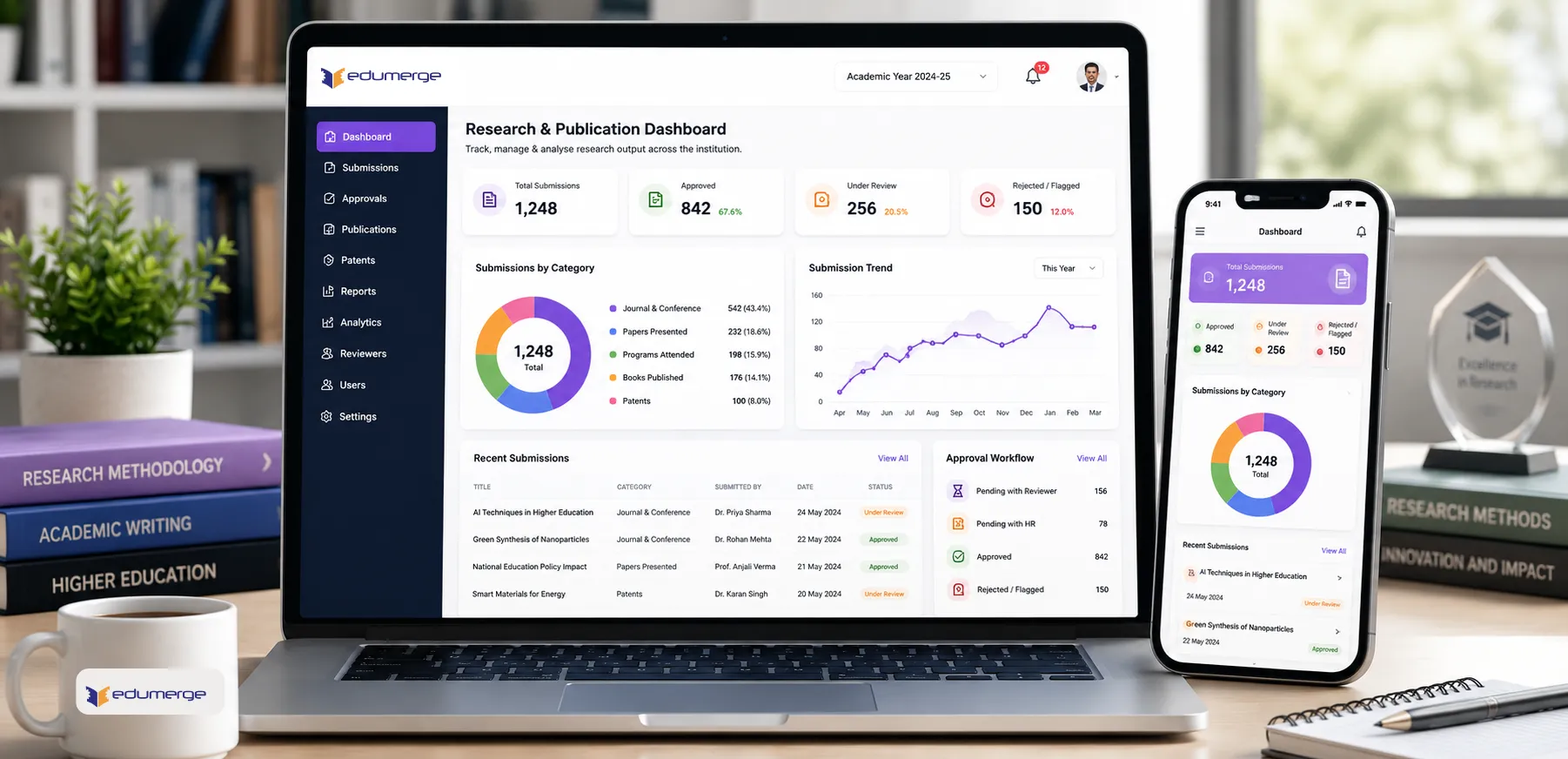
Faculty research tracking. Multi-level approval. Journals, conferences, books, patents. Dept analytics & NAAC-ready reports.
- Faculty submit research records across 5 categories: Journal & Conference, Papers Presented, Programs Attended, Books Published, and Patents
- Two-level approval workflow: dept reviewer followed by HR verification; with approve, reject, or flag actions
- Dept-wise research output reports & category-wise publication analytics for NAAC, NIRF, & institutional review
Overview
What Does Research & Publication Management Do?
Research & Publication Management gives colleges a structured, governed system for collecting, reviewing & reporting faculty research output. Faculty submit research records across five categories through a standardised submission workflow with draft-and-save capability and status tracking at every stage. Submissions pass through a two-level approval process: department-level reviewers evaluate the academic validity of each record, and HR staff complete the final verification. Approved records flow into department-wise research output reports and category-wise publication analytics. Giving college management & IQAC coordinators the structured, verified research data they need for NAAC self-study reports, NIRF ranking submissions, and internal academic quality reviews.
Benefits
Why Colleges Choose Research & Publication Management
Verified NAAC Research Data
Records submitted pass through a dept reviewer & an HR verifier before counted. The data IQAC submits in the self-study report is verified, categorised & available by department.
Two-Level Approval
Dept reviewers handle Level 1 review as subject experts on journal credibility & conference legitimacy. HR staff handle Level 2: confirming employment details, checking dates & completing the record.
Permanent Research Record
The My Research view gives every faculty member a running record of all their research submissions, by category & status. Accessible throughout their tenure at the institution.
Draft-and-Save
Faculty who cannot submit in a single session save it as a draft. They can return to complete & submit when remaining details are available. Incomplete submissions do not enter reviewer queue until submission.
Department-Wise Research Output Reports
Show the research contribution of every department. Publication counts by category, approval status & academic year for college management & IQAC coordinators review.
Configurable Department Approvers
Allows the college to assign Level 1 reviewers per department. And to update these assignments as department structures change: new departments, faculty transfers & reviewer substitutions.
Key Capabilities
How Research & Publication Management Works
Faculty Submission
Multi-Category Research Submission
Faculty submit research records across all 5 categories: Journal & Conference, Papers Presented, Programs Attended, Books Published, and Patents. Each category captures the relevant fields for that record type.
My Research View
Each faculty member's complete submission history; across all categories and at every status, is visible in their personal My Research view. Faculty track the progress of each submission without querying the department office.
Draft and Save
Submissions can be saved as drafts before final submission. Allowing faculty to begin a record when they have partial information and complete it when all details are available. Drafts are not visible to reviewers until submitted.
Status Tracking
Every submission has a trackable status: Draft, Submitted, Level 1 Approved, Verified, Rejected, or Flagged. Faculty see the current status of every record in their My Research view, with no ambiguity about where a record stands in the approval process.
Record Detail View and Edit Before Final Approval
Faculty can view the full detail of any submitted record and edit it before it reaches final approval. To correct errors, add missing details, or respond to a reviewer's flag without requiring the record to be withdrawn and resubmitted.
Review & Approval
Level 1 Review Dashboard
Department-approved reviewers access a dedicated dashboard showing all submissions assigned to their department. Pending review, recently actioned & flagged for faculty correction.
Approve, Reject, or Flag with Reason
Reviewers approve submissions that meet the institution's standards, reject those that do not (with a mandatory reason recorded), or flag submissions that require correction or additional information from the faculty member before a decision can be made.
HR Review Dashboard
After Level 1 approval, submissions pass to the HR Review dashboard for final verification. HR staff confirm employment details, attendance records, and administrative accuracy before records receive Verified status.
Bulk Review and Verification Actions
Reviewers and HR staff can action multiple submissions in a single operation. For periods when a large volume of records are ready for review, such as at the end of an academic year or before an accreditation cycle.
All Records View
A comprehensive view of all faculty research records across the institution. By department, category, status, and academic year. Accessible to authorised administrative staff and management for institution-wide research output oversight.
Reports & Configuration
Category-Wise Publication Analytics
The primary view for NAAC Research criterion documentation and NIRF research parameter submissions.
Department-Wise Research Output Reports
Research contribution per department, for management review, IQAC documentation & department-level performance assessment.
Department Approver Configuration
L1 reviewer assignments configured per dept. Assignments are updated without system changes as department structures evolve.
Workflow
The Research & Publication Lifecycle
From proposal approval and funding through publication, patents, and accreditation reporting.
Department approvers configured: Level 1 reviewers assigned per department; HR staff identified for Level 2 verification
Faculty member creates a new research submission; selects category (Journal, Conference, Paper, Book, Patent)
Faculty fills category-specific fields; saves as draft if details are incomplete, or submits when ready
Submitted record appears in Level 1 Review Dashboard for the relevant department reviewer
Department reviewer assesses submission; approves, rejects (with documented reason), or flags for faculty correction
Approved record passes to HR Review Dashboard for administrative verification and final approval
HR staff verify employment details, attendance, and accuracy; record status changes to Verified
Verified records automatically populate category-wise analytics and department-wise research output reports
IQAC accesses reports for NAAC self-study documentation, NIRF ranking submissions, and internal academic quality review
Faculty access My Research view anytime to review complete research history
Records remain accessible for promotion and award consideration
Stakeholders
Who Uses Research & Publication Management
Faculty / Teaching Staff
- Submit research records across all 5 categories through structured submission interface
- Track submission status from Draft through to Verified in the My Research view
- Edit records before final approval; respond to reviewer flags without full resubmission
- Access permanent research record for promotion, increment, or award consideration
Department Reviewers (Level 1 Approvers)
- Review & action all department submissions from the Level 1 Review dashboard
- Approve, reject, or flag records with a documented reason
- Bulk action multiple submissions when reviewing end-of-year submissions
- Assess journal credibility and conference legitimacy as subject experts
HR & Administrative Staff (Level 2 Verifiers)
- Access HR Review Dashboard for final verification of approved submissions
- Confirm employment details, attendance records, and administrative accuracy
- Bulk verify multiple records during accreditation cycles
- Ensure records meet institutional standards before final approval
IQAC Coordinators & Academic Heads
- Generate category-wise publication analytics for NAAC Research criterion doc
- Access department-wise research output reports for academic quality review
- Compile research data for NIRF ranking submissions
- Track research output trends by department and academic year
College Management / Principal
- Review institution-wide research output through All Records view
- Access research contribution data by department for strategic planning
- Monitor research performance against institutional goals & accreditation reqs
- Use research data for promotion, increment, and award consideration decisions
Accreditation Ready
NAAC & NIRF Alignment
Research & Publication Management is purpose-built to align with accreditation and ranking requirements
NAAC Criterion 2.3 (Research)
Research & Publication Management provides verified faculty research data. Every record has passed through department-level and HR verification before being counted in institutional reports.
- Category-wise publication analytics for self-study documentation
- Verified research records by department and academic year
- Complete audit trail of approvals and verification
NIRF Ranking Submission
NIRF ranking parameters for research include publication counts, category distribution, and department-wise research output. Reports are generated on-demand with verified data from the system of record.
- Publication counts by category and department
- Research output trends across academic years
- Verified data for institutional credibility
Analytics
Reports & Analytics
Category-Wise Publication Analytics
- Journal & Conference publications: count by dept, approval rate & academic year
- Papers Presented by conference, dept & year; distinct national & international
- Programs Attended: academic development programs, dept-wise participation tracking
- Books Published: by department, with publication year and co-author information
- Patents: by category (filed, granted), department, and inventor details
Department-Wise Research Output Reports
- Total publications by department: count across all categories
- Approval status breakdown: submitted, approved, verified, rejected, flagged
- Academic year comparison: track research output trends year-on-year
- Department performance ranking: which depts most actively generating research output
NAAC & NIRF Alignment Reports
- Research criterion (Criterion 2.3) documentation: verified faculty research records
- NIRF research parameter data: publication counts and category distribution
- IQAC accreditation cycle reports: research output overview for self-study documentation
Faculty & Reviewer Dashboards
- My Research: faculty member's complete submission history with status tracking
- Level 1 Review Dashboard: pending reviews, recently actioned, and flagged submissions by department
- HR Review Dashboard: submissions ready for final verification, with bulk action
Impact
Business Impact at Scale
Verified research data flowing directly from ERP to NAAC self-study and NIRF submissions; no manual compilation or data reconstruction
Two-level approval ensures academic quality at Level 1 and administrative accuracy at Level 2 before records reach institutional reports
Department-wise tracking reveals which departments are actively generating research output and which need institutional support
Permanent faculty research record accessible throughout tenure for promotion, increment, award, and accreditation purposes
Every Research Record. Every Department. Verified, Reported & Ready for NAAC.
See how edumerge's Research & Publication Management module gives colleges a structured, governed system for faculty research tracking. With multi-level approval, category-wise analytics, and department-wise reports ready for NAAC, NIRF & internal quality review.
Frequently Asked Questions
Common questions about faculty research and publication tracking
What categories of faculty research does the system track?+
Faculty submit records across five categories: Journal & Conference publications, Papers Presented, Programs Attended, Books Published, and Patents. Each category captures the fields relevant to that record type, so a patent submission and a journal submission ask for different details. This covers the research output types colleges typically report under NAAC and NIRF.
How does the two-level approval process work?+
A submitted record first goes to a department-level Level 1 reviewer, who assesses academic validity such as journal credibility or conference legitimacy, and can approve, reject with a documented reason, or flag it for correction. Once approved, the record moves to HR for Level 2 verification, where employment details, attendance, and administrative accuracy are confirmed. Only after both levels are complete does a record receive Verified status and count toward institutional reports.
Can faculty save an incomplete research submission and finish it later?+
Yes. Faculty can save a submission as a draft when some details are not yet available and return to complete it later. Draft records are not visible to reviewers and do not enter the review queue until the faculty member submits them.
How does this help with NAAC and NIRF reporting?+
Every record counted in an institutional report has passed department-level and HR verification, so the data behind NAAC Criterion 2.3 self-study documentation and NIRF research parameter submissions is verified rather than manually compiled. Category-wise publication analytics and department-wise research output reports are generated directly from this verified data, along with an audit trail of approvals.
Can faculty track the status of their research submissions?+
Yes, through the My Research view, which shows a faculty member's complete submission history across all categories along with each record's status: Draft, Submitted, Level 1 Approved, Verified, Rejected, or Flagged. Faculty can also view and edit a record before it reaches final approval, including responding to a reviewer's flag, without withdrawing and resubmitting the whole record.