College Tag Management
Tag Management for Colleges & Universities
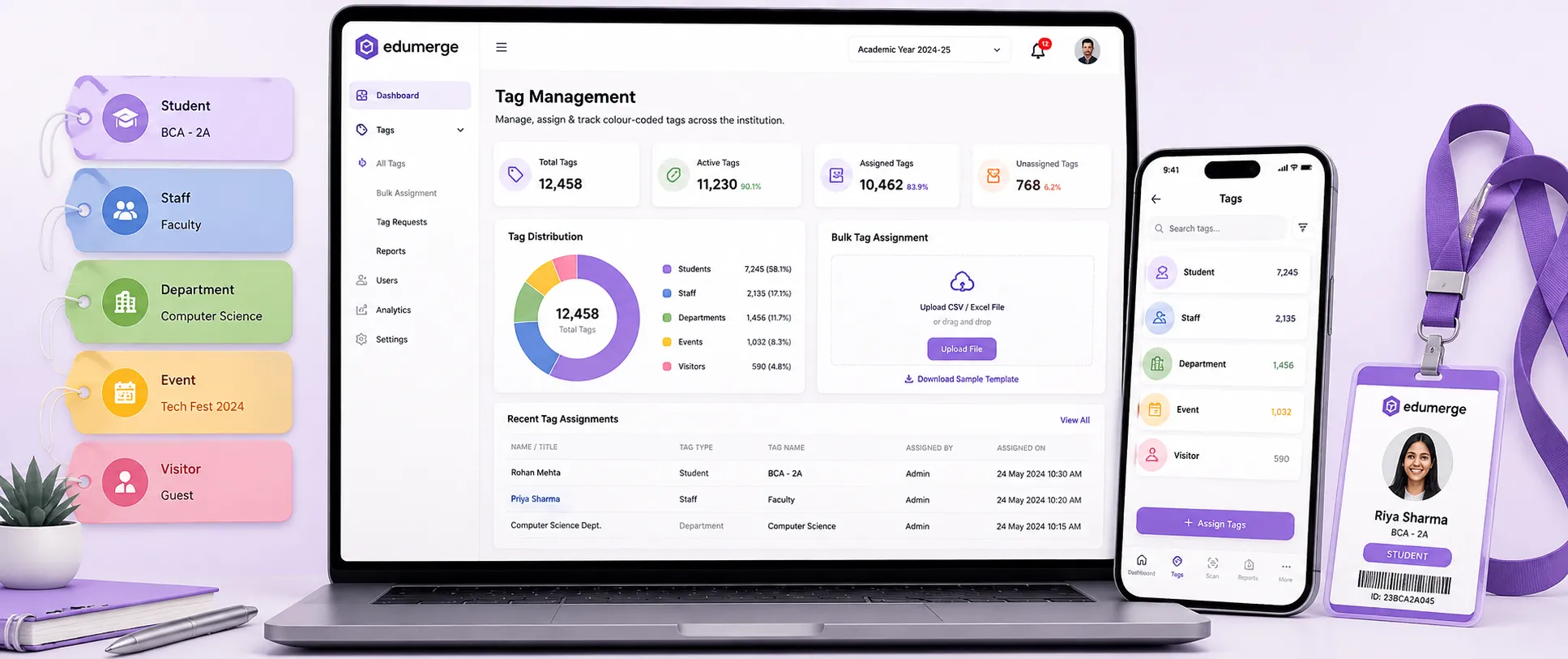
Label & group students and staff with colour-coded, scoped tags. Bulk assign, filter & track usage across the institution.
- Create colour-coded tags with custom names, categories & visibility scopes
- Bulk assign & unassign tags to students/staff by Course, Batch, Section, Department, or Designation
- Tag analytics dashboard with utilisation rate, total tags & total assignments
- Complete audit logs with actor and timestamp
Overview
What Does Tag Management Do?
Tag Management gives college administrators a flexible, institution-wide labelling system for students & staff. Tags are colour-coded, categorised & scoped. Each tag is configured to be visible to all users, to students only, to staff only, or to a custom audience. Once configured, tags are assigned in bulk to cohorts defined by course, batch, section, or department; or individually from any student or staff profile. A tag analytics dashboard tracks how tags are used across the institution, and a complete audit log captures every assignment, transfer & change with the responsible actor and a timestamp.
Benefits
How Does it Help Colleges?
Custom Groupings
Every college has student groupings that don't map to any standard field in the ERP. This gives them a structure; named, categorised, colour-coded & assignable in bulk.
Bulk Assignment
Bulk assignment with filters: Course, Batch, Section, Department for students; Department & Designation for staff, applies a tag to the full qualifying cohort in one operation.
Visibility Scopes
Global, Students Only, Staff Only, Custom; control who can see each tag in their interface, ensuring sensitive labels remain internal while student-facing labels are visible where appropriate.
Deep Search Across Tagged Entities
The advanced filtering & deep search across tagged entities allows administrators to query the institution's population by any combination of tags.
Audit Trail
Every tag assignment, transfer & change is logged with responsible actor and timestamp. For student queries or when management requests, the audit log provides a complete, immutable history.
Tag Analytics for Institutional Visibility
The tag analytics dashboard shows utilisation rate, total active tags & total assignments across the institution. Tags with low or no usage are identified for review.
Features
Key Capabilities
A detailed view of every capability across all three Tag Management steps.
Tag Setup
Create Tags with Custom Name, Colour, and Category
Tags are created with a descriptive name, a colour from the configured palette. Enabling visual identification across the ERP interface, and a category that groups related tags for management and filtering.
Visibility Scopes
Each tag is assigned a visibility scope at creation: Global (visible to all users), Students Only (visible only in student-facing views), Staff Only (visible only in staff-facing views), or Custom (a defined subset of users or roles).
Department-Level Tag Assignment and Filtering
Tags can be scoped and filtered at the department level. Enabling department-specific tags that are visible and assignable only within the relevant department's administrative context.
Tag Wizard - Guided Step-by-Step Creation
The Tag Wizard walks administrators through the tag creation process: name, colour, category, scope, and activation. In a guided sequence, reducing the risk of misconfigured tags being applied to large cohorts.
Activate/Deactivate Tags
Tags are activated or deactivated without deletion. Preserving the assignment history and audit trail for deactivated tags while preventing new assignments from being made to tags that are no longer in use.
Operations
Bulk Assign Tags to Students
Tags are assigned to student cohorts using filters: Course, Batch, Section, and Department. The filter output is reviewed before assignment, and the full cohort is tagged in a single operation, regardless of size.
Bulk Assign Tags to Staff
Tags are assigned to staff cohorts using Department and Designation filters. Enabling role-specific or department-specific tags to be applied to the relevant staff group efficiently.
Bulk Unassign and Transfer Operations
Tags are removed from cohorts in bulk using the same filter system. Tag transfers, moving students from one tag to another, are handled as a single operation rather than a two-step manual process.
Individual Tag Assignment from Profile
Tags are assigned and removed from individual student or staff profiles directly. For cases that require one-off assignment rather than bulk operations, and for reviewing and adjusting a specific person's full tag set.
Advanced Filtering and Deep Search
The search interface filters the institution's full population by any combination of tags. Enabling cross-tag queries that find, for example, all scholarship recipients in a specific batch who are also registered for placement.
Analytics & Audit
Tag Analytics Dashboard
A consolidated view of tag utilisation across the institution. Showing utilisation rate per tag, total active tags, and total tag assignments. Administrators identify unused tags, high-utilisation tags, and tags that may need review or consolidation.
Activity Logging with Timestamps
All tag operations: assignments, removals, transfers, are logged with the precise timestamp of the action, building a chronological activity record for the full tagging system.
Audit Logs - Full Change History with Actor
Every change to the tagging system: creation, assignment, removal, scope change, activation, deactivation. Is attributed to the specific user who made the change, with the timestamp.
Use Cases
What Colleges Use Tags For
Tags accommodate any institutional grouping need that the standard academic structure cannot capture.
Academic
- Scholarship recipients
- Academic probation
- Lateral entry students
- Distinction candidates
- Back-log students
- Slow learners flagged for support
Placement
- Placement-eligible
- Currently placed
- Dream company registered
- Internship completed
- Off-campus applicants
Welfare & Student Support
- Hostel residents (by block)
- Transport users
- NSS/NCC participants
- Sports quota admissions
- Differently-abled students
Administrative
- Fee concession category
- Government quota
- Management quota
- Exchange programme participants
Staff
- Internal examiners
- Department coordinators
- Programme officers
- Mentors
- Committee members
Workflow
Built for Real College Administration Workflows
The complete tag lifecycle: from creation to bulk assignment to audit.
Tag created using Tag Wizard: name, colour, category & visibility scope configured
Tag activated, now available for assignment across the institution
Bulk assign: filter students by Course, Batch, Section, or Dept; review cohort; apply tag
Individual assignments made from student or staff profiles as needed
Tag analytics reviewed; utilisation rate, count & active tag inventory checked
Audit log consulted when specific assignment is queried/review required
Tags deactivated when no longer needed; history retained, new assignments blocked
Stakeholders
Designed for Every Tagging Stakeholder
College Administration / Registrar
- •Create & manage institutional tags: names, categories, colours & scopes
- •Run bulk assignment operations at semester start or when cohort definitions change
- •Review tag analytics dashboard for institution-wide tag utilisation
Department Coordinators / HoDs
- •Assign & manage department-specific tags from their department view
- •Search students & staff using tag-based filters for departmental reporting
Placement Cell
- •Assign placement eligibility, registration & offer tags to student cohorts
- •Filter students by placement tags across the placement module
Student Affairs / Welfare Officers
- •Assign welfare & support category tags to students requiring specific attention
- •Maintain scoped tags that are not visible to students themselves
Management / IQAC
- •Access audit logs for governance review of tagging activity
- •Review tag analytics for institutional visibility into how student groupings are managed
Impact
Designed for Scale
Whether tagging students and staff at a single-campus college or across a multi-faculty institution.
Flexible labelling without database schema changes; custom groupings created & managed by administrators without IT involvement
Bulk operations handle institution-wide assignment regardless of cohort size; semester-start tagging operations completed in minutes
Visibility scopes ensure sensitive administrative labels remain internal while student-facing tags support self-service workflows
Complete audit trail for governance & compliance; every change attributed with actor & timestamp for IQAC review
Every Grouping Your College Needs. Without Adding a New Field to the Database.
See how edumerge's Tag Management module gives colleges a flexible, colour-coded, scoped tagging system for students & staff. With bulk assignment, deep search, utilisation analytics & a complete audit trail; all built-in.
Frequently Asked Questions
Common questions about student and staff tag management
What is student tag management in a college ERP, and how is it different from standard fields like course or batch?+
Tag Management lets administrators create custom, colour-coded labels for groupings that don't exist as fields in the ERP, such as scholarship recipients or placement-eligible students. Unlike a fixed field, a tag is defined once by name, category and colour, then assigned to any qualifying student or staff member without a database schema change. This gives colleges a flexible way to track institution-specific cohorts that standard academic structure cannot capture.
Can we stop students from seeing certain tags applied to their profile?+
Yes. Every tag is created with a visibility scope: Global, Students Only, Staff Only, or Custom. A sensitive administrative label, such as an academic probation tag, is set to Staff Only or Custom so it stays internal, while a student-facing tag, such as placement-eligible, is set to Global or Students Only so it supports self-service workflows.
How does bulk tag assignment work for a large batch or cohort?+
Tags are assigned in bulk using filters such as Course, Batch, Section and Department for students, or Department and Designation for staff. The filtered cohort is reviewed before the tag is applied, and the entire qualifying group is tagged in a single operation regardless of size. This is commonly used at semester start when cohort definitions change.
Can we see who assigned or removed a tag, and when?+
Yes. Every tag operation, including creation, assignment, removal, transfer, scope change, activation and deactivation, is recorded in the audit log with the responsible actor and a timestamp. This gives Management and IQAC a complete, immutable history to reference for governance review or when a specific student assignment is queried.
What happens to a tag's history if we deactivate it, and can departments manage their own tags?+
Deactivating a tag stops new assignments but preserves the existing assignment history and audit trail for that tag; nothing is deleted. Tags are also scoped and filtered at the department level, so a department coordinator or HoD manages department-specific tags from their own view without needing institution-wide access.