School Staff Information System
Complete Staff Master for Schools
A complete, audit-ready staff record, built for schools that manage hundreds of staff across teaching & non-teaching roles.
- Comprehensive staff profile management
- Dynamic forms, bulk operations & audit trails
- OTP-verified profile updates and a self-service staff portal reduce HR desk queries
- ID card generation, certificate printing & bulk upload via Excel
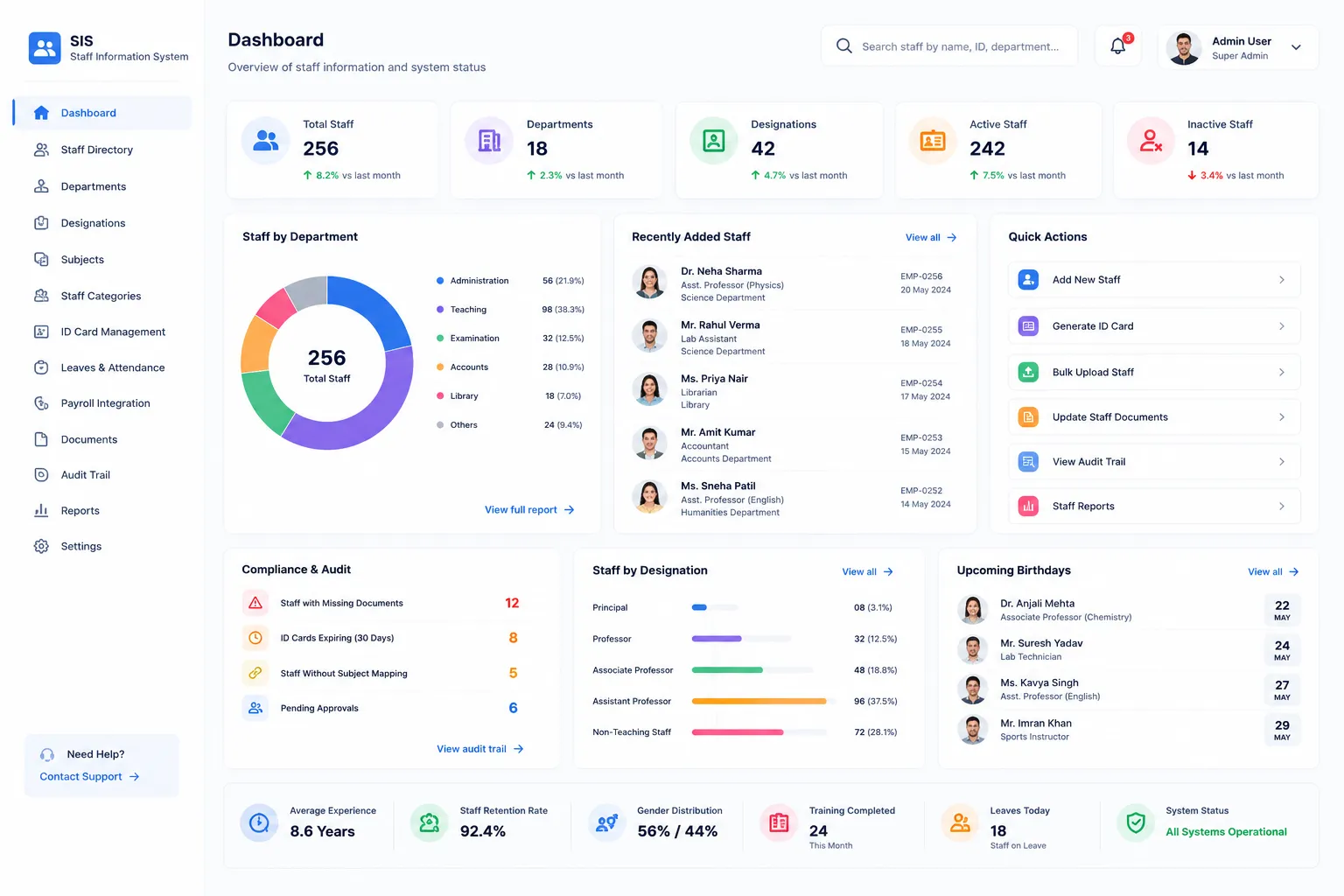
Overview
What Does This Module Do?
Staff Information System maintains a single, authoritative record for every teacher and staff member. Capture personal details, designations, qualifications, compliance documents, and audit-ready status history; all in one place.
Why Choose Us
What Makes edumerge Different?
Single Record. No Duplicates.
Authoritative staff record eliminates duplication & ensures data consistency.
No Unauthorized Changes
Staff personal information controlled by staff member or authorized HR only.
Transitions Without Errors
Department or role changes automatically update all linked records.
Board-Ready Records
Compliance documents validated and stored for regulatory audits.
Process
Staff Lifecycle
Organization Setup
Department configuration
Staff Master
Single record per person
Verification
OTP validation
Compliance
Document storage
Activation
System access enabled
ID & Certificates
Generated automatically
Self-Service
Staff portal access
Compliance Ready
Audit-ready records
Features
Key Capabilities
Everything schools need for comprehensive staff management
360° Staff Profile
Complete staff records with personal, professional, qualifications, and department details.
OTP-Verified Contacts
Phone numbers verified before system use for accurate communication.
Compliance Document Management
Attach docs like GST, PAN, qualifications, etc. with expiry tracking.
Self-Service Portal
Staff can update personal information and verify contacts independently.
Department Hierarchy
Define departments, subdivisions, and reporting structures.
Dynamic Role Configuration
Custom roles for teachers, support staff with role-based access.
Bulk Operations
Excel upload, mass updates with atomic rollback for safety.
ID Cards & Certificates
Auto-generate GST-compliant ID cards and certificates. No more manual work required.
Audit Trail
Every change logged with timestamp for compliance, audit and regular checks.
Process
Staff Management Workflow
Complete process from setup to compliance ready
Organization Setup: Configure departments and roles
Staff Master: Add staff with complete information
Verification: OTP verify contacts
Compliance: Upload required documents
Activation: Enable system access
ID & Certificates: Generate official documents
Self-Service: Staff updates personal info
Audit Ready: Records ready for board submission
Who Uses It?
Designed for every stakeholder in your institution
School Leadership
- Monitor staff strength
- Track compliance status
- Generate board reports
HR Administrators
- Manage staff records
- Process bulk updates
- Handle verifications
Teachers
- Update personal info
- Verify contacts
- Access own records
Impact
Business Impact for Schools
Measurable outcomes that transform staff management
Compliance Ready
All records audit-ready for board submission
Operational Efficiency
Reduce manual staff record management effort
Data Accuracy
Single authoritative record eliminates duplicates
Error Reduction
Automated transitions prevent data inconsistency
Every Teacher. Every Staff Member. One Complete, Accurate Record.
See how edumerge's Staff Information System gives school HR a complete, audit-ready staff management platform. From profile creation and bulk operations to ID card printing and self-service access.
Frequently Asked Questions
Common questions about staff information and HR record management for schools
How does the Staff Information System prevent duplicate staff records?+
The system maintains a single authoritative record for every teacher and staff member, so the same person cannot be entered twice across departments or modules. Any update to a staff record reflects everywhere that record is referenced. This removes the data inconsistency that comes from maintaining separate registers in different offices.
What is OTP verification for staff contact details, and why does it matter?+
When a staff member's phone number is added or updated, it must be verified with an OTP before the system treats it as valid for communication. This ensures HR notices, salary alerts, and official messages reach the correct person. It also stops incorrect or unverified numbers from sitting in the master record unnoticed.
Can staff update their own personal information, or does HR have to do it manually?+
Staff can use the self-service portal to update personal details and verify their own contact numbers, reducing the volume of requests handled at the HR desk. Sensitive fields still require HR authorization, so personal information cannot be changed without proper control. This keeps records current without adding manual data entry work for HR.
How are compliance documents like PAN and qualification certificates managed?+
Staff compliance documents such as PAN, qualification certificates, and other required credentials can be attached to each staff record with expiry tracking. This keeps every record audit-ready for board submissions and regulatory checks. Schools do not need to chase paper files when a compliance review comes up.
Can we bulk upload staff data instead of entering each record manually?+
Yes, staff records can be added or updated in bulk through Excel upload, which is useful for onboarding a full academic year's staff at once. Bulk operations run with atomic rollback, so a partial or failed upload does not leave the staff master in an inconsistent state. Every change from a bulk operation is still logged in the audit trail.