School Photo Gallery
Event Gallery Management for Schools
Every sports day. Every annual function. Every milestone. Organised, categorised & accessible, within the School ERP.
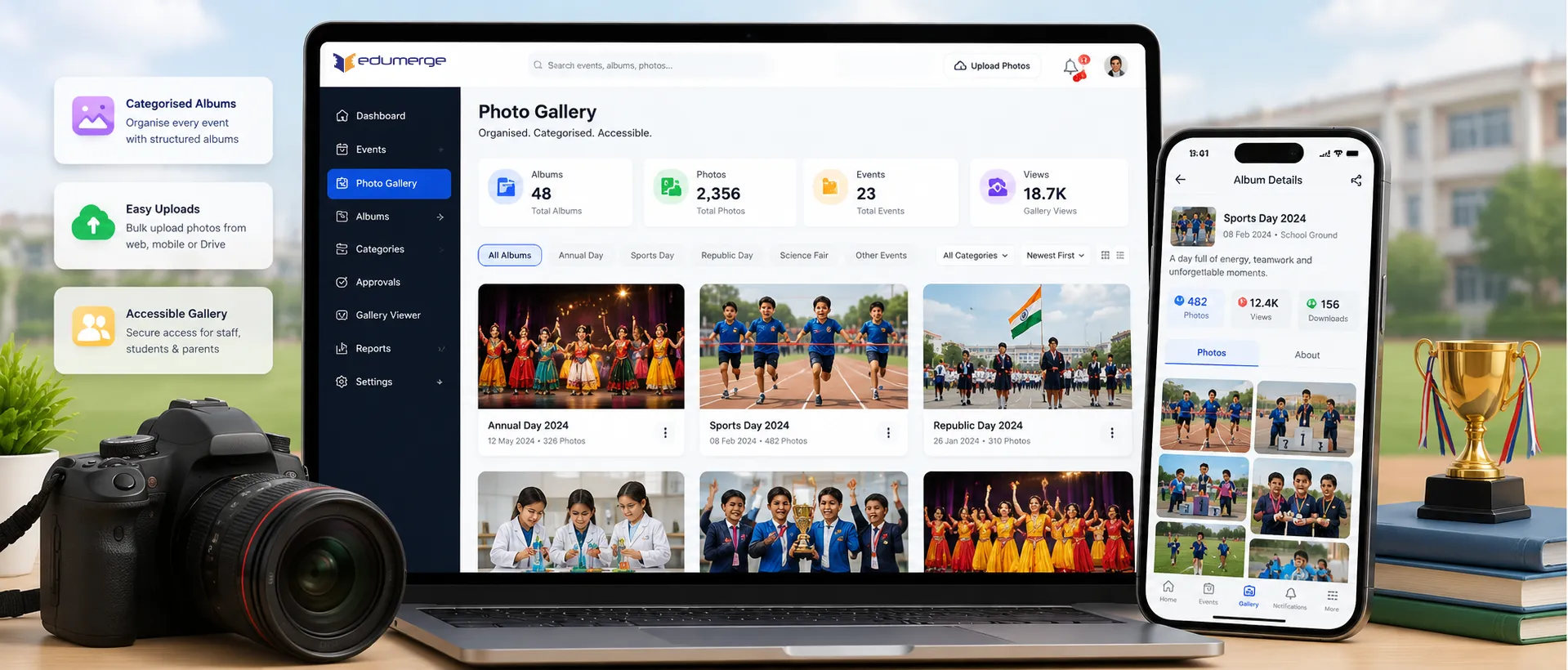
- Institutional photo gallery with categorised albums: Annual Day, Sports Day, Republic Day, Science Fair & any school-defined category
- Event photo uploads managed centrally by administration, no scattered WhatsApp groups or personal Google Drive folders
- Gallery viewer accessible to staff, students & parents within the ERP
Overview
What Does the Photo Gallery Do for Schools?
The photo gallery is the institutional memory of the school: a structured, centralised repository for every event photograph, activity image & campus milestone captured during the academic year. Rather than scattering photos across teacher WhatsApp groups, shared Google Drive folders, or social media posts that parents may or may not see, the Gallery gives the school one place to upload, organise & share its photographic record. Albums are categorised by event or activity type. Photos are uploaded directly to the ERP. And the gallery viewer makes every album accessible to the relevant stakeholders within the platform they already use.
Benefits
How Does it Help Schools?
Lasting Institutional Memory
When teachers leave, so do the photos on their phones & folders they managed. A centralised gallery means the school's photographic record is institutional. Events from 5 years ago are in the same system as last month's Sports Day.
Admissions Evidence That Shows
Prospective parents evaluating schools ask about co-curricular activities and campus life. A gallery showing actual event photographs is more persuasive than a list of activities in a brochure.
Parents Connected to Campus Life
The gallery brings campus life to parents who missed events. Photographs accessible within the ERP keep parents connected to school life between parent-teacher meetings and report days.
No More Repeated Requests
After every event, admin receives repeated requests for photographs from parents, newsletter teams, and website teams. A gallery populated after each event answers all requests self-service.
Secure & Controlled Access
All photos are stored within the School ERP with controlled access permissions. Parents, students, and staff access photos through the same secure portal they already use for attendance and fees.
Growing Archive Across Years
The gallery accumulates across academic years, creating a comprehensive photographic history of the school that grows and becomes more valuable as institutional memory.
Features
Key Capabilities
A detailed view of all Photo Gallery features.
Photo Gallery Management
Central Gallery Repository
Single repository for all school event photographs managed within the School ERP without requiring technical support or a separate content management tool.
Categorised Albums
Albums organised by event or activity category: Annual Day, Sports Day, Republic Day, Science Fair, Cultural Programme, and any institution-defined category.
Event Photo Uploads
Photographs uploaded directly into the Gallery from within the School ERP by administration or teaching staff, immediately categorised by relevant album.
Gallery Viewer
Gallery viewer accessible to staff, students, and parents from within the School ERP. No separate app or external link required.
Access Control
Controlled permissions ensure only authorised staff upload photos while parents, students, and staff browse albums based on configured access rules.
Mobile-Friendly Browsing
Gallery viewer accessible on desktop, tablet, and mobile devices so parents can browse event photos from any device.
Workflow
How the Photo Gallery Works in a School
The complete gallery lifecycle: from campus event to accessible album
Event photographed during the school activity or function
Administration or designated staff uploads photos to Gallery from the School ERP
Album created or selected, event categorised (Annual Day, Sports Day, Cultural Programme, etc.)
Gallery updated; photos accessible to staff, students & parents through gallery viewer
Parents, students & staff browse the event album at their convenience within the ERP
Stakeholders
Designed for Every Gallery Stakeholder
School Administration / Gallery Manager
- Create & manage categorised albums for each school event & activity
- Upload event photos promptly after each event, keeping the gallery current
- Manage the gallery library, adding new categories as the school calendar progresses
Teaching Staff
- Upload classroom activity photos, project displays & subject-specific event images
- Access the gallery to reference past events for academic planning & institutional reporting
Students
- Browse school event galleries & view photographs from activities they participated in
- Access the gallery within the School ERP, no separate app or link required
Parents
- View event photographs within the school portal
- Stay connected to campus life between school visits & parent-teacher meetings
Gallery Insights
Gallery Analytics & Reports
Gallery Dashboard
- •Total albums, photos uploaded, access statistics; management overview
Album View Count
- •Track how many times each album has been viewed by parents and students
Upload Activity
- •Staff upload history and completion status for event photo uploads
Popular Photos Report
- •Most-viewed photos and albums for insights on popular school events
Storage Usage
- •Monitor total storage consumed by albums and archival recommendations
Scale
Designed for Scale
Whether managing a gallery for a single school or across a group of schools:
Categorised albums accommodate any number of event types & activity categories without manual organisation overhead.
Album library grows across academic years, preserving the school's full photographic history within the ERP.
Gallery viewer accessible to all staff, students & parents without separate accounts or permissions management.
Upload & management handled by administration & teaching staff without technical support or external tools.
Every School Event. Every Album. One Centralised Gallery.
See how edumerge's Photo Gallery module gives schools a structured, categorised institutional photo gallery. Accessible to staff, students, and parents within the School ERP.
Frequently Asked Questions
Common questions about the School Photo Gallery module
Where are our school's event photos stored, and who can access them?+
Event photos are stored within the School ERP itself, not in a separate app or third-party cloud folder. The gallery viewer is accessible to staff, students, and parents based on configured access permissions, so families view albums through the same secure portal they already use for attendance and fees.
Can we organise photos by event, such as Annual Day or Sports Day?+
Yes. Albums are categorised by event or activity type, including Annual Day, Sports Day, Republic Day, Science Fair, Cultural Programme, and any category the institution defines. Photos are uploaded directly against the relevant album so the gallery stays organised as the school calendar progresses.
Who is allowed to upload photos to the gallery?+
Uploads are handled by school administration or designated teaching staff from within the School ERP. Controlled access permissions ensure only authorised staff can upload, while parents, students, and staff can browse albums based on the access rules configured for them.
Can parents view event photos on their phones?+
Yes. The gallery viewer works on desktop, tablet, and mobile devices, so parents can browse event albums from any device without installing a separate app or following an external link.
Does the gallery keep photos from past academic years, or only recent events?+
The gallery accumulates across academic years rather than being cleared or reset. Photos from events several years back remain in the same system as last month's activities, building a lasting institutional record even as teaching staff change over time.