Procurement Management
Procurement Management for Educational Institutions
Full procure-to-pay workflow: from dept need to vendor payment.
- Full procure-to-pay workflow: Indent → Purchase Requisition → RFQ → Purchase Order → GRN → Invoice → Payment
- Multi-level approvals & budget validation at every stage with escalation triggers
- Automated competitive bidding with side-by-side vendor quote comparison
Overview
What Does This Module Do?
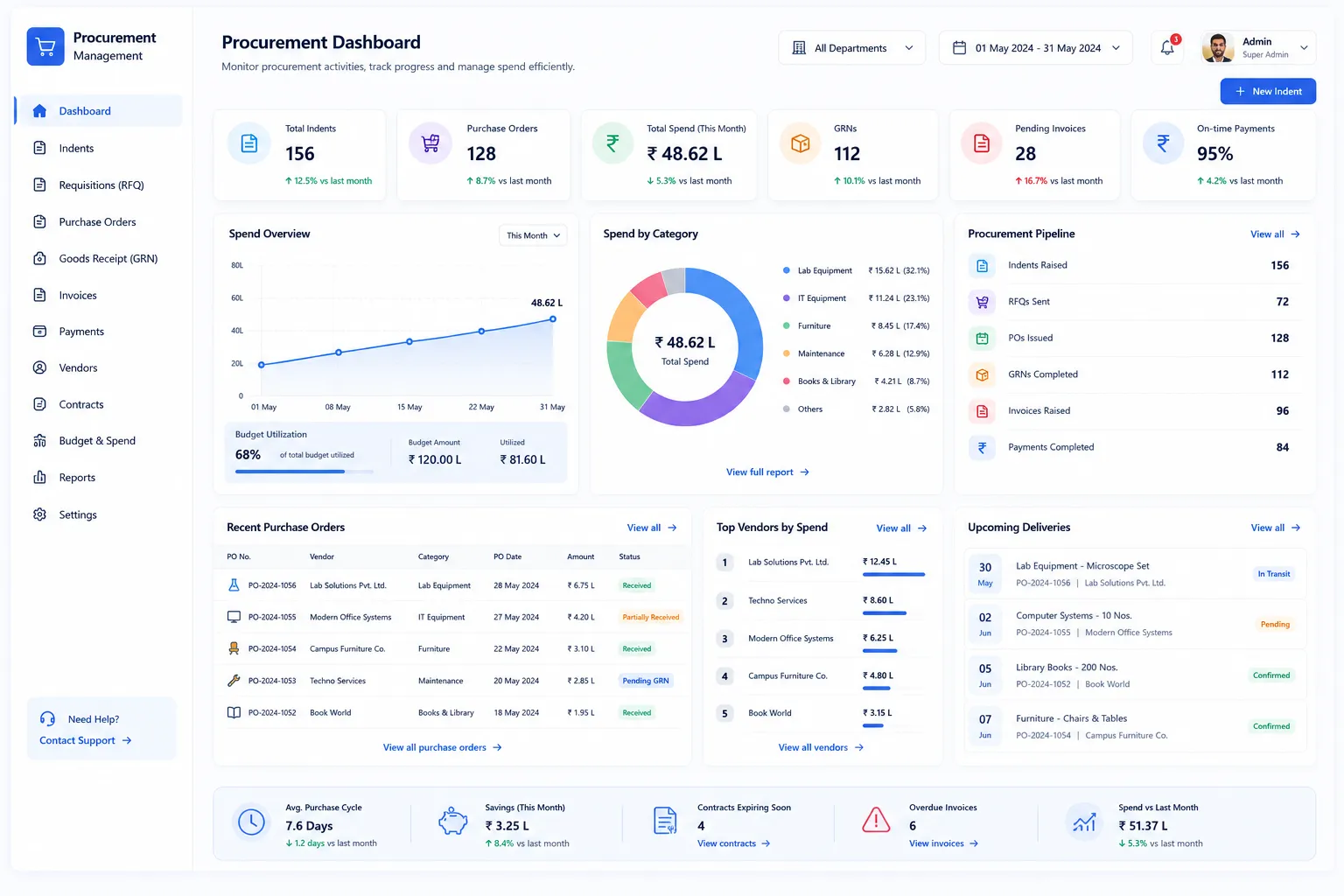
Procurement Management covers the complete procure-to-pay lifecycle. From the moment a department raises a material requisition to the final vendor payment. Every stage is connected: indents auto-route to purchase requisitions when stock is insufficient; PRs are budget-validated before approval; approved PRs convert to RFQs for competitive bidding or directly to POs for nominated vendors; purchase orders are receipted via GRN with quality checks and automatic stock posting; service orders are accepted through a dedicated Service Entry Sheet workflow; and vendor invoices are approved, matched & paid with full ageing and payment scheduling visibility. Every document links back to its parent, giving finance & management a complete audit trail from need identification to payment.
P2P Lifecycle
The Full Procure-to-Pay Lifecycle at a Glance
Seven connected stages; all managed within a single Finance & Control module
Indent
Department raises need
PR
Budget validated
RFQ
Vendors compete
PO
Order placed
SES
Service accepted
GRN
Goods received
Invoice & Payment
Pay vendor
Benefits
How Does it Help Institutions?
Approved Need->Every Spend
Procurement can't proceed without a dept indent or purchase requisition. Every PR goes through budget validation before approval; blocking or escalating when budget exceeds.
Competitive Bidding
The RFQ module invites multiple vendors in bulk, collects item-wise quotes with GST, and presents a side-by-side comparison view. Award creates the PO automatically from the winning quote.
Auto Stock Updates on Goods Receipt
When a GRN is posted, the inventory ledger updates automatically, no separate stock entry required. ASSET-type items create asset records simultaneously.
Service Procurement Workflow
Service-based POs follow a distinct path; a Service Entry Sheet replaces the GRN, with its own approval workflow before payment is cleared.
Full Document Linkage
Every document in the P2P chain links to its parent: the GRN links to the PO, the PO links to the PR and RFQ, the PR links to the originating indent.
Invoice Ageing & Dispute Management
Vendor invoices are tracked with status, ageing, and payment scheduling from the moment they are raised. Disputed invoices are flagged and blocked before payment clearance.
Features
Indent (Material Requisition)
Auto-detecting stock shortfalls and routing to procurement
Auto-Shortfall Detection
On submission, the system checks current store stock against the requested quantity and calculates the shortfall automatically.
Smart Status Routing
Indents move through defined status flow; DRAFT, PENDING_APPROVAL, PENDING_PR, STORE_ISSUE, COMPLETED, with routing determined by stock availability.
Issue Fulfilment Tracking
The indent tracks which requested items have been issued and which remain open, giving departments visibility into partial fulfilment.
Purchase Requisition (PR)
Budget validation and multi-level approval workflows
Budget Validation at Submission
Budget available for cost centre is checked at point of PR submission, before request enters approval chain.
Two-Layer Approval with Escalation
PRs go through department-level L1 approval followed by amount-based L2 module approval.
Budget Consumption Control
Budget is consumed (reserved) when a PR is approved & released when rejected or cancelled, ensuring it's always accurate.
Flexible Conversion Paths
Approved PRs convert to RFQ for bidding, or directly to PO for nominated vendor, depending on procurement strategy.
RFQ (Request for Quote)
Competitive bidding with automated vendor comparison
Multi-Vendor Bulk Invitation
Multiple vendors can be invited to quote. Each vendor submits item-wise pricing with GST through their portal.
Side-by-Side Quote Comparison
All vendor quotes for a given RFQ presented in a comparison view with item-wise pricing side by side.
Award and Auto-PO Creation
Awarding quote auto-creates filled PO from winning vendor's prices. Quote history preserved even after award.
Purchase Order (PO)
Compliant orders with full parent linkage and automated closure
GST-Inclusive Line Items
PO line items capture item, quantity, unit price, GST percentage & total; providing compliant, GST-ready purchase order.
Vendor Price Verification
PO price verified against vendor's catalog price before approval, errors flagged between negotiated & entered rate.
Full Parent Linkage
Every PO links to its parent PR & RFQ it was awarded from, providing a complete chain for audit & governance review.
PO Closure on Full Receipt
PO auto-closes when all line items have been fully received via GRN, preventing further GRNs/invoices from being raised.
Service Entry Sheet (SES)
Dedicated workflow for service-based procurement
Service-Specific Acceptance Workflow
Service-based purchase orders skip the GRN & use an SES for acceptance. SES records service being delivered to institution's satisfaction.
Approval Before Payment
The SES must be approved before a service invoice can be cleared for payment, ensuring that payment is only released after formal acceptance.
GRN (Goods Receipt Note)
Quality acceptance with automatic inventory and asset posting
Per-Line Quality Acceptance
Each line item on the GRN is individually marked ACCEPTED or REJECTED at the point of receipt. Only accepted quantities are posted to inventory.
Batch and Serial Number Capture
Batch numbers and serial numbers are captured at the point of GRN for items that require traceability; essential for lab consumables and electronics.
Automatic Stock Posting
When a GRN is posted, the inventory ledger updates automatically with the accepted quantity. No separate stock entry is required.
Automatic Asset Creation
ASSET-type items received via GRN automatically generate asset records in the Asset Management module, eliminating manual registration.
Partial Receipt Tracking
GRNs can be posted for partial quantities. The PO tracks remaining-to-receive quantities per line, enabling management of staged deliveries.
Invoice & Payment
Matching, dispute management, and payment tracking
Invoice Matching to PO/GRN
Vendor invoices created against related PO & GRN, payment cleared for goods & services ordered & received.
Invoice Blocking for Disputes
Invoices can be flagged & blocked before clearance, allowing finance to hold disputed invoices for resolution.
Invoice Ageing Analysis
Ageing view shows days outstanding per invoice across all vendors, for clear view of payables, enabling proactive mgmt.
Payment Scheduling & Tracking
Payments scheduled against approved invoices & tracked to recording. Payment mode, date & amount are captured.
Workflow
Built for Real Institutional Workflows
The complete P2P lifecycle - from department need to vendor payment
Dept raises indent; system checks stock & auto-calculates shortfall
Shortfall exists: indent triggers PR creation; budget validated
Approved PR converted to RFQ or directly to PO
RFQ issued to multiple vendors; quotes collected & compared
Winning quote awarded; PO auto-created with pre-filled items & GST
PO approved; vendor delivers goods; GRN raised with quality acceptance
GRN posted: inventory ledger updated; ASSET records auto-created
For service POs: SES raised & approved in place of GRN
Invoice raised against PO/GRN; approval obtained before payment
Payment recorded with mode & date; ageing updated; PO lifecycle closed
Who Uses It
Designed for Every Stakeholder in Your Institution
Department Staff
- Raise material indents for consumable items with required quantities
- Track indent status & issue fulfilment without following up with store
- View approved PR status & conversion to PO
Store Manager
- Review & approve department indents in the approval queue
- Process direct store issues when stock is available
- Monitor pending PR creation for shortfall indents
Procurement / Finance Admin
- Manage full P2P lifecycle from PR-> PO, GRN & invoice
- Create & manage RFQs; inviting vendors, collecting quotes & awarding
- Process GRNs with quality acceptance & batch/serial capture
- Manage vendor invoices, dispute blocks & payment scheduling
Finance Approvers (HOD, CFO)
- Review & approve PRs at L1 (department) & L2 (amount-based) levels
- Receive escalation notifications when budget thresholds are exceeded
- Approve GRNs before stock posting & invoices before payment clearance
Management / Trustees
- Budget utilisation visibility across cost centres & departments
- Full P2P audit trail from indent to payment for governance & compliance review
- Invoice ageing & payables overview without requesting extracts from finance
Analytics
Reports & Insights
Complete visibility into your procurement pipeline and vendor management
PR Pipeline Report
All purchase requisitions by status, cost centre, and approval stage; with budget consumed vs. available
RFQ Comparison Summary
Side-by-side vendor quote comparison for each active RFQ, with award history preserved
PO Status Report
All purchase orders by status, vendor, and delivery completion, with pending GRN quantities
GRN Receipt Report
Goods received vs. ordered by PO; with quality acceptance, rejection, and partial receipt tracking
Invoice Ageing Analysis
Days outstanding per invoice across all vendors, segmented by ageing bucket for payables management
Payment Schedule & History
Scheduled, in-progress, and completed payments by vendor, invoice, and payment mode
Budget Utilisation by Cost Centre
PR spend vs. available budget per cost centre; with consumed, available, and escalated amounts
Pending Approvals Report
All documents awaiting approval across the P2P chain; by stage, document type, and ageing
Scale
Designed for Scale
Whether managing procurement for a single campus or a multi-institution group, Procurement Management ensures:
Consistent P2P workflow & approval structures across all departments & campuses
Budget controls operating at cost-centre level; covering every dept, not just central procurement
Inventory, asset & finance; inter-connected; GRN posting updates stock & creates assets
Complete audit trail from indent to payment; available for governance, audit, or management review
From Department Need to Vendor Payment. Every Step Controlled & Connected.
See how edumerge's Procurement Management module covers the complete P2P lifecycle. With budget validation, competitive bidding, quality-controlled goods receipt, and invoice-to-payment tracking, in a single integrated Finance & Control module.
Frequently Asked Questions
Common questions about procure-to-pay workflow, budget validation, and vendor management
What is the procure-to-pay (P2P) workflow in edumerge's Procurement Management module?+
It is the complete chain from department need to vendor payment: Indent, Purchase Requisition, RFQ, Purchase Order, GRN or Service Entry Sheet, and Invoice & Payment. Each document links back to its parent, so a GRN traces to its PO, and the PO traces to its PR and RFQ. This gives finance and management a full audit trail from the moment a need is identified to the moment payment is made.
How does budget validation work for purchase requisitions?+
Budget available for the relevant cost centre is checked at the point a PR is submitted, before it enters the approval chain. Budget is reserved when the PR is approved and released automatically if the PR is rejected or cancelled, so the available budget figure stays accurate. Requests that exceed budget are blocked or escalated rather than silently approved.
Can vendors submit competitive quotes through the system?+
Yes. Approved PRs can be converted to an RFQ, which invites multiple vendors in bulk to submit item-wise pricing with GST through their portal. All quotes for that RFQ are presented in a side-by-side comparison view, and awarding the winning quote automatically creates a filled purchase order from that vendor's prices.
How are goods receipts and quality checks handled?+
Each line item on the GRN is individually marked accepted or rejected at the point of receipt, and only accepted quantities post to inventory automatically. Batch and serial numbers can be captured for items requiring traceability, and ASSET-type items generate asset records at the same time. GRNs can also be posted for partial quantities, so staged deliveries are tracked against the remaining-to-receive quantity on the PO.
Does the module support service-based procurement, not just goods?+
Yes. Service-based purchase orders follow a separate path using a Service Entry Sheet instead of a GRN, recording that the service was delivered to the institution's satisfaction. The SES must be approved before the corresponding service invoice can be cleared for payment.