Fee-to-Finance Integration
Integrated Fee-Finance Journey for Educational Institutions
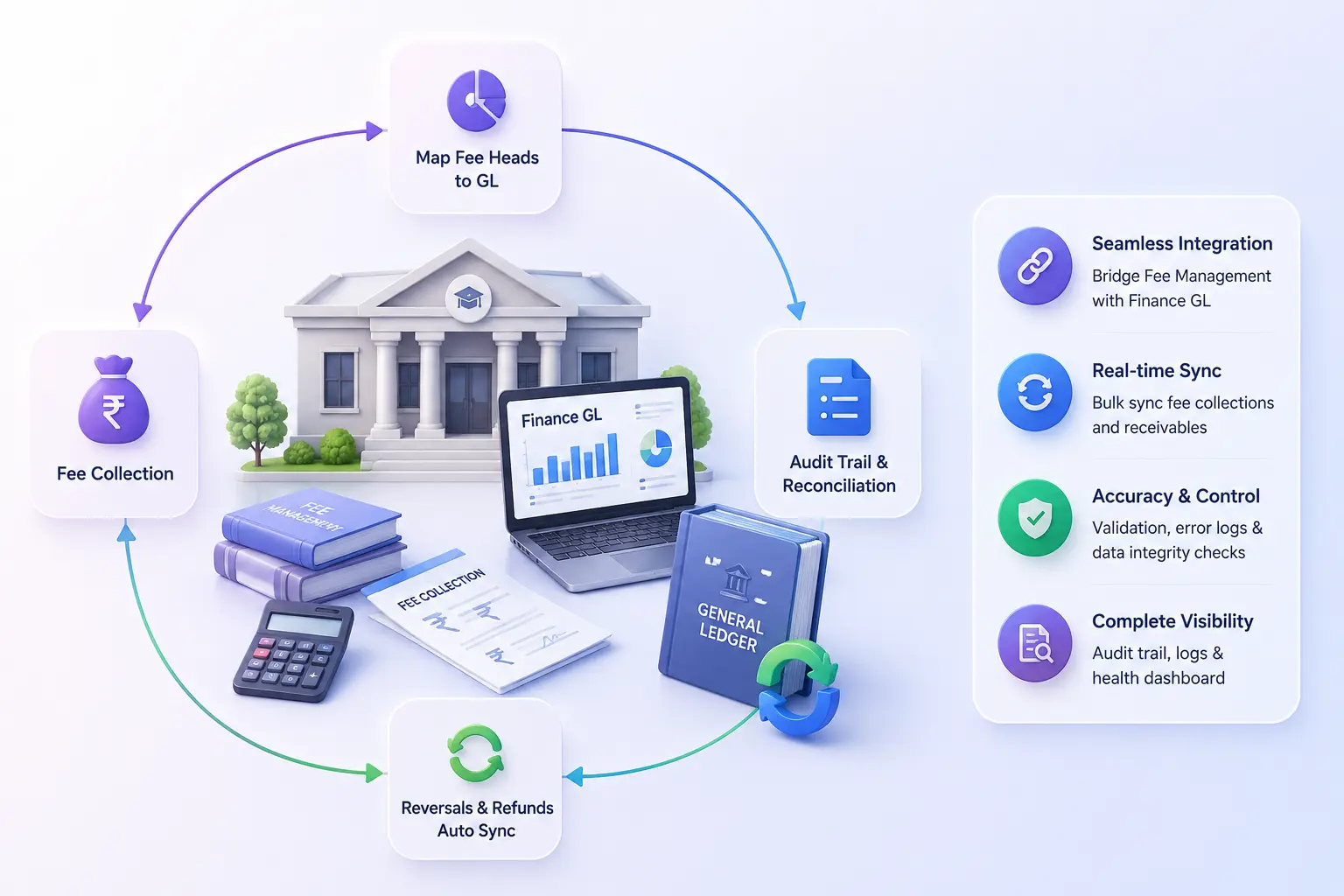
Bridge between Fee Mgmt & Finance GL. Map fee heads to ledger accounts, sync receivables & collections, and audit every posting.
- Fee head to GL account mapping: per institution, per payment mode
- Bulk demand & collection sync: pull receivables & process fee collections into GL
- Reversals, refunds & re-sync: complete audit trail with error logs & sync health
Overview
What Does Fee-to-Finance Integration Do?
Fee-to-Finance Integration is the accounting bridge between edumerge's campus Fee Management module & the Finance General Ledger. Without it, fee collections recorded in the campus ERP exist as operational data that does not automatically appear in the institution's accounting books. This integration closes that gap. By mapping each fee head to the correct GL account, syncing student demand data as Accounts Receivable, processing validated campus fee collections into the Finance GL, handling reversals & refunds, and providing a sync status dashboard & audit trail that covers every posting, error & re-sync event.
Benefits
How Does it Help Institutions?
Fee Collections Auto-Post to GL
Every fee payment recorded in ERP: cash, online, cheque, or challan, is available in the unprocessed receipts queue on the Finance side for review & validation before posting. Once validated, collections are auto-processed into the GOI Finance GL against mapped accounts.
Demand Data Creates Accounts Receivable
Student fee demand data flows from ERP into Finance GL as Accounts Receivable through Demand Sync. One operation per student per academic year pulls the receivable into the books. Demand vouchers are created. When collections are posted, they're matched against the receivable.
Reversals & Refunds Stay in Sync
Refunds & receipt cancellations processed in the campus Fee Management module are synced back to the Finance GL through the reversals sync. Ensuring that the accounting record reflects the actual collection position, not a gross collection figure that requires manual reversal journals.
Mapping Configuration Without Software Changes
Fee head to GL account mapping & payment mode to GL account mapping are configured within the integration settings. Covering institutions with different chart-of-accounts (CoA) structures, different posting modes (fee-head-wise or student-wise), and different GL creation rules.
Audit Trail Covers Every Sync Event
The Audit Trail Report covers the complete fee sync history. Every successful posting, every error, reversal & re-sync attempt. Error logs identify which receipts failed validation & why. Re-sync allows failed postings to be retried without re-entering data.
Key Capabilities
What the Integration Delivers
Fee Integration Dashboard
Sync orchestration center showing pending collection counts, recent reversals, and the sync audit trail, the starting point for daily Finance reconciliation.
Ledger Mapping Configuration
Each fee head is mapped to the correct GL account, with posting mode selection (fee-head-wise or student-wise) and GL creation rules configured per institution.
Payment Mode to GL Mapping
Different payment modes: cash, online, cheque, challan, mapped to their respective GL accounts, supporting institutions that post collections to separate accounts.
Unprocessed Receipts Queue
Campus fee collections arrive in a validated queue on the Finance side before posting. Allowing the Finance team to review and confirm each collection before it enters the GL.
Demand Sync
Student fee demand data is pulled from the ERP into Accounts Receivable per student & academic year. Creating receivable record, matched against collections.
Collection Sync (Bulk)
All unprocessed receipts are synced to the Finance GL in a single bulk operation, for daily or period-end posting runs.
Sync Reversals and Refunds
Campus-side refunds and receipt cancellations are synced to the Finance GL, maintaining net collection accuracy on both sides.
Demand Voucher Creation
Accounts Receivable vouchers are created from student fee demand data. Providing the formal accounting entry for fees charged.
Sync Status Dashboard
Per-institution sync health view showing which institutions are current, which have pending collections, and which have sync errors requiring attention.
Student Ledger Statement
A GOI Finance view of each student's complete fee activity: demand, collection, reversal, as a reconciled ledger statement.
Audit Trail Report
Complete sync history with error logs, reversal records, and re-sync capability, the Finance team's primary tool for integration exception management.
Integration Settings
Posting mode selector, GL creation rules, and auto-sync toggle. Configuring the integration behaviour without engineering involvement.
Campus Fee Collections. Finance GL.
One Governed Integration.
See how edumerge's Fee-to-Finance Integration bridges the campus Fee Management module and the Finance General Ledger. With complete fee head mapping, demand & collection sync, reversals, and a complete audit trail.
Frequently Asked Questions
Common questions about syncing campus fee collections with the Finance GL
How does fee collection data move from the campus ERP into the Finance GL?+
Every fee payment recorded in the campus ERP, whether cash, online, cheque, or challan, lands in an unprocessed receipts queue on the Finance side. The Finance team reviews and validates each receipt, and once validated, the Collection Sync posts it into the GOI Finance GL against the mapped fee head and payment mode accounts. This keeps the accounting books current without duplicate data entry.
Do all institutions in the group need the same chart of accounts to use this integration?+
No. Fee head to GL account mapping and payment mode to GL account mapping are configured separately for each institution within the integration settings. This covers institutions with different chart-of-accounts structures, different posting modes such as fee-head-wise or student-wise, and different GL creation rules.
What happens to fee dues that have not been collected yet?+
Student fee demand data is pulled from the ERP into the Finance GL as Accounts Receivable through Demand Sync, one operation per student per academic year. This creates a demand voucher for the amount charged, which is later matched against the corresponding collection once payment is received.
How are refunds and cancelled fee receipts reflected in the Finance books?+
Refunds and receipt cancellations processed in the campus Fee Management module are synced back to the Finance GL through the reversals sync. This ensures the accounting record shows the actual net collection position rather than a gross figure that would need a manual reversal journal.
How does the Finance team track sync errors or postings that failed?+
The Audit Trail Report covers the complete fee sync history, including every successful posting, error, reversal, and re-sync attempt. Error logs identify which receipts failed validation and why, and the re-sync capability lets the Finance team retry a failed posting without re-entering the underlying data.