Inventory Management
Inventory Management for Educational Institutions
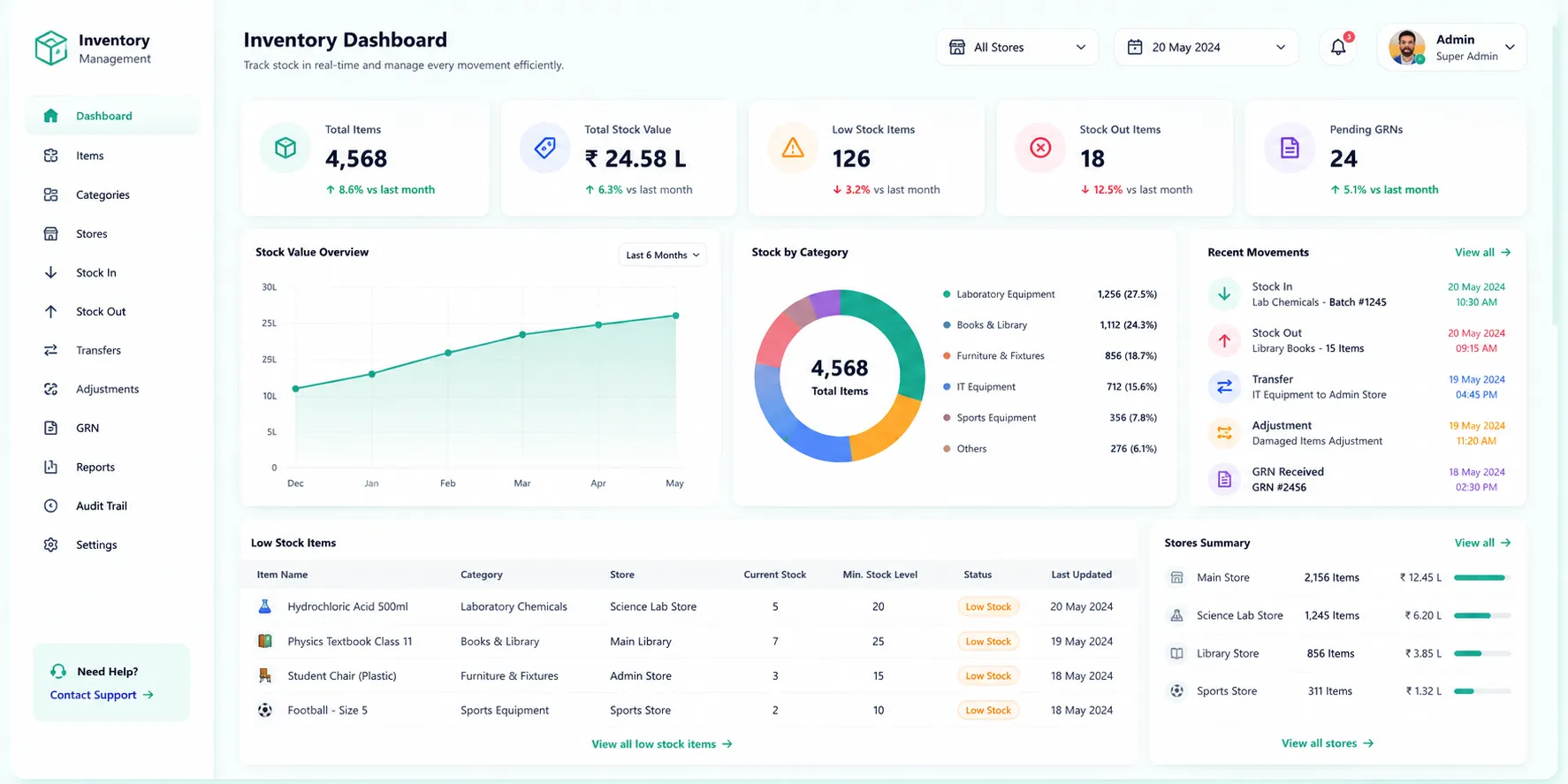
Real-time stock tracking. Movements audit trail. Ledger balances that never drift.
- Live per-item, per-store stock ledger updated automatically on every movement
- Immutable audit trail of every stock movement; from issue to return & reversal
- 20+ pre-built inventory reports; stock health, consumption, movement & valuation
Overview
What Does This Module Do?
Inventory Management gives institutions real-time visibility & control over every item in every store. The stock ledger updates automatically on every movement; whether a GRN receipt, a material issue, an inter-store transfer, or a physical count adjustment. Every movement is logged in an immutable audit trail with its type, reference document, quantity, unit price & the user who triggered it. Soft reservations prevent over-commitment on popular items. Material issues are tracked with cost centre allocation & can be reversed cleanly. Inter-store transfers maintain ledger integrity atomically. And 20+ pre-built reports give finance & administration the stock intelligence they need without custom extracts.
Inventory Lifecycle
The Full Inventory Lifecycle at a Glance
Six integrated steps - all managed within a single Finance & Control module
Stock Ledger
Auto-updated live balance per item, per store
Movements Trail
Immutable audit of every change
Material Issues
Withdrawal with cost centre tracking
Soft Holds
Reserve stock before physical issue
Transfers & Adjustments
Inter-store moves & count corrections
Reports & Analytics
20+ pre-built inventory reports on stock
Benefits
How Does it Help Institutions?
Stock Balances Always Accurate
The ledger updates on every movement; GRN receipt, material issue, inter-store transfer, or adjustment. No batch reconciliation step, no end-of-day sync.
Audit Trail That Cannot Be Manipulated
Every inventory change is logged as an immutable movement record. Nothing can be edited; only reversed & reversals create a new, logged counter-movement.
No Over-Commitment
Soft reservations ensure that stock committed against a purchase requisition or purchase order is excluded from available balance before it is physically issued.
Cost Centre Accountability
Every material issue is logged against a cost centre, purpose & user. Depts are accountable for consumption, finance can track actual vs. budgeted material spend per cost centre.
Inter-Store Transfers with Ledger Integrity
When stock is transferred between stores, both sides of the movement; TRANSFER_OUT from the source and TRANSFER_IN to the destination, are posted atomically.
Discrepancies Handled With Controls
When a physical count reveals a discrepancy, adjustments go through an approval workflow before the ledger is corrected. Reason documentation is mandatory.
20+ Reports Without Custom Extracts
Stock health, dead stock, reorder alerts, item consumption, valuation, inter-store transfers, cost centre spend, indent fulfilment; all available, pre-built.
Features
Stock Ledger
Live stock balances with real-time updates
Real-Time Balance
Ledger maintains a live balance for every item in every store. Balance updates the moment a movement is posted; GRN receipt, issue, transfer, or adjustment.
Available Stock Calculation
Available stock=(ledger quantity)-(active soft reservations). Committed-but-not-yet-issued stock is excluded from what appears available for new requests.
Low-Stock Alert View
Items that have fallen below their defined reorder level are surfaced in a dedicated alert view, enabling procurement to act before stock-outs occur rather than after.
Stock Valuation
Ledger calculates stock value=(quantity)x(unit price per item per store). Finance has an always-current inventory valuation without separate reports.
Stock Movements (Audit Trail)
Immutable record of every inventory change
8 Movement Types, All Logged
GRN, ISSUE, TRANSFER_IN, TRANSFER_OUT, ADJUSTMENT, SALES, RETURN & REVERSAL. Every change captured as a typed movement record.
Source Document Referencing
Every movement references the doc that triggered it; GRN ID, Issue ID, or Transfer ID. Traceable link from a stock movement to its originating doc.
Immutability and Reversal
Movements can't be edited after posting. Errors are corrected by reversal which creates an equal & opposite movement, and marks the original as reversed.
Filterable Movement Log
Movement log filtered by item, store, movement type & date range. Enabling finance/admin to pull exact slice of history they need for review or audit.
Material Issues
Cost centre-tracked withdrawals with full accountability
Cost Centre-Tagged Withdrawals
Every material issue-assigned to cost centre, ensures inventory consumption is tracked per dept/project that used it.
Auto-Numbered Issue Documents
Issue numbers are auto-generated on creation, providing a consistent document numbering trail for audit and reference.
Clean Reversal Workflow
If an issued item is returned or the issue is posted in error, a reversal restores the stock with a REVERSAL movement entry.
Indent Traceability
Each issue links to originating indent, finance checks withdrawal requests & authorisations before stock left store.
Stock Reservations (Soft Holds)
Prevent over-commitment on high-demand items
Pre-Issue Commitment Control
Stock can be soft-reserved against a purchase requisition, purchase order (PO), or other reference before physical withdrawal.
Automatic Reservation Release
Reservations auto-released when corresponding GRN is posted. Cancelled/rejected requests release the hold immediately.
Transfers & Adjustments
Inter-store moves and physical count corrections
Atomic Inter-Store Transfers
A transfer posts TRANSFER_OUT from the source store & TRANSFER_IN to the destination store in a single operation. There is no moment when the stock is in transit & unaccounted for in the ledger.
Physical Count Adjustment Workflow
When physical count reveals difference in actual stock, from system ledger, adjustment raised with discrepancy quantity & mandatory reason. Adjustment goes through an approval workflow before correcting ledger.
Full Audit Trail for Transfers and Adjustments
Every inter-store transfer and every physical count correction is reflected in the stock movement audit trail. Maintaining a single, complete record of all ledger changes across all sources.
Reports & Analytics (20+)
Pre-built reports covering every dimension of inventory management
Stock Position Reports
Balance report, stock register, item-wise ledger, valuation report, store-wise summary & multi-store availability view.
Movement & Consumption Reports
Stock movements report (filter by type, date, item), transfer & adjustment reports, item consumption report-issue over time.
Stock Health & Alert Reports
Dead-stock report, reorder alerts (below min level), high-usage report, and stock ageing analysis.
Procurement & Utilisation Reports
Budget utilisation (spend vs. budget/cost centre), indent fulfilment %age (requested vs. issued), and pending approvals report.
Workflow
Built for Real Institutional Workflows
The complete inventory management cycle - from stock receipt to consumption reporting
Stock received via GRN; ledger balance updated automatically with TRANSFER_IN movement
Soft reservation created against PR or PO; available balance reduced before physical issue
Reservation released when GRN posted; stock available for issue
Material issue raised with cost centre, purpose, and issued-to user; ISSUE movement posted
If stock needed at a different location, inter-store transfer initiated; TRANSFER_OUT & TRANSFER_IN posted
Periodic physical count conducted; discrepancies raised as adjustments with mandatory reason
Adjustment reviewed & approved; ADJUSTMENT movement posted to correct ledger
Finance reviews cost centre consumption, stock valuation & reorder alerts from the reports dashboard
Who Uses It?
Designed for Every Stakeholder in Your Institution
Finance Admin / Store Manager
- Maintain stock ledger & process GRN receipts, issues & transfers
- Review & approve physical count adjustments pre-ledger correction
- Monitor low-stock alerts and initiate reorder requests
- Generate valuation & consumption reports for period-end review
Dept Heads/Cost Centre Owners
- Raise material issue requests against their cost centre
- Review dept-wise indent fulfilment status & pending approvals
- Track departmental inventory consumption against budget
Procurement Team
- Monitor soft reservations against PRs & POs
- Track GRN-triggered reservation releases & available stock
- Use reorder alerts & dead-stock reports for procurement decisions
Management / Finance Leadership
- Institution-wide stock valuation & cost centre spend overview
- Budget utilisation reports for inventory expenditure governance
- Confidence that every ledger change has an immutable audit trail
Analytics
Reports & Insights
20+ pre-built reports - no custom extracts required
Stock Balance Report
Current quantity per item per store; the live ledger view for finance and store managers
Stock Valuation Report
Quantity x unit price per item per store; institution-wide inventory value at any point
Item Consumption Report
Issue rate over time per item; identifies high-consumption items and seasonal demand patterns
Dead-Stock Report
Items with no movement in a defined no. of days; flags stock that may be obsolete/over-purchased
Reorder Alerts Report
Items currently below minimum stock level; input for procurement planning
Stock Ageing Analysis
How long stock has been sitting in each store; supports write-off & rationalisation decisions
Budget Utilisation Report
PR spend vs. budget/cost centre; finance can track dept-wise inventory expenditure vs allocations
Indent Fulfilment Report
Requested vs. issued quantities; shows where supply is not meeting department demand
Transfer Report
All inter-store transfers with status and quantities; for reconciliation across store locations
Pending Approvals Report
All documents awaiting action across the approval chain; prevents approvals from stalling unnoticed
Scale
Designed for Scale
Whether managing a single store or multiple stores across a group of institutions
Per-item, per-store ledger precision regardless of the number of stores or items in the catalog
Inter-store transfers that maintain ledger integrity atomically, no reconciliation risk across locations
A single, unified movement audit trail covering all stores and all movement types
20+ reports available without custom development; covering every reporting need at scale
Every Item. Every Store. Every Movement. Tracked in Real Time.
See how edumerge's Inventory Management module gives institutions a live stock ledger, an immutable movements audit trail, and 20+ pre-built reports. Without spreadsheets, manual reconciliation, or custom data extracts.
Frequently Asked Questions
Common questions about stock ledger accuracy, audit trails, and inventory control
How does the stock ledger stay accurate without manual reconciliation?+
The ledger updates automatically the moment a movement is posted; a GRN receipt, a material issue, an inter-store transfer, or a physical count adjustment. There is no batch job or end-of-day sync step, so the balance shown is always the current balance. This removes the reconciliation gap that causes stock figures to drift from what is actually on the shelf.
What happens if a physical stock count does not match the system ledger?+
The discrepancy is raised as an adjustment with a mandatory reason and routed through an approval workflow before the ledger is corrected. Nothing is corrected silently; the adjustment itself is posted as a logged ADJUSTMENT movement, so the fix is as auditable as the original error. This keeps count corrections accountable rather than an untracked edit.
Can stock be reserved before it is physically issued?+
Yes. Soft reservations can be placed against a purchase requisition or purchase order, which reduces the available balance shown to other requesters even though the item has not physically left the store. The reservation is released automatically once the corresponding GRN is posted, or immediately if the request is cancelled or rejected. This prevents two departments from being promised the same unit of stock.
How are inter-store transfers tracked so stock does not go unaccounted for in transit?+
A transfer posts a TRANSFER_OUT from the source store and a TRANSFER_IN to the destination store as a single atomic operation. There is no intermediate state where the stock exists outside the ledger. Every transfer also appears in the same movement audit trail used for all other stock changes, so it can be reviewed alongside receipts, issues, and adjustments.
What reports can finance pull for inventory audit and budget tracking?+
Over 20 pre-built reports are available, covering stock balance and valuation, item consumption, dead stock, reorder alerts, stock ageing, inter-store transfers, budget utilisation against cost centres, and indent fulfilment. Because these are pre-built, finance and store managers do not need custom data extracts to answer routine audit or budget questions. The movement log itself can also be filtered by item, store, movement type, and date range for a specific review.