Onboarding
Onboarding New Hires in Educational Institutions
Guide every new joiner through a structured, digital onboarding journey. From document submission to formal signoff — without a single paper form.
- Digital document collection with a personalised, expiry-controlled portal link
- 6-stage onboarding journey with real-time milestone tracking
- Formal digital signoff that activates the employee record in your HRMS
Overview
What Does This Module Do?
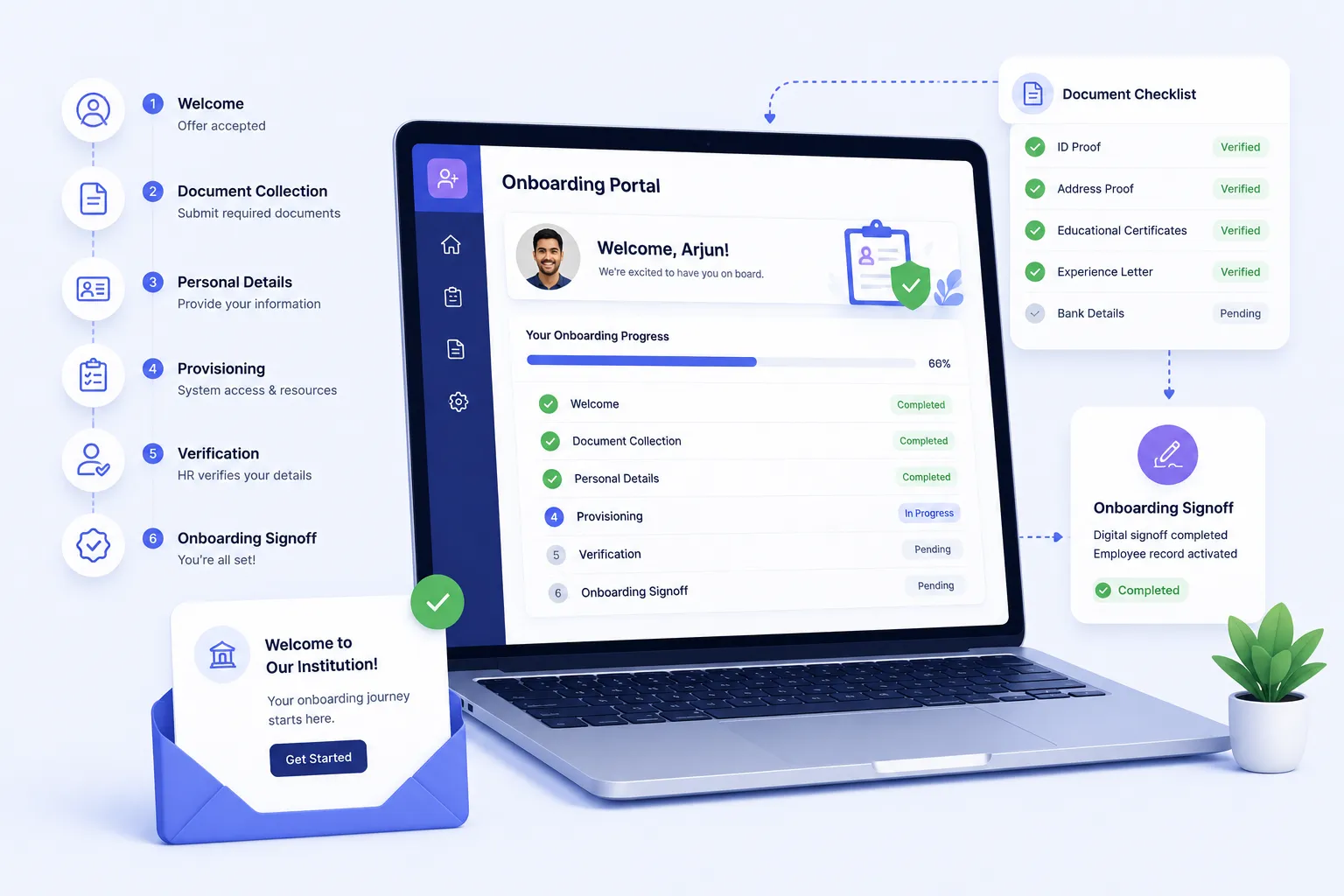
Onboarding takes over the moment a candidate accepts their offer. A personalised, time-limited digital portal is sent to the new joiner for document upload and personal details. HR verifies submissions, IT completes provisioning, and once everything is done — the new joiner signs off digitally. Their employee record is activated in the HRMS automatically. No paperwork. No couriers. No delays.
Benefits
How Does it Help Institutions?
No More Paper-Based Onboarding
New joiners complete everything digitally — from any device, before their first day. HR gets structured submissions, not a stack of photocopies.
New Joiners Start Day One Ready
Because documents are verified and access is provisioned before the joining date, new employees walk in ready to work — not waiting for IT or Admin.
Complete Transparency for Every Joiner
The onboarding portal shows new joiners exactly where they are in the process, what's complete, and what still needs their attention — reducing calls to HR.
Automatic Employee Record Activation
Once onboarding is complete & the new joiner signs off, their employee record is activated in the HRMS automatically. No manual creation, no missed steps.
Features
Key Capabilities
Everything you need to onboard new joiners digitally and efficiently
Personalised Onboarding Portal
Each new joiner receives a unique, secure portal link with their name, role, department, and an expiry date clearly visible. No HRMS login required.
Configurable Document Checklist
HR defines mandatory documents for each role. ID proof, academic certificates, previous employment records, etc. The portal guides joiners step by step.
Personal Details Collection
In addition to documents, the portal collects additional personal and statutory information from the new joiner that feeds directly into their HRMS employee profile.
Link Expiry Enforcement
Onboarding portal links carry a configured expiry date. HR can extend/regenerate links if a joiner needs more time. But the deadline is always clear & enforced.
HR Document Verification
HR reviews and verifies each submitted document within the HRMS, marking items verified as they are confirmed.
Provisioning Tracking
IT and Admin teams confirm system access, ID cards, and equipment within the same onboarding workflow — keeping everything in one place.
6-Stage Journey Tracker
New joiners see a live milestone timeline. Offer Accepted → Documents Submitted → Verified → Provisioning Complete → HR Approved → Signoff.
Digital Signoff and Declaration
Before onboarding is marked complete, the new joiner formally reads & signs off on an immutable onboarding declaration. Entering their name as a digital signature.
Automatic Employee Record Activation
On signoff completion, the new joiner's employee record is activated in the HRMS — transitioning them from candidate to confirmed employee in one step.
Built for Real Institutional Workflows
Designed to handle the complete onboarding lifecycle
Candidate accepts the offer. Unique onboarding portal link is generated & sent
New joiner uploads required documents and fills in personal details
HR verifies submitted documents in the HRMS itself
IT/Admin completes provisioning and marks it done
HR gives the final onboarding approval
New joiner opens signoff page, reads declaration, enters name & submits
Employee record activated. Onboarding complete
Who Uses It?
Designed for new joiners, HR teams, and IT/Admin staff
New Joiner (External)
- Receive and access their personalised onboarding portal
- Upload required documents and complete personal details
- Track milestone progress and complete final digital signoff
HR Admin
- Monitor document submission and verification across all joiners
- Mark verifications complete and give final HR approval
- Ensure no joiner is activated without completing all milestones
IT / Admin Team
- Track and confirm provisioning tasks within the onboarding workflow
- Ensure new joiners have access and equipment on day one
Analytics
Reports & Insights
Get complete visibility into your onboarding process
Completion Rates
Track how many new joiners complete each milestone on time
Submission Timelines
Identify who is behind on document uploads & take action before link expiry
Pending Verifications
See which HR verification tasks are outstanding across all active joiners
Time to Onboarding
Understand avg. onboarding duration from offer acceptance to final signoff
What Makes It Powerful?
Built to streamline your onboarding process from offer acceptance to day one
No Paper, No Courier, No Delays
Fully digital from document collection to signoff.
Joiner-First Experience
A clear, guided portal that tells new joiners exactly what to do.
Automatic Activation
No manual employee record creation — the system handles it on signoff.
End-to-End Accountability
HR, IT & Admin each have defined roles within the same workflow.
Designed for Scale
Whether onboarding 2 employees a month or 50, we've got you covered!
Every joiner follows the same structured process regardless of HR workload
Group institutions can manage onboarding across campuses from a single HRMS view
All onboarding records are retained for compliance and audit readiness
Onboard New Hires — Digitally and Effortlessly
See how edumerge's Onboarding module helps you guide new joiners from offer acceptance to day one — without a single paper form.
Frequently Asked Questions
Common questions about digital onboarding for new joiners
Does the new joiner need an HRMS login to complete onboarding?+
No. Each new joiner receives a unique, secure onboarding portal link with an expiry date, and no HRMS login is required. The link carries their name, role, and department, so they can upload documents and fill in personal details from any device before their first day.
What happens if a new joiner does not complete onboarding before the portal link expires?+
The onboarding link carries a configured expiry date so the deadline stays clear at all times. If a joiner needs more time, HR can extend or regenerate the link directly, without restarting the entire process.
Can we set different document requirements for different roles?+
Yes. HR defines a configurable document checklist for each role, such as ID proof, academic certificates, and previous employment records. The portal then guides each new joiner step by step through only the documents applicable to their role.
How does the employee record get created in the HRMS?+
The employee record is activated automatically once the new joiner completes the digital signoff and declaration at the end of the 6-stage journey. There is no manual record creation by HR, which removes the risk of a missed or delayed activation.
How do HR and IT coordinate provisioning tasks during onboarding?+
HR verifies submitted documents within the HRMS, while IT and Admin teams confirm system access, ID cards, and equipment within the same onboarding workflow. Both sets of tasks are tracked on one live milestone timeline, so nothing is confirmed as complete until every step, from document verification to provisioning, is actually done.