College Custom Reports
MIS Report Builder for Colleges & Universities
With dynamic field selection from any module, filter & grouping configuration, saved templates, and cross-module reporting.
- Design custom report templates with fields pulled from any College ERP module
- Filter & grouping config for each report, slice data exactly as mgmt/IQAC needs
- Save, preview & export report templates, reuse across cycles without rebuilding
Overview
What Does MIS Report Builder Do?
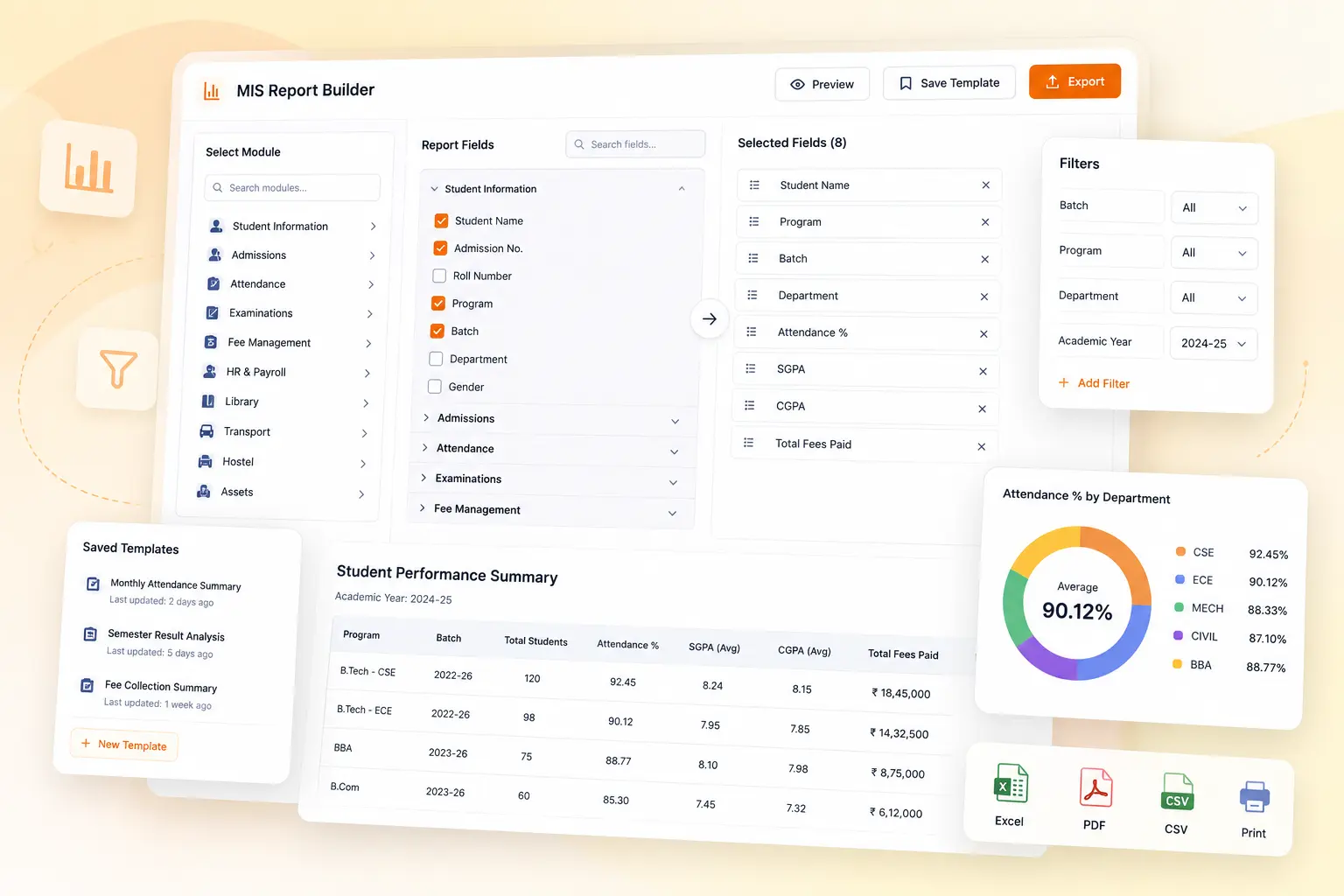
MIS Report Builder is a custom report creation tool that enables colleges to design reports that pull data from any combination of College ERP modules. With dynamic field selection, filter & grouping configuration, saved templates, and cross-module reporting capabilities, administrators can create decision-ready reports without IT involvement.
Benefits
How Does it Help Colleges?
Reports Designed Around What Management Actually Needs
Answer cross-module questions. Like students with attendance<75% who also have outstanding fees, or students whose CGPA falls below placement eligibility.
Filters & Grouping Make Large Datasets Readable
Organises datasets by dept, sem, batch, fee status, or any field: producing structured, decision-ready views instead of spreadsheets requiring manual work.
Saved Templates Eliminate Repeated Configuration
Recurring reports built once as templates. Each subsequent run applies the same field selection, filters & grouping without reconfiguration.
Form Configuration for Institution-Specific Fields
Custom fields defined in form configuration are available as selectable fields in Report Builder, reflecting the full data model of the College ERP.
Preview Before Export Confirms Layout
Preview the report output before distribution, confirming field selection, filter results, and grouping layout.
Export in Configured Format for Distribution
Confirmed reports are exported in the configured format for distribution to management, IQAC, or regulatory bodies.
Features
Key Capabilities
A detailed view of every capability across MIS Report Builder.
Custom Report Template Creation
Admins design templates from scratch. Selecting output fields, applying filters & grouping to produce specific data view required. Templates are named & saved for reuse.
Dynamic Field Selection from Any Module
Report fields selected across College ERP: attendance, fee, placement, library & more. Cross-module combinations produce reports worth reviewing.
Filter & Grouping Configuration
Each template is configured with data filters: by dept, batch, sem, status, or any available field & grouping rules organise output by relevant dimension.
Report Preview & Export
Templates are previewed before export. Confirming field selection, filter results & grouping layout. Then exported in configured format for distribution & review.
Saved Report Templates
Completed templates are saved & available for repeated use. With same field selection, filters & grouping applied on each run. Use recurringly without reconfiguration.
Integration with Form Configuration Module
Defined custom fields are available as selectable in the Report Builder. Ensuring full data model of the institution's setup is accessible for custom reporting.
Impact
Why Institutions Choose MIS Report Builder
Cross-module reporting answers questions that standard reports cannot address
Filter & grouping configuration transforms raw data into decision-ready insights
Saved templates eliminate repeated config, reducing administrative overhead
Admin-driven report creation removes IT bottleneck for custom reporting requests
Form configuration integration ensures full data model accessibility
Preview & export functionality ensures data quality before distribution
Every Report Your College Needs. In-Built.
See how edumerge's MIS Report Builder gives colleges a flexible, cross-module custom reporting tool. With dynamic field selection, filter & grouping configuration, saved templates, and form configuration integration.
Frequently Asked Questions
Common questions about MIS Report Builder for colleges
Can we build a report that pulls data from more than one College ERP module?+
Yes. MIS Report Builder supports dynamic field selection across modules, so a single report can combine fields from attendance, fees, placement, and library, for example. This lets you answer cross-module questions such as students with attendance below 75% who also have outstanding fees, without exporting each module's data separately.
Do we need IT or a developer to create a new custom report?+
No. Report Builder is designed for administrators to create templates directly, selecting fields, applying filters and grouping, and saving the result. This removes the IT bottleneck that usually comes with custom reporting requests.
Can we reuse the same report format for every semester or examination cycle?+
Yes. Once a report template is designed with its field selection, filters, and grouping, it can be saved and reused. Each subsequent run applies the same configuration automatically, so recurring reports for IQAC or management do not need to be rebuilt each cycle.
Will custom fields we have configured in our College ERP show up in Report Builder?+
Yes. Fields defined through the Form Configuration module are available as selectable fields in Report Builder. This keeps the full data model of your institution's setup, including institution-specific fields, accessible for custom reporting.
Can we check a report before it goes out to management or a regulatory body?+
Yes. Every report template can be previewed before export, so field selection, filter results, and grouping layout can be confirmed first. Once confirmed, the report is exported in the configured format for distribution.