Works Alongside edumerge
Google Workspace for Education Plus
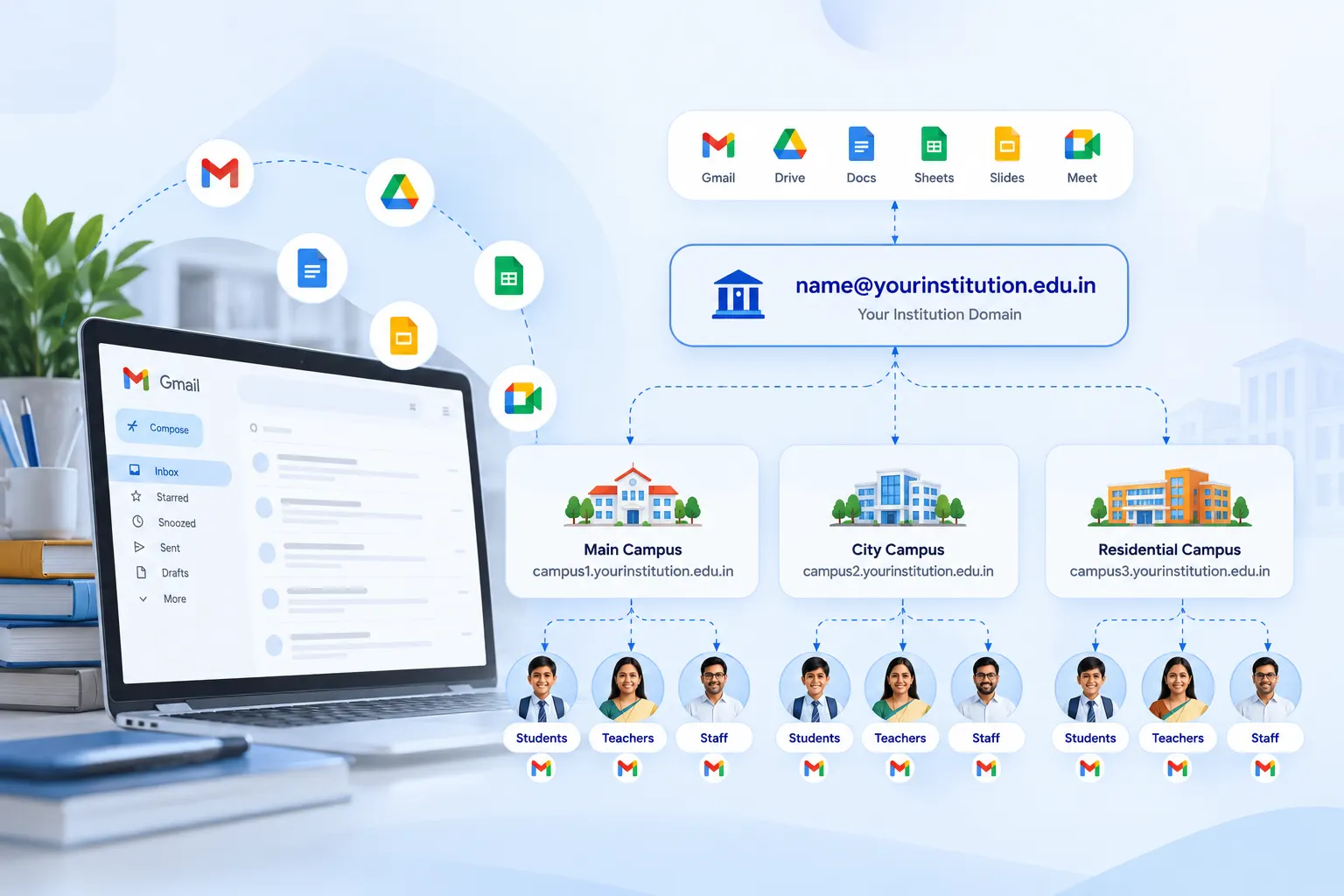
Give every student & staff member an official email ID on your institution's domain, with Gemini AI, advanced security & Classroom analytics in one governed workspace.
- Official email IDs on your domain for every student and staff member
- Gemini in Docs, Sheets, Slides, Forms and Vids, under admin controls
- Security Center, data loss prevention and context-aware access
- Classroom analytics, unlimited originality reports & Meet for 1,000 participants
- One partner for licensing, provisioning, training and support
Overview
What edumerge Delivers with Google Workspace for Education Plus?
Education Plus is Google's most complete edition for education. It gives institutions Gmail, Drive, Docs, Sheets, Slides, Forms, Classroom, Meet, Vids and Calendar on their own domain, together with Gemini AI, premium teaching tools and additional storage.
edumerge delivers it as a managed service
Arranges licences through our Google partnership
Verifies your domain
Creates accounts for students & staff
Configures security & sharing policies for each campus
Trains your teams & remains your support desk for the term
- Education Plus is licensed and billed separately from edumerge's ERP, HRMS and Finance & Control suites. -
- For a group of institutions, the result is one identity standard across every campus. -
- Students & staff stop using personal email IDs for official work. -
- Every account is created, suspended and archived under rules your IT team controls. -
Benefits
How Google Workspace for Education Plus Helps Institutions
Identity Standard Across Every Campus
Students & staff get email IDs on your domain. Every circular, admission reply & email carries the institution's name.
Accounts That Stay with the Institution
When a staff member leaves, Admins suspend access, transfer file ownership & retain records for the institution.
Governed AI for Staff and Students
Staff use Gemini inside the tools they already work in, under admin controls & never used to train AI models.
Fewer Separate Tool Subscriptions
Video classes, plagiarism checks, eSignatures, no-code apps, files & online forms run in one suite, fewer tools to buy, renew & secure.
Security Your IT Team Can See
Security Center, data loss prevention for Gmail, Drive & Chat, attachment sandbox & context-aware access, managed from Admin console.
Data for Principals and Trustees
Classroom analytics show assignment completion and grade trends at class, student and assignment level, without manual reports.
Features
Google Workspace for Education Plus Features
Everything included in Education Plus, grouped by how your institution uses it.
Gemini AI
Gemini in Docs, Sheets, Slides, Forms and Vids
Draft lesson plans, circulars and question papers, analyse data, build slides, summarise form responses and create videos from a prompt.
Gemini for Education
Access to Gemini 3, custom AI experts with Gems, Gemini Canvas for writing and coding, Guided Learning, interactive quizzes on any subject, Deep Research reports (5 per month) and image creation.
Gemini Notebook
AI research grounded only in your own sources, with audio & video overviews, infographics and slide decks. Education Plus adds higher limits, more sources per notebook and the latest Gemini models.
Gemini in Classroom
AI help for teachers across 30+ use cases, and teacher-led AI experiences for students grounded in class materials.
Workspace Studio
Design, manage and share AI agents that automate everyday work across Workspace, with higher limits in Education Plus.
Google Vids
Create teaching videos with a teleprompter, noise cancellation, stylised captions and transcript trimming.
Gemini features in Docs, Sheets, Slides, Forms and Vids are available to users aged 18 and above, as set by Google. Administrators control which user groups get each AI feature.
Classroom and Teaching
Classroom analytics
Assignment completion, grade trends & usage at class, student and assignment level for principals and HoDs.
Class visits and templates
Visit a class to support educators without becoming a co-teacher, and share class templates & classwork across teachers.
Originality reports
Unlimited plagiarism checks with peer comparison against past student submissions.
Practice sets
Interactive assignments that check understanding, with real-time feedback and hints.
Interactive YouTube lessons and Read Along
Add questions to videos and encourage reading practice inside Classroom.
Class management and grading
Rubrics shown beside student work, a customisable comment bank, grading periods & scales, and posts scheduled to multiple classes.
Classroom add-ons
Use approved third-party teaching tools inside Classroom.
Class tools for managed Chromebooks
Keep students on task with focus & lock modes and content pushed to their screens. Chromebook hardware is not included.
Google Meet
Up to 1,000 participants per call
And meetings of up to 24 hours.
Livestreaming within your domain
For up to 100,000 viewers, with Q&A and polls.
Recordings saved to Drive
Call transcripts and attendance tracking.
Breakout rooms, waiting room, moderation controls
Hand raising, polls and digital whiteboarding.
Co-presenting
Speaker notes while presenting, noise cancellation & international dial-in.
Collaboration and Communication
Gmail on your domain
Ad-free email with AI-powered protection that Google says blocks more than 99.9% of attacks.
Docs, Sheets, Slides and Forms
Real-time collaboration on circulars, timetables, reports & surveys, plus eSignature for Docs and PDFs.
Drive and storage
100 TB of pooled storage for the institution plus 20 GB per licence, with more available in 10 TB increments.
Calendar, Chat, Groups, Sites and Tasks
Shared calendars, secure messaging, mailing groups, internal sites without code and task lists.
AppSheet Core
No-code apps for administrative workflows.
Cloud Search
Personalised search across your institution's domain.
Workspace LTI
Use Assignments, Meet, Gemini and Drive inside your existing learning management system.
Security and Administration
Security Center
Threat prevention, automatic monitoring, a security dashboard and a security health page.
Investigation tool
Find and remove spam, phishing and malware across the domain.
Context-aware access
Control who can open which apps based on user, device and location.
Data loss prevention
Rules that stop sensitive data leaving through Gmail, Drive and Chat.
Attachment sandbox
Email attachments scanned in a virtual sandbox before users open them.
Drive labels and classification
Sharing controlled by how sensitive the content is.
Device management
Endpoint and advanced mobile-device management for institution-owned and personal devices.
Identity controls
2-step verification, Cloud Identity Premium, Secure LDAP, hosted S/MIME for Gmail and automated Groups memberships (beta).
Logs in BigQuery
Gmail & Classroom log analysis for security and usage dashboards.
Records and Compliance
Vault eDiscovery
Search across email, chat and files.
Retention and archiving
Policies for Gmail and Google Meet records, plus integration with compliant third-party archiving tools.
Audit reports
Track user activity across the domain.
Workflow
How edumerge Sets Up Education Plus for Your Institution
Live in 2 to 3 weeks, from first call to trained users.
Discovery
Week 1Confirm student and staff counts, domain, campuses and admin contacts.
Domain verification
Week 1Verify your domain with Google and agree the account naming format.
Provisioning
Weeks 1 to 2Assign Education Plus licences, create organisational units per campus, create accounts in bulk, and apply security, sharing & AI policies.
Training
Weeks 2 to 3Sessions for faculty, office staff and IT administrators.
Go-live
Accounts handed over, with edumerge as the support desk.
Adoption reviews
Day 30 and Day 90Usage review and a plan with management.
Migration from non-Google email systems is scoped and quoted separately.
Who Uses It
Who Uses Google Workspace for Education Plus?
Designed for every stakeholder across the institution.
Trustees & Group Leadership
- One email identity standard across every campus in the group
- AI use runs under institutional controls, not personal accounts
- Adoption reviews with edumerge at 30 and 90 days
Principals, Deans & HoDs
- Classroom analytics on assignment completion and grade trends
- Class visits to support teachers
- Large staff meetings, parent sessions and events on Meet
IT Heads
- One Admin console with campus-level policies
- Security Center, data loss prevention and device management
- Audit reports, Vault and BigQuery logs
Faculty & Office Staff
- Gemini for drafting lesson plans, circulars, question papers and reports
- Unlimited originality reports, practice sets and Classroom grading tools
Students
- An official email ID for applications, internships and placements
- Classroom, Drive, Meet and Gemini Notebook under the policies your institution sets
Scale
Built for Groups of Institutions
Whether you run one college or a group of schools, colleges and universities, edumerge sets up Education Plus so that:
Campuses follow same naming+account standard
Campuses have own org. unit & policies
Licences can be added mid-year, billed pro rata
Billing, renewals & support run through one partner
Every Student & Staff Member. One Official Identity.
See how edumerge sets up and governs Google Workspace for Education Plus across your campuses, alongside School ERP, College ERP, HRMS and Finance & Control.
Frequently Asked Questions
Common questions about Google Workspace for Education Plus for schools, colleges and universities
Is Google Workspace for Education Plus included in edumerge's pricing?+
No. Education Plus is licensed and billed separately from edumerge School ERP, College ERP, HRMS and Finance & Control. Share your student & staff counts and edumerge will send a quotation.
How is Education Plus billed?+
Education Plus is an annual subscription, billed in advance, with GST extra. Pricing is locked for the subscription term, licences added mid-year are billed pro rata, and Google offers automatic discounts on multi-year commitments of two years or more.
Can students and staff get email IDs on our own domain?+
Yes. edumerge verifies your domain with Google and creates accounts for students & staff in a standard format, for example firstname.lastname@yourinstitution.edu.in. Groups can use one domain for all campuses or a separate domain for each institution.
What does edumerge handle, and what is not included?+
edumerge handles licensing through its Google partnership, domain setup, account creation, admin & security configuration, training for faculty, office staff & IT admins, and support for the term. Chromebook hardware, Google add-ons such as Google AI Pro for Education, and migration from non-Google systems are not included and are quoted separately.
Do students get Gemini AI?+
Gemini features in Docs, Sheets, Slides, Forms and Vids are available to users aged 18 and above, as set by Google, so college and university students can use them. Younger students use Gemini in Classroom through teacher-led experiences grounded in class materials. Administrators decide which user groups get each AI feature.
Is our institution's data used to train Google's AI?+
Data in Gemini for Education and Gemini Notebook is not reviewed by anyone or used to train AI models. Gmail in Workspace for Education is ad-free.
How long does it take to go live?+
Two to three weeks for most institutions. Discovery in week 1, provisioning in weeks 1 to 2 and training in weeks 2 to 3, followed by adoption reviews at day 30 and day 90.
Can a group of institutions set different policies for each campus?+
Yes. Each campus, department or user group sits in its own organisational unit in the Admin console, with its own sharing, security and AI settings, while the group's IT team keeps central control.
Does Google Workspace replace the edumerge ERP?+
No. Google Workspace handles email, files, classes and meetings. edumerge School ERP, College ERP, HRMS and Finance & Control remain the system of record for admissions, fees, attendance, exams, staff and finance.
What is the best way for a group of institutions in India to standardise email IDs?+
Set up Google Workspace for Education on a verified institutional domain, create organisational units for each campus, and apply one naming format and account lifecycle policy across the group. edumerge runs this setup end to end on Education Plus, with AI, advanced security and analytics included.