School CCE & Progress Cards
CCE & Student Progress Cards for Schools
Board-compliant marks entry, grade computation & print-ready progress card generation for K–12.
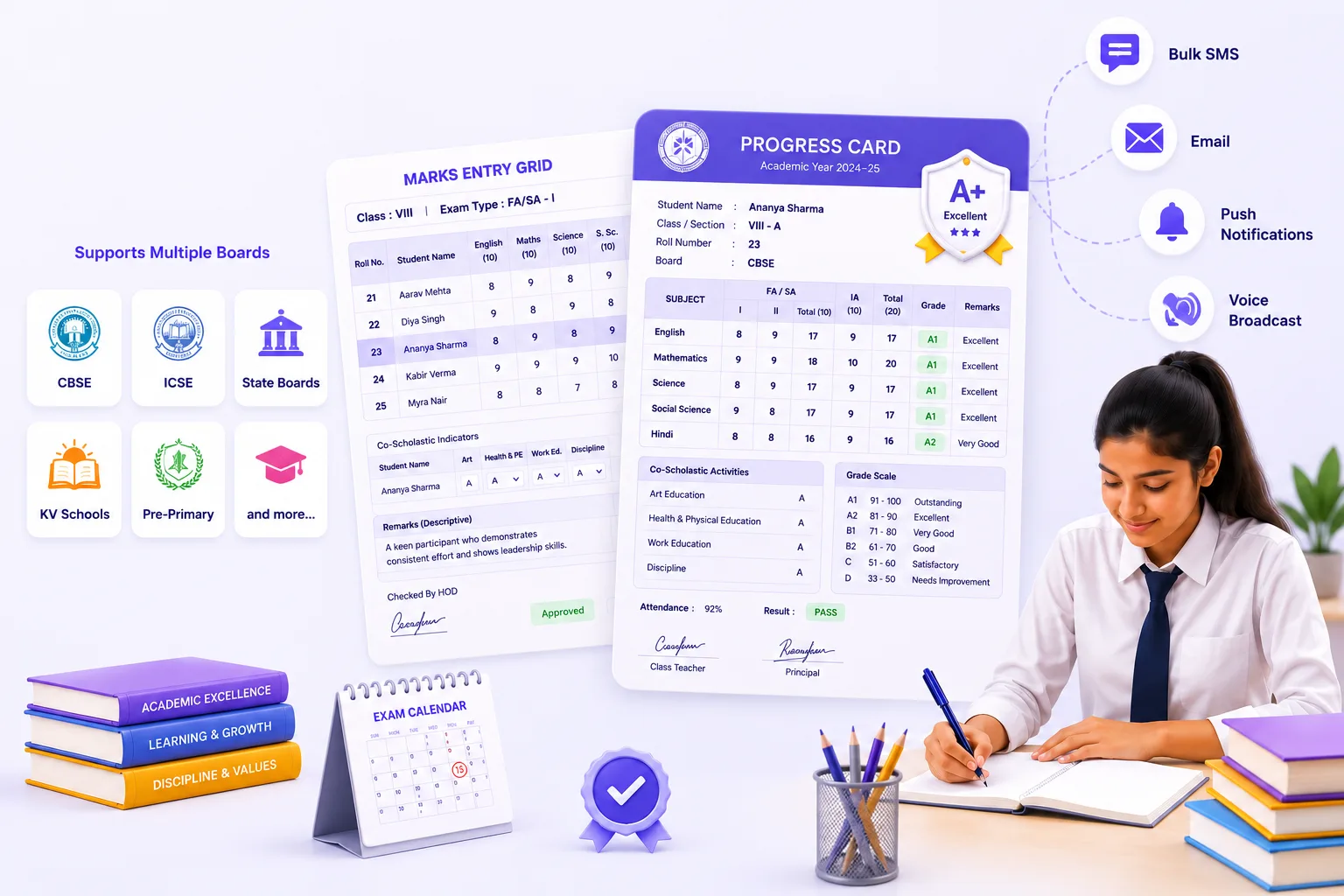
- Board-specific exams, grade scales, co-scholastic activity definitions
- Subject-to-exam mapping, subject-wise marks entry for FA/SA & IA
- Co-scholastic & descriptive indicator entry, correction with HOD authorisation
- Bulk upload & hall ticket generation
- Auto-grade assignment, weighted totals, SGPA, CGPA, pass/fail determination
- Print-ready progress cards for CBSE, ICSE, State boards, KV & Pre-Primary
Overview
What Does CCE & Progress Cards Do?
CCE & Progress Cards gives schools a complete, board-compliant assessment & report card platform covering the full cycle. From configuring exam types & grade scales for each board, through teacher marks entry for academic & co-scholastic components, to automatic grade computation & print-ready progress card generation for every student. It supports K–12 across CBSE, ICSE, State boards, KV, and Pre-Primary formats. Without a separate setup per board. Schools in a Group of Institutions running multiple boards manage all progress card requirements from the same platform.
Board Support
Supported Boards: Pre-Primary to K-12
The module ships with pre-configured formats for each board. State board templates are configurable without additional development.
| Board | What the Module Provides |
|---|---|
| CBSE | FA/SA exam structure, A1-E grade scale, CCE Performance Profile in 2-page (Term) and 4-page (full year) formats, co-scholastic and descriptive indicator sections |
| ICSE | Term 1/Term 2 structure, 100-point grading, ICSE Performance Profile in 2-page format per term |
| State Boards | Configurable per board: grade templates & schema set up for each state board without additional development |
| KV (Kendriya Vidyalaya) | Kendriya Vidyalaya-specific progress card template with KV-prescribed format |
| Pre-Primary | Nursery, LKG, and UKG progress card templates; appropriate for early years assessment reporting |
Benefits
How Does it Help Schools?
One Platform for Every Board, Including Mixed-Board
Schools in a Group of Institutions often run more than one board: a CBSE senior school alongside a State board junior school, or a KV-affiliated campus alongside a private ICSE institution. Handles all boards within the same platform.
Teachers Enter Marks Once
Once marks are entered in subject-wise entry grid, grade computation engine handles everything: weighted totals across IA & theory, grade assignment, SGPA per term, cumulative CGPA, pass/fail determination & overall result.
Marks Integrity Protected at Every Stage
Marks entry locks at the configured date, preventing post-deadline changes without an authorised unlock. Corrections after submission require HOD authorisation with a documented workflow. Every change to a submitted marks record is logged.
Progress Cards Ready to Print on Result Day
Class-wise batch progress card generation produces print-ready PDFs for all students in a class simultaneously. Board-specific formats, co-scholastic sections & descriptive indicators are auto-included from the configuration & marks data.
Co-Scholastic & Descriptive Indicators Captured
Progress cards that leave co-scholastic & descriptive indicator sections blank are a common gap in school report card systems. We capture both, per student, per subject, as part of the marks entry workflow, and auto-include them.
Key Capabilities
What the Module Delivers
Board-Specific Configuration
Exam types, grade scales, co-scholastic definitions & progress card schemas configured per board, without additional development.
FA/SA and IA Marks Entry
Subject-wise entry grid for all exam components with weighted IA total computation, status tracking (Pending/Partial/Submitted), and bulk Excel upload.
Co-Scholastic Assessment
Activities, attitudes & values entry per student. Captured in the marks entry workflow and printed on the progress card.
Descriptive Indicators
Grade-band-specific descriptive text per subject per student. Configurable per institution and printed on board-compliant cards.
HOD Authorisation for Corrections
Post-submission marks corrections require HOD approval. Maintaining marks integrity with a documented authorisation trail.
Automatic Grade and Result Computation
Grade assignment, weighted totals, SGPA, CGPA, pass/fail, and overall result computed automatically from entry data.
Marks Lock with Unlock Workflow
Marks locked by authorised staff after the entry window; unlocking requires a separate authorised action, preventing unauthorised post-deadline changes.
Consolidated Result Sheet
Class and section-wise result sheet generated from computation data, for examination coordinator review before progress card release.
Multi-Format Progress Cards
CBSE 2-page and 4-page, ICSE 2-page, State board, KV, and Pre-Primary templates. Board-appropriate format applied automatically per student.
Batch and Individual Print
Class-wise bulk PDF generation at once. Individual student card view & print. PDF export & bulk download.
Hall Ticket Generation
Hall tickets for CCE assessments generated from the marks configuration and student data.
Who Uses It?
Designed for Every Examination Stakeholder
Exam Coordinator/Admin
- Configure board-specific exam types, grade scales & co-scholastic definitions at start of academic year
- Set marks entry lock dates and manage the entry status across subjects & teachers
- Generate consolidated result sheets & trigger class-wise progress card batch printing
Subject Teachers
- Enter FA/SA, IA component, co-scholastic & descriptive indicator marks in the subject-wise entry grid
- Upload bulk marks via Excel for large sections; track submission status per subject
HOD/Academic Head
- Authorise marks corrections requested after the submission deadline
- Review marks entry status across subjects in the department before lock
School Management/Principal
- Access consolidated result sheets and progress card generation for any class
- Review pass/fail distribution and overall result classification across the school
Scale
Designed for School Groups
Whether managing CCE and progress cards for a single school or across a Group of Institutions with multiple boards and campuses:
Board Configuration
Each school in a group configures its board-specific schema on one platform.
Built for Students at Scale
Handle bulk marks upload & class-wise batch progress card generation.
One System, Every Board
Multi-board support enables one software for every school in the group.
Governance Built In
Marks lock, HOD authorisation & audit trail provide governance controls.
Every Board. Every Class.
Every Progress Card. Ready to Print.
See how edumerge's CCE & Progress Cards module gives schools a complete board-compliant assessment platform, built into School ERP.
Frequently Asked Questions
Common questions about CCE & progress card software for schools
What is CCE in school progress cards?+
CCE (Continuous and Comprehensive Evaluation) is an assessment approach that combines scholastic marks from formative and summative exams with co-scholastic indicators like discipline, participation, and life skills. edumerge's CCE & Progress Cards module lets schools configure exam types, weightages, and grading scales to match their board's CCE structure.
Can one system generate progress cards for CBSE, ICSE, and State board schools?+
Yes. edumerge supports board-specific grade scales, exam patterns, and report card layouts for CBSE, ICSE, State boards, KV, and Pre-Primary formats within the same platform. Each board's format, weightages, and co-scholastic indicators are configured independently, so a school group running multiple boards doesn't need separate software per campus.
How does marks entry and correction work?+
Subject teachers enter marks against exam types (FA/SA/IA) mapped to their subjects. Corrections after submission require HOD authorisation, so every change is tracked and approved rather than edited silently. This keeps the final progress card audit-ready before printing.
Can progress cards be printed in bulk for an entire class or school?+
Yes. Once grades are computed and approved, progress cards can be generated and printed class-wise or school-wide in one run, rather than one student at a time. This is built specifically to handle the volume a full-school report card cycle requires.
Does the system calculate SGPA and CGPA automatically?+
Yes. For boards and grade structures that use SGPA/CGPA, edumerge computes these automatically from entered marks and configured weightages, removing manual calculation and the errors that come with it.