College Photo Gallery
Campus Event Gallery Management for Colleges & Universities
Every convocation. Every cultural fest. Every achievement. Documented, categorised & accessible, within the College ERP.
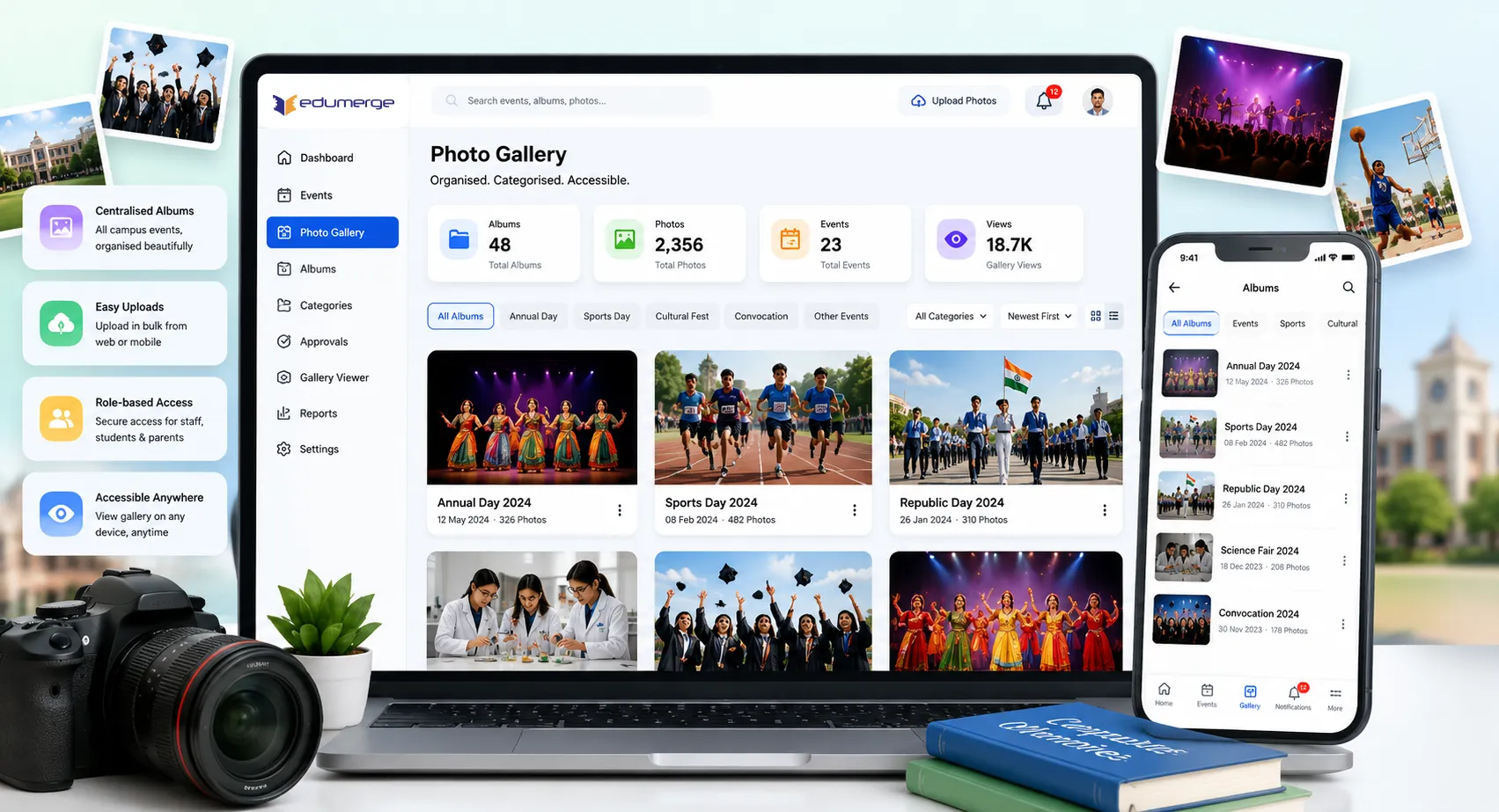
- Institutional photo gallery with categorised albums for academic events, cultural programmes, sports activities & campus milestones
- Event photo uploads managed centrally, replacing scattered department-wise WhatsApp groups & personal cloud folders
- Gallery viewer accessible to faculty, students, parents & alumni
Overview
What Does the Photo Gallery Do for Colleges?
The Photo Gallery is the institutional visual record of the college. A structured, centralised repository for event photographs, activity images, and campus milestones organised by category and accessible within the College ERP. Colleges generate a significant volume of institutional photography across the academic year: convocation, cultural fests, technical symposiums, sports meets, department-level seminars & community outreach activities. The Gallery addresses this by providing a single, categorised repository within the ERP that faculty, students & parents can access through the platform they already use for attendance, fees & academic records.
Benefits
How Does it Help Colleges?
NAAC Documentation Evidence
IQAC coordinators can browse categorised galleries and select photographic evidence for self-study reports without collection overhead.
Institutional Memory Persisting Beyond Faculty Tenures
Gallery ensures college's photographic record is institutional. Photographs from 5 years ago are in the same system as last semester's convocation.
Students & Parents Engaged With Campus Life
Parents have visibility into campus life through updated event photographs across the academic year. Students can directly share album links.
Admissions Conversations Backed by Visual Evidence
Gallery shows prospective students and parents real events, scale of annual activities, and quality of campus infrastructure answering what student life is like.
Centralized Repository Reducing Scattered Storage
All campus event photographs replaced scattered WhatsApp groups, personal cloud folders, and department-wise unorganised collections.
Structured Access Control & Governance
Gallery viewer permissions managed within the ERP. Faculty, students, parents & alumni access albums without separate accounts or external links.
Features
Key Capabilities
A detailed view of all Photo Gallery features.
Photo Gallery Management
Gallery Dashboard
Central view of all institutional albums, organised by event category with upload status, photo count & last updated timestamp.
Categorised Albums
Albums organised by event type; Convocation, Cultural Fest, Tech Symposium, Sports Meet, Community Outreach & any institution-defined.
Event Photo Uploads
Photographs uploaded directly into Gallery from within College ERP by admin or dept coordinators. Uploads are immediately categorised.
Gallery Administration
Administration & dept coordinators create, update & maintain gallery without requiring technical support or separate content management tool.
Gallery Viewer & Access
Gallery Viewer Interface
Accessible to faculty, students, parents, and alumni from within the College ERP. No separate app, no external link, no permission request.
Role-Based Gallery Access
Different stakeholders access the gallery through their College ERP roles. Faculty can upload and manage, students and parents can browse.
Album Browsing & Searching
Stakeholders browse and search event albums by category or date. Gallery viewer shows album metadata, photo count and event details.
Institutional Integration
Gallery accessed from the same portal used for attendance, fees, and academic records. No context switching or external systems.
Workflow
How the Photo Gallery Works in a College
The complete gallery lifecycle, from campus event to accessible album
Event or activity photographed during the campus programme
Department coordinator or administration uploads photos to the Gallery from within the College ERP
Album created or selected, event categorised (Convocation, Cultural Fest, Sports Meet, etc.)
Gallery updated; photos accessible to faculty, students & parents through the gallery viewer
IQAC or administration accesses categorised albums for NAAC documentation, reports, or admissions
Analytics
Built-In Reports & Analytics
Pre-built analytics dashboards and reports for institutional review.
Gallery Statistics
- Album count by category
- Photo count across institution and by category
Event Documentation Report
- Albums created, event category, photo count, upload date
- For institutional records and accreditation
NAAC Documentation Evidence
- Categorised albums supporting NAAC criteria documentation
- Evidence of academic, cultural, sports & community activities
Campus Activity Overview
- Timeline of institutional events documented photographically
- For institutional reports, management review & external communications
Personas
Designed for Every Gallery Stakeholder
Administration / Gallery Manager
- Create & manage categorised albums for institutional events & activities
- Upload photographs promptly after events, maintaining a current, complete gallery
- Manage the gallery library across academic years, preserving institutional history
Department Coordinators / Faculty
- Upload department-level event photographs; seminars, workshops, departmental activities
- Access gallery to compile evidence for NAAC documentation & institutional reports
IQAC / Accreditation Cell
- Browse categorised albums to locate & compile photographic evidence for NAAC criterion documentation
- Access historical event photographs without departmental coordination overhead
Students & Parents / Alumni
- Browse event galleries: convocation, cultural fest, sports activities, from their college portal
- View campus event photographs and stay connected to institutional life across the academic year
Scale
Designed for Scale
Whether managing a gallery for a single campus or across a group of institutions.
Institutional photo record preserved within the ERP independent of individual faculty tenure
Categorised albums accommodate any number of event types & activity categories across academic years
Gallery viewer accessible to all faculty, students, parents & alumni without separate accounts or permissions
NAAC documentation evidence compiled from structured gallery without email coordination overhead
Every Campus Event. Every Academic Year. One Institutional Gallery.
See how edumerge's Photo Gallery module gives colleges a structured, categorised institutional photo gallery. Accessible to faculty, students & parents within the College ERP, and available as photographic evidence for NAAC documentation.
Frequently Asked Questions
Common questions about edumerge's College Photo Gallery module
Where are event photos stored, and who can upload them?+
Event photographs are stored centrally within the College ERP, organised into categorised albums by event type. Administration and department coordinators upload photos directly from within the ERP, and uploads are immediately categorised, replacing scattered WhatsApp groups and personal cloud folders.
Can faculty, students and parents all view the gallery, or only staff?+
The gallery viewer is accessible to faculty, students, parents and alumni through their existing College ERP login and role. No separate app, external link or additional permission request is needed; access is managed within the same portal used for attendance, fees and academic records.
How does the Photo Gallery help with NAAC accreditation documentation?+
IQAC coordinators and the accreditation cell can browse categorised albums covering academic, cultural, sports and community activities to select photographic evidence for self-study reports. Because albums are already categorised by event type, this evidence is compiled without the usual email coordination and collection overhead.
What happens to the photo gallery when a faculty member or coordinator leaves?+
The gallery is an institutional record within the ERP, not a personal folder or device tied to any one person. Photos from years past remain in the same system as the latest semester's events, so the college's photographic history persists independent of individual faculty tenure.
Can we organise the gallery by our own event categories, like convocation or sports meets?+
Yes. Albums can be organised by any institution-defined event category, such as Convocation, Cultural Fest, Tech Symposium, Sports Meet or Community Outreach. Administration and department coordinators can create, update and maintain these albums directly, without needing technical support or a separate content management tool.