Staff Profile
Staff Profile Management for Educational Institutions
One complete staff record. Payroll, appraisals, documents & more.
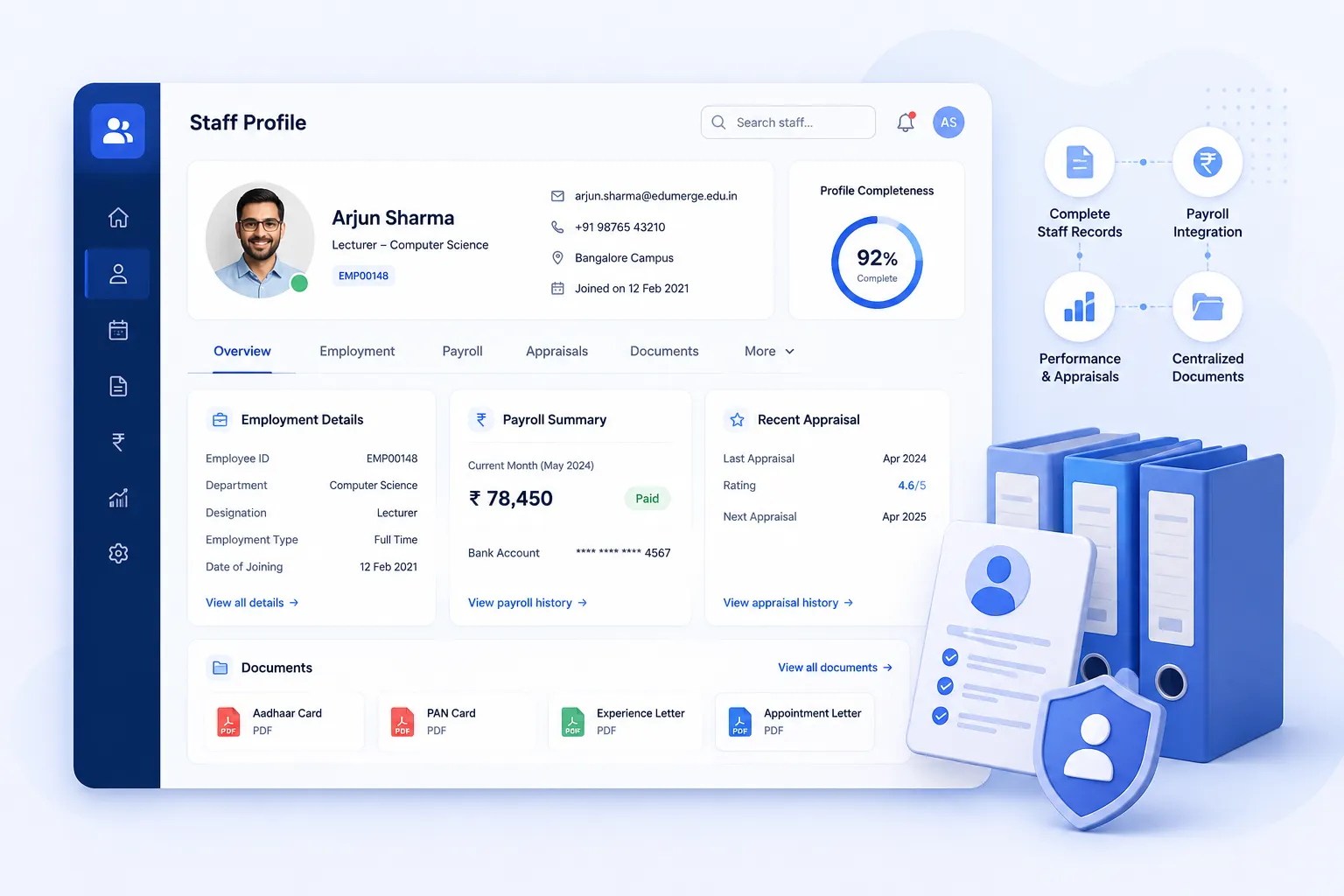
- HRMS-context staff profile integrating payroll records, appraisal history & docs
- Single source of truth for every staff member across all HRMS modules
- Document management per staff; stored, versioned & accessible from one place
Overview
What Does This Module Do?
Staff Profile is the central record for every employee in the HRMS. It's not a standalone contact sheet, but a live, integrated profile that pulls together payroll data, appraisal history, and personal documents into one HRMS-context view. Every other module in the HRMS writes back to the Staff Profile, so HR always has a complete, current picture of each employee without switching between systems or manually consolidating records.
Benefits
How Does it Help Institutions?
One View of the Whole Employee
HR no longer needs to open payroll, navigate to appraisals & separately search for documents to understand one employee's status. The Staff Profile brings all of it into a single HRMS-context view.
Live Data, Not a Static Record
Because the profile integrates directly with payroll & appraisal modules, the data shown is always current. A payroll change or a completed appraisal is reflected in the profile immediately.
Documents Where They Belong
Offer letters, certificates, background verification reports, and onboarding declarations are stored against the staff member's profile. Not in a shared drive folder or email thread. The right document is always one click away for HR.
Consistent Record Across the Employee Lifecycle
From onboarding through probation, appraisals & eventual exit, every significant action in the HRMS adds to the Staff Profile. When leadership or auditors need to review an employee's history, the profile is the complete record.
Features
Key Capabilities
Everything you need for comprehensive staff profile management
Staff Profile View (HRMS Context)
Structured, comprehensive view of each employee's record - personal details, role, department, employment type, reporting line, and status.
Payroll Records Integration
Current salary structure, salary history, payslips, and LOP records accessible directly from the staff profile. Linked live from the Payroll module.
Appraisal History Integration
All completed appraisal cycles, KRA scores, ratings, manager comments, and outcome decisions surfaced in the staff profile.
Document Management per Staff
Upload, organise, and manage all documents - identity proof, certificates, offer letter, background verification reports - stored securely.
Employment History
Chronological record of positions, designations, departments, and reporting lines. Updated automatically as changes are processed.
Cross-Module Data Surface
Attendance summary, leave balance, probation status, L&D completions, and compliance records surfaced from across the HRMS.
Built for Real Institutional Workflows
The Staff Profile as the living record across the full employee lifecycle
Employee record created & activated on completion of digital onboarding
Personal details, role & department populated from onboarding data
Payroll structure linked at the point of first salary processing
Appraisal history builds automatically as each cycle completes
Documents uploaded by HR at key lifecycle events (joining, confirmation, promotion)
Profile remains the single reference point through exit and F&F settlement
Who Uses It?
Designed for every stakeholder in your institution
HR Admin
- Maintain & update staff records across all profile sections
- Upload & manage employee documents from a single location
- Access payroll & appraisal data in context without switching modules
Department Managers
- View direct report's profile for role, history & performance context
- Reference appraisal history before performance conversations
Management / Leadership
- Access complete staff records for governance & audit purposes
- Confidence that every employee record is accurate & up to date
Analytics
Reports & Insights
Profile Completeness Report
Identify staff records with missing documents or incomplete profile sections requiring HR attention
Document Expiry Tracking
Surface documents approaching expiry (e.g. certs, contracts) so HR can request renewals in advance
Employee History Export
Generate complete employment history report for any staff member; useful for audits, promotions, or exit
Designed for Scale
Whether managing staff across a single campus or a group of institutions, Staff Profile ensures:
Every employee has a single, consistent record regardless of which campus they belong to
Group institutions can access staff profiles across campuses from one centralised HRMS view
All profile data is retained securely and available for compliance, audit, and governance requirements
Every Staff Member. One Complete Record. Always Current.
See how edumerge's Staff Profile module gives HR a single, integrated view of every employee - with payroll, appraisal history, and documents in one HRMS-context record.
Frequently Asked Questions
Common questions about the Staff Profile module in edumerge HRMS
How is a Staff Profile different from a basic employee database?+
A basic employee database is a static record of personal details. The Staff Profile is a live, HRMS-context view that pulls in payroll history, appraisal outcomes, and documents from other modules as they happen. HR sees one current record instead of consolidating data from separate systems.
Does the profile update automatically when payroll or appraisal data changes?+
Yes. Payroll records, salary history, and appraisal outcomes are linked live from the respective HRMS modules, so a payroll change or a completed appraisal cycle reflects in the Staff Profile immediately. HR does not need to manually re-enter or sync this data.
What documents can be stored against a staff member's profile?+
Identity proof, certificates, offer letters, and background verification reports can all be uploaded, organised, and stored securely against the individual staff profile. This keeps HR from relying on shared drives or email threads to locate a document during audits or reviews.
Can department managers see the same staff profile as HR?+
Department managers can view their direct reports' profiles for role, employment history, and appraisal context ahead of performance conversations. HR admins retain full access to maintain and update records, upload documents, and manage payroll and appraisal data across all staff.
Does Staff Profile work across multiple campuses for a group of institutions?+
Yes. Every employee has a single, consistent record regardless of campus, and group institutions can access staff profiles across all campuses from one centralised HRMS view. This gives leadership a governance and audit-ready record without consolidating data from separate campus systems.