School Online Tests
Online Assessments for Schools
Create, copy & conduct timed online assessments with MCQ & subjective questions, auto-grading, and class-wise analytics.
- Subject & chapter-wise questions with difficulty tagging, marks configuration & bulk Excel import
- Timed tests for classes & sections: manual or random question selection, copy assessment, scheduled publish/deactivate
- Timer-based student test interface, MCQ auto-grading, instant result display, class-wise performance summary & Excel export
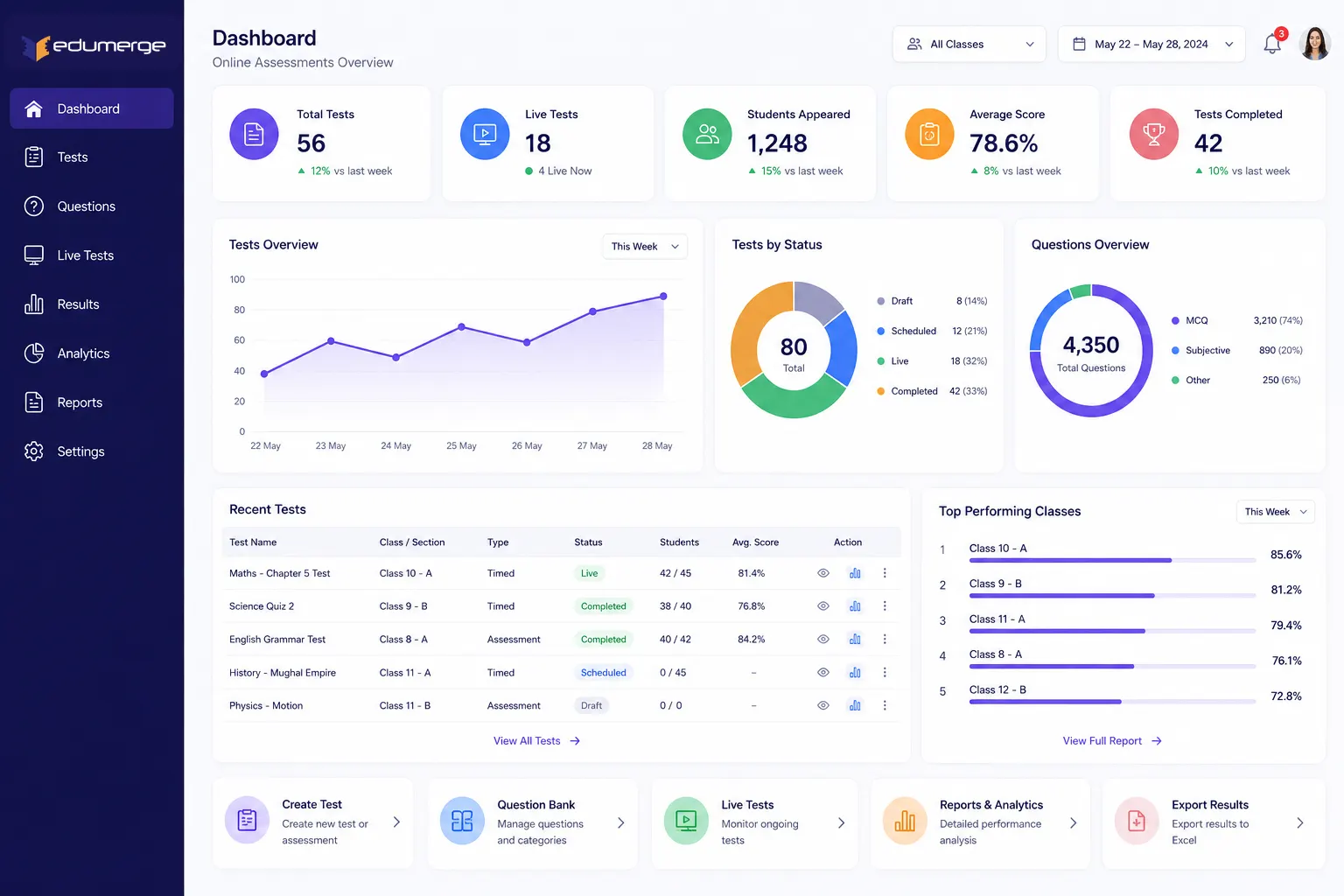
What Does Online Assessments Do?
Online Assessments gives schools a complete online test platform built into the School ERP. Covering every stage from building the question bank through configuring & delivering timed tests to analysing results.
How Does it Help Schools?
A Question Bank That Gets More Useful Over Time
Questions are created once & reused across assessments: tagged by subject, chapter, topic, difficulty level, and marks.
Tests Built in Minutes
The copy assessment feature duplicates an existing test with all its settings intact: structure, duration, attempt limits, instructions & question selection.
Random Question Selection Discourages Sharing
Assessments using random question selection draw from the question bank differently for each configuration run, without building separate tests for each group.
MCQ Auto-Grading Delivers Results Immediately
MCQ and true/false questions are auto-graded on submission. Results appear to students the moment the test is completed or times out, with immediate feedback.
Analytics Show Where the Class Struggled
Class-wise performance summary, subject & chapter-wise accuracy analysis, and top performers & rank list give teachers a layered view of results.
Results Ready to Export
All assessment results are exportable to Excel; for report cards, parent communication, management review, or submission to the academic coordinator.
The Complete Online Assessment Lifecycle
From question bank setup to class results in hand
Teacher builds or uploads question bank for the relevant subject & chapter
Assessment created: subject, class, section, duration & attempt limit configured
Questions selected manually or drawn randomly from the bank
Instructions added; assessment previewed to confirm layout & question set
Assessment published: visible in student test queue from the scheduled start time
Students take the test within the scheduled window; timer auto-submits on timeout
MCQ responses auto-graded; instant results displayed to students on submission
Teacher reviews class-wise performance summary & chapter-wise accuracy analysis
Results exported to Excel: reports, parent communication, or management review
Key Capabilities
Question Bank
Question Bank per Subject & Chapter/Topic
Matching the curriculum structure teachers already work with, and making question retrieval by chapter straightforward when building assessments.
MCQ, True/False & Short-Answer Types
Three question types supported. MCQ & true/false are auto-graded; short-answer requires manual marking.
Difficulty Level Tagging
Each question is tagged with a difficulty level. Enabling teachers to build tests with a defined difficulty distribution.
Marks per Question Configuration
Marks are configured per question. Allowing tests with uniform marking as well as tests where higher-difficulty questions carry more marks.
Bulk Question Upload via Excel Template
Question bank populated in bulk using a standardised Excel template. Enabling teachers to prepare questions offline.
Question Preview and Edit
Questions are previewed exactly as students will see them before being included in an assessment, and can be edited at any point while not in active use.
Question Usage History
Each question carries a history of which assessments have used it. So teachers know how recently & frequently a question has been tested.
Assessment Configuration
Targeted Assessment Creation
Each assessment is configured with a subject, target class & section. Ensuring it appears in the correct student group's test queue and results.
Question Selection (Manual or Random)
Teachers select questions manually from the bank for full control over the test composition, or specify a count & difficulty mix for random selection.
Copy Assessment
An existing assessment is duplicated with all settings. Ready to be rescheduled or retargeted without rebuilding.
Test Duration and Attempt Limit
The test window & number of attempts a student is permitted are configured per assessment. Single-attempt tests or multi-attempt practice sessions.
Schedule: Start and End Date/Time
Tests open & close at configured date & time, students can access the test only within the scheduled window.
Instructions Text for Students
A custom instructions block is displayed to students before they begin the test, for test rules, duration reminders, or subject-specific guidance.
Assessment Preview Before Publish
The full assessment: questions, instructions, timer, and layout, is previewed as the student will see it before the test is published to the class.
Publish and Deactivate
Published assessments are live in the student's test queue. Deactivated assessments are removed from the queue without deletion.
Assessment Wrapper = Embedded Delivery
Assessments run embedded inside the School ERP. Keeping the test experience contained within the platform & avoiding external browser navigation.
Conduct & Results
Timer-Based Interface/Auto-Submit
The student test interface displays a live countdown timer. When the timer reaches zero, the test is submitted automatically.
MCQ Auto-Grading & Instant Result
MCQ & true/false responses graded against answer keys configured, on submission. Results: score, percentage & question-level feedback.
Student Test History and Score Tracking
Each student's full test history: assessments taken, scores, dates & attempt count, is accessible for academic tracking across the year.
Class-Wise Performance Summary
Aggregated view of class performance on each assessment. Avg score, distribution, pass/fail count & per-student results in a single view.
Subject and Chapter-Wise Accuracy Analysis
Accuracy broken down by subject topic & chapter. Showing which areas of the syllabus the class performed strongly in and which require revisiting.
Top Performers and Rank List
Students ranked by score for each assessment. Giving teachers a rank list & management to identify academic performance leaders.
Result Export to Excel
Assessment results: student names, scores, question-level responses & rank, exported to Excel for distribution or report card preparation.
Analytics & Reports
Class-Wise Performance Summary
Average score, score distribution, and per-student results for any assessment, for teacher review and class-level feedback.
Subject & Chapter-Wise Accuracy Analysis
Topic-level accuracy breakdown, showing where the class performed well and where intervention is needed.
Result Export to Excel
Complete result set for any assessment, for report cards, parent communication, and management reporting.
Top Performers & Rank List
Student ranking by score per assessment, for recognition and academic performance tracking.
Student Test History
Full assessment history per student, assessments taken, scores, dates, and attempt count.
Designed for Every Assessment Stakeholder
Teachers / Subject Staff
- Build & maintain the subject and chapter-wise question bank
- Create, configure & schedule assessments for their classes & sections
- Review class performance, chapter accuracy & rank lists after each test
Students
- Take timed tests in the embedded assessment interface
- Receive instant results on MCQ & true/false submissions
- Access test history & past scores from their profile
Academic Coordinator / Principal
- Review class-wise performance summaries across subjects & assessments
- Access exported results for management reporting & academic review
- Monitor assessment frequency & coverage across classes
Business Impact at Scale
Bulk question upload and copy assessment enable rapid test creation across multiple classes without rebuilding from scratch
MCQ auto-grading & instant results deliver feedback to every student regardless of class size, without teacher marking time
Chapter-wise accuracy analysis shows exactly where students struggled, pointing directly to where teaching intervention is needed
Scheduled start & end times allow simultaneous tests across sections without manual coordination
Built, Scheduled, Graded & Analysed - Inside the School ERP.
See how edumerge's Online Assessments module gives schools a complete online test platform. With subject-wise question bank, timed MCQ & subjective tests, MCQ auto-grading, class-wise performance analytics, and result export; built into School ERP.
Frequently Asked Questions
Common questions about online assessments and MCQ auto-grading for schools
Can teachers reuse questions across multiple tests instead of creating them each time?+
Yes. Questions are created once in the subject and chapter-wise question bank, tagged by difficulty level and marks, and reused across any number of assessments. Each question also carries a usage history showing which assessments have used it and how recently, so teachers can avoid repeating the same questions too often.
Does the platform auto-grade tests, or does the teacher still need to mark them?+
MCQ and true/false questions are auto-graded on submission, with results and instant feedback shown to the student immediately. Short-answer questions are supported as a question type but require manual marking by the teacher, since they are not objectively auto-gradable.
How does random question selection stop students from sharing answers?+
When an assessment uses random question selection, the platform draws questions from the bank differently for each configuration run rather than serving an identical fixed paper. Teachers set a question count and difficulty mix instead of building separate versions of the test by hand.
What happens if a student's internet drops or they run out of time during a timed test?+
The student test interface displays a live countdown timer for the configured test duration, and the assessment auto-submits automatically once the timer reaches zero. Each assessment also has a configured attempt limit, so schools can allow a single attempt or multiple attempts depending on whether it is a formal test or a practice session.
Can the school see which topics a class is struggling with, not just overall scores?+
Yes. Beyond the class-wise performance summary and rank list, results are broken down by subject and chapter-wise accuracy analysis, showing exactly which parts of the syllabus the class handled well and which need revisiting. Results and question-level responses can also be exported to Excel for report cards or management review.