Expense & Claims Mgmt
Expense & Claims Management for Educational Institutions
Every claim submitted. Every payable tracked. Every revenue channel: canteen, events, books, uniforms, managed in one module.
- Expense claims submission & management
- Configurable categories, reimbursement workflows & approval routing
- AP/AR management & purchase invoice entry with workflow approvals & RBAC
- Sales & revenue management: canteen & wallet, ASA programs, events & ticketing, books & uniforms, product catalog, and vendor partnerships
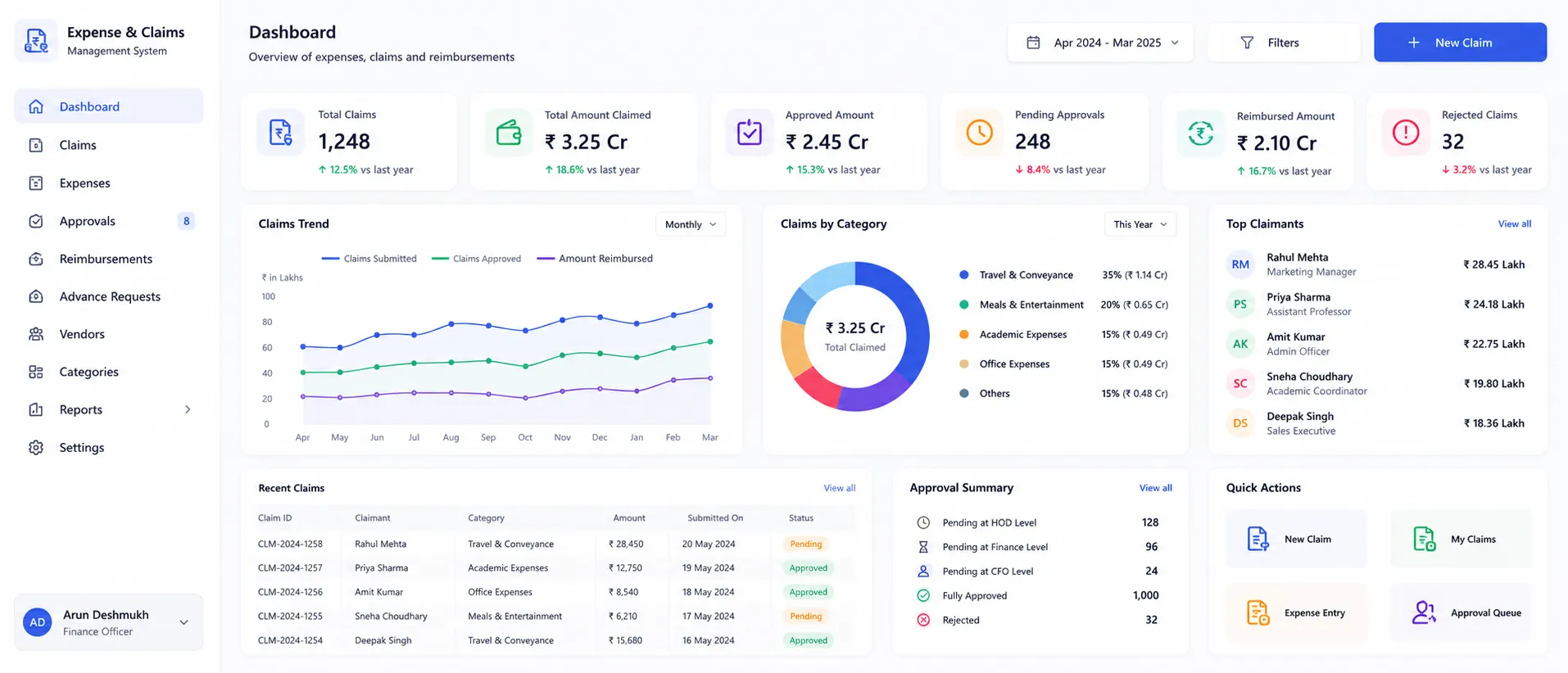
Overview
What Does Expense & Claims Management Do?
Expense & Claims Management covers the full spectrum of non-payroll financial activity in an educational institution. From the staff member submitting a travel claim to the finance officer processing a purchase invoice, from the canteen recording a student meal transaction to the events team reconciling ticket sales. The module is structured around three operational areas: expense and reimbursement management for staff claims; AP/AR and procurement invoicing for institutional payables and receivables; and a sales and revenue layer covering every non-fee income channel the institution operates.
Benefits
How Does it Help Institutions?
Seamless Expense Claims
Staff submit claims digitally, with category, amount, description & supporting docs attached. Claims auto-route through configured approval workflow.
Expense Categories Enforcing Policy
Configurable expense categories define what the institution considers a reimbursable expense and how each category is handled.
AP/AR Managed
Accounts Payable & Accounts Receivable tracked. Connected to same accounting engine that handles payroll, procurement & fee management.
Purchase Invoice Processing
Purchase invoices entered against approved purchase orders & routed through the configured approval workflow before payment is cleared.
Canteen Sales & Student Wallets
Canteen sales recorded against student wallet balances. Enabling cashless transactions at the canteen counter. Wallet top-ups managed.
Complete P&L Reports
P&L report covers all institutional revenue. Canteen, events, ASA, books, uniforms & other non-fee revenue lines flow into the P&L.
Key Capabilities
Expense & Reimbursement
Expense Claims
Staff submit expense claims digitally. Specifying expense category, amount, date, purpose & attaching supporting documents.
Expense Categories
Reimbursable expense categories configured centrally. Each category can have associated rules & documentation requirements.
Reimbursement Management
Approved expense claims consolidated for reimbursement processing. Finance tracks which have been reimbursed & which are pending.
RBAC Configuration
Role-Based Access Control configured per finance function. Defining which roles can submit, review, approve & report on each transaction type.
AP/AR & Procurement Invoicing
AP/AR Management
Accounts Payable and Accounts Receivable are managed within the Finance & Control module. Payables track amounts owed to vendors. Receivables track amounts owed to the institution from institutional transactions.
Purchase Invoice Entry
Purchase invoices are entered against the relevant purchase order or vendor record. Invoice details: vendor, date, amount, tax, and line items, are captured and the invoice is routed for approval before payment clearance.
Workflow Approvals
All financial transactions requiring authorisation: expense claims, purchase invoices, reimbursements & sales adjustments route through configurable multi-level approval workflows. Approvers act on their queue.
Sales & Revenue
Sales & Revenue Dashboard
Consolidated view of all institutional sales revenue: canteen, ASA programs, events, books, uniforms & vendor partnerships, in one dashboard. Total non-fee revenue by channel, period, and category.
Canteen Sales & Wallet Management
Canteen transactions are recorded against student digital wallet balances, enabling cashless purchases. Wallet top-ups are processed through the module. Transaction history per student is retained for account review.
Events & Ticketing
Institutional events: annual days, sports meets, cultural programs, seminars, with associated ticket or registration revenue are managed within the module. Ticket sales are recorded, attendee lists are maintained.
Books & Uniforms Sales
Sales of books, uniforms, and similar items to students or parents are managed through the module. Inventory levels, order fulfilment, and payment recording are handled within Finance & Control.
Product Catalog Management
The institution's billable product catalog: items available for purchase by students, parents, or staff, is managed centrally. Products are configured with pricing, availability, academic year scoping, and grade-level mapping.
P&L Reports
Profit and Loss reports covering all revenue and expenditure tracked within the Expense & Claims module: canteen, ASA, events, product sales, expense claims, and purchase costs are generated from live data.
Stakeholders
Designed for Every Finance Stakeholder
Finance Admin / Accounts Officer
- Process expense reimbursement claims & manage the approval inbox
- Enter & route purchase invoices through the approval workflow
- Reconcile AP/AR positions & track outstanding payables & receivables
Canteen / Sales Counter Staff
- Record canteen transactions against student wallet balances
- Process product sales, book orders & uniform purchases at the counter
- Access limited to sales entry only, no AP/AR or claims visibility
Event Coordinator / ASA Team
- Record event ticket sales & ASA program fee collections in the module
- Track participant records & revenue per event or program
Finance Manager / CFO
- Review the Sales & Revenue dashboard for consolidated non-fee revenue by channel
- Access P&L reports covering expense, procurement & sales activity
- Monitor workflow approval queues & SLA compliance across all transaction types
- Configure RBAC roles & expense categories as institutional policies change
Staff / Claimants
- Submit expense claims with supporting documents through the self-service portal
- Track claim status through the approval workflow without following up with finance
- View personal reimbursement history
Reports & Insights
Reports & Insights
Sales & Revenue Dashboard
Consolidated non-fee revenue by channel: canteen, ASA, events, books, uniforms, for the current period and year to date
P&L Report
Full Profit & Loss covering all revenue and expenditure tracked in this module, for finance review and management reporting
Expense Claims Register
All claims by status, category, claimant, and period, for reimbursement planning and expense policy review
Reimbursement Outstanding
Approved claims pending reimbursement: amounts and ageing, for finance liability management
Purchase Invoice Status
All invoices by status, vendor, and approval stage, for AP management and payment planning
AP Ageing Report
Outstanding payables by age: current, 30, 60, 90+ days, for cash flow management
Canteen Revenue & Wallets
Canteen sales and wallet activity by student, date, and transaction type
Event Revenue Report
Ticket sales and revenue per event, for post-event financial review
Product Sales Report
Books, uniforms, and catalog product sales by item, period, and grade; for inventory and revenue planning
RBAC Audit Log
User access and role assignments, for governance review and compliance documentation
Scale
Designed for Scale
Whether managing expense claims and sales for a single institution or across a group, Expense & Claims Management ensures:
Expense categories & reimbursement policies applied consistently across all departments & campuses
RBAC configuration that scales to any number of roles without manual access management per individual
All sales revenue channels consolidated in one dashboard, regardless of how many sales touchpoints the institution operates
P&L reports covering every non-fee revenue line without manual data consolidation from separate systems
Every Claim Processed. Every Invoice Tracked. Every Revenue Channel in One Dashboard.
See how edumerge's Expense & Claims Management module gives educational institutions a complete platform for staff expense reimbursements, AP/AR and purchase invoicing, and non-fee sales revenue. With workflow approvals and RBAC built into every transaction type.
Frequently Asked Questions
Common questions about expense claims, AP/AR and sales revenue management
What does Expense & Claims Management cover in edumerge's Finance & Control suite?+
It covers three areas in one module: staff expense claims and reimbursements, Accounts Payable/Accounts Receivable with purchase invoice processing, and non-fee sales revenue such as canteen, events, books, and uniforms. All three connect to the same accounting engine that handles payroll, procurement, and fee management. This gives finance teams a single system for every non-payroll financial activity rather than separate tools per function.
How does the expense claim approval workflow work?+
Staff submit a claim digitally with category, amount, description, and supporting documents attached, and the claim auto-routes through the institution's configured approval workflow. Approvers act on claims from their queue, and finance tracks which approved claims have been reimbursed and which are still pending. Expense categories are configured centrally so each category carries its own rules and documentation requirements.
Can the module handle vendor purchase invoices and AP/AR, not just staff reimbursements?+
Yes. Purchase invoices are entered against the relevant purchase order or vendor record, with vendor, date, amount, tax, and line items captured, then routed for approval before payment clearance. Accounts Payable and Accounts Receivable positions are tracked within the same module, alongside expense claims and reimbursements. All of these transaction types share the same configurable, multi-level approval workflow.
Does the module track non-fee revenue like canteen sales, events, and book or uniform sales?+
Yes. Canteen sales are recorded against student wallet balances for cashless transactions, event ticket sales and ASA program revenue are recorded per event, and book and uniform sales are managed with inventory, order fulfilment, and payment recording. All of these channels roll up into a consolidated Sales & Revenue dashboard and into the P&L report, alongside expense claims and purchase costs.
How does Role-Based Access Control work across claims, invoices, and sales counters?+
RBAC is configured per finance function, defining which roles can submit, review, approve, and report on each transaction type. For example, canteen and sales counter staff have access limited to sales entry only, with no visibility into AP/AR or claims data, while finance managers can configure RBAC roles and expense categories as institutional policy changes. This keeps approval authority and data access aligned to each stakeholder's actual responsibilities.