College Mentoring Lifecycle
Mentor-Mentee Management System for Colleges & Universities
Allocation, RAG-banded student tracking, interaction logging, two-way meeting requests & engagement analytics across roles.
- Bulk mentor allocation by dept, batch, or academic year, with reallocation history
- Mentor sees full mentee list with Red/Amber/Green risk bands based on recency
- 360° student profile: attendance, fee, follow-ups & meeting history in one screen
- Two-way meeting requests: students to mentors & vice-versa, tracked separately
- Role-based dashboards for Admin/HOD, Mentor & Student
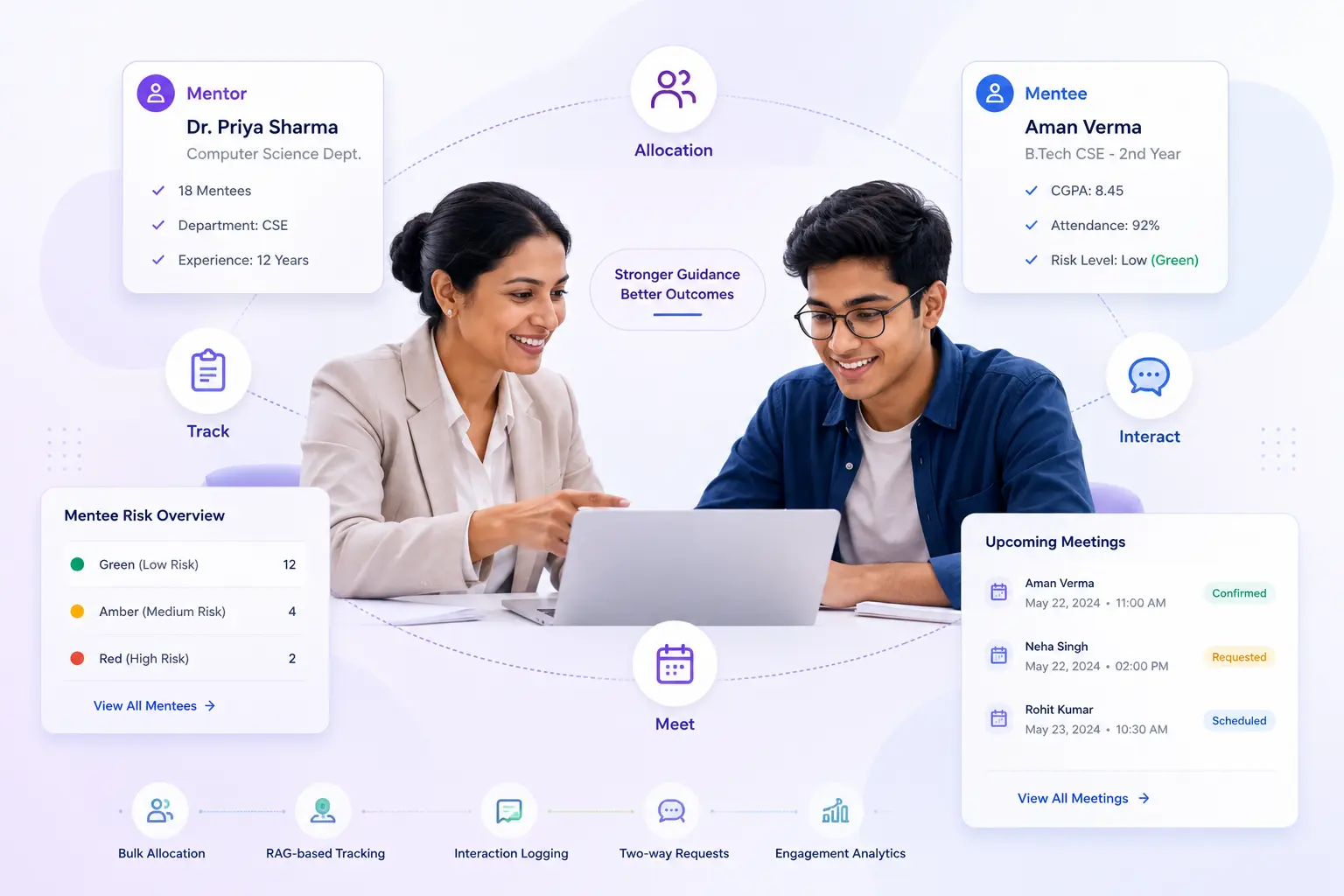
Overview
What Does Mentor-Mentee Management Do?
Mentor-Mentee Management gives colleges a complete, structured system for the full mentoring lifecycle. Right from the initial allocation of mentors to students through every interaction, follow-up, meeting request & outcome, to the reports that give coordinators & HODs visibility into programme health.
Benefits
How Does it Help Colleges?
Coordinators See Programme Health
Admin/HOD dashboard surfaces full mentoring picture in one view: active & silent mentors, student engagement cohorts & student categories.
Mentors Know Who to Contact Next
Mentee Contact Priority list on mentor dashboard is sorted by urgency: students needing urgent contact appear at top. Combined with the RAG-banded mentee list.
Every Interaction Is Structured
A mentor logging a Quick Check-in & a mentor logging a Counselling session, both produce records in same format, making programme-level reports meaningful.
Meeting Requests Auto-Close the Loop
Two-way meeting request flow: students initiate, mentors respond; mentors initiate, students confirm availability, eliminates informal coordination.
Follow-Ups Cannot Be Forgotten
Every interaction can carry follow-up action items with due dates. Overdue & pending follow-ups are visible in the student's Follow-ups tab; sortable by due date.
Mentor Changes Without Lost History
When a mentor is reassigned; due to leave, exit, or department restructuring, student's interaction history with previous mentor is preserved intact.
Features
Key Capabilities
A detailed view of every capability across the Mentor-Mentee module.
Mentor Allocation
Bulk Allocation by Dept, Batch, or Year
Mentors are assigned to students in bulk, filtered by dept, batch, or academic year. Reducing the manual effort of individual assignments at each sem-start.
Allocation Tracking with Timestamps
Every allocation is recorded with the date, time, and the staff member who created it. Providing a complete assignment record for governance and audit.
Reallocation Without Losing History
When a student's mentor changes, reallocation is applied without removing the student's interaction history with the previous mentor.
My Mentees - Student List with RAG Bands
Mentee List with Risk Band Indicators
Each mentor sees their full mentee list with a Red, Amber, or Green risk band per student.
RAG Band Logic
Red=student with concerning indicators across dimensions. Amber=attention needed. Green=student on track and recently contacted.
One-Click to Student 360 Profile
Clicking any student in the mentee list opens their full 360 profile directly, no separate navigation required.
Student Profile 360
Single Screen - Complete Mentee Context
A single screen showing the mentee's attendance %age, fee status, past interactions, all follow-up action items, and full meeting history.
Log Interaction from Profile
Mentors & admins log new interaction directly from the student's 360 profile. Pre-loaded with the student's context.
Request Meeting from Profile
Mentors raise a meeting request to the student directly from the 360 profile screen, without navigating to the Meeting Requests page first.
Interaction Logging & Follow-Ups
Interaction Record Fields
Each logged interaction captures meeting type, summary, outcome, duration, and an optional follow-up date. Providing a structured record rather than a freeform note.
Interaction Templates
5 standard templates available. Academic Review, Career Guidance, Counselling, Fee Discussion & Quick Check-in. Maintaining consistent record structure.
Follow-Up Action Items per Interaction
Each interaction can carry one or more follow-up action items with due dates. Follow-ups appear in the student's Follow-ups tab, sortable by due date.
Follow-Up Management
Mentors mark follow-up actions complete, add child follow-ups & attach completion notes. Overdue & pending follow-ups are visible & grouped.
Meeting Requests - Two-Way Flow
Student-Initiated Requests
Students raise meeting requests to their assigned mentor with a subject, description, request type (Meeting, Problem, or Query), and preferred date.
Mentor-Initiated Requests
Mentors initiate meeting requests to any mentee using a mentee picker from the Meeting Requests page. Without navigating to the individual student profile first.
Student Response to Mentor-Initiated Requests
When a mentor initiates a request, student receives it under Received from Mentor & can share their preferred availability date and a note.
Separate Sent and Received Tabs
Both students & mentors have distinct Sent & Received tabs with live badge counts for pending & action-needed items.
Scheduled Meetings Tab
Post-mentor confirmation & scheduling, meeting moves from open requests list into Scheduled Meetings tab with all details.
Log Meeting from Scheduled Tab
After the meeting, mentor clicks Log on the Scheduled tab to open the interaction form pre-filled with the student's context.
Reassignment & HOD Activity View
Bulk Mentee Reassignment
When a mentor goes on leave, exits, or a dept is restructured, their mentees are reassigned in bulk to another mentor.
Reassignment Audit Log
Every reassignment is logged with reason, from-mentor, to-mentor & staff member who made the change. A permanent record for governance & HR review.
HOD Activity View
HODs see a breakdown of mentoring activity across every faculty member in their department. Interactions, follow-ups & students not contacted; without admin access.
Analytics
Reports & Insights
6 analytics views for mentoring programme visibility
Admin/HOD Dashboard
- •Mentor Performance table
- •Student Engagement Cohorts
Mentor Dashboard
- •Monthly activity trend chart
- •Risk breakdown donut, Mentee Contact Priority list by urgency
Interactions Report
- •All logged interactions filterable
- •Exportable for audit & programme review
Management Report
- •Inactive mentors, at-risk students, mentor load distribution
- •For coordinator and principal oversight
Mentoring Insights
- •Programme health, engagement rates & cohort trends
- •For IQAC review & NAAC student support documentation
HOD Activity View
- •Faculty-level mentoring breakdown
- •Available within HOD role access
Stakeholders
Designed for Every Mentoring Stakeholder
College Admin / Mentoring Coordinator
- •Configure mentor allocation, interaction templates & module settings
- •Bulk-allocate mentors to students at the start of each semester or academic year
- •Monitor programme health from dashboard: mentor activity, student engagement cohorts
- •Generate Interactions Report & Management Report for institutional review
Mentor / Faculty
- •Review mentee list with RAG risk bands & Mentee Contact Priority list from the dashboard
- •Open student 360 profiles: attendance, fees, interaction history & follow-ups in one screen
- •Log interactions using templates; set follow-up action items with due dates
- •Initiate or respond to meeting requests; log meeting outcomes from the Scheduled tab
HOD / Department Head
- •Review faculty-level mentoring activity across the department from the HOD Activity View
- •Identify faculty who are inactive or students who have not yet been contacted
- •No admin credentials required, accessible within standard HOD role access
Students
- •Raise meeting requests to assigned mentor with subject, type & preferred date
- •Respond to mentor-initiated meeting requests with availability & notes
- •View own interaction history, follow-up items & meeting records
Impact
The Business Case for Structured Mentoring
Bulk allocation eliminates manual mentor assignment overhead at semester start
RAG bands give mentors instant visibility into which students are urgent
Interaction templates ensure consistent record quality across the programme
Two-way meeting requests & follow-up tracking eliminate informal coordination
Reassignments preserve history, handling mentor attrition & dept restructuring
Programme-level dashboards & reports give IQAC/principal actionable visibility
Every Student Tracked. Every Interaction Logged. Every Gap Visible.
See how edumerge's Mentor-Mentee module gives colleges a structured, end-to-end mentoring lifecycle system across Admin, Mentor, and Student roles.
Frequently Asked Questions
Common questions about mentor-mentee tracking and the mentoring lifecycle for colleges
What determines whether a student shows as Red, Amber, or Green in the mentor's mentee list?+
The RAG band reflects risk indicators across dimensions such as attendance, fee status, and recency of mentor contact. Red marks students with concerning indicators that need urgent attention, Amber marks students who need attention soon, and Green marks students who are on track and have been contacted recently. Mentors see this band directly against each name in their mentee list, so they know who to prioritise without opening every profile.
If a mentor goes on leave or leaves the college, what happens to their mentees' history?+
Mentees can be reassigned in bulk to another mentor, whether the trigger is leave, exit, or department restructuring. Each reassignment is logged with reason, from-mentor, to-mentor, and the staff member who made the change, creating a permanent record for governance and HR review. The student's full interaction history with the previous mentor is preserved and stays visible to the new mentor.
Can students request a meeting with their mentor, or does the mentor always have to initiate?+
Both directions work. Students raise a meeting request to their assigned mentor with a subject, description, request type (Meeting, Problem, or Query), and preferred date, and mentors can equally initiate a request to any mentee using a mentee picker. Each side has separate Sent and Received tabs with live badge counts, and once a mentor confirms, the meeting moves into a Scheduled Meetings tab for logging after it takes place.
What information can a mentor see about a student before a meeting?+
The Student Profile 360 screen shows the mentee's attendance percentage, fee status, past interactions, all follow-up action items, and full meeting history in one place. Mentors can log a new interaction or raise a meeting request directly from this same screen. This removes the need to check separate systems before or during a mentoring conversation.
Can a Head of Department review mentoring activity without needing admin login credentials?+
Yes. The HOD Activity View gives department heads a breakdown of mentoring activity across every faculty member in their department, including interactions, follow-ups, and students who have not yet been contacted. This view is accessible within standard HOD role access, so no admin credentials are required.