Attendance Management | Biometric | Geo-Fencing
Staff Attendance Management for Educational Institutions
Accurate, verified data. No manual registers, proxy, or guesswork.
- Daily & shift-based marking with monthly registers & regularized self-service
- Geo-fence with GPS + selfie verification & zone management on interactive map
- Role-based dashboards for admins, managers & staff; with full audit logs
Overview
What Does This Module Do?
Attendance Management covers two complementary methods of capturing staff attendance: institutional (biometric & shift-based) and field-based (geo-fenced GPS with selfie verification). Both methods feed into the same HRMS attendance record. Daily & monthly registers are maintained automatically, regularisation requests are handled through a structured workflow, and all attendance data flows directly into payroll without manual reconciliation. For institutions with staff across multiple locations or working in the field, geo-fence zones are drawn directly on an interactive map and validated in real time when staff mark attendance.
Benefits
How Does it Help Institutions?
Zero Proxy, Zero Manual Registers
Shift-based marking, GPS location validation, and selfie verification eliminate proxy marking & manual register discrepancies.
One System for On-Campus & Field Staff
On-campus staff use shift-based or biometric marking; field staff use geo-fenced GPS attendance; all feeding the same HRMS record.
Self-Service Regularisation
Staff submit correction requests directly through the portal when attendance is missed/incorrectly marked. Admins process approvals in bulk.
Real-Time Visibility for Every Role
Admins see institution-wide attendance. Managers see their team. Staff see their own record. Live & role-appropriate dashboards.
Geo-Fence Zones Built for Flexibility
Drawn directly on an interactive map within HRMS. Tolerance radius & selfie settings are configurable per zone without tech involvement.
Payroll-Ready Data
Monthly attendance registers, LOP calculations, and late-mark data are computed & available for payroll processing at month-end.
Features
Staff Attendance
Daily & shift-based operations for on-campus staff
Attendance Dashboard
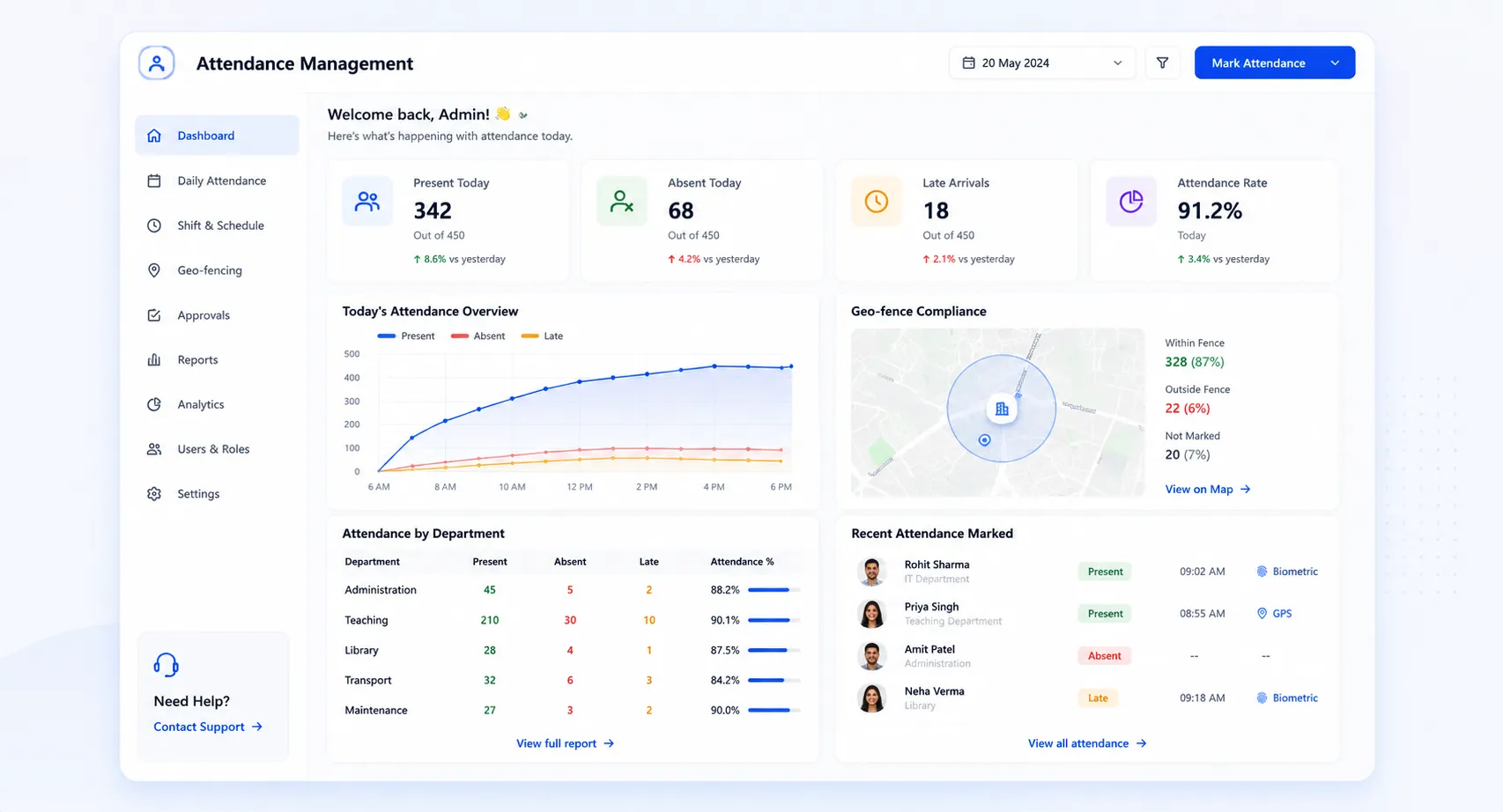
Real-time overview of daily attendance across the institution; present, absent, late, and on leave, visible to HR & admin at a glance.
Daily & Shift-Based Marking
Attendance marked daily or against assigned shifts. Shift timings, grace periods, and late-mark thresholds configured per role or department.
Monthly Attendance Register
Complete, automatically maintained monthly register showing present days, absences, late marks, half-days, and leave, ready for HR review & payroll.
Staff Regularisation (Self-Service)
Staff submit correction requests for missed or incorrectly marked attendance directly from their HRMS portal, with reason and supporting context.
Admin Regularisation Panel
HR and admins review, approve, or reject regularisation requests in bulk from a dedicated panel. Approved corrections applied automatically.
Configuration
Set shift timings, define holiday calendars, configure late-mark & half-day policies, and set department-level attendance rules.
Features
Geo-Fence Attendance
GPS + Selfie verification for field and multi-location staff
Role-Based Dashboards
Admin dashboard shows institution-wide geo-fence attendance; Manager dashboard tracks their team; Staff dashboard shows personal geo-attendance log.
GPS + Selfie Attendance Marking
Staff mark attendance from mobile app. System validates GPS location is within the defined geo-fence zone and captures a selfie for identity confirmation.
Geo-Fence Zone Management
Admins draw geo-fence zones directly on an interactive Leaflet map. Each zone can have a configurable tolerance radius for multiple locations.
Reporting Manager Assignment
Each staff member's geo-fence attendance is linked to their assigned reporting manager for correct team-level visibility.
Reports (Daily, Monthly, Staff-Wise)
Generate geo-fence attendance reports at daily and monthly intervals with staff-wise breakdowns showing location-verified attendance records.
Audit Logs (GPS Coordinates, Timestamps)
Every geo-fence attendance mark logged with exact GPS coordinates, timestamp, and selfie captured. Audit logs are immutable & available anytime.
Built for Real Institutional Workflows
Two parallel attendance workflows feeding one unified HRMS record
On-Campus / Shift-Based Attendance
Shifts & schedules configured in HRMS at the start of the term
Attendance marked daily or by shift; via biometric device or HRMS portal
Late marks, half-days & absences flagged automatically against shift rules
Staff submit regularisation requests for anomalies through self-service
Admin reviews & bulk-approves regularisations from the panel
Monthly register locked & passed to payroll for LOP & deduction processing
Geo-Fence / Field Attendance
Admin draws geo-fence zones on the Leaflet map & configures tolerance radius
Staff assigned to geo-fence zones with reporting manager linked
Staff mark attendance from mobile app; GPS location validated & selfie captured
Attendance recorded only if both GPS check & selfie verification pass
Manager views team geo-attendance in real time from their dashboard
Audit logs with GPS coordinates & timestamps available for any review
Who Uses It?
Designed for every stakeholder in your institution
HR Admin
- Configure shift timings, holiday calendars & attendance policies
- Manage geo-fence zones and selfie verification settings
- Process regularisation requests in bulk & generate monthly registers
- Access full attendance reports & audit logs across all staff
Department Managers
- View real-time attendance for direct reports from the manager dashboard
- Track geo-fence attendance for field or multi-location team members
- Review & approve regularisation requests for their team
Staff & Faculty
- Mark daily/shift-based attendance through HRMS portal/biometric device
- Mark geo-attendance from app when working at field/off-campus locations
- Submit self-service requests for missed or incorrect attendance
Analytics
Reports & Insights
Get complete visibility into attendance patterns and compliance
Daily Attendance Summary
Real-time present, absent, late & on-leave counts by department for the current day
Monthly Attendance Register
Complete record per employee; input-ready for payroll processing (LOP)
Regularisation Report
All correction requests raised, approved & rejected in the current period, by dept
Geo-Fence Attendance Report
Location-verified attendance records by staff member, daily/monthly, zone-level data
GPS Audit Log Export
Full timestamped and coordinate-level audit log of all geo-fence attendance marks
Absenteeism & Late Mark Trends
Patterns in absences and late arrivals by department & role category
Designed for Scale
Whether managing a single campus or a multi-location group institution, Attendance Management ensures:
Consistent attendance policies & shift configurations across all departments & campuses
Multiple geo-fence zones defined for each campus, building, or field location
All attendance data; consolidated in one HRMS record per employee
Audit-ready logs for every regularisation, marked attendance & verified fence
Accurate Attendance, Automatically. Payroll-Ready at Month End.
See how edumerge's Attendance Management module captures real staff presence data; on campus and in the field. Eliminating manual registers & proxy marking, and feeding payroll without reconciliation.
Frequently Asked Questions
Common questions about staff attendance and geo-fence tracking
How does geo-fence attendance stop proxy marking for field or off-campus staff?+
Staff mark attendance from the mobile app, and the system checks two things before recording it: the GPS location must fall within the defined geo-fence zone, and a selfie is captured for identity confirmation. If either check fails, the attendance is not recorded. Every mark is logged with exact GPS coordinates, timestamp, and the selfie, so the record is auditable.
Can staff correct a missed or wrongly marked attendance entry themselves?+
Yes. Staff submit a regularisation request directly from their HRMS portal, with a reason and supporting context, instead of routing it through HR manually. Admins review these requests from a dedicated panel and can approve or reject them in bulk. Approved corrections are applied automatically to the attendance record.
Does attendance data feed into payroll automatically for LOP calculation?+
Both on-campus and geo-fence attendance feed into the same HRMS record, and the monthly attendance register is maintained automatically with present days, absences, late marks, and half-days. This register, along with LOP and late-mark data, is computed and made available for payroll processing at month-end without manual reconciliation.
Can we set up separate geo-fence zones for different campuses or field locations?+
Yes. Admins draw geo-fence zones directly on an interactive map within HRMS, and each zone can have its own configurable tolerance radius and selfie verification setting. This allows multiple zones to be defined for different campuses, buildings, or field locations without any technical involvement.
How do managers and admins track attendance for staff working across multiple locations?+
Role-based dashboards give each stakeholder the right level of visibility: admins see institution-wide attendance across both on-campus and geo-fence records, managers see their own team in real time, and staff see their personal attendance log. Each staff member's geo-fence attendance is also linked to their assigned reporting manager, so team-level visibility stays accurate even for field-based roles.