College Notices & Announcements
Notices & Announcements for Colleges & Universities
Notices, circulars, bulk SMS, email, push notifications & voice broadcast, with audience targeting & delivery tracking.
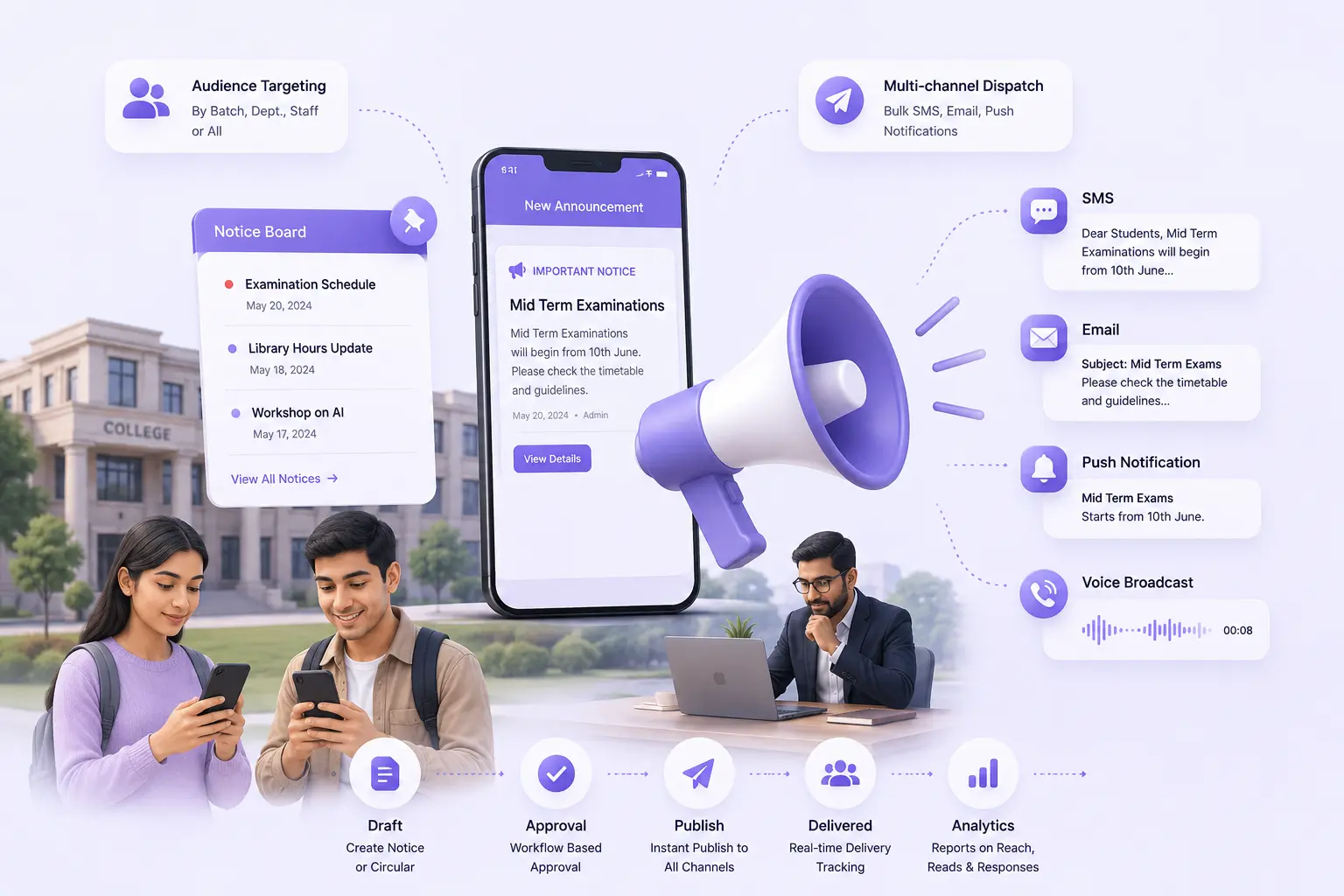
- Notice board with approval workflow (draft → approval → published)
- Audience targeting by batch, dept, staff; with read/unread tracking
- Multi-channel dispatch: bulk SMS, email & push notifications
- Per-recipient sent/delivered/failed status & manual resend for failures
- Automated voice broadcast: record/upload audio, track call delivery in real time
Overview
What Does Notices & Announcements Do?
Notices & Announcements gives colleges a complete institutional communication platform. Covering the full lifecycle from notice creation through approval, multi-channel dispatch, delivery confirmation, and audit. Notices are created with rich text, file attachments, category classification, and audience targeting. Every notice goes through a configurable approval workflow before reaching students, parents, or staff. Dispatch happens across SMS, email, push & voice: each with delivery status tracked per recipient. A live notice board with role-based views, acknowledgement tracking, and a full publish/edit/delete audit log gives IQAC and administration documented evidence of institutional communication for quality review.
Benefits
How Does it Help Colleges?
Notices Go Through Approval
The four-stage approval workflow: draft, sent for approval, approved, published, ensures every notice is reviewed before it reaches students, parents, or staff. Rejection returns it to author with remarks. For colleges with multi-admin levels, the workflow is configurable per institution. Approved notices publish immediately.
Voice Broadcast for Parents Who Don't Use App
For parents who do not actively use a mobile app or check SMS regularly. Voice broadcast reaches them directly as an automated outbound call with a recorded message from the college. Delivery is tracked per recipient in real time: Called, Picked Up, Not Answered, Failed. Failed calls retry up to the configured maximum.
Per-Recipient Delivery Status Across Every Channel
Bulk SMS, email, push & voice broadcast all surface delivery status per individual recipient. Failed SMSs are identifiable & resendable individually. Read receipt tracking shows which students & parents opened the notice. For colleges with NAAC requirements, this provides evidence on dispatched & received communications.
Role-Based Notice Board With Acknowledgement Tracking
The live notice board shows each audience only their targeted notices. Students see student notices, parents see parent notices, faculty see faculty notices. Notice acknowledgement tracking confirms that recipients have seen & acknowledged critical communications.
Key Capabilities
What the Module Delivers
Notice Approval Workflow
4-stage workflow (draft → approval → approved → published) with rejection remarks; every notice authorised before reaching the audience.
Audience Targeting
Batch, section, parents, students, staff, or all, per notice. Standard and batch-specific notice options for targeted departmental communication.
Bulk SMS with Delivery Status
SMS dispatched to the targeted audience with sent/delivered/failed per recipient. Manual resend for failures. Tracking log per notice.
Email and Push Notifications
Email integration and push notifications to the parent and student mobile app, parallel to or independent of SMS dispatch.
Voice Broadcast
Automated outbound voice call with in-app recording or MP3/WAV upload. Per-recipient tracking. Configurable retry count & interval.
Read / Unread and Acknowledgement Tracking
Per-recipient read status and acknowledgement for published notices, for critical communications requiring confirmed receipt.
Role-Based Notice Board
Live board with distinct views for parents, students & staff. Searchable, filterable by category and date range. Archive and expiry management.
Scheduled Publish and Auto-Expiry
Notices scheduled to publish at a future date and expire automatically. For advance preparation of semester notices and time-bound announcements.
Audit Log
All publish, edit, and delete actions with user and timestamp; permanent institutional communication record for IQAC and regulatory review.
Export Notice History
Full notice history exported; for documentation, audit submissions, IQAC & accreditation reporting and institutional reporting.
Every Notice Approved. Every Channel Tracked. Every Delivery Documented.
See how edumerge's Notices & Announcements module gives colleges a complete communication platform. With an approval workflow, bulk SMS, email, push notifications, voice broadcast, per-recipient delivery tracking, and a role-based notice board with audit logs.
Frequently Asked Questions
Common questions about notices, circulars & multi-channel communication
How does the notice approval workflow work before a notice reaches students or parents?+
Every notice moves through four stages: draft, sent for approval, approved, and published. A reviewer can reject a notice back to the author with remarks for correction, and the workflow itself is configurable per institution for colleges with multiple approval levels. Once approved, the notice publishes immediately across the selected channels.
Can we send notices to specific batches, sections, or departments instead of the whole college?+
Yes. Audience targeting lets you send a notice to a specific batch, section, department, staff group, parents, students, or the entire institution. This keeps departmental or batch-specific circulars from cluttering the notice board for audiences they do not concern.
How do we know if an SMS or email notice actually reached the parent?+
Bulk SMS, email, push notifications, and voice broadcast all track delivery status per individual recipient, shown as sent, delivered, or failed. Failed SMSs are identifiable and can be resent manually, and a tracking log is kept per notice for reference.
What is voice broadcast and why would a college use it for notices?+
Voice broadcast is an automated outbound call carrying a recorded message, useful for reaching parents who do not actively use the mobile app or check SMS regularly. Delivery is tracked per recipient in real time as Called, Picked Up, Not Answered, or Failed, with failed calls retried up to a configured maximum.
Can we prove to IQAC or NAAC that a notice was actually sent and received?+
Yes. Per-recipient delivery status across SMS, email, push, and voice broadcast, combined with read and acknowledgement tracking, gives documented evidence of dispatch and receipt. A full publish, edit, and delete audit log with user and timestamp, along with exportable notice history, supports IQAC and accreditation review.