Probation Management
Staff Probation Management for Educational Institutions
Structured evaluation. Clear milestones. Confident confirmations.
- Pipeline overview with phase-wise staff tracking across the entire probation period
- Configurable evaluation forms built & submitted within the HRMS
- Multi-level approval workflow with an immutable audit trail for every decision
Overview
What Does This Module Do?
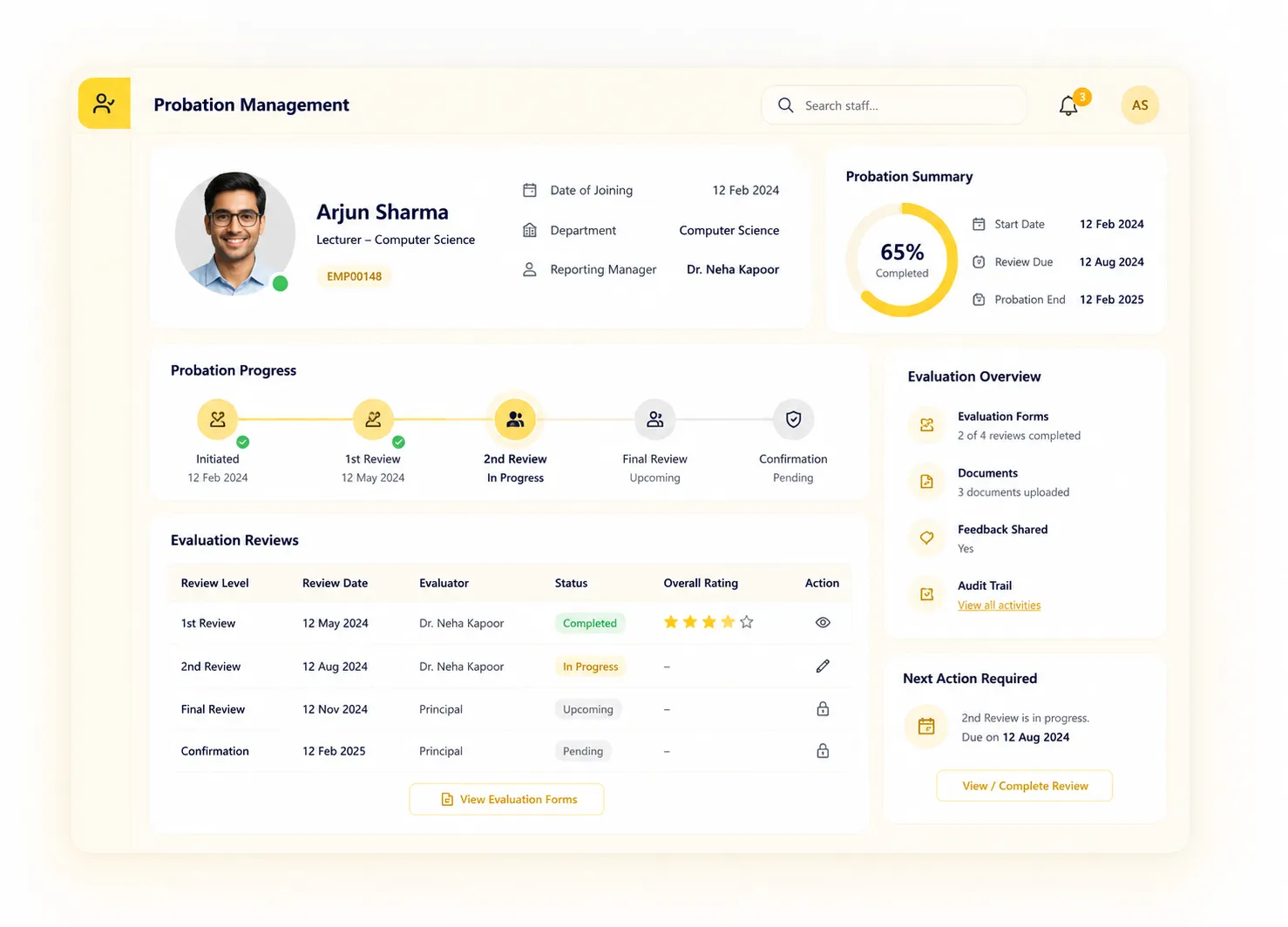
Probation Management gives HR a structured, end-to-end system to track every new hire through their probationary period. The module is built around a defined phase progression: from the moment a staff member enters probation, their timeline, evaluation forms, and approvals are managed in one place. HR gets a pipeline dashboard, managers complete structured evaluations, and every outcome is logged with an immutable audit trail.
Benefits
How Does it Help Institutions?
Full Pipeline Visibility
HR sees every probationary staff member's current phase at a glance, not scattered across emails or spreadsheets. The pipeline dashboard shows where each person stands and flags anyone approaching a milestone without a completed evaluation.
Structured Evaluations, Not Ad-Hoc Conversations
Every evaluation uses a configured form with defined criteria. Managers complete & submit evaluations within the system. There is no room for informal decisions that bypass the process.
Decisions That Can Always Be Explained
Every confirmation, extension, or exit decision is logged in an immutable audit trail: timestamped & attributed. Whether for internal governance or a dispute, HR has a complete, unalterable record.
Evaluator Experience Designed for Managers
Managers see their own pending evaluations queue without needing HR to chase them. Each evaluator has a self-view of what they have submitted and what is still outstanding, reducing back-and-forth.
Features
Key Capabilities
Everything you need for comprehensive probation management
Probation Pipeline Dashboard
Real-time overview of all staff currently in probation, segmented by phase, with visibility into upcoming milestones & overdue evaluations.
Staff Phase Timeline View
Each probationary employee has a timeline showing their configured phases, completed milestones & upcoming checkpoints; visible to HR and the relevant manager.
Evaluation Form Builder
HR builds structured evaluation forms with defined criteria for each phase or role type. Forms are reusable and version-controlled within the system.
Evaluation Submission
Managers complete and submit evaluations directly within the HRMS for each milestone. Submissions are timestamped and locked on submission.
Evaluator Self-View (My Evaluations)
Each evaluator has a personal view of all evaluations assigned to them; submitted, pending, and upcoming, so nothing is missed.
Pending Evaluations Queue
Managers see a prioritised queue of evaluations awaiting their action, with the staff member's name, phase, and deadline clearly visible.
Multi-Level Approval Workflow
Probation outcomes route through a configurable approval chain before being finalised. Each approver reviews submitted evaluations and records their decision.
Configuration - Periods, Phases, Criteria
HR configures probation duration, the number & naming of phases, and the evaluation criteria applied to each phase, tailored to the institution's structure.
Immutable Audit Trail
Every action in the module; evaluation submissions, approval decisions, configuration changes, is logged permanently with timestamp and actor.
Built for Real Institutional Workflows
Designed to handle the complete probation lifecycle
New joiner's probation period, phases & criteria configured at onboarding
Staff member appears in the probation pipeline dashboard under Phase 1
Manager receives evaluation assignment at the configured milestone
Evaluator completes & submits structured evaluation form
Submission routes through the multi-level approval workflow
Approved decision (confirm, extend, or exit) logged to the immutable audit trail
Employee record updated; next phase triggered or probation closed
Who Uses It?
Designed for every stakeholder in your institution
HR Admin
- Configure probation periods, phases & evaluation criteria
- Monitor the probation pipeline & flag overdue evaluations
- Process & record confirmation, extension, or exit decisions
Manager / Evaluator
- Complete & submit evaluations for direct reports via the evaluator self-view
- Review pending evaluations queue & act before deadlines
Approvers / Management
- Review submitted evaluations & approve/return through the approval workflow
- Confidence that all probation outcomes are formally documented & auditable
Analytics
Reports & Insights
Pipeline Overview
All staff currently in probation, by phase, department, and days remaining
Pending Evaluations
Evaluations overdue or approaching deadline across all active probation cases
Confirmation Rate
Proportion of staff confirmed, extended, or exited, by department and role
Audit Trail Export
Complete, timestamped record of all decisions & actions for compliance review
Designed for Scale
Whether managing a single campus or a group of institutions, Probation Management ensures:
Standardised evaluation processes across all departments & campuses
Consistent phase-wise tracking regardless of HR team size/workload
Real-time pipeline visibility for HR, approvers & institutional leadership
From Day One to Confirmed Staff - Manage Every Probation Seamlessly
See how edumerge's Probation Management structures phase-wise tracking, evaluation workflows, and approval decisions; with a full audit trail built in.
Frequently Asked Questions
Common questions about staff probation tracking and evaluation
What is probation management software and how does it work?+
Probation management software tracks every new hire through their probationary period in one system, instead of relying on emails or spreadsheets. edumerge's module gives HR a pipeline dashboard showing each staff member's current phase, lets managers complete structured evaluation forms at each milestone, and routes outcomes through a multi-level approval workflow before they are finalised.
Can we set different probation periods and phases for different roles?+
Yes. HR configures the probation duration, the number and naming of phases, and the evaluation criteria applied to each phase, so the structure can be tailored to different roles, departments, or the institution's own policy.
How do managers complete probation evaluations?+
Managers receive an evaluation assignment at each configured milestone and complete a structured form built by HR, with defined criteria rather than an informal conversation. Each manager also has a self-view showing their pending evaluations queue and what has already been submitted, so nothing is missed without HR having to chase them.
What happens if a confirmation or exit decision is questioned later?+
Every evaluation submission, approval decision, and configuration change is logged in an immutable audit trail, timestamped and attributed to the person who acted. This gives HR a complete, unalterable record to refer back to for internal governance or in the event of a dispute.
Can a probation period be extended instead of ending in confirmation?+
Yes. Once an evaluation is submitted, the outcome routes through the configurable multi-level approval workflow, where approvers record a decision to confirm, extend, or exit the staff member. Whatever the decision, it is logged to the audit trail and the employee record is updated so the next phase is triggered or probation is closed.