College Student Attendance Mgmt
Student Attendance Management System for Colleges & Universities
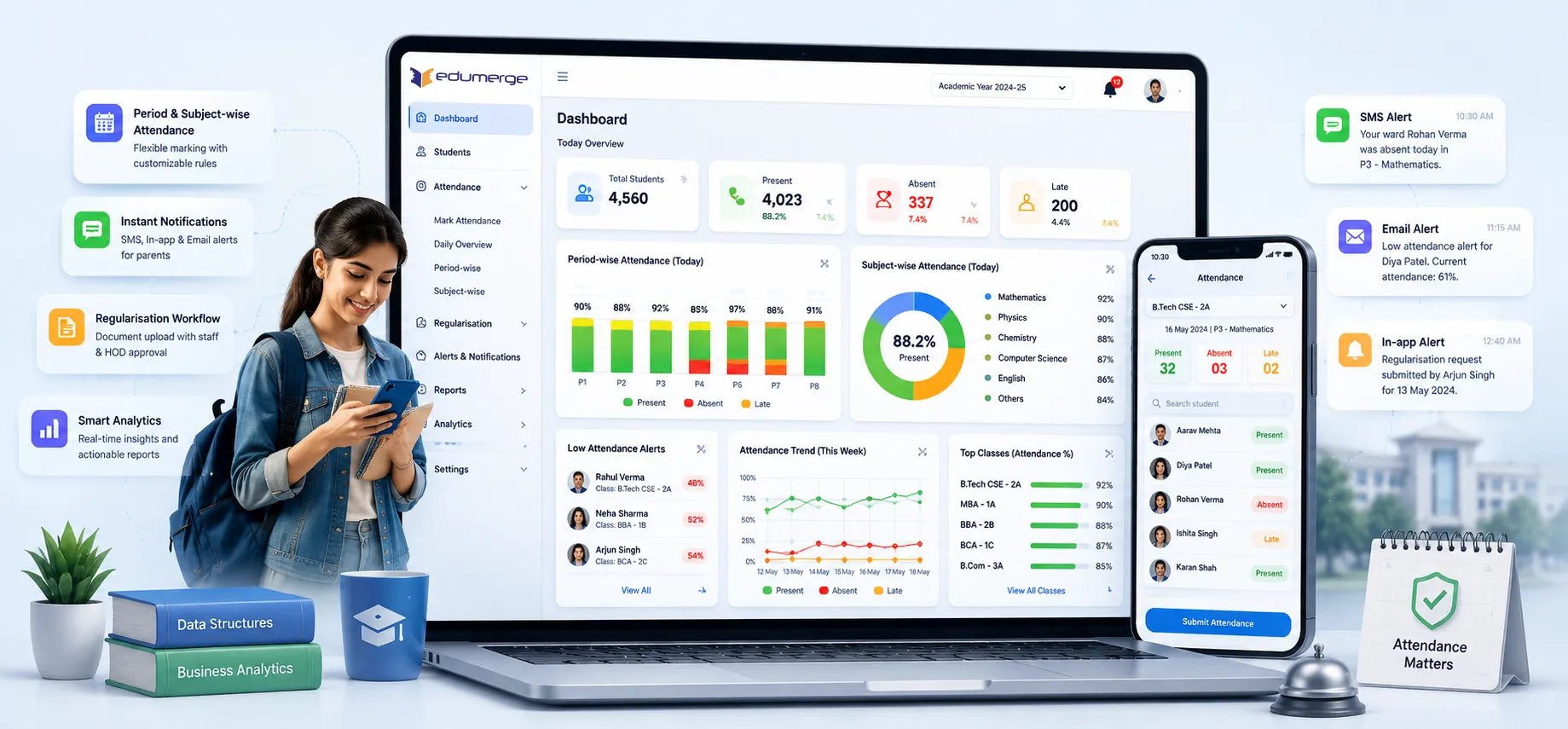
Period & subject-wise attendance; marked, regularised, notified & reported. With AI-powered face recognition.
- Batch & individual entry, role-scoped marking, and configurable locking
- Auto SMS, in-app & email notifications to parents on absence/low attendance
- Regularisation workflow with document upload, staff & HOD approval queue
- AI-powered camera-based marking, standalone or embedded, mobile-optimised
Overview
What Does College Attendance Management Cover?
College Attendance Management in edumerge comprises a complete period- & subject-wise attendance platform covering configuration, marking, regularisation, notifications, dashboards, reporting & access control, and Face Attendance, a camera-based AI attendance marking module available exclusively for College ERP that works standalone or embedded within the ERP navigation.
Benefits
How Does it Help Colleges?
Subject-Wise Attendance
Handle elective subjects, optional courses, lab sessions, and university-prescribed attendance rules with subject-level tracking for each student.
75% Compliance Managed Proactively
Configurable minimum attendance threshold with auto-notify ensures students below threshold are flagged automatically with parent notifications.
Faculty Spend Less Time on Roll Call
Batch marking allows a faculty member to mark an entire lecture batch in a single session. Selecting course, batch, date & period once and marking the full list.
Regularisation That Is Auditable
Student regularisation workflow with document upload, staff & HOD review queue, and full audit trail for every status change.
Parents Informed Automatically
Auto-trigger SMS to parent contact the moment a student is marked absent, with delivery status tracking and multi-channel alerts.
NAAC Documentation Ready
Subject-wise attendance reports, semester summary reports, below-threshold alerts, and department-wise aggregates for accreditation requirements.
Features
Key Capabilities
A detailed view of every capability across College Attendance Management.
Configuration
Period Configuration (P1–P8)
Up to 8 periods per day with custom names and times reflecting the college's actual timetable structure.
Custom Marking Types
Present, Absent, Leave, On-Duty, Regularized, and any institution-specific type with configurable counting rules.
Per-Type UI Color Assignment
Each marking type displays in distinct color in marking interface for visual confirmation during batch entry.
Minimum Attendance Threshold
Configured centrally (typically 75%), used for auto-notifications and below-threshold alert reports.
Auto-Notify Toggle & Threshold
Automatic threshold-breach notifications monitored with parent notification when minimum is crossed.
Tag-Based Attendance Grouping
Students can be tagged for special cohorts, sports teams, NCC/NSS participants, or institutional programmes.
Attendance Marking
Period-Wise Marking (P1–P8 per Day)
Attendance marked per period per day, providing granular record for university-mandated monitoring.
Subject-Wise Attendance for Electives
Students taking different electives tracked at subject level, essential for open elective structures.
Batch Marking
Faculty selects course, level, date, and period once to mark full batch in single session.
Student List Auto-Filter
Marking interface shows only enrolled students in relevant optional subject, preventing cross-batch errors.
Configurable Locking Window
Records lock after grace period, allowing legitimate corrections but preventing retroactive manipulation.
Role-Scoped Marking
Faculty mark only assigned courses; HODs mark across department; access enforced at data layer.
Face Attendance
Camera-Based Facial Recognition
Attendance is marked using the device camera & facial recognition, identifying enrolled students in real time.
Standalone Mode
Opens as a full-screen dedicated tool; optimised for use on a tablet or device placed at the lecture hall entrance.
Embedded Mode
Integrated within the College ERP navigation, accessible from within the normal attendance workflow.
Mobile-Optimised Deployment
Dedicated Open Standalone button makes Face Attendance practical on smartphones and tablets.
Real-Time Recognition with Feedback
With visible loading & error state feedback, faculty know immediately whether an issue was faced.
Regularisation & Notifications
Student Regularisation Submission
Students submit requests for absences with date, period, course, reason text, and supporting document.
Document Attachment
Digital document upload eliminates need for physical copies to department office.
Staff & HOD Pending Queue
All submitted requests visible in approver's pending queue, prioritised by date and course.
Automatic % Recalculation on Approval
When regularisation approved, student's attendance percentage recalculates immediately.
Auto-Trigger SMS on Absence
SMS fires to parent contact the moment student marked absent; immediate, not batched.
Multi-Channel Alerts
Absence alerts sent across SMS, in-app (for students), and email channels.
Reports & Dashboards
Staff Daily Marking Dashboard
Faculty see pending classes for day, which have been marked, and which remain outstanding.
Student Self-Service View
Students see attendance percentage by subject with trend view showing weekly and monthly patterns.
Parent View
Parents access child's attendance summary and recent absences through parent portal, read-only.
HOD Department View
Heads of Department see attendance across all courses and faculty in their department.
Individual Student Report (PDF-Ready)
Complete attendance record across all dates and periods with percentage, formatted for printing.
Class-Wise & Below Threshold Reports
Students sorted by attendance percentage, below-threshold alert report for intervention planning.
Workflow
Built for Real College Attendance Workflows
Three parallel workflows: manual marking, face recognition & regularisation, feeding one attendance record
System configured with periods, marking types, minimum threshold & notification templates
Faculty opens daily marking dashboard; pending classes for the day are listed
Faculty selects course, batch, date & period; auto-filtered student list loads
Batch marking applied: all students marked in single session, or Face Attendance used
Absent students trigger immediate SMS to parent; delivery status logged
Students below threshold receive auto-notification if toggle enabled
Student submits regularisation request for specific absence with reason & document
Request appears in faculty & HOD pending queue
Faculty or HOD approves or rejects with mandatory reason
On approval: attendance record updated; attendance % recalculated; audit trail retained
HOD views department-wide attendance across all courses & faculty
Administration generates semester summary & below-threshold reports for NAAC documentation
Analytics available for placement eligibility reviews, management reporting & institutional governance
Audit log accessible for compliance & institutional review requirements
Stakeholders
Designed for Every Attendance Stakeholder
Faculty / Lecturers
- Mark period-wise or subject-wise attendance using batch entry or face recognition
- Review & action regularisation requests from the pending queue
- View class attendance summaries & daily pending marking dashboard
HOD / Department Coordinator
- View department-wide attendance across all courses & faculty
- Review & approve regularisation requests for the department
- Generate department-wise aggregate reports & subject-wise breakdowns
Students
- View personal attendance percentage by subject through self-service dashboard
- Monitor weekly & monthly attendance trends against the minimum threshold
- Submit regularisation requests with supporting documents for legitimate absences
IQAC / College Administration
- Generate below-threshold, semester summary & department-wise reports for NAAC
- Review audit log for attendance data integrity & governance compliance
- Configure attendance rules: periods, marking types, thresholds & notification policies
Analytics
Reports & Insights
8 standard reports from Student Attendance: printable, exportable, and filterable by date range, course, and subject.
Individual Student Report
- All dates, periods, and attendance % for any student
- PDF-ready for sharing with student, parent, or examination office
Class-Wise Report
- All students in batch sorted by attendance %
- For faculty and HOD review to identify at-risk students
Below Threshold Alert Report
- Students below configurable minimum %
- For IQAC, HOD, and administration intervention planning
Monthly & Semester Summary
- Month-wise and semester-wise attendance totals and percentages
- For internal review, university reporting, and NAAC documentation
Department-Wise Aggregate
- Attendance performance across all courses in a department
- For HOD and Principal review and cross-department comparison
Subject-Wise Breakdown
- Attendance per subject across the batch
- For identifying subjects with consistently lower attendance
Date-Range Filtered Report
- Attendance data for custom period
- Exam windows, semester segments, or specific academic weeks
Face Attendance Records
- All camera-based marked attendance with recognition confidence
- For auditing and troubleshooting face recognition accuracy
Scale
Designed for Scale
Whether managing attendance for a single-faculty college or a multi-department institution with thousands of students.
Period-wise and subject-wise tracking handles college-level academic complexity, not school models
Proactive 75% compliance management prevents students from becoming ineligible unnecessarily
Face Attendance eliminates manual roll call for high-volume sessions without dedicated hardware
Regularisation audit trail provides NAAC evidence of consistent, transparent attendance governance
Attendance Marked Accurately. Parents Notified Immediately. NAAC Documentation Always Ready.
See how edumerge's College Attendance Management gives institutions a complete platform. Period & subject-wise marking, regularisation workflows, parent notifications, role-based dashboards, and AI-powered face recognition.
Frequently Asked Questions
Common questions about college attendance management, face recognition, and regularisation
How does subject-wise attendance work for electives and optional courses?+
Each student's marking interface is auto-filtered to show only the students enrolled in that specific elective or optional subject. This prevents faculty from marking students who are not part of that batch, and keeps attendance percentage calculated correctly at the subject level rather than only at the class level.
Can attendance be marked using face recognition instead of manual roll call?+
Yes. Face Attendance is a camera-based AI marking module available for College ERP. It can run as a standalone full-screen tool on a tablet placed at the lecture hall entrance, or embedded within the ERP navigation, and it works on mobile devices as well.
What happens when a student's attendance falls below 75%?+
The minimum attendance threshold, typically 75%, is configured centrally. When a student crosses below it, the system automatically flags the student and, if the auto-notify toggle is enabled, sends a notification to the parent. Below-threshold reports are also generated for HOD and IQAC intervention planning.
How does the attendance regularisation and approval process work?+
A student submits a regularisation request with the date, period, course, reason, and a supporting document upload. The request appears in the faculty or HOD pending queue for review. On approval, the attendance record and percentage are recalculated immediately, and the status change is retained in the audit trail.
Can parents see their child's attendance and get absence alerts?+
Parents get a read-only view of their child's attendance summary and recent absences through the parent portal. SMS alerts are triggered automatically to the parent's contact the moment a student is marked absent, with delivery status tracked, alongside in-app and email notification channels.