School Student Attendance Mgmt
Student Attendance Management System for Schools
Period-wise and subject-wise attendance: marked, regularised, notified & reported.
- Period-wise attendance marking (P1–P8) with batch & individual entry, configurable marking types
- Automated SMS, in-app & email alerts to parents on absence or low attendance
- Student regularisation request workflow with supporting document upload & staff/HOD approval queue
- Printable & exportable reports; individual, class, department & subject-wise
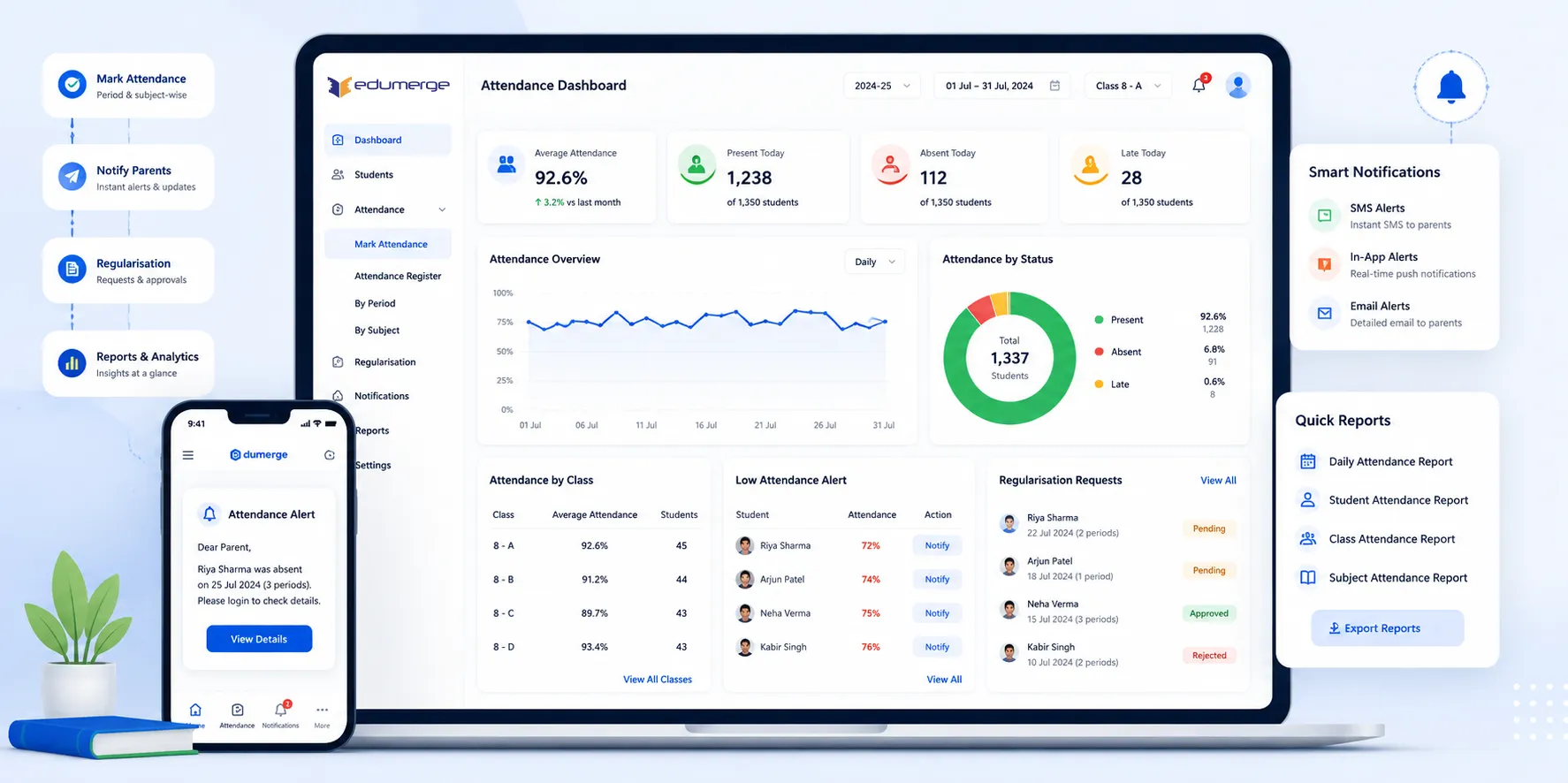
Overview
What Does Student Attendance Management Do?
Student Attendance Management is a complete period-wise & subject-wise attendance platform. Covering every stage of the attendance lifecycle; from the morning configuration of marking periods & types, through daily marking by teachers for their assigned classes, to the automated parent notification when a student is marked absent. The regularisation request a student submits when their absence is legitimate, and the management reports the HOD and administration need to track attendance trends across the school. Students below the minimum attendance threshold are flagged automatically. And every action; marking, editing, regularisation, notification, is logged with user and timestamp for audit.
Benefits
How Does it Help Schools?
Parent Notification
Auto-trigger SMS to parents fires the moment a student is marked absent. Notification delivery status is tracked: sent, failed, or delivered. Parent contact priority resolution ensures right parent is reached when primary contact unavailable.
Teachers Mark Attendance Faster
Batch marking allows a teacher to enter attendance for all students in a class in a single session. Student list is auto-filtered by enrollment and optional subject selection, so teachers never see students who should not be on their roll.
Legitimate Absences Documented
Regularisation workflow gives students a formal channel to submit absence justifications with supporting documents. Staff & HODs review requests from a pending queue. Approved regularisations update the attendance %age immediately.
75% Minimum Enforced Automatically
Configurable minimum attendance threshold triggers automatic notifications when a student falls below the defined level. Students-below-threshold alert report gives administration a current list of at-risk students at any point in the year.
Role Specific Views
Staff see pending classes for the day. Students see their own attendance percentage by subject. Parents see their child's summary and recent absences; read-only access. HODs see department-wide attendance. Administrators see everything.
Records That Cannot Be Manipulated
UNIQUE constraint prevents duplicate entries for the same student, date, period, course, level, and subject. Editing is only permitted within configurable locking window. Once locked, records are preserved for audit with full change history.
Capabilities
Key Capabilities
A detailed view of every capability across all four Attendance Management dimensions.
Configuration
Period Configuration (P1–P8)
Up to 8 periods per day, each configurable with custom name and time. Period names and times reflect the school's actual timetable structure.
Custom Marking Types
Beyond Present and Absent, marking types are fully configurable: Leave, On-Duty, Medical, Late, Regularized, and any institution-specific type.
Per-Type UI Color Assignment
Each marking type displays in a distinct colour in the marking interface. Enabling teachers to visually confirm the marking type without reading text labels.
Minimum Attendance Threshold
School's minimum attendance percentage (typically 75%) is configured centrally. Students who fall below trigger automated notifications and appear in alert reports.
Auto-Notify Toggle & Threshold
Automatic notification on threshold breach is toggled on or off centrally. System monitors each student's attendance percentage and triggers notification.
Notification Templates (Dynamic Snippets)
SMS, email & in-app templates include dynamic variables: student name, attendance percentage, date. Ensuring every alert is personalised and informative.
Attendance Marking
Period-Wise Marking (P1–P8 per Day)
Attendance marked per period per day, providing granular attendance record showing not only presence but which periods they attended.
Subject-Wise Attendance for Electives
For schools with optional or elective subjects, attendance is marked at subject level. Ensuring students attending different subjects in same period are tracked accurately.
Batch Marking
Teacher selects course, level, date, and period once and marks all students in the class in a single session. Reduces time for daily entry and minimises missed students.
Student List Auto-Filter
Student list in marking interface is automatically filtered by enrollment and optional subject selection. Teachers see only students who should be attending their class.
Configurable Locking Window
After configurable number of days, attendance records are locked and cannot be edited without administrator override. Balances flexibility with data integrity protection.
UNIQUE Constraint
Database-level unique constraint prevents duplicate attendance records, making double-entry and system-level duplication impossible.
Regularisation Workflow
Student Regularisation Submission
Students submit regularisation requests for specific absences, selecting date, period, course, providing reason text, and attaching supporting document where required.
Supporting Document Attachment
Medical certs, travel docs, or any supporting evidence is attached digitally to request. Justification accessible to staff & HODs during review.
Pending Queue for Staff & HOD
Submitted regularisation requests appear in pending queue for relevant staff and HOD. Approvers action requests from queue without individual student contact.
Automatic Status Update on Approval
When regularisation request is approved, student's attendance record updated to regularized automatically. Attendance percentage recalculates immediately.
Mandatory Rejection Reason
Rejected requests require approver to enter rejection reason. Ensuring students receive documented explanation for why regularisation was not accepted.
Audit Trail for All Status Changes
Every status change in regularisation workflow is logged with timestamp and user who took action. Full history of every request is permanently retained.
Reports & Dashboards
Staff Daily Marking Dashboard
Teachers see pending classes for current day, which classes have been marked and which have not. Pending list ensures no class is missed.
Role-Based Dashboards
Students see personal attendance %age by subject. Parents see child's attendance summary & recent absences. HODs see department-wide attendance.
Individual Student Report
PDF-ready report showing specific student's attendance across all dates and periods with percentage calculated. Formatted for printing and sharing.
Class-Wise & Department Reports
All students in class sorted by attendance %. Department-wise aggregates show department-level performance. Date-range filtered for any custom period.
Below Threshold Alert Report
Configurable report listing all students whose attendance has fallen below defined minimum. For administration review, parent communication, and academic intervention.
Monthly & Semester Summary Reports
Attendance summaries for standard reporting periods: monthly & semester-wise. Providing recurring reports for management review and regulatory submissions.
Workflow
Built for Real School Attendance Workflows
The complete daily attendance lifecycle
Attendance configured: periods, marking types, min threshold, notification rules & holiday calendar
Teacher opens daily marking dashboard; pending classes for the day are listed
Teacher selects course, level, date & period; student list auto-filters by enrollment
Batch marking applied; all students in class marked in a single session
Absent students trigger immediate SMS notification to parent; delivery status logged
Student below minimum threshold triggers auto-notification if toggle is on
Student submits regularisation request for specific absence with reason & document
Request appears in staff & HOD pending queue for review and action
Staff or HOD approves or rejects with mandatory reason for rejection
On approval: attendance record updated to regularized; attendance % recalculated
Administration runs below-threshold alert report to identify at-risk students
Class-wise & department-wise reports generated for academic review and intervention
Individual student reports shared with students & parents as needed
Monthly & sem. summaries produced for management & board reporting
Users
Designed for Every Attendance Stakeholder
Teachers / Subject Staff
- Mark daily period-wise or subject-wise attendance using batch or individual entry
- Review & action regularisation requests from their pending queue
- View class attendance summaries for their assigned courses
HOD / Academic Coordinator
- View department-wide attendance overview across all courses & teachers
- Review & approve regularisation requests for the department
- Generate department-wise aggregate reports for academic review
Students
- View personal attendance percentage by subject through self-service dashboard
- Track weekly & monthly attendance trends to stay above minimum threshold
- Submit regularisation requests with supporting documents for legitimate absences
Parents
- Receive immediate SMS, email, or in-app alert when child is marked absent
- View child's attendance summary & recent absences through parent view
- Track child's attendance trend & act on low-attendance alerts before threshold breach
Analytics
Reports & Insights
8 standard reports: printable, exportable, and filterable by date range, class & subject.
Individual Student Report
- All dates, periods, and attendance % for specific student; PDF-ready for sharing
Class-Wise Report
- All students sorted by attendance %, for teacher and administration review
Below Threshold Alert
- Students whose attendance has fallen below minimum, for intervention planning
Monthly Summary Report
- Month-wise attendance totals and percentages by class and student
Semester Summary Report
- Full-semester attendance data for each student, for end-of-semester academic review
Department-Wise Aggregate
- Attendance performance across all courses within a department, for HOD reporting
Date-Range Filtered Report
- Attendance data for any custom period: exam windows, special events, or academic weeks
Subject-Wise Breakdown
- Attendance per subject across class, for subject teachers to identify low-attendance subjects
Scale
Designed for Scale
Whether managing attendance for a 200-student school or a multi-section institution with thousands of students across departments.
Batch marking & auto-filtered student lists handle large classes without individual entry
Role-based access scoping ensures every teacher, HOD, student & parent sees only their relevant data
Automated parent notifications send without administrative overhead regardless of absence volume
UNIQUE constraint & configurable locking window maintain data integrity as record volume grows
Attendance Marked Accurately, Communicated Immediately, and Reported Completely.
See how edumerge's Student Attendance Management module gives schools a complete period-wise and subject-wise attendance platform with automated parent notifications, structured regularisation workflows, role-based dashboards, and printable reports.
Frequently Asked Questions
Common questions about school attendance management and parent notifications
How does the parent SMS alert for student absence work?+
The moment a teacher marks a student absent for a period, the system automatically triggers an SMS, email, or in-app notification to the parent. Delivery status is tracked as sent, failed, or delivered, and parent contact priority resolution ensures the right parent is reached if the primary contact is unavailable.
What is the minimum attendance percentage rule and how is it enforced?+
Schools configure a minimum attendance threshold, typically 75%, centrally in the system. Students who fall below this level are flagged automatically and appear in a below-threshold alert report, with automated notifications triggered if the auto-notify toggle is switched on.
Can students request correction for a wrongly marked absence?+
Yes. Students submit a regularisation request for a specific absence, selecting the date, period, and course, adding a reason, and attaching a supporting document such as a medical certificate. The request goes into a pending queue for staff and HOD review, and approval updates the attendance percentage immediately, while rejection requires a mandatory reason.
How do teachers mark attendance for a large class quickly?+
Batch marking lets a teacher select the course, level, date, and period once and mark all students in that class in a single session. The student list is auto-filtered by enrollment and subject selection, so teachers only see students who should be on their roll, which reduces daily entry time and missed students.
Can attendance records be edited or manipulated after marking?+
No. A database-level UNIQUE constraint prevents duplicate entries for the same student, date, period, course, and subject, and editing is only allowed within a configurable locking window. Once locked, records are preserved for audit with a full change history, and every marking, edit, and regularisation action is logged with user and timestamp.