edumerge Govern AI
AI Governance for Institution Groups
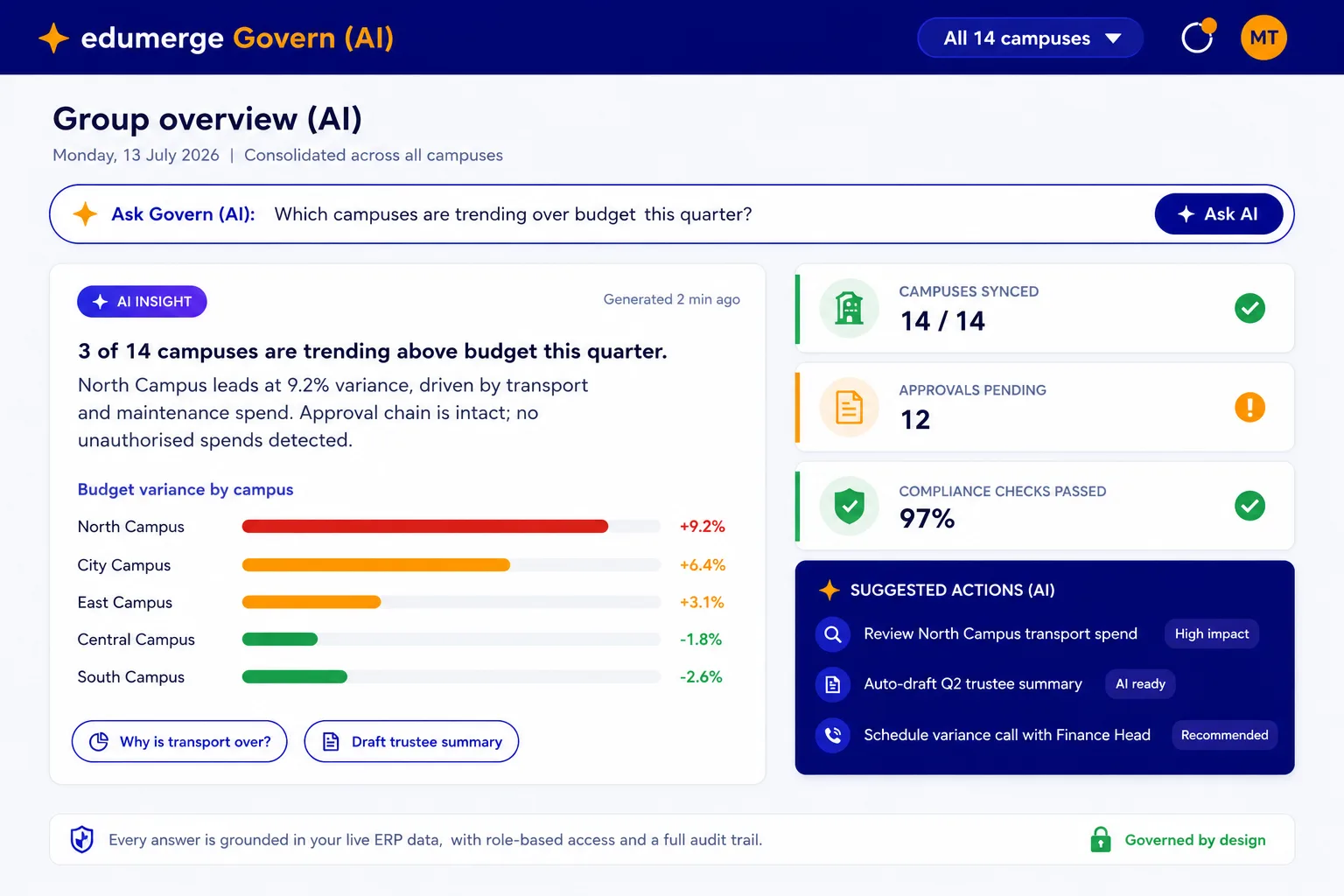
edumerge Govern is the governed AI layer for your entire institution group. It answers questions about your students, staff & finances from verified data, confirms before it acts, and logs every step. Scope-locked to the asker's role. Built for Trustees, CFOs & Chairpersons who cannot afford AI that behaves unpredictably.
- Answers only what it can verify from one unified data source across every campus
- Governed by role: a campus admin sees their campus; a Trustee sees the group
- Every action logged and auditable: full trail, accessible to authorised roles
The Problem
The AI Problem No One in Your Group Has Solved Yet
Every institution group we speak with is facing the same situation: AI tools arrived in their campuses before governance did. Staff are using tools that were never approved. Answers are generated from data no one verified. And when a Trustee or CFO asks who is responsible for what the AI said, no one has an answer.
Ungoverned AI in the Building
Your staff and faculty are already using AI. Most of it was never approved, configured, or scoped to what your institution actually owns. It answers from wherever it can find data, not from your verified records.
No Way to See What the AI Did
When an AI tool sends a communication, generates a report, or summarises a financial position, there is no audit trail. No one knows what data it used, what it excluded, or who approved the action.
AI That Acts Before You Decide
Most AI tools are optimised to do things for you. For a Trustee or CFO, that is the problem, not the solution. An AI that acts without confirmation is an AI you cannot trust with your institution's data.
Answers That Cannot Be Traced Back
When a board member asks where a number came from, the answer cannot be 'the AI said so.' Your institution needs AI where every answer shows its source and every action is attributable to a person and a permission.
The edumerge Govern Shift
From AI You Manage After the Fact to AI You Control From the Start
edumerge Govern is not a chatbot layered on top of your ERP. It is the AI layer built inside the governed platform your group already runs on. It knows only what your platform knows. It answers only what it can verify. And it never acts without your explicit approval.
| Ungoverned AI Today | edumerge Govern | What This Means for Your Board |
|---|---|---|
Any staff member can use any AI tool. No scope, no audit, no control. | AI that is scope-locked to the asker's role and governed by your platform's permissions. | Every AI action is attributable, auditable, and reversible. |
Answers From Anywhere AI uses public models or disconnected data. Results are unverifiable. | Answers From Your Data Every answer is drawn from edumerge's unified data layer. Source is always cited. | A Trustee can ask where a number came from and get a traceable answer. |
Acts Without Asking AI takes actions (drafts, sends, updates) without a confirmation step. | Confirms Before It Acts Every write action requires explicit approval. The user sees what will happen first. | No action is taken on your institution's data without a person approving it. |
Governance Architecture
The Four-Step Governance Model
Every interaction with edumerge Govern follows the same governed sequence. This is not a design choice. It is the architecture that cannot be bypassed.
Step 01 · ASK
A user submits a query. Before anything else, the system checks the user's role and permissions. If the query is outside the user's scope, it is refused here, before any data is accessed.
Step 02 · VERIFY
edumerge Govern looks for the answer in the verified data the user is permitted to see. If the data does not exist, is incomplete, or cannot be verified, Govern says so. It does not guess or fills gaps with inference.
Step 03 · CONFIRM
For any action beyond reading a report, such as drafting a communication, flagging an exception, or scheduling a task, edumerge Govern shows the user exactly what it is about to do & waits for approval.
Step 04 · ACT AND LOG
Once confirmed, the action executes. A full audit entry is written: what was done, by whom, on whose authority, at what time, and from which data source; accessible to authorised roles and immutable.
If a query cannot be verified, edumerge Govern does not guess. It tells the user exactly what it could not find and why. The refusal is the feature, not a limitation.
Core Capabilities
Governed Intelligence Across Your Institution Group
Four confirmed capabilities in the current version.
1. Scope-Locked Answers
Every query is answered within the boundaries of the asker's role. A campus admin sees their campus. A group CFO sees all campuses. A Trustee sees what the Trustee is permitted to see. Govern does not override the permission structure of the edumerge platform.
- Role-based query scope enforced at the data layer, not the interface layer
- Cross-campus queries available to group-level roles
- Scope cannot be extended within a session: requires a permission change by admin
2. Source-Cited Answers
Every answer edumerge Govern gives includes a citation of the data it used. A Trustee asking about fee collection for the month sees the answer and the underlying data in the same response. If a number looks wrong, the source is visible in one click.
- Every answer includes the data source: campus, module, date range
- No inference from incomplete data: if a field is missing, the answer flags it
- Board-presentable responses: answers formatted for leadership use, not technical output
3. Confirm-Before-Act
edumerge Govern does not execute any write action without showing the user a preview of what it is about to do and receiving explicit approval. This applies to every action: drafts, flags, scheduled tasks, and communications.
- Preview-before-execute on all write actions
- Cancellation available at the confirmation step
- No action is triggered by query alone: a query that implies action requires a separate approval step
4. Full Audit Trail
Every query, every answer, every action, and every refusal is logged. The audit trail is accessible to roles with audit permissions and is retained for the period configured by the institution. It cannot be deleted by the person who initiated the action.
- Query log: who asked what, when, and what the answer was
- Action log: what was executed, who approved it, on what data
- Refusal log: what was refused, why, and at which governance step
- Export available for compliance and board review
Who This Is For
Built for the People Who Govern Institution Groups
edumerge Govern is a management layer. It is not built for students, parents, or teaching staff. It is built for the people at the top of the institution who need verified, governed intelligence to make decisions and answer to a board.
Trustees and Managing Trustees
Ask any question about the group: fee collection across campuses, payroll position, compliance status, exceptions. Get a verified, source-cited answer scoped to the Trustee role.
Chairpersons and Secretaries General
Get a live picture of the group before any board meeting. Cross-campus summaries, exception flags & governance signals, all from verified data, without waiting.
CFOs and Finance Heads
Query the financial position of any campus or the full group. Fee collections, budget vs. actual, pending approvals, exception alerts. Every answer shows the source.
Group Administrators and IT Heads
Configure the permission structure that governs what each role can ask and act on. Manage the audit trail. Ensure Govern is operating within the boundaries the institution has set.
Why edumerge Govern
What Makes edumerge Govern Different From Any Other AI
There are many AI products that can answer questions about your institution. The question is not whether they are intelligent. The question is whether they are governed. edumerge Govern is the only AI for institution groups that is built from the ground up as a governed system, not adapted to be one after the fact.
Built on Your Platform's Data, Not a Generic Model
edumerge Govern does not use a general-purpose AI that answers from the internet or from data it was trained on. It answers from the unified data layer of your edumerge platform. The data is yours. The answers are verifiable. The scope is your institution's, not anyone else's.
Refuses Instead of Guesses
Most AI products fill gaps. They infer, extrapolate & generate plausible-sounding answers even when the data is incomplete. edumerge Govern does the opposite. If the data is not there, it says so. A refusal is more valuable than a guessed answer.
Governance Is the Architecture, Not a Setting
The confirm-before-act step, scope-locking, audit trail, and refusal of the unverifiable are not features that can be turned off. They are the architecture. A Trustee approving the platform does not need to trust that the settings are configured correctly.
Owned by Your Institution, Not by a Vendor
The audit trail, the query history, and the action log belong to your institution. edumerge does not train models on your institution's data. Your data does not leave your platform's permission boundary.
See Governed AI in a Working Demo
The fastest way to understand edumerge Govern is to see it handle a real question, refuse something it cannot verify, and walk through a confirm-before-act sequence. The demo is configured to your institution's structure, not a generic walkthrough.
Frequently Asked Questions
Common questions about edumerge Govern
What data does edumerge Govern answer from?+
edumerge Govern answers exclusively from the data in your institution's edumerge platform. It does not access the internet, external databases, or data from other institutions. Every answer is drawn from the unified data layer your group's campuses share on the edumerge platform.
Can a staff member at one campus access data from another campus?+
No. edumerge Govern is scope-locked to the permission structure of your edumerge platform. A campus-level user can only query data within their campus's scope. Cross-campus queries are available only to roles that have group-level permissions, such as a group CFO or Managing Trustee.
What happens when edumerge Govern cannot answer a question?+
Govern tells the user exactly what it could not find and why. It does not generate a plausible-sounding answer from incomplete data. The refusal includes which data was missing and at which step the query could not be verified.
Does edumerge train AI models on our institution's data?+
No. Your institution's data is not used to train any AI model. Govern operates within your platform's data boundary. Your data does not leave your institution's permission scope.
Is edumerge Govern available as a standalone product?+
No. edumerge Govern is the AI layer of the edumerge platform. It requires the edumerge Student ERP, HRMS, or Finance and Control modules to have a verified data layer to answer from. It cannot be deployed independently.
What is the difference between edumerge Govern and the AI Insights in Finance and Control?+
AI Insights in Finance and Control is module-specific: it surfaces intelligence within the finance context. edumerge Govern is cross-platform: it answers questions that span students, staff, and finance across all campuses in one query. Govern is the group-level intelligence layer. AI Insights is a module-level feature.