School Timetable & Substitution Mgmt
Timetable & Substitution Management for Schools
A visual, rules-driven timetable; built once, migrated each term, with substitutions managed in real time.
- Drag-and-drop builder with scheduling policies, workload rules & room mgmt
- Periods, breaks & session types configured for the school's academic structure
- Substitution management for absent teachers with profile-based timetable views
What Does Timetable Management Do for Schools?
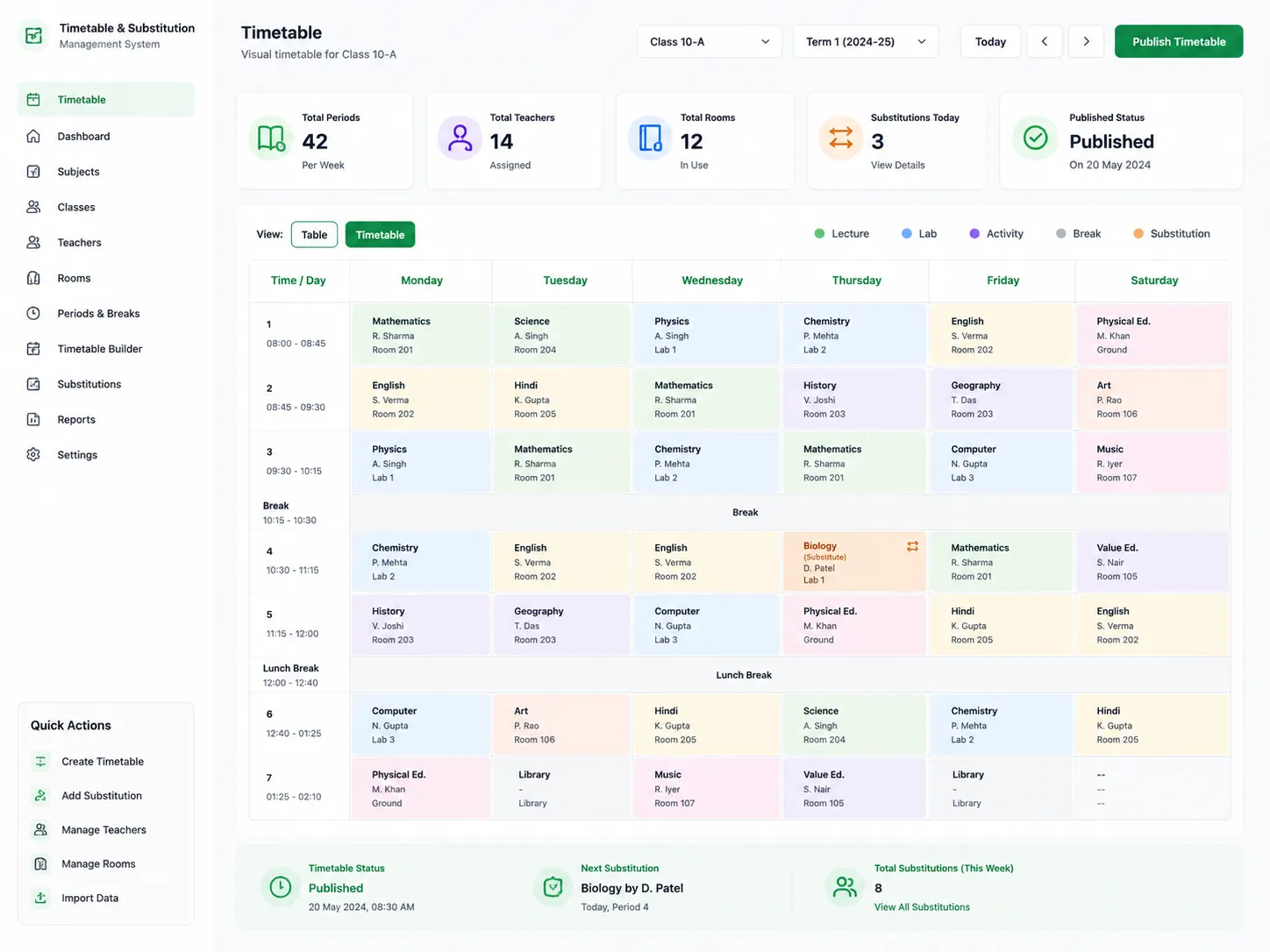
Timetable Management gives school administrators a visual, structured system to build and manage the school timetable. From the initial time structure setup through to daily substitution management when teachers are absent. The timetable builder is drag-and-drop, guided by a time structure wizard and a scheduling policies wizard that encode the school's rules directly into the process. Workload rules ensure no teacher is over-assigned. Room management prevents double-booking. And when a term ends, the timetable migrates to the next period without rebuilding from scratch. Students, teachers & departments each have their own profile-based view; so everyone sees exactly the timetable that is relevant to them.
How Does it Help Schools?
One Timetable for the Whole School
Every class, section, teacher & room, managed in a single visual timetable. Drag-and-drop scheduling makes complex multi-section, multi-subject timetables manageable.
Conflicts Caught Before Publishing
Scheduling policies & workload rules applied during construction ensure double-bookings, over-assignment & policy violations are caught before communicating the timetable.
Room Allocation Without Double-Booking
Room management tracks room assignments across the timetable, preventing two sessions from being scheduled in the same room at the same time; within the same timetable workflow.
Immediately Visibile Substitution
When a teacher is absent & a substitution is created, the change is reflected in the relevant profile-based views immediately. Students get to know who's taking their session.
Profile-based Views
Students see their class timetable. Teachers see their teaching schedule. Departments see all sessions across their faculty. Each person has the timetable information they need.
Migration Between Terms
When a term ends, the timetable auto-migrates to the next period, carrying forward unchanged structure, subject assignments & room allocations without requiring a full rebuild.
Key Capabilities
A detailed view of every capability across Timetable Management sub-modules.
Timetable Builder
Drag-and-Drop Visual Builder
The timetable is built by school admins dragging & adjusting subjects, teachers sessions into time slots on a visual grid.
Configuration Management
Timetable configurations are created & edited within the module. Including active, archiving previous & managing multiple configurations for different academic years.
Time Structure Wizard
A guided setup wizard configures the school day's time structure. The no of periods, their duration, break placement & any half-day or special day configurations.
Time Structure Setup (Periods, Breaks)
Periods and breaks are defined precisely; their start and end times, durations, and whether they apply across all days or vary by day of the week.
Session Types Configuration
Different session types: theory, practical, lab, tutorial, activity, are configured with their characteristics. The builder applies session type rules when scheduling.
Subject Credit Hours Management
Subject teaching hours per subject are defined within the module. Timetable builder tracks whether each subject's scheduled sessions meet its credit hour requirement.
Scheduling Policies & Workload
Scheduling Policies Wizard
Scheduling constraints like max consecutive sessions for any teacher, subjects that cannot be placed in first/last period, min gaps between sessions can be configured.
Workload Rules Management
Min & max teaching loads per teacher are configured as workload rules. Builder applies these while scheduling to prevent over-assignment or under-utilisation.
Room Management
Rooms & labs registered with their type, capacity & availability. Assignment mgmt within timetable builder, prevents double-booking & ensures session type matching.
Migrate Timetable Between Periods
The current timetable is migrated to the next term at period end. Carrying forward unchanged structure, subject assignments, and room allocations without full rebuild.
Timetable Dashboard & List View
A dashboard view shows the full timetable in grid form. A list view provides a structured breakdown of all sessions by class, section, subject, teacher, and room.
Substitution & Views
Substitution Management
When a teacher is absent, a substitution entry replaces them with an available colleague for the affected sessions. Logged & reflected in all relevant proile views.
Create Substitution Entries
Substitution entries are created within the timetable module, specifying the absent teacher, affected sessions & the replacement.
Profile-Based Views (Student, Faculty, Department)
Students see their class schedule, teachers see their personal teaching schedule, departments see all sessions including substitutions.
Timetable Reports
Structured reports covering session counts by subject & teacher, workload distribution, room utilisation, and substitution history for review & reporting.
Built for Real Institutional Workflows
The complete timetable lifecycle for schools
Time structure configured: periods, breaks & session types defined for the school day
Scheduling policies & workload rules configured: defining constraints for the timetable builder
Subject credit hours & room management set up
Timetable built using the drag-and-drop visual builder: guided by configured rules
Conflicts & policy violations flagged during construction; resolved before publishing
Timetable published: profile-based views updated for students, teachers & depts
At term end: timetable migrated to next period; changes applied to updated sections
Daily: absent teacher substitution entries created; views updated immediately
Designed for Every Timetable Stakeholder
Timetable Coordinator / School Admin
- Build & manage full school timetable using visual drag-and-drop builder
- Config time structure, policies, workload rules & room assignments
- Migrate the timetable between academic periods at term end
- Create substitution entries for absent teachers
Principal / Academic Head
- Access timetable dashboard for a full-school view of the current schedule
- Review workload distribution across teachers & departments
- Access timetable reports for academic planning & review
Teachers
- View their teaching timetable through the faculty profile-based view
- See substitution assignments when covering for absent colleagues
Students
- View their class timetable through the student profile-based view
- See substitution updates immediately when a teacher is replaced
Reports & Insights
Timetable Management includes 6 pre-built reports and analytics dashboards.
Timetable Dashboard
- Full-grid timetable view by class & section, for administrative review and publication
Workload Distribution Report
- Teaching load/teacher: actual sessions vs. configured workload rules, for compliance & planning
Room Utilisation Report
- Room & lab booking status across the timetable; for facility planning and double-booking verification
Subject Session Count Report
- Scheduled sessions per subject vs. configured teaching hours; for academic compliance review
Substitution History
- All substitution entries by date, absent teacher & replacement; for management records
Profile-Based Timetable Views
- Individual timetable exports for students, teachers & departments, for distribution and personal reference
Designed for Scale
Whether managing timetables for a single school or across a group of schools, Timetable Management ensures:
Visual drag-and-drop builder makes complex multi-section timetables manageable.
Scheduling policies & workload rules catch conflicts before publishing; no more errors.
Room management prevents double-booking regardless of the no of rooms & session types.
Profile-based views mean each stakeholder sees only the information relevant to them.
School Timetable, Built Right, Managed Every Day.
See how edumerge's Timetable Management module gives schools a visual, rules-driven scheduling system with substitution management and profile-based views.
Frequently Asked Questions
Common questions about school timetable and substitution management
Can the timetable builder handle multiple sections, subjects and teachers without manual conflict checking?+
Yes. The drag-and-drop builder applies scheduling policies and workload rules as the timetable is constructed, so double-bookings, teacher over-assignment and policy violations are flagged before the timetable is published. This holds across multi-section, multi-subject school timetables, not just single-class schedules.
How does the system manage teacher substitutions when a teacher is absent?+
A substitution entry is created within the timetable module, specifying the absent teacher, the affected sessions and the replacement colleague. The change is reflected immediately in the relevant profile-based views, so students and staff know who is taking the session without a separate announcement step.
Do students and teachers see the same timetable view, or something specific to them?+
Each stakeholder gets a profile-based view. Students see their class timetable, teachers see their personal teaching schedule, and departments see all sessions across their faculty, including substitutions. This keeps each view limited to the information relevant to that person.
Does the timetable need to be rebuilt every new term or academic year?+
No. When a term ends, the timetable migrates to the next period, carrying forward the unchanged structure, subject assignments and room allocations. Admins can then adjust only what has changed for the new term instead of rebuilding the schedule from scratch.
How does the module prevent two classes from being scheduled in the same room?+
Rooms and labs are registered with their type, capacity and availability, and room management tracks assignments across the timetable as it is built. This prevents two sessions from being booked into the same room at the same time and ensures the room type matches the session type, such as a lab session needing a lab room.