School Student Feedback
Student Feedback Management for Schools
Configurable forms for subject, teacher & facility feedback. With anonymous responses, student & parent channels, and analytics.
- Form Builder: Rating scale, text, checkbox & dropdown questions; subject & teacher-wise targeting, anonymous or named, open/close scheduling
- Feedback Collection: Student-facing portal & parent channel; response tracking, reminder notifications, submission status dashboard
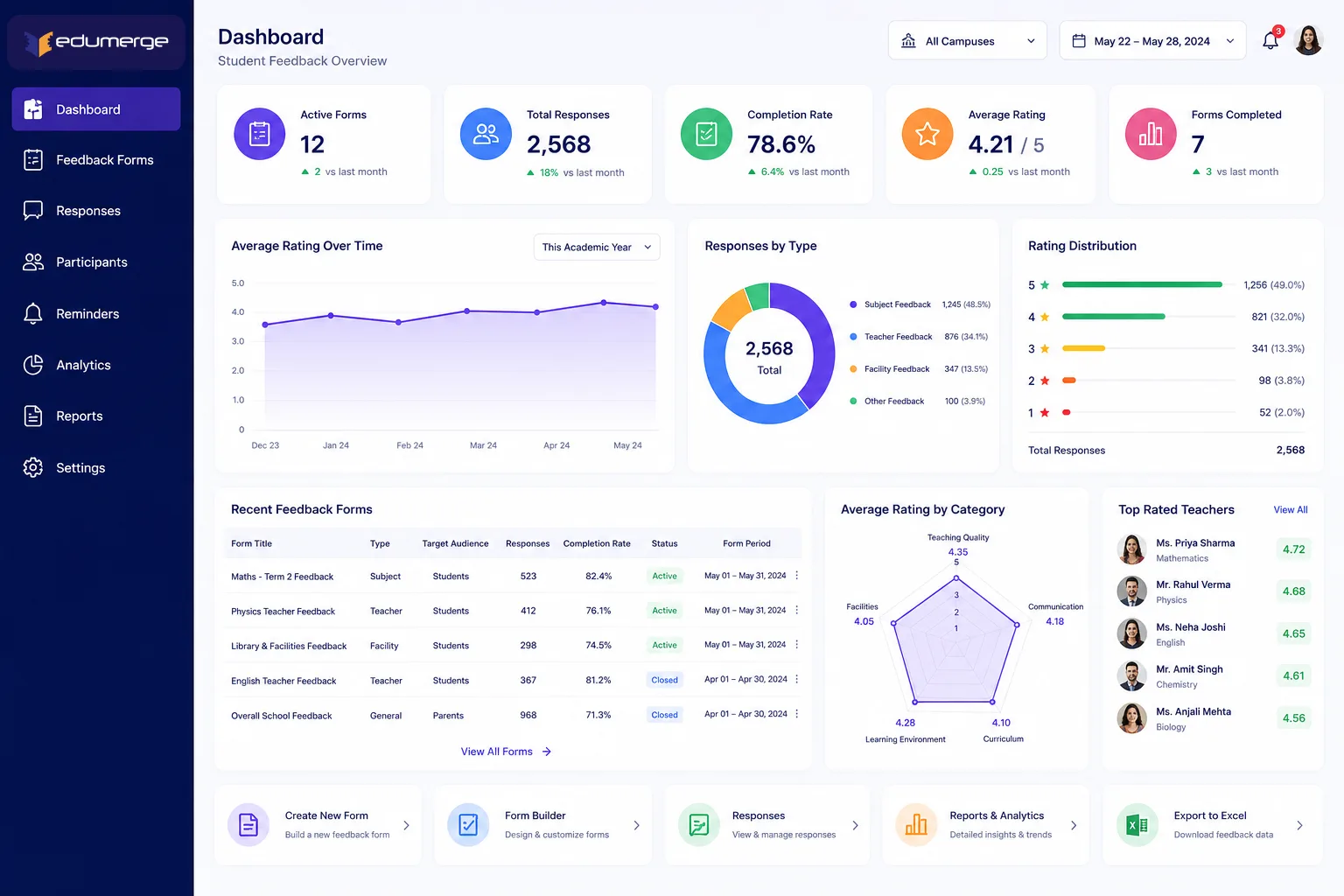
- Analytics & Excel Export: Avg ratings per question & form, response distribution charts, subject & teacher-wise view, trend analysis across academic years
Overview
What Does Student Feedback Management Do?
Student Feedback Management gives schools a structured system for collecting, tracking, and analysing feedback from students & parents on teaching quality, subject delivery, and facilities. Administrators build feedback forms using a configurable form builder and target them to specific subjects, teachers, classes, or academic years.
The Complete Feedback Lifecycle
From form design to actionable analytics
Admin creates form: selects question types, targets subject/teacher, configures anonymous/named mode
Form scheduled with open & close dates; academic year scoped; preview confirmed
Form published: appears in student portal & parent channel on the scheduled open date
Submission status dashboard monitored; reminder notifications sent to students with pending responses
Form closes on the scheduled date; no further submissions accepted
Analytics reviewed: average ratings, distribution charts, subject & teacher-wise comparisons
Trend analysis compared against the same period in previous academic years
Named mode responses reviewed individually for teacher development conversations where applicable
Full response dataset exported to Excel for management reporting & quality documentation
How Does it Help Schools?
Feedback That Is Structured
Form Builder gives feedback a defined structure: rating scales for quantitative measurement, text fields for qualitative comment, checkboxes & dropdowns for categorical responses.
Anonymous Responses Captured
Students are less likely to give honest feedback when their names are attached. Anonymous configuration removes this barrier; giving schools access to candid feedback on all parameters.
Both Student & Parent Voices in One System
Student & parent feedback cover different dimensions of school quality. Both channels are handled within the same module, with separate submission portals & distinct response tracking.
Response Tracking Closes the Collection Gap
The submission status dashboard shows responded & pending counts in real time. Reminder notifications are auto-sent to students with pending responses. Duplicate submission prevention ensures every response counted is genuine.
Analytics That Make Feedback Actionable
Average rating per question, response distribution charts, and subject-wise and teacher-wise comparative views give management the data to act on. Trend analysis reveals where intervention is needed.
Trend Analysis Across Academic Years
Year-on-year trend analysis shows whether teacher ratings are improving, whether a new curriculum approach is landing better with students, or whether a facilities issue has been resolved.
Key Capabilities
A detailed view of every capability across all three Student Feedback steps.
Form Builder
Multiple Question Types
Rating scales for quantitative teaching quality scores, text fields for open-ended, checkboxes for multi-select, and dropdowns for single-select categorical answers.
Subject & Teacher-Wise Form Targeting
Forms are targeted to specific subjects, teachers, classes, or sections. Ensuring students respond to feedback relevant to their actual experience & correct analytics.
Anonymous Response Configuration
Each form is configured for anonymous responses (names not collected or displayed) or named responses (respondent identity recorded & accessible in analytics).
Form Open/Close Date Scheduling
Forms are scheduled to open & close at configured date & time. Removing the need for manual activation & ensuring consistent collection windows.
Academic Year Scoping
Forms are scoped to a specific academic year. Enabling year-on-year comparison in trend analysis & ensuring correctly attributed historical feedback data.
Form Template Reuse
Forms used in previous cycles are saved as templates & reused. Maintaining consistency in question structure across years & reducing setup time for recurring rounds.
Preview Before Publish
The complete form: all questions, response options & instructions; previewed exactly as students & parents will see it before the form is published.
Feedback Collection
Student Feedback Portal
Students access pending feedback forms through a dedicated submission portal within the School ERP. Without a separate login or external link.
Parent Feedback Channel
Parents submit feedback through a separate channel within the parent portal. Covering distinct perspective of parents on facilities & overall experience.
Response Tracking per Student
Each student's submission status is tracked per form. Giving administrators the individual-level visibility needed for follow-up & completion rate management.
Reminders for Pending Responses
Students with pending form submissions receive automatic reminder notifications before the form close date. Reducing follow-up burden on admins.
Submission Status Dashboard
Shows the total responded & pending counts for every active form. With a breakdown by class & section; giving administrators a real-time view of collection progress.
Prevent Duplicate Submission
Once a student or parent submits a response, form is locked for that respondent. Preventing accidental or deliberate duplicate submissions.
Analytics & Export
Average Rating
Calculated per question & as an overall form score. Giving teachers & management a quantitative summary without needing to read individual responses.
Response Distribution Charts
Each rating-scale question shows the distribution of responses across rating options. Revealing not just the average but how responses are spread.
Subject & Teacher-Wise View
Ratings are compared across subjects & teachers in a single view. Enabling management to identify relative strengths & areas for development.
Trend Analysis Across Academic Years
Form results are compared year-on-year for the same feedback period. Showing whether ratings are improving, declining, or stable.
Individual Response Drill-Down
For forms configured in named mode, each response is accessible. Enabling management to review specific comments & ratings for teacher development.
Export All Responses to Excel
Complete dataset: all respondents, questions, answers & ratings, is exported to Excel for management presentations, quality documentation, or board reporting.
Designed for Every Feedback Stakeholder
School Admin/Academic Coordinator
- •Build & publish feedback forms for each academic cycle
- •Monitor submission status & trigger reminders for pending responses
- •Review analytics & export results for management review & quality documentation
Principal/School Management
- •Access subject-wise & teacher-wise comparative analytics for academic quality oversight
- •Review trend analysis across academic years for continuous improvement evidence
- •Use exported data for board reporting & parent communication on school quality
HOD/Department Heads
- •Review subject-specific & teacher-specific feedback ratings for their department
- •Access individual response drill-down (named mode) to support teacher development conversations
Students
- •Submit feedback on subjects & teachers through the student portal within the School ERP
- •Receive reminder notifications for pending feedback forms before the close date
Parents
- •Submit feedback through the parent channel on teaching quality, facilities, communication & overall satisfaction
Scale & Business Impact
Form Builder gives feedback a defined structure with rating scales, text fields, checkboxes, and dropdowns for consistent, comparable data
Anonymous configuration removes response barriers; giving schools access to candid feedback on teaching delivery and classroom environment
Both student and parent voices captured in one system with separate portals, giving management a complete picture of school quality
Response tracking, reminders, and duplicate prevention ensure high collection rates and data integrity across feedback cycles
Structured. Tracked. Analysed. Acted On.
See how edumerge's Student Feedback module gives schools configurable feedback forms, a student & parent submission platform, response tracking with reminders, and rating analytics with year-on-year trend analysis.
Frequently Asked Questions
Common questions about student feedback management for schools
Can student feedback forms be collected anonymously?+
Yes. Each form is configured for anonymous responses, where names are not collected or displayed, or named responses, where respondent identity is recorded and accessible in analytics. Schools typically use anonymous mode for teacher and subject feedback to get candid responses, and named mode where individual follow-up is needed.
Can parents give feedback separately from students?+
Yes. Parents submit feedback through a separate channel within the parent portal, distinct from the student feedback portal. This covers the parent perspective on facilities, communication, and overall satisfaction, with response tracking maintained separately for each channel.
How does the school know if all students have submitted their feedback?+
A submission status dashboard shows responded and pending counts for every active form, with a breakdown by class and section. Students with pending responses receive automatic reminder notifications before the form close date, and duplicate submission prevention locks the form for a respondent once they submit.
Can feedback be analysed subject-wise and teacher-wise?+
Yes. Analytics include average ratings per question and per form, response distribution charts, and subject-wise and teacher-wise comparative views. For forms configured in named mode, individual responses are also available as a drill-down for teacher development conversations.
Can feedback results be compared across academic years?+
Yes. Forms are scoped to a specific academic year, and trend analysis compares results for the same feedback period year-on-year. This shows whether teacher ratings are improving, whether a curriculum change is landing better with students, or whether a facilities issue has been resolved. The complete dataset can also be exported to Excel for management or board reporting.