College Staff Information System
Complete Staff Information System for Colleges & Universities
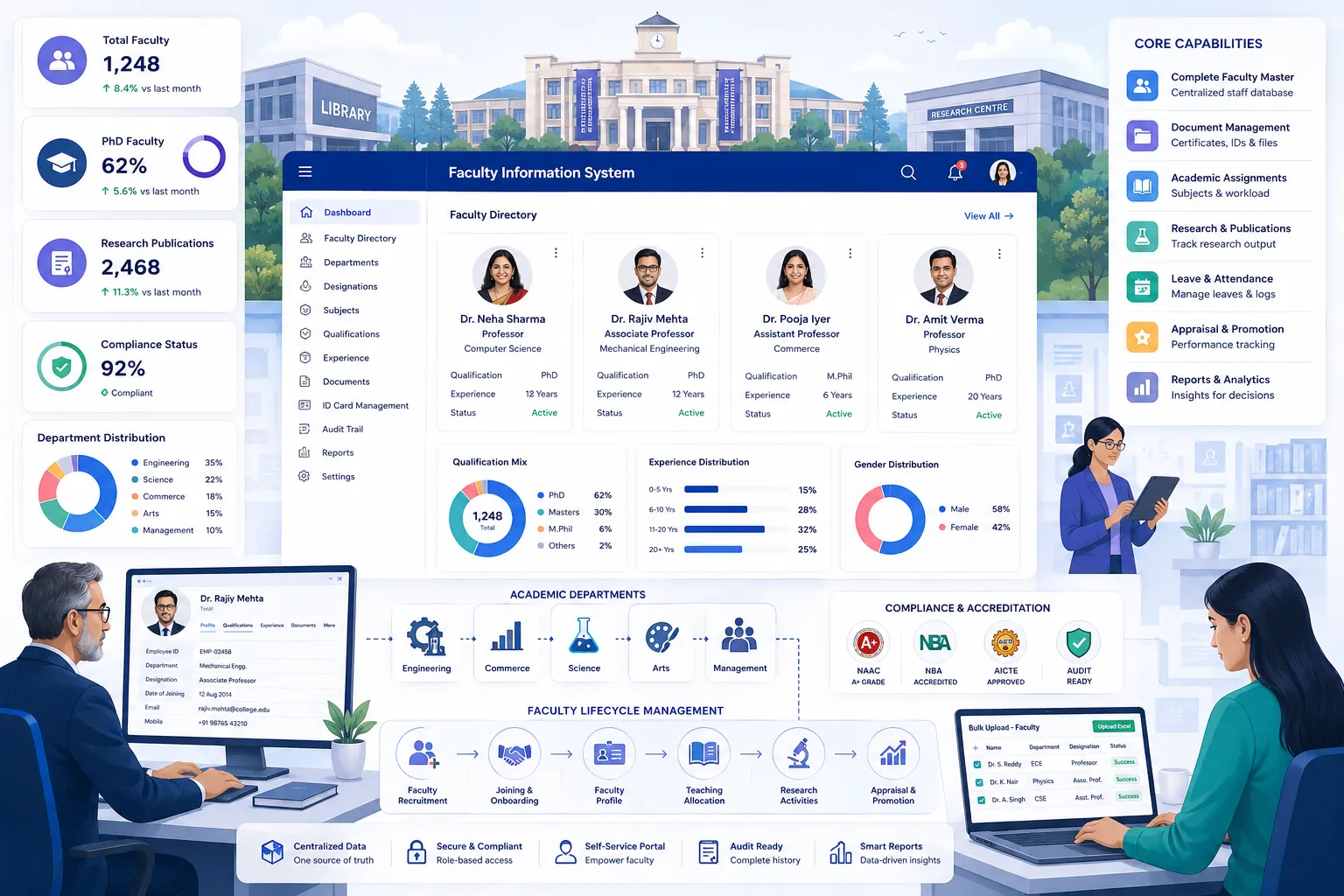
Comprehensive staff profile management with dynamic forms, bulk operations, and audit trails.
- Department hierarchy, designation grades, dynamic form configuration
- 360° staff profile with grid/table views, advanced filters, OTP-verified updates & duplicate detection
- Bulk upload with data sanitization, bulk update, photo import, birthday/role exports, and atomic rollback
- Analytics dashboard: staff strength KPIs, demographics, department distribution, data quality alerts, and workforce trend charts
Overview
What Does This Module Do?
Staff Information System gives colleges a comprehensive, configurable staff profile platform across 5 integrated steps: Organisation Structure, Staff Profiles, Bulk Operations, Certificates & ID Cards, and an Analytics Dashboard with KPI cards, demographics, workforce trend charts, data quality alerts, and quick actions. All in one decision support view.
Why Choose Us
What Makes edumerge Different?
Single Record. No Duplicates.
Authoritative faculty record eliminates duplication & ensures data consistency.
No Unauthorized Changes
Faculty personal information controlled by faculty member or authorized HR only.
Transitions Without Errors
Department or role changes automatically update all linked records.
NAAC-Ready Records
All compliance and qualification documents validated for accreditation audits.
Process
Faculty Lifecycle
Organization Setup
Department configuration
Faculty Master
Single record per person
Verification
OTP validation
Compliance
Document storage
Activation
System access enabled
ID & Certificates
Generated automatically
Self-Service
Faculty portal access
NAAC Ready
Audit-ready records
Features
Key Capabilities
Everything colleges need for comprehensive faculty management
Organisation Structure
ConfigDepartment hierarchy, designation grades, dynamic form configuration, and saved table preferences.
Department Management & Hierarchy
Department structure is configured with parent-child hierarchy, accommodating multi-faculty institutions with nested department structures.
Designation & Grade Configuration
Designations and grade levels are defined centrally, providing the classification framework for staff profiles and role-based access.
Form Configuration (Admin vs Regular View)
Form fields are configured separately for Admin and Regular user views. With sub-form support for nested sections and field-level visibility control per role.
Add/Remove/Reorder Fields Dynamically per Form View
Fields are added, removed, or reordered on any form view without system changes. Allowing the institution to adapt the staff record structure to its specific data requirements.
Tags Management for Grouping Staff
Tags are created & assigned to staff for grouping, filtering, and bulk operations. Accommodating custom classifications beyond standard designation & dept structure.
Department Assignment for Tags
Tags are scoped to specific departments. Ensuring tag-based filtering and reporting reflects the department structure of the institution.
User Table Preferences (Saved Column Order, Visibility, Sort Direction)
Each staff member's table view preferences; which columns are visible, their order, and the default sort direction, are saved per user.
Staff Profiles
Action360 degree staff profile with grid/table views, advanced filters, OTP-verified updates, and duplicate detection.
360 Degree Staff Profile with Configurable Dynamic Form Fields
Every staff member has a comprehensive profile capturing personal, professional, qualification, research, and department details with form fields configured dynamically.
Staff List with Grid View and Table View
The staff list is available in grid view (card-based) and table view (row-based); with table column customisation saved per user.
Advanced Filter Operators
Staff lists are filtered using advanced operators: contains, equals, not equals, starts with, ends with, is empty, is not empty, and date range. Enabling precise cohort queries.
Staff List Pagination & Export
The staff list paginates for large institutions and is exportable, for HR reporting, compliance submissions, and management review.
OTP-Verified Profile Updates
Contact number and email updates are verified via OTP before being applied. Ensuring communication details in the system are accurate and staff-confirmed.
Auto-Save Draft on Profile Edit Forms
Profile edits are auto-saved as drafts. Preventing data loss when a form session is interrupted before the staff member submits.
Duplicate Detection on Create
When a new staff record is created, system checks for matching name, phone & email before saving. Flagging potential duplicates for review.
Staff Audit History Timeline
Every change to a staff profile is logged in a chronological timeline. Showing what changed, who changed it, and when.
My Profile Self-Service Portal
Staff members update their own personal info, verify contacts & access records through a self-service portal. Reducing HR overhead for routine maintenance.
Subject Teaching Assignments per Staff
Each staff member's subject and teaching assignments are recorded in their profile. Connecting the staff record to the academic structure.
Academic Roles Assignment
Academic roles: HOD, coordinator, examiner, mentor, are assigned per staff member, separate from their administrative designation.
Bulk Operations
ActionBulk upload with data sanitization, bulk update, photo import, birthday/role exports, and atomic rollback.
Bulk Staff Upload via Excel/CSV with Row-Level Validation
The full staff cohort is uploaded via Excel or CSV. Validation runs per row, errors reported individually without blocking valid rows.
Data Sanitization on Upload
Upload data is auto-sanitized. Email typo correction, phone no. normalisation, Aadhaar/PAN/IFSC/bank account format validation, and date parsing across formats.
Bulk Staff Update (Field-Level Mass Edit)
Selected fields are updated across multiple staff records in a single operation; for designation changes, department transfers, or any field that changes across a cohort.
Photo & Document Bulk Upload
Staff profile photos and compliance documents are uploaded in bulk. Reducing the effort of populating photo & document records at onboarding or during annual reviews.
Birthday Export (Filtered Staff Birthday Report)
Staff birthdays are exported filtered by Today/Week/Month/Year; for HR communication, recognition programmes, and welfare management.
Role Assignment Export
Current role assignments across all staff are exported as Excel/CSV, for role review, audit submissions, and academic structure documentation.
Bulk Roll-Back with Atomicity Guarantee
Any bulk upload or update operation can be rolled back in full, with atomicity guarantee ensuring the data returns to its pre-operation state without partial updates remaining.
Import History with Per-Row Error Detail
Every bulk import operation is logged in the import history with per-row error detail. So admins can review what was uploaded, what was rejected, and why.
Certificates & ID Cards
ActionGenerate, customise, and print staff ID cards and certificates.
ID Card Generation & Print
Staff ID cards are generated from profile data and printed; with institution branding, department, designation, and barcode or QR code.
Certificate Generation
Experience certificates, service letters, and other official staff certificates are generated from the staff profile; with institution letterhead and configurable certificate content.
Custom ID Card Designer
The ID card layout is configured through a custom designer. Allowing the institution to set the dimensions, field positions, fonts, colours & logo placement.
Analytics
Reports & Insights
5 dashboard views in the Analytics Dashboard; available without running a separate report.
KPI Dashboard
Total staff, active/inactive split, department counts, Teaching vs Non-Teaching split, Profile Completeness %, Role Coverage count.
Overview Tab
Birthday widget with export, Data Completeness panel (6 fields with progress bars), Attention Required panel (HOD gaps, untagged staff, multi-role counts).
Demographics Tab
Gender distribution, age by department, designation distribution, Teaching vs Non-Teaching split, active vs inactive; 5 chart views.
Workforce Tab
Experience distribution by department, joining trend (last 5 years), department summary table with utilisation %, workforce summary grid.
Recent Activity Feed
Create/Update/Delete log with performer and timestamp, auto-refresh every 5 minutes; live audit trail on the dashboard.
Who Uses It?
Designed for every stakeholder in your institution
College Leadership
- Monitor faculty strength
- Track compliance status
- Generate NAAC reports
HR Department
- Manage faculty records
- Process bulk updates
- Handle verifications
Faculty
- Update personal info
- Verify contacts
- Access own records
Impact
Business Impact for Colleges
Measurable outcomes that transform faculty management
NAAC Compliance
All records audit-ready for accreditation submission
Operational Efficiency
Reduce manual faculty record management effort
Data Accuracy
Single authoritative record eliminates duplicates
Error Reduction
Automated transitions prevent data inconsistency
Every Faculty Member. Every Staff. One Structured, Compliant Record.
See how edumerge's Staff Information System gives college HR a complete staff management platform. Configurable for any higher education structure, with audit trails built for NAAC and compliance requirements.
Frequently Asked Questions
Common questions about faculty and staff information management for colleges
How does the system prevent duplicate faculty records?+
When a new staff record is created, the system checks for matching name, phone number, and email before saving it. Any potential match is flagged for review before the record is confirmed. This keeps one authoritative record per faculty member, so departments cannot accidentally create parallel entries for the same person.
Can faculty update their own contact details, and how is it verified?+
Yes. Faculty use the My Profile self-service portal to update personal information themselves. Changes to contact number or email require OTP verification before they are applied, so HR does not have to manually confirm every update, and contact details in the system stay staff-confirmed and accurate.
Can we customize the design of staff ID cards for our institution?+
Yes. ID cards are generated from staff profile data and printed with a custom designer where the institution sets dimensions, field positions, fonts, colours, and logo placement. Cards can include department, designation, and a barcode or QR code alongside institution branding.
What happens if a bulk staff upload fails partway through?+
Excel or CSV uploads are validated row by row, so errors are reported individually without blocking valid rows. If an upload or update needs to be undone, the bulk roll-back has an atomicity guarantee, meaning the data returns fully to its pre-operation state with no partial changes left behind. Every import is also logged in the import history with per-row error detail for review.
Is the staff information system ready for NAAC accreditation audits?+
Yes. Compliance and qualification documents attached to each staff profile are validated for accreditation audits, and every change to a profile is logged in an audit history timeline showing what changed, who changed it, and when. This gives colleges an audit-ready record set without extra preparation before a NAAC submission.