AI tools reached campuses before governance did. Leadership teams evaluating edumerge Govern AI usually recognise the pattern:
- circulars drafted in free chatbots,
- fee figures pasted into unapproved AI tools, and
- summaries in circulation that no one can trace back to a record.
Microsoft and LinkedIn's 2024 Work Trend Index found that 78% of AI users bring their own AI tools to work, and 52% are reluctant to admit using AI for their most important tasks. In India, a 2025 CENTA survey of over 5,000 teachers found more than 70% already use AI tools in teaching.
Adoption is not the problem; accountability is. When a Trustee asks where an AI-generated number came from, which campus data it used or who approved the message it sent, most education groups have no answer. That gap is what edumerge governed AI for education groups is built to close.
TL;DR
edumerge Govern AI is a governed AI layer on top of edumerge's school ERP, college ERP, HRMS and Finance & Control. It answers questions about students, staff and finances across every campus in your group, drawing only on verified data from your edumerge platform.
Every answer is scope-locked to the asker's role and cites its source. Before any action, edumerge Govern AI shows a preview and waits for explicit approval, then logs every query, answer, action and refusal.
edumerge Govern AI runs on the entire edumerge product suite, working on the verified data layer those suites create.
What is edumerge Govern AI?
edumerge Govern AI is the governed AI layer for educational institution groups. It answers questions across everything your edumerge platform holds, from attendance & fees to payroll & compliance, using verified data.
Each answer is scoped to the asker's role and cites its source. edumerge Govern AI confirms before acting and logs every step.
If your educational group is comparing AI governance software in India, ask one question first: does the AI live inside your records, or does it reach in from outside?
edumerge Govern AI is built inside the same platform that already holds every campus's records. It works within the rules your group has already set, rather than going around them.
edumerge Govern AI at a Glance
| Attribute | edumerge Govern AI |
|---|---|
| What it is | The governed AI layer of edumergeOS (School ERP, College ERP, HRMS and Finance and Control) built inside the edumerge platform rather than added on top of it. |
| Who it is built for | Trustees, managing trustees, chairpersons, secretaries general, CFOs & finance heads, with group administrators and IT heads configuring permissions. |
| What data it answers from | Only from the unified data layer of your institution's edumerge platform. It strictly does not use any information from the internet, external databases or other institutions' data. |
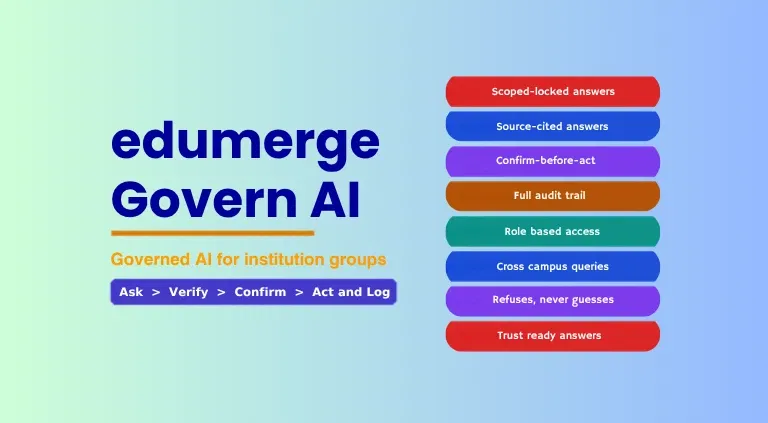
| Core safeguards | Scope-locked answers, source-cited answers, confirm-before-act and a full audit trail. |
| Availability | Part of the edumerge platform. Requires the edumerge School ERP, College ERP, HRMS or Finance and Control. May integrate with your existing tech stack which is subject to discussion with your team. |
What edumerge Govern AI is not:
- Not a chatbot added on top of an ERP: It is the AI layer of the governed platform your group already runs on, and it knows only what that platform knows.
For a wider view of what to look for when evaluating these tools, see our guide to AI governance software for Indian education groups.
How edumerge Govern AI Works: The Four-Step Governance Model
Every interaction with edumerge Govern AI follows the same four-step sequence, whether a user is reading a report or approving an action. This sequence is built into the product's architecture rather than offered as a setting, so no user or administrator can bypass it.
1. Ask
When a user submits a question in plain language, edumerge Govern AI first checks their role and permissions before accessing any data. If the question falls outside that scope, it declines it at this stage, and no data is touched.
2. Verify
edumerge Govern AI looks for the answer only in verified data the user is permitted to see. If the data is missing, incomplete or cannot be verified, it clearly states what is missing rather than filling the gap with an assumption.
3. Confirm
For anything beyond reading a report, such as drafting a communication, flagging an exception or scheduling a task, edumerge Govern AI shows exactly what it is about to do. Nothing happens until the user approves, and the user can cancel at this step.
4. Act and Log
Once approved, the action executes. Simultaneously, it writes an immutable audit entry recording what was done, by whom, on whose authority, at what time and from which data source.
An Illustrative Example: A Group CFO Chases Pending Fee Collections
| Step | What the Group CFO does | What edumerge Govern AI does |
|---|---|---|
| Ask | Asks: "What is our fee collection for this month across all campuses?" | Checks that the CFO holds a group-level role with access to every campus, then accepts the query. |
| Verify | Review the campus-wise answer. | Returns collection against demand for each campus, citing campus, fee module and date range. Any campus with incomplete data for the period is flagged, not estimated. |
| Confirm | Ask edumerge Govern AI to send a reminder note to campuses with pending collections. | Drafts the note, lists the recipient campuses and shows a preview. Nothing is sent until the CFO approves. |
| Act and Log | Approves the note. | Sends the note to the listed campuses and writes an audit entry: the action, the approver, the authority, the time and the fee data used. |
What edumerge Govern AI cannot verify, it says so.
If it cannot verify an answer, it does not guess. It tells the user what data was missing, why the answer could not be verified and at which step the query stopped.
For a board, this refusal is a feature, not a limitation. A clear statement that the data is not there is worth more than a confident number no one can defend.
For a closer look at why accuracy matters more than speed at board level, read our guide on what leadership actually needs from AI.
edumerge Govern AI Features: Scope-Locked, Source-Cited, Confirm-Before-Act and Fully Audited
The current version of edumerge Govern AI offers 4 capabilities. Each one answers a question Trustees, Chairpersons & CFOs ask before approving any AI for their institutions.
| Feature | What it does | Outcome for the board |
|---|---|---|
| Scope-Locked Answers | Answers every query within the asker's role, enforced at the data layer. | No one sees data beyond their remit, including through AI. |
| Source-Cited Answers | Shows the campus, module and date range behind every answer. | Any figure can be traced to its source in the same response. |
| Confirm-Before-Act | Previews every write action and waits for explicit approval. | No action touches institution data without a named person approving it. |
| Full Audit Trail | Logs every query, answer, action and refusal. | A complete, exportable record for compliance and board review. |
Scope-Locked Answers:
- Role-based AI access is enforced at the data layer, rather than the interface, so a cleverly worded question cannot reach data outside the asker's remit.
- Cross-campus queries are available only to group-level roles.
- A user's access cannot be extended during a session. And any change to their scope requires an authorised administrator to update their permissions.
| Role | What edumerge Govern AI answers from |
|---|---|
| Campus Admin | Their own campus only |
| Group CFO | All campuses in the group |
| Managing Trustee | The group, as the trustee role permits |
Source-Cited Answers:
- Every answer names its data source as campus, module and date range.
- If a field is missing, the answer flags it rather than inferring a value.
- Answers are formatted for leadership use and made ready for a board discussion, rather than being a raw technical output.
Confirm-Before-Act:
- Every write action, including drafts, flags, scheduled tasks and communications, shows a preview before it executes.
- The user can cancel at the confirmation step.
- A question never triggers an action on its own and any implied action needs a separate approval.
Full Audit Trail:
- Query log: Who asked what, when, and what the answer was.
- Action and refusal logs: What was executed or refused, who approved it, on what data and at which governance step.
- Auditable AI for trustees: Retained for the period the institution sets, visible to audit-permitted roles, exportable, and not deletable by the person who initiated the action.
To understand how audit records support compliance and accreditation reviews, explore why AI needs an audit trail in regulated education.
edumerge Govern AI vs General-Purpose AI Tools: Why it Matters to Educational Institution Groups
General-purpose AI tools are built to be useful to anyone. Whereas edumerge Governed AI for education institutions is purposely built to be accountable to a board. The key difference shows up across 6 criteria.
| Criteria | General-purpose AI tools | edumerge Govern AI |
|---|---|---|
| Data source | Public models, the open web or whatever data a user pastes in | Only your institution's verified edumerge platform data |
| Scope control | No link to institutional roles; any user can ask anything | Scope-locked to the asker's role, enforced at the data layer |
| Actions | Can draft, send or update without a formal approval step | Previews every write action and waits for explicit approval |
| Audit trail | Usually no trail the institution controls or can inspect | Every query, answer, action and refusal logged and exportable |
| Handling of data gaps | Often fills gaps with plausible-sounding inference | States what is missing and why; refuses instead of guessing |
| Data use for model training | Varies by tool and plan; often unclear to the institution | edumerge does not train models on institution data |
1. Board-Ready Answers for Chairpersons, With Every Figure Traceable
A Chairperson walking into a board meeting needs a live picture of the group, rather than a pack compiled by hand from campus reports. edumerge Govern AI provides only verified cross-campus summaries, exception flags and governance signals.
This ensures that every figure traces back to its campus, module and date range. Therefore when a board member asks where a number came from, the answer is a source, not "the AI said so".
2. Your Data Stays Yours: Ownership, Privacy and No Model Training
The audit trail, query history and action log belong to the institution, not to edumerge. edumerge does not train models on institution data, and edumerge Govern AI operates inside the permission boundary of your edumerge platform, so data does not leave that scope.
Is edumerge Govern AI Right for Your Group?
Your staff are already using AI. What matters now is whether it follows your institution's rules or no rules at all. In most institution groups, those rules do not exist yet, and leadership often discovers this only when a figure in a board report cannot be explained.
edumerge Govern AI puts your rules in charge of every AI decision.
- Every answer comes only from verified data on your edumerge platform.
- Every query stays within the asker's role.
- Nothing moves without a person's approval, and
- Every step is recorded in an audit trail your institution owns.
So when a Trustee asks where a number came from or who approved an action, you have the answer in one click: the source, the approver and the time.
If your group is ready to bring AI inside its governance structure, start with the questions your board already asks. Explore edumerge Govern AI and book a working demo configured to your campuses, your roles and your data.
Frequently Asked Questions (FAQs)
1. What is edumerge Govern AI?
edumerge Govern AI is the governed AI layer of edumergeOS. It answers questions about students, staff and finances across every campus in an institution group, using only verified edumerge platform data, scoped to the asker's role, with every action confirmed and logged.
2. How is edumerge Govern AI different from AI Insights in Finance and Control?
AI Insights in Finance & Control is a module-level feature that surfaces intelligence within the finance context. edumerge Govern AI is the group-level intelligence layer: it answers questions that span students, staff and finance across all campuses in a single query.
3. What data does edumerge Govern AI answer from?
edumerge Govern AI answers only from the data in the institution's own edumerge platform. It does not access the internet, external databases or data from other institutions.
4. Can a staff member at one campus see data from another campus through edumerge Govern AI?
No. A campus-level user can query only data within their own campus. Cross-campus queries are available only to roles with group-level permissions, such as a Group CFO or Managing Trustee.
5. What happens when edumerge Govern AI cannot answer a question?
edumerge Govern AI states what data it could not find, why the answer could not be verified and at which step the query stopped. It does not generate a plausible-sounding answer from incomplete data.
6. Does edumerge Govern AI take actions automatically?
No. Every write action, including drafts, flags, scheduled tasks and communications, is shown as a preview first and executes only after explicit approval. The user can cancel at the confirmation step.
7. Who can see the edumerge Govern AI audit trail?
Only roles granted audit permissions. The trail covers every query, answer, action & refusal, is retained for the period the institution sets, can be exported for compliance & board review, and cannot be deleted by the person who initiated the action.
8. Does edumerge train AI models on institution data?
No. Institution data is not used to train any AI model. The audit trail, query history and action log belong to the institution, and data stays within the platform's permission boundary.
9. Who is edumerge Govern AI built for?
edumerge Govern AI is built for Trustees, Managing Trustees, Chairpersons, Secretaries General, CFOs and Finance Heads of institution groups. With Group Administrators and IT Heads configuring its permissions.