Fee collection in an engineering college is one of the most operationally demanding finance functions in Indian higher education. A mid-size engineering college with 2,000 students, 6-8 fee heads per student, 2 semesters, and multiple payment modes generates thousands of transactions every academic year.
Most finance teams in Indian engineering colleges still manage this with a combination of disconnected tools. A fee collection module in one system, a bank account in another, an accounting package on a standalone machine, and spreadsheets bridging the gaps.
Automating fee collection in an engineering college means eliminating every one of those manual bridges. This guide explains the full automation path, giving the finance head and principal a live dashboard that does not depend on a monthly report from the accounts office.
TL;DR
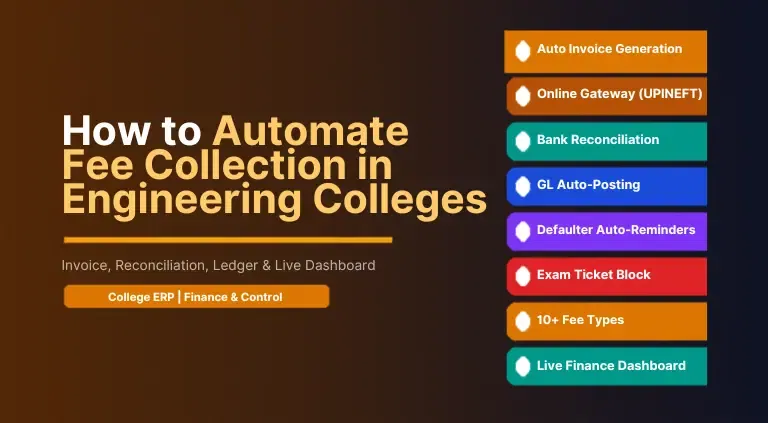
To automate fee collection in an engineering college, you need a fee management system that covers the full lifecycle: course-wise & batch-wise fee structure configuration, automated invoice & receipt generation, online collection via UPI, NEFT & card gateways, automatic ledger posting, bank statement reconciliation without manual matching, defaulter tracking with auto-reminders, and real-time collection dashboards for the finance head & principal.
edumerge College ERP combined with Finance & Control does all of this on one shared database. So a fee paid online auto-generates the receipt, posts to the student ledger, updates the GL, and appears on the finance head's dashboard without any manual intervention.
Why Fee Collection is Still Manual in Most Engineering Colleges
The manual fee management problem in Indian engineering colleges is not a technology problem. It is an integration problem. Most institutions have adopted individual tools for different parts of the fee cycle, but those tools do not share data. The result is a set of disconnected processes that require human handoffs at every transition.
Six disconnection points that keep engineering college fee management manual:
- Payment channels that do not talk to each other. Online payments via UPI or net banking are settled by the gateway and reported separately. Cash collections are recorded by cashiers in their own system. Cheque & PDC payments are tracked in a separate register. At month-end, the accounts team manually compares three or four different sources with the bank statement.
- Invoices generated separately from accounting. The fee module generates a receipt. The accountant then manually passes a journal entry in the accounting system. When there are corrections, refunds, or receipt cancellations, the accountant must manually reverse both the receipt and the journal entry.
- Scholarship and concession tracking outside the fee system. Government scholarship lists, management concession approvals, and staff-ward discounts are maintained in spreadsheets. The accounts team manually adjusts the student's ledger balance when the concession is confirmed, often weeks after the fee was originally raised.
- No automated reminders for defaulters. The accounts team compiles a defaulter list from the fee system at the end of each installment period and either calls students individually or sends batch messages manually. Follow-up tracking is informal.
- Exam hall ticket blocking requires coordination. The finance team sends the defaulter list to the exam cell by email or a physical memo. The exam cell manually implements the block, often missing students or including already-cleared cases.
- Bank reconciliation is a month-end crisis. Gateway settlement reports arrive with internal reference numbers that do not match ERP receipt numbers. Cashier daily collection reports do not match bank credits exactly. The accounts team spends 3-5 working days at month-end matching transactions manually.
These 6 disconnection points are structural. They are not solved by buying a better spreadsheet or a faster accounting package. But by deploying a platform where the fee module, payment gateway, accounting ledger, and the institutional workflow are connected on one database.
You might also like to explore how edumerge solves fee collection problems.
Manual vs Automated Fee Management: A Direct Comparison
The table below maps the ten most time-consuming fee management tasks in an Indian engineering college and shows what changes when automation replaces manual processes.
| Task | Manual Process | Automated with edumerge |
|---|---|---|
| Fee structure creation | Excel sheets per course, updated manually each year | Batch x Course matrix with amount variants, deployed in minutes |
| Invoice generation | Accounts staff print or manually enter invoices per student | Auto-generated on installment due date; atomic receipt number guaranteed |
| Online payment posting | Finance team manually matches gateway reports with student records | Gateway payments auto-post receipt and ledger entry in real time |
| Bank reconciliation | Month-end comparison of bank statement with ERP records; manual | Automated statement matching with GL; unmatched items flagged instantly |
| Defaulter follow-up | Manual list compiled from spreadsheet; phone calls by accounts staff | Auto-reminders via SMS and email on due date and at configured intervals |
| Exam hall ticket blocking | Finance team informs exam cell separately; often missed | System auto-blocks hall ticket for students with outstanding dues |
| Refund processing | Manual refund form; accounts staff calculates and passes journal | Structured refund workflow with documented reason, approval, and auto journal entry |
| Collection report for principal | Monthly report prepared by finance team in Excel | Live dashboard: collection vs demand, defaulter aging, head-wise analytics |
| Ledger posting | Accountant passes journal entries manually for each mode | Every payment auto-posts to the correct GL account per fee head mapping |
| Audit trail | Paper vouchers and Excel logs; incomplete and inconsistent | Full audit trail per transaction: who collected, when, via which mode, any edits |
No limit on custom fee heads in edumerge
edumerge College ERP supports unlimited custom fee head creation. Every head gets its own name, GST rate, bank account linkage, installment schedule, fine rules, and discount applicability. Whether your college collects a placement cell fee, an alumni fund contribution, a sports development charge, or a department-specific lab deposit, it is configured as a named fee head in the system and tracked with the same automation as tuition.
How to Automate Fee Collection in Engineering Colleges: 8-Step Process
The following eight steps take an engineering college from manual, disconnected fee processes to fully automated fee collection with live reconciliation and management dashboards.
Step 1: Configure fee heads and bank account linkages
Define every fee head your engineering college collects: tuition, hostel, mess, transport, examination, development, and all custom heads. Link each head to the specific bank account into which those collections are deposited. Set the applicable GST rate per head. This is the foundation that makes head-wise reconciliation automatic later.
edumerge capability: Fee Heads with GST Rates and Bank Account Linkage per Head
Step 2: Build batch-wise and course-wise fee structures
Engineering colleges have fee variations by program (B.Tech, M.Tech, MBA), by branch (CSE, ECE, Mechanical), by student category (general, SC/ST, scholarship, lateral entry, staff ward, management quota), and by gender. In edumerge, you build this as a Batch x Course amount matrix where every variant is defined once and applied automatically to every student who matches that combination. No separate Excel per course.
edumerge capability: Amount Matrix (Level x Gender x Category)
Step 3: Define installment schedules and fine rules per head
For each fee head, define whether it is collected annually, per semester, or in custom installments. Assign a specific due date to each installment. Configure fine rules as fixed amount, percentage, or per-day accrual from the due date. An engineering college that charges Rs. 50 per day late fee on tuition from the due date requires no manual calculation once this rule is set.
edumerge capability: Installment Schedule + Fine Rules (Fixed / Percentage / Per-Day)
Step 4: Apply discount and scholarship rules
Government scholarship categories (post-matric, merit, minority, SC/ST), management concessions, and sibling or staff-ward discounts are configured as discount rules at the fee structure level. The system calculates the net payable amount for each student automatically based on the category assigned to them. The accounts team does not maintain a separate concession register.
edumerge capability: Discount Rules (Category-Based) + Maker-Checker Approval
Explore more about edumerge College ERP’s fee management capabilities.
Step 5: Activate online collection via payment gateway
Integrate your preferred payment gateway: Razorpay, Cashfree, or CCAvenue are supported natively. Once integrated, students pay from the student portal or parent app using UPI, net banking, credit or debit card, or NEFT. Every online payment generates an atomic receipt number instantly. The receipt is emailed to the student automatically. The payment posts to the student ledger and the GL without any accounts team action.
edumerge capability: Online Gateway Integration (Razorpay / Cashfree / CCAvenue)
Step 6: Enable cash and offline payment recording with atomic receipts
For students who pay at the counter (cash, cheque, demand draft, PDC), cashiers record the payment in the same system. Receipt numbers are generated atomically across all cashiers simultaneously, eliminating the risk of duplicate receipts. PDC management tracks post-dated cheques with presentation due dates and bounce handling workflows.
edumerge capability: Multi-Mode Collection with Atomic Receipt Number Generation
Step 7: Activate automated bank reconciliation
Connect the college's bank account statement to the Finance and Control module. The automated reconciliation engine matches bank credits against ERP receipts using amount, date, and reference. Online gateway settlements reconcile automatically. Cash and cheque deposits are matched against daily collection reports. Unmatched items are flagged for manual review. The accounts team no longer spends the last week of each month on reconciliation.
edumerge capability: Banking Reconciliation Dashboard with Statement Auto-Matching
Step 8: Configure management dashboards and defaulter workflows
Set up the finance head's live collection dashboard: daily and cumulative collection vs demand, defaulter aging by days outstanding, head-wise collection analytics, and gateway-wise settlement status. Configure automated SMS & email reminders at configured intervals before & after the due date. Set the rule that blocks exam hall ticket generation for students with outstanding dues above a threshold. The accounts team stops making calls and starts managing exceptions.
edumerge capability: Real-Time Collection Intelligence + Formula-Based Due Calculation Engine
How edumerge Connects Fee Collection to Institutional Accounting
Fee collection automation is only half the solution for an engineering college. The other half is what happens after a payment is received: how it posts to the ledger, how it appears in the bank reconciliation, and how it flows into the institution's financial statements. This is where most standalone fee modules fall short, because they are not connected to the accounting layer.
edumerge connects the College ERP fee module directly to Finance and Control accounting on the same database. The integration works as follows:
- Fee head to GL account mapping. Every fee head is mapped to a specific GL account in the chart of accounts. When a payment is collected under that head, the debit to the bank account and the credit to the income account are posted automatically. The accountant does not manually pass the journal entry.
- Per-mode collection posting. Cash collections post to the cash-in-hand account. Cheque and DD payments post to a suspense account until the bank credit confirms clearance. Online gateway payments post to the gateway settlement account and are moved to the bank account automatically when the settlement arrives.
- Bank statement reconciliation. The banking reconciliation dashboard in Finance and Control accepts the bank statement import. The auto-matching engine compares bank credits against ERP receipts. Gateway settlements reconcile against the payout reports automatically. Unmatched items are queued for the accounts officer to investigate.
- GST-compliant invoicing and filing. Every fee head is configured with its applicable GST rate at the setup stage. Invoices and receipts include the correct GST amount automatically. The GSTR-2B reconciliation module in Finance and Control supports GST compliance without the accounts team manually extracting data from the fee system.
- Period-end locking. Once the accounts team closes a period, no back-dated entries are permitted without supervisor approval. This prevents the reconciliation gaps that open up when cashiers enter late receipts into closed periods.
- Financial statements that include fee income. Because fee collections auto-post to the GL, the income and expenditure statement, cash flow statement, and trial balance in Finance and Control reflect current fee income without the accounts team manually entering summary totals from the fee system.
edumerge College ERP + Finance & Control: Built for Engineering College Fee Automation
edumerge College ERP's fee management module and Finance and Control accounting module are not two separate products that integrate via an API. They are two modules on the same database. An action in one module updates every related record in every other module without any data transfer, import, or manual action.
Five reasons why the integrated architecture matters for engineering college fee automation:
- Student record to fee structure in one step. When a student is admitted and their category (general, SC/ST, management quota, scholarship, lateral entry) is recorded in the student information system, the fee structure applicable to that category is assigned automatically. The student's fee ledger is populated without any accounts team action at admission time.
- Payment to ledger posting in zero steps. An online payment via the student portal at 11:45 PM is recorded as a receipt with an atomic receipt number, credited to the student's fee ledger, and posted to the correct GL account, all before midnight. No accounts officer is online. No batch job runs the next morning. It happens the moment the gateway confirms the transaction.
- Due date to automatic reminder in zero steps. When an installment due date passes, the system identifies every student with an outstanding balance for that installment and sends them a reminder via SMS and email according to the reminder schedule configured by the accounts team. No list is compiled. No message is drafted individually.
- Outstanding balance to exam hall ticket block in zero steps. A student with an outstanding tuition installment cannot generate an exam hall ticket. This is enforced automatically by the system. No memo, no phone call, no coordination between the accounts office and the exam cell.
- Collection to management dashboard in real time. The finance head's dashboard shows today's collection, the semester's collection vs demand, defaulter aging, head-wise recovery, and gateway settlement status. The data is live because it comes from the same database where the cashier just recorded the cash payment two minutes ago.
Explore the complete fee & finance solution for engineering colleges.
Is your engineering college's fee process fully connected, or still held together by spreadsheets?
The test is simple. Can your finance head see today's collection status, outstanding aging & bank reconciliation status right now, without asking the accounts office?
If the answer is no, your fee process has integration gaps. edumerge College ERP and Finance & Control close every one of those gaps.
Automating fee collection in an engineering college is not a single-module problem. It requires a platform where fee structure configuration, invoice generation, multi-mode collection, online payment gateway integration, ledger posting, bank reconciliation, refund workflows, defaulter management, and management dashboards are all connected on one database.
edumerge provides exactly that. End-to-end fee automation where every step from fee structure to financial statement happens without a manual handoff.
For engineering colleges run by a trust or society, that same ledger also needs to consolidate at the trust level. Top 10 Trust & Society Accounting Software for Educational Institutions in India covers what that consolidation layer needs to do.
Frequently Asked Questions (FAQs)
1. What does it mean to automate fee collection in an engineering college?
Automating fee collection in an engineering college means replacing manual processes, separate spreadsheets, and disconnected payment channels with one integrated system, without any manual handoff between steps.
2. How does automated bank reconciliation work for an engineering college?
Automated bank reconciliation in an engineering college ERP works by connecting the college's bank statement to the accounting module. The system matches incoming credits against ERP receipts using amount, date & transaction reference. Online gateway payments reconcile automatically. Cash & cheque deposits are matched against daily cashier collection reports. Unmatched items are flagged & queued for manual review. The result is that the accounts team sees the reconciliation status in real time, not at month-end.
3. What is an amount matrix in engineering college fee management?
An amount matrix in engineering college fee management is a configuration table that defines fee amounts based on multiple dimensions at once. It can be the batch or year of admission, the course or program, the branch, the student category (general, SC/ST, scholarship, management quota, lateral entry), and in some cases the gender. Once configured, it's applied automatically to every student who matches each combination.
4. How does engineering college fee software handle government scholarships?
Engineering college fee software handles government scholarships by allowing the finance team to configure discount rules for each scholarship category. Post-matric, merit, minority, SC/ST, and others. When a student is assigned a scholarship category, the system auto-calculates the net payable amount after deducting the scholarship amount from the gross fee. The discount is documented, approved through a maker-checker workflow, and appears in the student's fee ledger without any manual journal entry.
5. Can fee management software automatically block exam hall tickets for defaulters?
Yes. edumerge College ERP connects the fee management module directly to the academic module. A rule can be configured such that any student with outstanding dues above a defined threshold is automatically blocked from downloading or receiving an exam hall ticket. The accounts team does not need to inform the exam cell. The system auto-enforces the block at the point when the student or staff tries to generate the ticket.
6. What is a fee head in college fee management software?
A fee head is a named category of fees collected by the college. Examples include tuition, hostel, mess, transport, examination, development, placement, sports, library, and any other category the college chooses. Each fee head is configured separately with its own amount, installment schedule, fine rules, GST rate, bank account linkage, and discount applicability. This separation allows the college to track collection, reconciliation, and reporting by type of fee.
7.How long does it take to implement automated fee collection in an engineering college?
With a purpose-built platform like edumerge, an engineering college can go live with automated fee collection within days. Fee head configuration, fee structure setup per batch and course, payment gateway integration, and student category assignment typically complete in 1-2 weeks for a single-campus engineering college. Multi-campus college groups may take 3-4 weeks for full rollout across all campuses with group-level consolidation.
8.What is the difference between fee management software and accounting software for colleges?
Fee management software handles the collection side: fee structure, invoice generation, payment collection, receipts, reminders, and defaulter tracking. Accounting software handles the institutional books: general ledger, bank reconciliation, GST filing, financial statements, and audit compliance. edumerge integrates fee management within College ERP and links it directly to Finance and Control accounting.
9.Does engineering college fee software generate GST-compliant invoices?
Yes. edumerge fee management creates fee heads with the applicable GST rate at the configuration stage. Every invoice generated automatically includes the correct GST components. GST-compliant receipts are generated for every payment across all collection modes. The Finance & Control accounting module supports GSTR-2B reconciliation and GST filing preparation for the college's statutory compliance requirements.
10.How does automated fee reconciliation reduce audit risk for engineering colleges?
Manual fee processes create audit risks through incomplete trails, unstructured refunds, undocumented concessions, and mismatches between cashier records & bank statements. Automated fee reconciliation eliminates these risks by creating a complete audit trail for every transaction. Who collected, when, via which mode, what ledger entry was posted, what bank credit matches, and what approvals were obtained. edumerge generates audit-ready transaction reports that require no manual preparation before an external audit.