Every principal knows the feeling: 5 people in the room, 5 different versions of the same information, and no clear agreement on what is actually true.
That is the defining symptom of a school that has not yet digitized its operations. Not a management or people failure, but a failure of the systems those people are forced to work within.
The good news is this: digitizing school operations is no longer a large-scale IT project. It does not require a tech team, a 6-month implementation timeline, or a multi-crore capital budget.
Modern cloud-based school ERP platforms have made it possible for schools of every size. From a 300-student CBSE school to a 15K-student multi-campus group; to go fully digital in weeks, not years.
This is a guide for principals & school leaders ready to make that move, looking for a clear, practical roadmap.
TL;DR
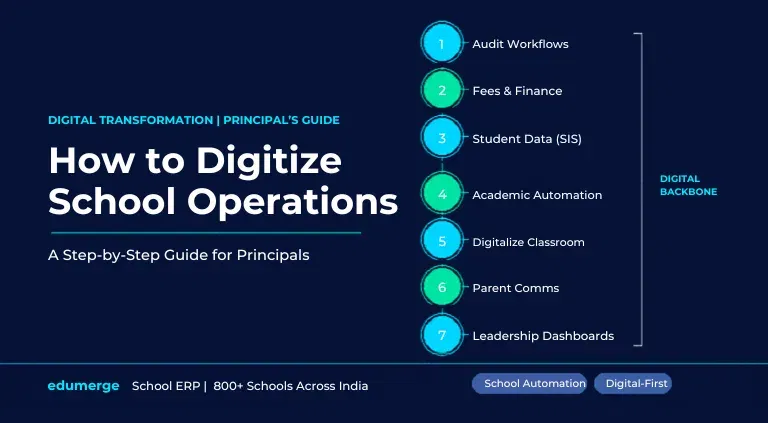
Digitizing school operations involves replacing manual, paper-based workflows with an integrated digital platform. The steps are:
- audit your current tools & workflows,
- prioritise the highest-pain area first (usually fees or attendance),
- centralise student data in a single information system,
- automate academic workflows including timetabling and report cards,
- digitize classroom delivery,
- unify parent communication on one channel, and
- enable real-time dashboards for leadership.
The most effective approach uses a single school ERP as the digital backbone. Not a patchwork of separate tools.
What Does It Mean to Digitize School Operations?
Surface digitization is:
- moving paper forms to PDF forms.
- Converting physical registers to Excel sheets.
- Using WhatsApp instead of printed circulars.
The work still happens manually; it just happens on a screen instead of on paper. This is not real digitization.
Deep digitization/school automation is when workflows run automatically.
- Attendance is marked via mobile app & the parent WhatsApp alert fires without anyone pressing a button.
- A fee invoice is generated on schedule & the payment reminder follows it automatically.
- A report card is populated from marks entered by subject teachers, formatted & delivered to parents digitally. Without the class teacher touching a spreadsheet.
The difference is not the tool. It is the workflow design beneath the tool.
True digital transformation of schools means redesigning workflows so that data flows automatically between functions, and routine tasks happen without manual handoffs.
Why Are Principals the Right People to Lead This?
Digitization in schools often stalls when treated as an IT initiative. It succeeds when treated as an operations initiative; led by the principal or school head.
This is because the core challenges of digitizing school administration are not technical. But organisational. They involve:
- deciding which workflows to prioritise,
- getting department heads aligned,
- choosing a platform that fits the school's structure, and
- managing the transition from old to new without disrupting the academic calendar.
Principals who have led successful digitization projects describe the same turning point. The moment they stopped waiting for a technology solution to arrive & started defining what they needed their school to do differently.
3 Questions Every Principal Must Answer
Before selecting any software or defining any implementation timeline, clarity on these 3 questions will save months of misdirection.
| Question | Why It Matters |
|---|---|
| 1. Where is your biggest operational pain right now? | Fee reconciliation chaos? Attendance disputes with parents? Teachers spending weekends on report cards? Timetabling that takes 2 weeks and still has clashes? The answer to this question determines where you start, not where the vendor's demo begins. |
| 2. How many disconnected tools is your school currently running? | List every tool: accounting software, attendance app, WhatsApp groups, Excel sheets for timetables, third-party payment gateway, standalone library software. The longer this list, the stronger the case for a unified school ERP over individual module upgrades. |
| 3. What does success look like 90 days after go-live? | Not in 3 years, in 90 days. Defining a concrete near-term outcome (fee collection - fully online, parents receive automated attendance alerts, timetable - clash-free & AI-generated) gives the implementation a measurable finish line. |
With these three answers in hand, you are ready to design your digitization plan.
Explore more about edumerge for school leadership & management.
Step-by-Step Guide to Digitizing Your School Operations
Step 1: Audit Your Current Workflows and Tools
The first step in any serious digitization strategy for schools is a workflow audit. Before deciding what to change, document what currently exists. For each core function; admissions, attendance, fees, academics, communication, HR, transport, ask 3 questions:
- How is this task currently done (which tool, on what frequency, who owns it)?
- How long does it take per week, per month, per term?
- Where does it most frequently go wrong, and what does that cost?
This audit will almost always reveal two things.
- The school is running more parallel tools than anyone realised.
- The highest-cost problems are concentrated in 2-3 functions.
Those concentrations are where digitization delivers the fastest ROI.
On edumerge's, MIS Dashboard & analytics can be configured to track operational metrics across every function. Enabling leadership an ongoing audit view, not just a one-time snapshot.
Step 2: Digitize Fee Collection and Financial Workflows First
If your audit surfaces fee management as a significant pain point, and for most Indian schools, it will. This is the highest-leverage place to start your digitization journey.
Fee management is the right first step for a structural reason: it has the most direct, measurable financial impact. Every inefficiency here has a rupee value attached to it. Demonstrating an early, quantifiable win in this area builds organisational confidence in the digitization effort and creates momentum for subsequent phases.
edumerge's fee management module handles multi-category fee structures, online payment collection, automated invoicing, AI-driven reminder workflows, and real-time finance dashboards. Including a maker-checker control layer that prevents unauthorised configuration changes.
Step 3: Centralise Student Data in a Single Information System
One of the most foundational steps in digitizing school administration is creating a single, authoritative record for every student. This is what a Student Information System (SIS) does, and it's the database that every other module draws from.
Without a centralised SIS, the same student's data exists in five different places in five different formats. The admission register, the fee ledger, the attendance log, the exam database, the parent communication system; and no two of them are ever in perfect sync.
edumerge's SIS maintains a complete, continuously updated student record linked to every module. From admissions, attendance, fee ledger, academic history & communication logs, all are one-view, with granular role-based access controls.
Step 4: Automate Academic Workflows
Once student data is centralised and financial workflows are running automatically, the next phase of school automation targets academic operations. Right from timetabling, lesson planning, assessments, to report card generation.
- Timetabling is where most schools feel the pain most acutely. A manual timetable built in Excel requires 10–14 days of iterative work at the start of every term, inevitably contains clashes, and has to be substantially rebuilt whenever a teacher leaves or a new subject is added.
- Even online assessments & report cards close the loop on academic workflow digitization. Teachers enter marks directly into the system from any device. The school's grading logic (CBSE, ICSE, or custom) is applied automatically. Report cards are generated, formatted, and made available to parents digitally on the same day results are finalised.
With edumerge, AI Timetable, Lesson Plan, Online Assessments, Digital Report Cards, and Performance Analytics are all built into the platform. Connected to the same student database, with no re-entry of data between steps.
Step 5: Digitize Your Classroom
Digitizing back-office operations creates operational efficiency. Digitizing your classroom extends that transformation into the learning experience itself.
At its core, this step is about moving instructional content, assessments, and student progress tracking into the same digital environment that now manages the rest of the school.
Teachers can attach structured lesson plans to each timetable slot, share learning resources directly with students, conduct online quizzes and formative assessments. While reviewing class-level performance data without waiting for a term-end exam.
Digitizing K-12 schools at the classroom level also creates a compliance & accountability record. Every lesson plan, every assessment, every resource shared is timestamped & attached to the academic record. Academic coordinators can review curriculum coverage in real time without asking teachers for updates.
It's about giving teachers better tools to do what they already do; teach. While eliminating the administrative overhead that currently consumes a significant portion of their time.
Edumerge provides teachers a connected digital workspace for content delivery, assessment, and progress tracking. All linked to the class timetable and student records.
Step 6: Unify Parent Communication on One Platform
Fragmented parent communication is one of the most visible signs of a school that has not yet completed its digital transformation.
- Attendance notifications come from one WhatsApp number.
- Fee reminders from another.
- Academic updates from the class teacher's personal phone.
- Emergency alerts from a mass SMS blast.
- Circulars on a notice board.
With edumerge's communication management module, unify WhatsApp, SMS, email & in-app notifications into a single workflow layer. With automated triggers, broadcast segmentation, delivery tracking, and a full message history per student.
Step 7: Give Leadership Real-Time Operational Visibility
The final step in digitizing school operations is the one that most directly changes how school leadership functions. Replacing the weekly report-gathering exercise with a live operational dashboard.
In a fully digitized school, the principal does not ask for a report on fee collection. The dashboard shows it, updated in real time.
- Attendance rates across every class are visible from one screen.
- Academic performance trends are a filter away.
- Admission pipeline status updates automatically.
The school's operational health is readable at a glance, without chasing any department head for a status update.
edumerge enables role-based MIS Dashboards to give principals, trustees, and department heads a real-time view of every operational metric. From fees & attendance, to admissions, academics, and HR. All with configurable reports that are audit-ready from day one.
What to Look for in a Digital Backbone for Your School
| Criterion | What to Look For |
|---|---|
| Architecture | Single codebase, single database; not connected apps |
| Automation depth | Workflows run without manual triggers by default |
| Mobile accessibility | Full functionality on mobile for teachers and parents |
| Role-based access | Granular controls per user type, not one-size-fits-all |
| AI capabilities | Timetabling, fee recovery prediction, performance analytics |
| Communication integration | WhatsApp, SMS, email built in; not third-party plugins |
| Scalability | Single campus to multi-campus group on the same platform |
| Onboarding model | Named account manager, not a help centre queue |
| Data security | Role-based access, audit logs, encrypted data at rest |
A platform that clears all nine of these criteria is not just a software purchase. It is a 5–10 year operational infrastructure investment for your school.
Your School's Digital Backbone is One Decision Away
The gap between a school still running on registers & WhatsApp groups, and one operating with full institutional intelligence is not a technology gap. It's a decision gap.
Every step in this guide is available to implement today. Not next year, not after the next budget cycle, not after the new academic year.
The tools exist. The onboarding pathways exist.
The only thing that changes between a school that has digitized & one that hasn't, is that someone, at some point, made the call to begin.
edumerge School ERP is built to be that digital backbone. One codebase, one database, every module connected. Trusted by 800+ schools and 15+ lakh users across India, with same-day onboarding & named account managers from Day One.
It covers every step in this guide:
- Fee Management & Finance Control
- AI Attendance & Substitution Management
- Student Information System
- AI Timetable & Lesson Planning
- Online Assessments & Digital Report Cards
- Communication Management (WhatsApp, SMS, Email, In-App)
- Real-Time MIS Dashboards for Leadership
- Transport, Library & Hostel Management
- Multi-Campus Support
Book a Free Demo of edumerge School ERP →
Frequently Asked Questions (FAQs)
1. How do I digitize school operations without disrupting the academic calendar?
Start with modules that run parallel to existing workflows rather than replacing them immediately. Fee collection & parent communication are good examples. Run both systems simultaneously for the first 2-4 weeks, then cut over entirely. Avoid go-live dates in the middle of exam season or fee-collection cycles.
2. What is the first step to digitize your school operations?
The first step is a workflow audit; documenting every current process, tools used, time cost, and most frequent failure points. This audit surfaces the highest-priority module to start with and creates a baseline against which ROI can be measured post-implementation.
3. How to implement digitization in schools that have limited technical staff?
Modern cloud-based school ERP platforms require no on-premise servers, no IT team, and no technical configuration. The implementation is handled by the vendor's onboarding team. Staff training is typically completed in 2-3 sessions. Schools with zero technical staff have successfully gone live with full-featured ERPs in under a week.
4. What does it cost to digitize a school?
The cost varies by platform & school size. Cloud-based school ERP platforms typically operate on a per-student, per-year subscription model; making the cost predictable & scalable. The relevant ROI question is not the subscription cost but the cost of the current inefficiency. Be it staff hours in manual reconciliation, or revenue leakage from untracked fee discounts, or administrative errors in report cards, timetables & attendance records.
5. What is school automation?
School automation refers to the use of software to run routine administrative & academic workflows without manual intervention. Examples include: automatic fee reminders sent to parents before due dates, attendance alerts dispatched to parents the moment a student is marked absent, etc.
6. How long does it take to digitize school administration?
With a cloud-based school ERP & guided onboarding, core modules (fees, attendance, communication) can be live within a day. Full operational digitization, including academics, timetabling, transport & analytics, typically takes 4-8 weeks for a single-campus school. Multi-campus rollouts are typically phased over 1-3 academic terms.
7. What is the difference between digitizing a school and digital transformation of schools?
Digitizing a school refers to moving specific workflows from manual/paper to digital formats. Digital transformation of schools refers to a deeper structural change. Redesigning how the school operates at a foundational level, using digital capabilities to create outcomes that were not previously possible. The former is a step; the latter is the destination.