What's the first thing people do when they can't figure out a system? They stop using it. That's the problem many schools face when their School ERP Software looks impressive on paper but is hard to use in real life. Whether it's the admin team, teachers, or parents — if the interface is confusing, they won't engage. And that defeats the whole purpose of having a digital system in the first place. In this blog, we break down why ease of use in school ERP is non-negotiable — and how the right solution can simplify operations for everyone involved.
Why "Ease of Use" Is the Most Important Feature in Any School ERP
Your School Management System should not feel like a puzzle. From managing admissions to marking attendance and sharing student progress, a lot depends on how comfortable users feel with the platform. If it takes 5 clicks to mark attendance or 15 minutes to find a student's fee status, the system is doing more harm than good. This is why user-friendly school ERP solutions have become the top priority for institutions today — especially those managing large volumes of data and parent communication.
What Makes an ERP User-Friendly?
1. Simple, Clean Interface
Your staff shouldn't need special training to use the software.
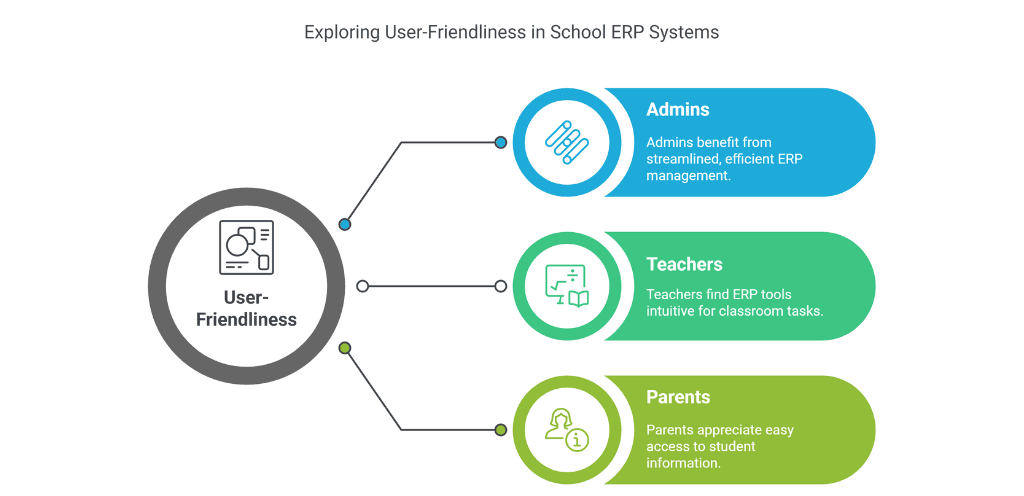
- Admins should be able to generate reports, send broadcasts, and manage fee collections in a few clicks.
- Teachers should easily access their classes, upload assignments, and mark attendance from anywhere.
- Parents must be able to log in and quickly view their child's progress, fees, or timetable.
The interface should be minimal, clean, and distraction-free — reducing the learning curve for everyone.
2. Role-Based Dashboards
One of the smartest features of an intelligent ERP system is role-based access. This means each user — admin, teacher, parent, or student — sees only what's relevant to them.
- Admins: Full control over operations and reports
- Teachers: Access to only their assigned classes, subjects, and student data
- Parents: View updates specific to their child
This reduces clutter and confusion. No one has to scroll through irrelevant data to find what they need.
3. Mobile-First Design
Teachers and parents are always on the move. A truly user-friendly ERP must have a responsive mobile app that works smoothly on smartphones.
- Teachers can mark attendance on the go.
- Parents can check notifications without logging into a desktop.
- Students can view assignments and results on their phones.
If your ERP is clunky on mobile, you've already lost half your users.
4. Fast Loading Time
No one has patience for slow software. If it takes 10 seconds to load a dashboard or open a student profile, users will get frustrated. A good ERP should be:
- Cloud-based for instant access
- Optimized for speed
- Reliable even with large amounts of data
5. Minimal Clicks to Complete Tasks
How many steps does it take to:
- Mark attendance?
- Generate a fee report?
- Send a broadcast message to parents?
If the answer is more than 3–4 clicks, the system is too complicated. User-friendly ERPs prioritize efficiency by minimizing unnecessary steps.
6. Clear Navigation
Users should never feel lost. The menu structure should be intuitive:
- Clear labels (not jargon or technical terms)
- Logical grouping of features
- A visible "Home" button to return to the main screen
Think of it like walking through a well-organized mall versus a maze — one is pleasant, the other exhausting.
7. Built-In Help and Support
Even the best systems need support. A user-friendly ERP should offer:
- Tooltips and hints on key features
- An in-app help center
- Video tutorials for common tasks
- Quick customer support via chat or call
If users can solve their own problems without waiting for tech support, you've nailed ease of use.
What Happens When an ERP Is Not User-Friendly?
1. Low Adoption Rates
If teachers or staff find the system too complicated, they'll avoid using it. This defeats the purpose of investing in a digital solution.
2. Wasted Time and Resources
Instead of saving time, a poorly designed ERP adds extra work — learning complex processes, fixing errors, and dealing with frustrated users.
3. Poor Parent Engagement
Parents expect transparency and easy communication. If they struggle to log in or can't find their child's information, they'll stop using the portal altogether.
4. Increased Support Requests
A confusing system leads to endless support tickets and training sessions, adding burden to your IT or admin team.
How to Evaluate Ease of Use Before Choosing an ERP
1. Request a Live Demo
Don't just look at feature lists. See the software in action. Ask to perform common tasks like:
- Adding a new student
- Marking attendance
- Generating a fee report
How long did it take? How many clicks? Did it feel natural?
2. Test the Mobile App
Download the app and test it yourself. Is it responsive? Can you easily navigate without zooming in or struggling with tiny buttons?
3. Check Reviews and Testimonials
Look for feedback from other schools. Do they mention ease of use? Are parents and teachers happy with the platform?
4. Ask About Onboarding and Training
A good ERP provider will offer:
- Onboarding assistance
- Training sessions for staff
- Ongoing support
If they say "you'll figure it out," that's a red flag.
5. Prioritize Customization
Every school is different. Your ERP should allow you to customize:
- Fee structures
- Report formats
- Communication templates
But customization should be simple — not requiring a developer every time you want to make a change.
Why edumerge Prioritizes Ease of Use
At edumerge, we believe that technology should simplify, not complicate. Our School ERP is designed with real users in mind, including a dedicated solution built for school and college admins:
- Intuitive interface that requires minimal training
- Role-based dashboards for admins, teachers, parents, and students
- Mobile-first design for on-the-go access
- Fast, reliable cloud-based platform
- Minimal clicks to complete daily tasks
- 24/7 support to help whenever you need it
Final Thoughts
A School ERP should make life easier, not harder. If your current system feels like a burden, it's time to switch to something better. Ease of use isn't just a nice-to-have feature — it's the foundation of a successful digital transformation. When admins, teachers, and parents can use the system effortlessly, engagement goes up, errors go down, and your institution runs smoother than ever.
Ready to experience a truly user-friendly School ERP? Book a demo with edumerge today and see the difference yourself.
One of the daily tasks that tests ease of use the most is scheduling. The New-Age School Timetable Management: Smart, Error-Free & Auto-Suggested looks at what that should feel like.